1. Introduktion
Tak for købetasing the Smart Tech 40" Full HD LED TV. This manual provides essential information for the safe and efficient operation of your television. Please read it thoroughly before use and retain it for future reference.
2. Sikkerhedsoplysninger
- Strømforsyning: Sørg for, at tv'et er tilsluttet en stikkontakt med den korrekte lydstyrke.tage som angivet på produktetiketten.
- Ventilation: Bloker ikke ventilationsåbningerne. Sørg for tilstrækkelig plads omkring tv'et til korrekt luftgennemstrømning for at forhindre overophedning.
- Vand og fugt: Do not expose the TV to rain or moisture. Avoid placing objects filled with liquids, such as vases, on the TV.
- Rensning: Tag stikket ud af stikkontakten før rengøring. Brug en blød, tør klud. Brug ikke flydende rengøringsmidler eller sprayrengøringsmidler.
- Montering: If wall-mounting, ensure the wall mount is compatible with the TV's VESA specifications and can support the TV's weight. Professional installation is recommended.
- Børn: Supervise children to ensure they do not play with the TV or remote control.
3. Pakkens indhold
Kontroller, at alle varer er til stede i emballagen:
- Smart Tech 40" FHD LED TV
- Fjernbetjening
- Strømkabel
- Brugervejledning (dette dokument)
- TV-stativ (2 stk.) og skruer
- Batterier til fjernbetjening
4. Fysisk overview
4.1 Foran View

Billede: Forside view of the Smart Tech 40" FHD LED TV, showcasing the screen and branding.
4.2 bag View og forbindelser

Billede: Bagside view of the TV, highlighting various input/output ports and VESA mounting points.
- ØRETELEFON UD: Til tilslutning af hovedtelefoner.
- USB: Til tilslutning af USB-lagerenheder.
- CI: Fælles grænsefladestik til betingede adgangsmoduler.
- COAXIAL: Digital lydudgang.
- HDMI 1, 2, 3: High-Definition Multimedia Interface inputs for external devices.
- DVB-T2/C/S2: Antenna/Cable/Satellite input for digital broadcasting.
- AV IN: Analog audio/video input.
- PC AUDIO IN: Audio input for PC connection.
- VGA: Video Graphics Array input for PC connection.
4.3 Dimensions and Remote Control

Image: TV dimensions (width 904mm, height with stand 567mm, height without stand 518mm, depth with stand 207mm) and the included infrared remote control.
The TV features a VESA mount pattern of 200mm x 100mm for wall mounting.
4.4 Energy Label
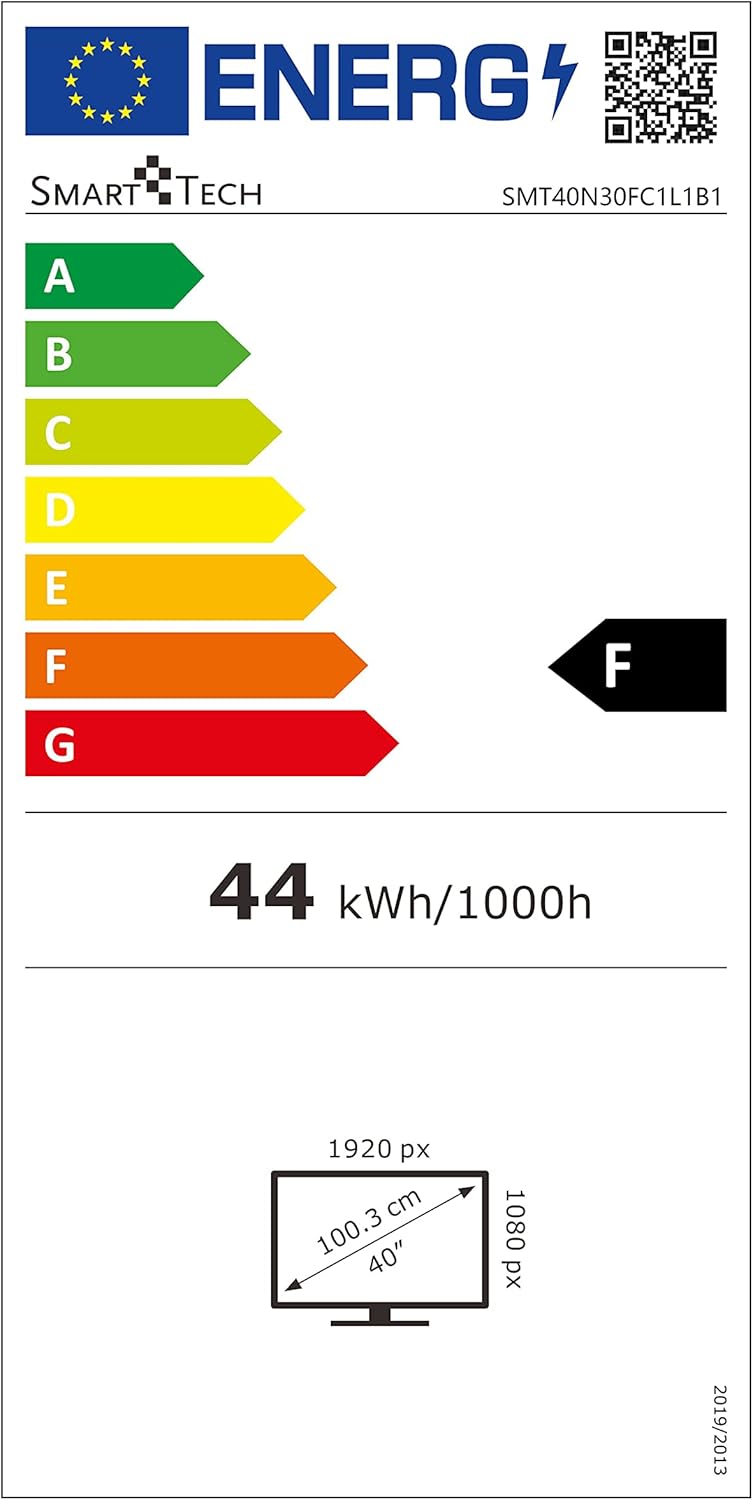
Image: EU Energy Label for the Smart Tech TV, indicating an 'F' energy efficiency class and 44 kWh/1000h consumption. For more details, visit the EPREL-database.
5. Opsætning
5.1 Montering af tv-stativet
- Placer forsigtigt tv'et med forsiden nedad på en blød, ren overflade for at forhindre, at skærmen beskadiges.
- Juster stativstykkerne med de tilsvarende riller i bunden af tv'et.
- Fastgør stativerne med de medfølgende skruer. Spænd dem ikke for hårdt.
- Løft forsigtigt tv'et op til dets oprejste position på en stabil, plan overflade.
5.2 Vægmontering (valgfrit)
If you choose to wall mount your TV, ensure you use a VESA-compatible wall mount (200mm x 100mm) that can support the weight of the TV (approximately 5.66 kg). Follow the instructions provided with your wall mount kit. Remove the TV stand before wall mounting.
5.3 Tilslutning af eksterne enheder
- Magt: Tilslut strømkablet til tv'ets strømindgang og derefter til en stikkontakt.
- Antenne/Kabel/Satellit: Connect your antenna, cable, or satellite dish to the DVB-T2/C/S2 input.
- HDMI-enheder: Use HDMI cables to connect devices like Blu-ray players, game consoles, or set-top boxes to the HDMI 1, 2, or 3 ports.
- USB-enheder: Insert USB storage devices into the USB port for media playback.
- Andre enheder: Use AV IN, VGA, or PC AUDIO IN for older devices as needed.
6. Betjeningsvejledning
6.1 Tænd/sluk
Tryk på MAGT button on the remote control or the TV to turn the TV on or off.
6.2 Indledende opsætning
The first time you turn on the TV, an initial setup wizard will guide you through language selection, country, and channel scanning. Follow the on-screen prompts.
6.3 Channel Tuning
To scan for channels:
- Tryk på MENU knappen på fjernbetjeningen.
- Naviger til menuen 'Kanal' eller 'Opsætning'.
- Select 'Auto Scan' or 'Auto Tuning' and confirm. The TV will search for available digital and analog channels.
6.4 Valg af indgangskilde
Tryk på KILDE or INPUT button on the remote control to cycle through available input sources (HDMI 1, HDMI 2, HDMI 3, DVB-T2/C/S2, AV, VGA, USB).
6.5 Smart Features (Browser)
This TV includes a built-in browser. Access it from the main menu to navigate the internet. An active internet connection is required.
7. Vedligeholdelse
7.1 Rengøring af skærmen
Tør forsigtigt skærmen af med en blød, fnugfri klud. Ved genstridige mærker, tør let afampen the cloth with water or a specialized screen cleaner (ensure it's safe for LED screens) and wipe gently. Do not apply pressure.
7.2 Rengøring af kabinettet
Tør tv-kabinettet af med en blød, tør klud. Undgå at bruge slibende rengøringsmidler eller opløsningsmidler.
8. Fejlfinding
| Problem | Mulig årsag | Løsning |
|---|---|---|
| Ingen strøm | Strømkabel ikke tilsluttet; stikkontakten virker ikke | Check power cable connection; Test outlet with another device |
| Intet billede, men der er lyd | Forkert indgangskilde valgt; Ekstern enhed er ikke tændt | Press SOURCE button to select correct input; Ensure external device is on |
| Ingen lyd, men der er billede | Volume too low or muted; Audio settings incorrect | Increase volume or unmute; Check audio output settings in TV menu |
| Fjernbetjening virker ikke | Batteries depleted or incorrectly inserted; Obstruction between remote and TV | Replace batteries; Ensure line of sight to TV's IR sensor |
| Dårlig billedkvalitet | Weak antenna signal; Incorrect picture settings | Check antenna connection/position; Adjust picture settings (brightness, contrast, etc.) |
9. Specifikationer
| Feature | Specifikation |
|---|---|
| Model | SMT40N30FC1L1B1 |
| Skærmstørrelse | 40 tommer |
| Displayteknologi | LED |
| Opløsning | 1080p (1920 x 1080 Pixels) |
| Opdateringshastighed | 60 Hz |
| Aspektforhold | 16:9 |
| Tuner-teknologi | DVB-T2/C/S2 |
| Hardware-interface | HDMI, USB |
| Forbindelsesteknologi | HDMI (x3), USB (x1), AV IN, VGA, PC Audio In, Earphone Out, CI, Coaxial |
| Særlige funktioner | Browser |
| Lydudgangstilstand | Digital |
| Højttalere Maksimal udgangseffekt | 70 watt |
| Wattage (Power Consumption) | 70 watt |
| Produktmål (med stativ) | 90.3 x 20.7 x 56.7 cm |
| Produktets vægt | 5.66 kg |
| VESA Mount Kompatibilitet | 200 mm x 100 mm |
| Inkluderede komponenter | Power Cable, Remote Control |
| Fjernbetjeningsteknologi | Infrarød |
| Batterier påkrævet til fjernbetjening | Yes (Batteries Included) |
| Model årgang | 2020 |
10. Garanti og support
For warranty information and technical support, please refer to the warranty card included with your product or contact Smart Tech customer service. Keep your purchase receipt as proof of purchase.


