1. Introduktion
Welcome to your JBL J777 Wireless In-Ear Headphones. This manual provides detailed instructions to help you get the most out of your device, ensuring proper setup, operation, and maintenance. Please read this manual thoroughly before using your headphones.
2. Produktet er slutview
The JBL J777 headphones are designed for wireless audio playback and hands-free calling, offering convenience and quality sound.
2.1 Komponenter
- In-ear earbuds with silicone tips
- Flexible neckband cable
- Inline remote control with integrated microphone
- USB charging port (typically located on the remote)
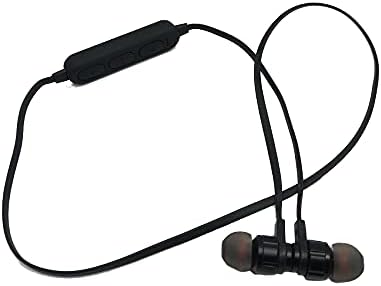
This image displays the complete JBL J777 wireless in-ear headphones. It features two black earbuds connected by a flexible cable, with an inline remote control positioned on the cable. The design is intended for comfortable wear around the neck.
2.2 Styringer
The inline remote control provides easy access to various functions:
- Tænd/sluk-/multifunktionsknap: Used for powering on/off, play/pause music, and answering/ending calls.
- Lydstyrke op-knap: Increases volume, also used for skipping to the next track.
- Lydstyrke ned-knap: Decreases volume, also used for skipping to the previous track.

En detaljeret view of the inline remote control for the JBL J777 headphones. It shows three distinct buttons for power/multi-function, volume up, and volume down, along with a small microphone opening for hands-free calls.
3. Opsætning
3.1 Opladning af hovedtelefonerne
- Connect the micro-USB charging cable to the charging port on the inline remote control.
- Tilslut den anden ende af kablet til en USB-strømkilde (f.eks. en computers USB-port eller en USB-vægadapter).
- The LED indicator will typically show red during charging and turn off or blue when fully charged.
- The integrated 90mAh lithium battery provides wireless operation.
3.2 Bluetooth -parring
To connect your JBL J777 headphones to a Bluetooth-enabled device:
- Sørg for, at hovedtelefonerne er slukket.
- Tryk og hold på Power/Multi-function button for approximately 5-7 seconds until the LED indicator flashes red and blue alternately. This indicates the headphones are in pairing mode.
- On your mobile phone or Bluetooth-enabled device, go to the Bluetooth settings and enable Bluetooth.
- Søg efter available devices and select "JBL J777" from the list.
- Once paired, the LED indicator will typically flash blue slowly or remain solid blue.
- The headphones have an operation distance of up to 10 meters (33 feet) in an open environment.
4. Betjeningsvejledning
4.1 Tænd/sluk
- For at tænde: Tryk og hold på Power/Multi-function button for 3 seconds. The LED will flash blue.
- For at slukke: Tryk og hold på Power/Multi-function button for 3 seconds. The LED will flash red and then turn off.
4.2 Musikafspilning
- Afspil/pause: Tryk på Power/Multi-function knap én gang.
- Næste nummer: Tryk og hold på Lydstyrke op knap.
- Forrige nummer: Tryk og hold på Lydstyrke ned knap.
- Lydstyrke op: Tryk på Lydstyrke op knap kortvarigt.
- Skrue ned for lyden: Tryk på Lydstyrke ned knap kortvarigt.
4.3 Opkaldshåndtering
- Besvar/afslut opkald: Tryk på Power/Multi-function knap én gang.
- Afvis opkald: Tryk og hold på Power/Multi-function knappen i 2 sekunder.
- Genopkald sidste nummer: Dobbelttryk på Power/Multi-function knap.
4.4 Aktiv støjreduktion
The JBL J777 headphones feature active noise cancellation to reduce ambient noise for a more immersive listening experience. This feature operates automatically or is controlled via the multi-function button, depending on the specific model variant.
5. Vedligeholdelse
Proper care ensures the longevity and optimal performance of your headphones.
- Rensning: Gently wipe the earbuds and cable with a soft, dry cloth. Do not use harsh chemicals or abrasive materials.
- Opbevaring: Store the headphones in a cool, dry place away from direct sunlight and extreme temperatures. Avoid tangling the cable.
- Batteripleje: For at forlænge batteriets levetid bør du undgå at aflade batteriet helt ofte. Oplad hovedtelefonerne regelmæssigt, selvom de ikke er i brug i længere perioder.
6. Fejlfinding
If you encounter any issues with your JBL J777 headphones, refer to the following common problems and solutions:
- Hovedtelefoner tænder ikke: Sørg for, at batteriet er opladet. Tilslut til en strømkilde, og prøv igen.
- Kan ikke parres med enhed:
- Ensure the headphones are in pairing mode (flashing red and blue).
- Sørg for, at Bluetooth er aktiveret på din enhed.
- Flyt hovedtelefonerne tættere på din enhed.
- Turn off and on both the headphones and your device, then try pairing again.
- Ingen lyd:
- Kontroller lydstyrkeniveauet på både hovedtelefonerne og din tilsluttede enhed.
- Sørg for, at hovedtelefonerne er korrekt parret og tilsluttet.
- Prøv at afspille lyd fra et andet program eller en anden kilde.
- Dårlig lydkvalitet eller uregelmæssig forbindelse:
- Sørg for, at der ikke er nogen forhindringer mellem hovedtelefonerne og din enhed.
- Gå væk fra andre trådløse enheder, der kan forårsage interferens.
- Re-pair the headphones with your device.
7. Specifikationer
Detailed technical specifications for the JBL J777 Wireless In-Ear Headphones:
| Mærke | JBL |
| Modelnummer | J777 |
| Type | In-ear trådløse hovedtelefoner |
| Forbindelse | Trådløs (Bluetooth 4.2) |
| Bluetooth Profiles | HFP, A2DP, AVCTP, AVDTP, AVRCP |
| Operation Afstand | Op til 10 meter (33 fod) |
| Sendeeffekt | Klasse 2 |
| Frekvensområde | 2.402 - 2.480 GHz |
| Højttaler diameter | Ø15 mm |
| Impedans | 32Ω |
| Mikrofon | Integreret |
| Støjkontrol | Aktiv støjreduktion |
| Batteri | Rechargeable Lithium, 90mAh |
| Kompatibel med | Mobiltelefoner |
| TF-kortstøtte | 128MB - 32GB |
| Inkluderede komponenter | Ørepuder |

This image shows the rear side of the JBL J777 product packaging. It clearly lists technical specifications such as Bluetooth version, supported profiles, operation distance, transmitting power, frequency range, speaker size, impedance, and battery capacity. It also indicates TF card support.
8. Garanti og support
For warranty information regarding your JBL J777 Wireless In-Ear Headphones, please refer to the documentation provided at the time of purchase. This information is typically included in the product packaging or available on the official JBL webwebsted.
For further assistance, technical support, or to inquire about service, please visit the official JBL support page or contact their customer service department directly. Keep your proof of purchase handy for any warranty claims.


