1. Introduktion
This manual provides essential instructions for the safe and efficient use of your Xiaomi Poco F3 smartphone. It covers device setup, basic operations, maintenance guidelines, and troubleshooting tips. Please read this manual thoroughly before using your device to ensure optimal performance and longevity.
2. Pakkens indhold
Upon unboxing your Xiaomi Poco F3, please verify that all the following items are included:
- Xiaomi Poco F3 Smartphone
- Strømadapter
- USB Type-C-kabel
- SIM-udskubningsværktøj
- Protective Case (availability may vary by region)
- Hurtig startvejledning
- Garantikort
3. Enhedslayout og komponenter
Familiarize yourself with the physical components of your Xiaomi Poco F3.

Figur 3.1: Vinklet view of the Poco F3, highlighting the display and rear camera setup.
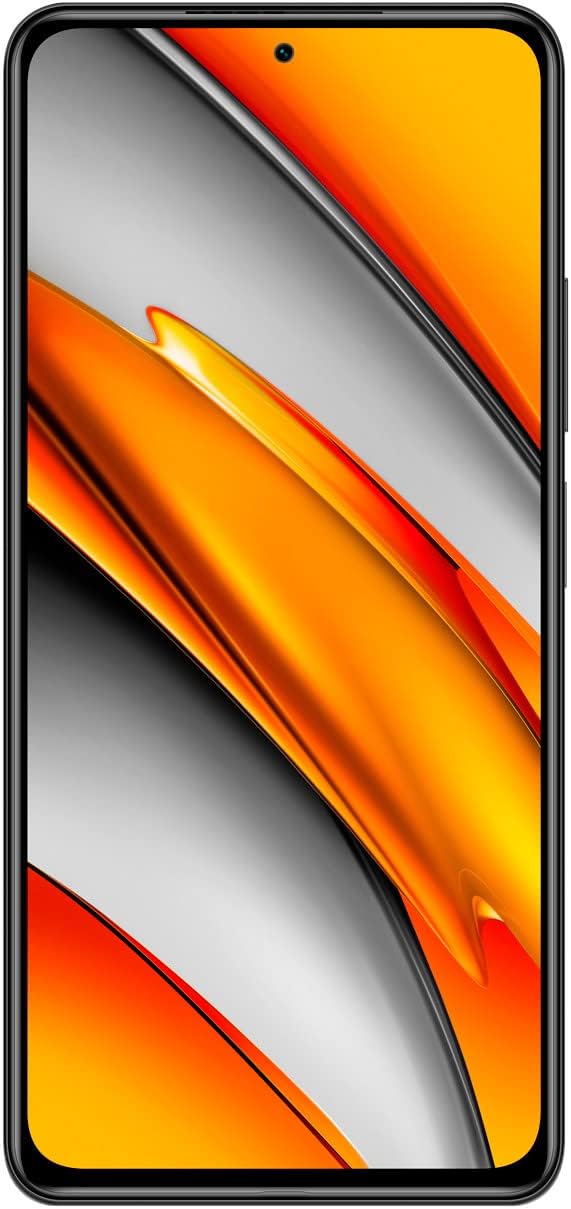
Figur 3.2: Front view of the Poco F3, showing the full display and front camera.

Figur 3.3: Bag view of the Poco F3, detailing the triple camera system and branding.

Figur 3.4: Højre side view of the Poco F3, illustrating the power button and volume controls.

Figur 3.5: Nederste kant view of the Poco F3, displaying the SIM tray, USB-C port, and speaker.

Figur 3.6: Øverste kant view of the Poco F3, showing the secondary speaker, microphone, and IR blaster.
Nøglekomponenter:
- Vise: Large AMOLED screen for vibrant visuals.
- Forreste kamera: Located at the top center of the display for selfies and video calls.
- Bagkameramodul: Houses the triple camera setup and LED flash.
- Tænd/sluk-knap/fingeraftrykssensor: On the right side, used for power control and biometric authentication.
- Lydstyrkeknap: Located above the power button, for adjusting audio levels.
- SIM-kortbakke: On the bottom edge, for inserting Nano-SIM cards.
- USB Type-C-port: På den nederste kant, til opladning og dataoverførsel.
- Højttalere: Stereo speakers located on the top and bottom edges for enhanced audio.
- Mikrofoner: Primary microphone on the bottom, secondary microphone on the top for noise cancellation.
- IR Blaster: On the top edge, for controlling compatible home appliances.
4. Opsætning
4.1. Isætning af SIM-kortet
- Locate the SIM card tray on the bottom edge of your device.
- Insert the provided SIM eject tool into the small hole on the SIM tray. Press firmly until the tray pops out.
- Placer dit/dine Nano-SIM-kort i bakken med guldkontakterne nedad. Sørg for, at de vender korrekt som angivet på bakken.
- Carefully push the SIM tray back into the slot until it is flush with the device.
4.2. Tænd din enhed
Tryk og hold på Power knap (located on the right side) for a few seconds until the Xiaomi logo appears on the screen.
4.3. Indledende konfiguration
Upon first startup, follow the on-screen instructions to set up your device. This typically includes:
- Valg af sprog og region.
- Opretter forbindelse til et Wi-Fi-netværk.
- Logger ind med din Google-konto.
- Opsætning af skærmlås (pinkode, mønster, adgangskode eller fingeraftryk).
- Reviewog accepterer vilkår og betingelser.
5. Betjening af din enhed
5.1. Power On, Off, and Restart
- Tænd: Press and hold the Power Button until the device vibrates and the logo appears.
- Sluk: Press and hold the Power Button until the power menu appears, then tap 'Power off'.
- Genstart: Press and hold the Power Button until the power menu appears, then tap 'Restart'.
5.2. Skærmnavigation
Your Poco F3 features a touch-sensitive display. Use the following gestures for navigation:
- Tryk på: Vælg et element, eller åbn en app.
- Stryg: Rul gennem skærme eller lister.
- At klemme: Zoom ind eller ud på fotos og web sider.
- Langt tryk: Få adgang til kontekstmenuer eller flyt ikoner.
5.3. Forbindelse
Manage your device's network connections:
- Wi-Fi: Gå til Indstillinger > Wi-Fi for at oprette forbindelse til tilgængelige trådløse netværk.
- Bluetooth: Gå til Indstillinger > Bluetooth at parre med Bluetooth-enheder som hovedtelefoner eller højttalere.
- Mobile Data/5G: Gå til Settings > SIM cards & mobile networks to enable or disable mobile data and manage 5G connectivity.
5.4. Camera Basics
Sådan bruger du kameraet:
- Åbn Kamera app fra din startskærm eller appskuffe.
- Tryk på udløserknappen for at tage et billede.
- Swipe left or right to switch between different camera modes (e.g., Photo, Portrait, Video).
- Tryk på ikonet for kameraskift for at skifte mellem forreste og bageste kamera.
5.5. Lås op med fingeraftryk
To set up fingerprint unlock:
- Gå til Indstillinger > Adgangskoder og sikkerhed > Oplåsning med fingeraftryk.
- Follow the on-screen instructions to register your fingerprint(s).
- Once registered, you can unlock your device by placing your finger on the power button.
6. Vedligeholdelse
6.1. Rengøring af din enhed
To maintain the appearance and functionality of your Poco F3:
- Brug en blød, fnugfri klud til forsigtigt at tørre skærmen og kabinettet af.
- Undgå at bruge skrappe kemikalier, slibende materialer eller aerosolspray.
- Hold portene fri for støv og snavs.
6.2. Softwareopdateringer
Søg regelmæssigt efter og installer softwareopdateringer for at sikre, at din enhed har de nyeste funktioner, sikkerhedsrettelser og forbedringer af ydeevnen.
- Gå til Indstillinger > Om telefonen > MIUI-version.
- Tap 'Check for updates' and follow the prompts if an update is available.
6.3. Batteripleje
For at forlænge batterilevetiden:
- Brug kun den originale oplader og det originale kabel, der fulgte med din enhed.
- Undgå at udsætte enheden for ekstreme temperaturer (varme eller kolde).
- Optimize battery settings in Settings > Battery & performance.
- Undgå at aflade batteriet helt ofte.
7. Fejlfinding
This section addresses common issues you might encounter with your Poco F3.
7.1. Enheden tænder ikke
- Sørg for, at batteriet er opladet. Tilslut enheden til opladeren i mindst 30 minutter.
- Attempt a force restart by pressing and holding the Power Button for approximately 10-15 seconds.
7.2. Problemer med netværksforbindelse
- Kontroller, om SIM-kortet er korrekt isat og aktiveret.
- Toggle Airplane Mode on and off from the Quick Settings panel.
- Genstart din enhed.
- Verify your mobile data plan is active and you have coverage.
7.3. Applikationer der går ned eller fryser
- Ryd cachen og dataene i den problematiske app via Indstillinger > Apps > Administrer apps.
- Sørg for, at appen er opdateret til den seneste version fra Google Play Butik.
- If the issue persists, try uninstalling and reinstalling the app.
7.4. Langsom ydeevne
- Luk unødvendige baggrundsapplikationer.
- Clear cached data regularly via Settings > About phone > Storage.
- Sørg for, at din enhed har tilstrækkelig ledig lagerplads.
- As a last resort, consider a factory reset (back up your data first). Go to Indstillinger > Om telefonen > Fabriksindstilling.
8. Specifikationer
Below are the key technical specifications for the Xiaomi Poco F3 (Model: M2012K11AG):
| Feature | Specifikation |
|---|---|
| Modelnavn | Poco F3 |
| Varemodelnummer | M2012K11AG |
| Operativsystem | MIUI 12 |
| VÆDDER | 8 GB |
| Hukommelseslagringskapacitet | 256 GB (intern) |
| Skærmstørrelse | 6.67 tommer |
| Displayteknologi | AMOLED |
| Opløsning | 1080 x 2400 pixels |
| Opdateringshastighed | 120 Hz |
| Batterikapacitet | 4520 mioamp Hours (typ) |
| Produktdimensioner | 6.44 x 3.01 x 0.31 tommer |
| Varens vægt | 6.9 ounces (196 gram) |
| Forbindelsesteknologier | Wi-Fi, 5G, Bluetooth, GPS |
| Farve | Natsort |
| Fabrikant | Xiaomi |
9. Garanti og support
Your Xiaomi Poco F3 is covered by a limited warranty. Please refer to the warranty card included in your package for detailed terms and conditions, including warranty period and coverage.
For technical support, service, or further assistance, please visit the official Xiaomi support website or contact their customer service. Contact information can typically be found on the Xiaomi official webwebstedet eller i din hurtigstartguide.


