Indledning
Thank you for choosing the Eurom Cool-Eco 120 A+ Mobile Air Conditioner. This manual provides important information regarding the safe operation, installation, maintenance, and troubleshooting of your new appliance. Please read this manual thoroughly before using the air conditioner and keep it for future reference.
Vigtige sikkerhedsoplysninger
ADVARSEL: For at mindske risikoen for brand, elektrisk stød eller personskade skal du altid følge de grundlæggende sikkerhedsforanstaltninger, når du bruger dette apparat.
- Sørg for, at strømforsyningen matcher voltage angivet på mærkatet.
- Brug ikke klimaanlægget med en beskadiget ledning eller stik.
- Stik ikke fingre eller fremmedlegemer ind i luftindtaget eller -udtaget.
- Hold apparatet væk fra brandfarlige materialer og åben ild.
- Tag altid stikket ud af stikkontakten før rengøring eller servicering.
- Dette apparat er ikke beregnet til brug af personer (inklusive børn) med nedsatte fysiske, sensoriske eller mentale evner, eller mangel på erfaring og viden, medmindre de har fået opsyn eller instruktion i brugen af apparatet af en person, der er ansvarlig for deres sikkerhed.
- Børn skal være under opsyn for at sikre, at de ikke leger med apparatet.
Produkt overview
Hovedenhed
The Eurom Cool-Eco 120 A+ is a compact and portable air conditioning unit designed for efficient cooling. It features a sleek white design with integrated wheels for easy mobility.

This image shows the front of the Eurom Cool-Eco 120 A+ mobile air conditioner, highlighting its clean, white design and the Eurom logo at the bottom.

Dette billede viser sideprofile of the air conditioner, revealing the connection point for the exhaust hose and the unit's compact dimensions.
Kontrolpanel
The control panel is located on the top of the unit, providing easy access to all functions and settings.

This image shows a close-up of the air conditioner's top control panel, featuring buttons for power, mode, fan speed, timer, sleep, and swing, along with LED indicators.

Dette billede giver en detaljeret view of the digital display on the unit, showing the current temperature setting.
Fjernbetjening
A convenient remote control is included for operating the air conditioner from a distance.

This image displays the remote control, which includes a small screen and buttons for adjusting temperature, mode, fan speed, and other functions.
Tilbehør
The package includes essential accessories for installation and operation.

This image shows the various accessories provided, such as the flexible exhaust hose, window slider kit, and a small drainage tube.
Opsætning
Udpakning
Tag forsigtigt klimaanlægget og alt tilbehør ud af emballagen. Gem emballagen til senere opbevaring eller transport.
Placering
Place the air conditioner on a flat, stable surface. Ensure there is at least 30 cm (12 inches) of space around the unit for proper airflow. Do not block the air inlets or outlets.
Montering af udstødningsslange
- Screw one end of the exhaust hose onto the exhaust port on the back of the unit.
- Forlæng slangen til det nærmeste vindue eller den nærmeste åbning.
- Fastgør vinduesadapteren til den anden ende af udstødningsslangen.
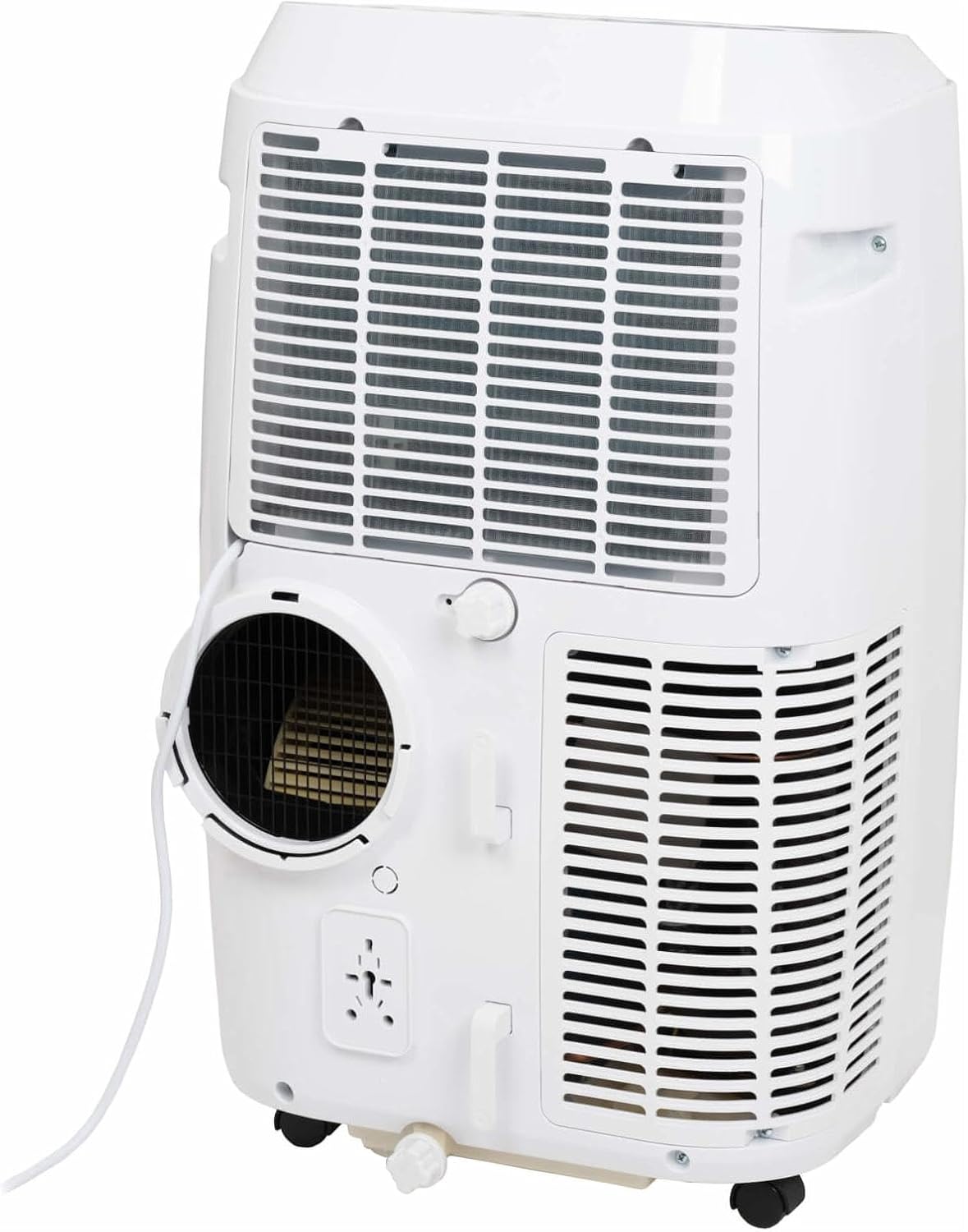
This image shows the rear of the air conditioner, illustrating where the exhaust hose connects to the unit.
Installation af vinduesæt
Use the provided window sealing kit to secure the exhaust hose in a window opening. Adjust the slider kit to fit your window, then place the window adapter into the opening.
Betjening af dit klimaanlæg
Kontrolpanel funktioner
The control panel on top of the unit allows you to manage all settings. Press the MAGT knappen til at tænde eller slukke enheden. Brug MODE button to cycle through cooling, fan, and dehumidification modes.
- MAGT: Tænder eller slukker for enheden.
- KØRSELSVEJLEDNING: Selects operating mode (Cool, Fan, Dry/Dehumidify).
- OP/NED-pile: Adjusts temperature setting or timer.
- HASTIGHED: Changes fan speed (Low, Medium, High).
- TIMER: Indstiller tiden for automatisk tænding eller automatisk slukning.
- SVINGE: Aktiverer eller deaktiverer den automatiske lameludsving.
- SOVE: Aktiverer dvaletilstand for mere støjsvag drift og gradvis temperaturjustering.
Fjernbetjeningsfunktioner
The remote control duplicates most functions available on the control panel, offering convenience. Ensure the remote control is pointed towards the unit's receiver when pressing buttons.
The remote control features a display showing the current settings and buttons for power, mode selection, temperature adjustment, fan speed, timer, and sleep mode.
Driftstilstande
- Cool tilstand: Provides cooling. Set your desired temperature using the UP/DOWN arrows.
- Ventilatortilstand: Cirkulerer luften uden at køle. Juster ventilatorhastigheden efter behov.
- Tørretilstand (affugtning): Reduces humidity in the room. The fan speed is fixed in this mode.
Smart app kontrol
This model supports Smart App Control. Refer to the separate Smart App manual or the manufacturer's website for detailed instructions on connecting and controlling your unit via the app.
Pleje og vedligeholdelse
Rengøring af luftfilteret
Luftfilteret bør rengøres hver anden uge eller oftere afhængigt af brugen. Et snavset filter kan reducere effektiviteten og luftstrømmen.
- Tag klimaanlæggets stik ud af stikkontakten.
- Find luftfilterpanelet (normalt på bagsiden eller siden af enheden).
- Fjern filteret.
- Vask filteret med varmt sæbevand. Skyl grundigt, og lad det lufttørre helt, før det sættes i igen.
Drænende vand
During dehumidification or in very humid conditions, water will accumulate inside the unit. The unit has an internal water tank that will trigger a "Full" indicator when full. You will need to drain the water manually.
- Placer en lav gryde eller beholder under drænåbningen nederst på bagsiden af enheden.
- Fjern aftapningsproppen.
- Lad alt vandet løbe ud.
- Sæt aftapningsproppen ordentligt på plads.
Opbevaring
Before storing the unit for an extended period, ensure the water tank is completely drained. Clean the air filter and store the unit in a dry, cool place, preferably in its original packaging.
Fejlfinding Guide
| Problem | Mulig årsag | Løsning |
|---|---|---|
| Enheden tænder ikke. | Ingen strøm; netledningen er taget ud; afbryderen er udløst. | Kontroller strømforbindelsen; nulstil afbryderen. |
| Enheden køler ikke effektivt. | Snavset luftfilter; udstødningsslange ikke korrekt installeret; rum for stort; vinduer/døre åbne. | Clean air filter; ensure hose is sealed; close windows/doors; check room size suitability. |
| Water tank full indicator is on. | Den indvendige vandtank er fuld. | Tøm vandet ud af enheden. |
| Enheden er støjende. | Enheden står ikke på en plan overflade; ventilatorblokering. | Placer på en plan overflade; kontroller for blokeringer i ventilatorområdet. |
Tekniske specifikationer
| Feature | Specifikation |
|---|---|
| Mærke | Eurom |
| Modelnummer | 262845 |
| Kølekapacitet | 12000 BTU |
| Strømkilde | El-kabel |
| Water Capacity (Internal Tank) | 1.2 liter |
Garanti og kundesupport
Garantioplysninger
This product comes with a manufacturer's warranty. Please refer to the warranty card included with your purchase or visit the official Eurom webwebstedet for detaljerede garantivilkår og -betingelser. Gem din købsbevis til garantikrav.
Kundesupport
For technical assistance, spare parts, or service, please contact Eurom customer support. Contact details can typically be found on the Eurom website or in the product packaging. When contacting support, please have your model number (262845) and serial number ready.


