1. Sikkerhedsoplysninger
Please read and understand all safety information before operating the Triplett CM650 Clamp Meter. Failure to follow these instructions may result in electric shock, fire, or serious injury.
- Overhold altid lokale og nationale sikkerhedsforskrifter.
- Do not use the meter if it appears damaged or if the test leads are damaged.
- Ensure the meter is set to the correct function and range before making measurements.
- Do not exceed the maximum input limits for any function. The CM650 is rated CAT III-600V.
- Vær forsigtig, når du arbejder med voltages above 30V AC RMS, 42V peak, or 60V DC, as these pose a shock hazard.
- Keep fingers behind the finger guards on the test leads during use.
- Udskift batterierne med det samme, når indikatoren for lavt batteri vises, for at sikre nøjagtige aflæsninger.
- Do not operate the meter in explosive gas, vapor, or dust environments.
2. Produktet er slutview
The Triplett CM650 is a True RMS 6000-count AC/DC clamp meter designed for accurate electrical measurements. It features a large backlit LCD, inrush current measurement, and a non-contact voltage detektor.
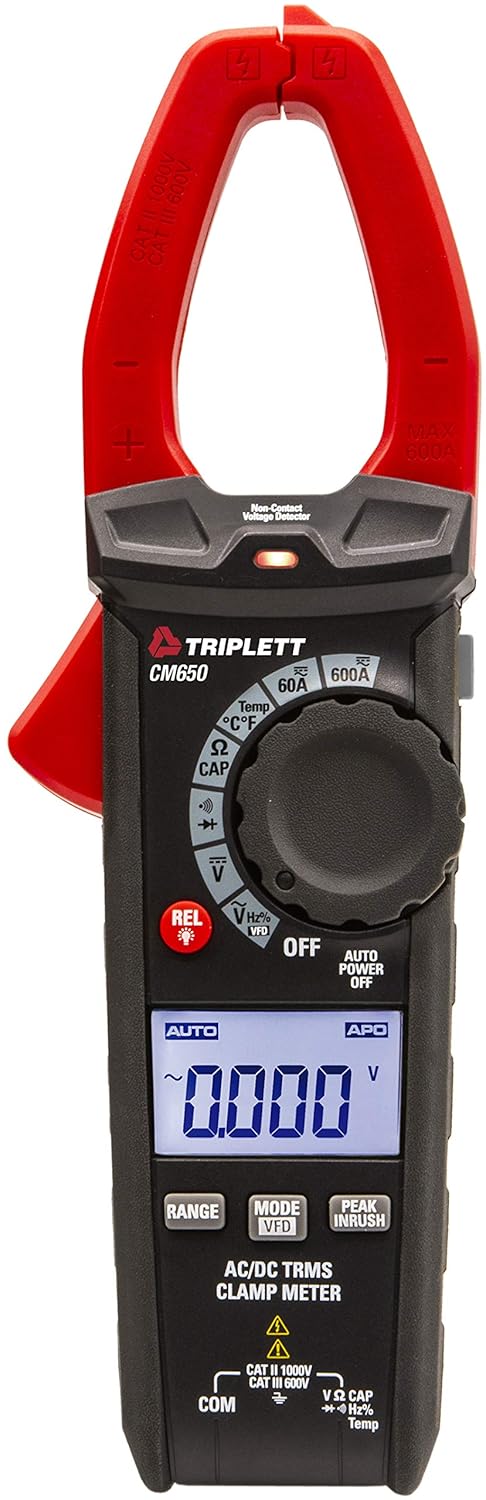
Figur 2.1: Front view of the Triplett CM650 True RMS 600A AC/DC Clamp Meter. This image displays the meter's main body, the red clamp jaws, the rotary dial, the LCD screen, and the function buttons.
2.1 Komponenter og kontroller
- Clamp Kæber: Used for non-contact AC/DC current measurement.
- Clamp Udløser: Åbner og lukker clamp kæber.
- Rotary Function Switch: Selects the desired measurement function.
- LCD-skærm: 6000-count backlit display for reading measurements.
- Funktionsknapper: Include RANGE, MODE/VFD, PEAK INRUSH, REL/Light, and Data Hold.
- Indgangsstik: For connecting test leads (COM, VΩCAPHzTemp).
- NCV Sensor: Non-Contact Voltage detection sensor.
- Lommelygte: Integrated LED light for illuminating work areas.

Figur 2.2: Nærbillede view of the Triplett CM650's rotary dial and function buttons. This image highlights the various measurement selections such as 60A, 600A, Temperature, Resistance/Capacitance, Continuity/Diode, Voltage, and VFD mode, along with the REL and backlight button.
3. Opsætning
3.1 Batteriinstallation
The CM650 requires 3 AAA batteries (included). To install or replace batteries:
- Ensure the meter is OFF and disconnect all test leads.
- Locate the battery compartment on the rear of the meter.
- Brug en skruetrækker til at åbne batteridækslet.
- Insert the 3 AAA batteries, observing correct polarity (+/-).
- Sæt batterirummets dæksel på igen og fastgør det med skruen.
3.2 Tilslutning af testledninger
For bdtage, resistance, capacitance, frequency, temperature, diode, and continuity measurements, connect the test leads as follows:
- Indsæt den sorte testledning i KOM indgangsstik.
- Indsæt den røde testledning i VΩCAPHzTemp indgangsstik.

Figur 3.1: The Triplett CM650 clamp meter shown with its included accessories: test leads, K-type thermocouple probe, and a soft carrying case. This illustrates the complete package provided with the device.
4. Betjeningsvejledning
Turn the rotary switch to the desired function to begin measurement. The meter features an automatic shutdown function to conserve battery life, which can be deactivated if needed.
4.1 AC/DC Current Measurement (Clamp)
To measure AC or DC current up to 600A without breaking the circuit:
- Drej drejekontakten til 60A or 600A AC/DC current range.
- Tryk på clamp trigger to open the jaws.
- Enclose only one conductor within the clamp jaws. Ensure the jaws are fully closed.
- Aflæs den aktuelle værdi på LCD-displayet.

Figur 4.1: A hand holding the Triplett CM650 clamp meter, with its jaws clamped around a single wire within an electrical panel, demonstrating how to measure current. The display shows a reading of 60.0 A.

Figur 4.2: The Triplett CM650 clamp meter being used to measure current on a wire connected to an industrial motor. The meter's display shows a reading of 16.00 A, illustrating its application in industrial settings.
4.2 bindtage-måling (AC/DC)
Til at måle AC eller DC voltage:
- Connect the test leads to the appropriate input jacks (COM and VΩCAPHzTemp).
- Drej drejekontakten til V (Bindtage) position. The meter will auto-range.
- Touch the test probes to the circuit points where voltage skal måles.
- Læs bindtage -værdi på LCD -displayet.
4.3 Resistance, Capacitance, Frequency, Temperature, Diode, and Continuity
For these measurements, connect the test leads as described in Section 3.2 and select the corresponding function on the rotary switch. Use the MODE button to cycle through sub-functions if necessary (e.g., Resistance, Capacitance, Diode, Continuity share a dial position).
- Resistance (Ω): Measures electrical resistance in Ohms.
- Capacitance (CAP): Measures capacitance in Farads.
- Frekvens (Hz): Measures the frequency of an AC signal.
- Temperature (°C/°F): Use the K-type thermocouple probe for temperature measurements.
- Diode test: Checks the forward voltagen dråbe af en diode.
- Kontinuitet: Emits an audible tone if the circuit has low resistance (continuity).
4.4 Specialfunktioner
- Ægte RMS: Provides accurate readings for non-sinusoidal or noisy AC waveforms.
- Inrush Current (PEAK INRUSH): Captures the instantaneous surge current when electrical equipment is powered on. Press the PEAK INRUSH knappen for at aktivere denne funktion.
- Low Pass Filter (LPF/VFD): Filters out high-frequency noise and harmonics when measuring variable frequency drives (VFDs). Activate by pressing the MODE knap i voltage function until VFD appears.
- Non-Contact Voltage (NCV): Registrerer AC voltage without physical contact. Hold the NCV sensor near a live conductor. An LED indicator and audible beep will signal the presence of voltage.
- Relative Mode (REL): Allows for comparisons with a stored reference value. Press the REL button to store the current reading as a reference. Subsequent readings will show the difference from this reference.
- Data Hold: Freezes the current reading on the display. Press the HOLDE button to activate/deactivate.
- Min/Max: Records the minimum and maximum values during a measurement session.
- Lommelygte: Tryk på REL/Light button briefly to turn the integrated flashlight on or off.
5. Vedligeholdelse
5.1 Rengøring
Wipe the meter with a dry, clean cloth. Do not use abrasives or solvents. Keep the input terminals free of dirt and moisture.
5.2 Udskiftning af batteri
Refer to Section 3.1 for battery replacement instructions. Replace batteries promptly when the low battery indicator appears on the display to ensure accurate measurements.
6. Fejlfinding
| Problem | Mulig årsag | Løsning |
|---|---|---|
| Måleren tænder ikke | Døde eller forkert installerede batterier | Kontroller batteripolariteten; udskift batterierne. |
| No reading or "OL" displayed | Incorrect function/range; open circuit; measurement exceeds range | Select correct function/range; check circuit continuity; ensure measurement is within meter's limits. |
| Unøjagtige aflæsninger | Low battery; external interference; dirty test leads | Replace batteries; move away from strong electromagnetic fields; clean test leads and input jacks. |
| NCV registrerer ikke volumentage | Voltage too low; sensor not close enough; shielded wire | Sørg for voltage is present and within detectable range; place sensor closer to conductor; NCV may not work on shielded wires. |
7. Specifikationer
| Feature | Specifikation |
|---|---|
| Model | CM650 |
| Vise | 6000 Count, Backlit LCD |
| AC / DC strøm | Op til 600A |
| Ægte RMS | Ja |
| Indløbsstrøm | Ja |
| Lavpasfilter (LPF) | Ja |
| Non-Contact Voltage (NCV) | Yes, with LED indicator |
| Mål | Resistance, Capacitance, Frequency, Temperature, Diode Test, Continuity |
| Sikkerhedsvurdering | CAT III-600V |
| Strømkilde | 3 AAA batterier (medfølger) |
| Produktdimensioner | 22.35 x 7.62 x 4.06 cm |
| Varens vægt | 290.3 g |
| Inkluderet tilbehør | Test cables, K-type thermocouple probe, carry case |
8. Garanti og support
The Triplett CM650 True RMS 6000 Count 600A AC/DC Clamp Meter comes with a 1 års garanti fra købsdatoen. Denne garanti dækker fejl i materialer og udførelse ved normal brug.
For warranty claims, technical support, or service inquiries, please contact Triplett customer service. Keep your proof of purchase for warranty validation.
For more information, visit the official Triplett webwebstedet eller kontakt din lokale forhandler.


