Indledning
Tak for købetasing the Bytech True Wireless Bluetooth Boost Link True Speaker. This manual provides essential information for setting up, operating, and maintaining your new speakers. Please read this manual thoroughly before use to ensure proper operation and to maximize your listening experience. These speakers feature True Wireless Stereo (TWS) functionality, Bluetooth connectivity, FM Radio, and Bass Boost for rich audio.
Sikkerhedsoplysninger
- Udsæt ikke højttalerne for ekstreme temperaturer, fugtighed eller direkte sollys.
- Undgå at tabe højttalerne eller udsætte dem for kraftige stød.
- Do not disassemble, repair, or modify the speakers yourself. Refer all servicing to qualified personnel.
- Hold højttalerne væk fra vand og andre væsker.
- Brug kun det specificerede opladningskabel og strømadapter.
- Rengør højttalerne med en blød, tør klud. Brug ikke slibende rengøringsmidler eller opløsningsmidler.
- Listen at moderate volume levels to avoid hearing damage.
Pakkens indhold

Image: The Bytech Boost Link True Wireless Speakers shown in their retail packaging, highlighting the two speakers and the Bluetooth connectivity feature.
Kontroller venligst, at alle varer er til stede og i god stand:
- 2 x Bytech Boost Link True Wireless Speakers
- 1 x opladningskabel (USB)
- 1 x Brugermanual (dette dokument)
Produkt overview

Billede: En nærbillede forfra view of the two Bytech Boost Link True Wireless Speakers, showing the speaker grilles and control buttons at the bottom.
Gør dig bekendt med højttalerens komponenter og betjeningselementer:
- Højttalergitter: Beskytter højttalerdriveren.
- Kontrolknapper:
- Power knap: Power On/Off, Play/Pause.
- Mode knap: Switch between Bluetooth, FM Radio, etc.
- Forrige nummer/lydstyrke ned-knap: Kort tryk for forrige nummer, langt tryk for at sænke lydstyrken.
- Næste nummer/lydstyrke op-knap: Kort tryk for næste nummer, langt tryk for at skrue op for lydstyrken.
- Opladningsport: Til tilslutning af USB-opladerkablet.
- LED-indikator: Viser strømstatus, opladningsstatus og parringsstatus.
Opsætning
Opladning af højttalerne
Before first use, fully charge both speakers. Connect the supplied USB charging cable to the charging port on each speaker and plug the other end into a USB power adapter (not included) or a computer's USB port. The LED indicator will show charging status and turn off or change color when fully charged.
Tænd/sluk
- For at tænde: Press and hold the Power button on each speaker until the LED indicator lights up and you hear a power-on prompt.
- For at slukke: Press and hold the Power button on each speaker until the LED indicator turns off and you hear a power-off prompt.
Betjeningsvejledning
Bluetooth Pairing (Single Speaker Mode)
- Ensure the speaker is powered on and in Bluetooth pairing mode (LED indicator will flash).
- Aktiver Bluetooth på din enhed (smartphone, tablet, bærbar computer), og søg efter tilgængelige enheder.
- Select "BYTECH BOOST LINK" (or similar name) from the list.
- Når parringen er afsluttet, vil LED-indikatoren stoppe med at blinke og forblive konstant, og du vil høre en bekræftelseslyd.
Ægte trådløs stereo (TWS) parring (to højttalere)
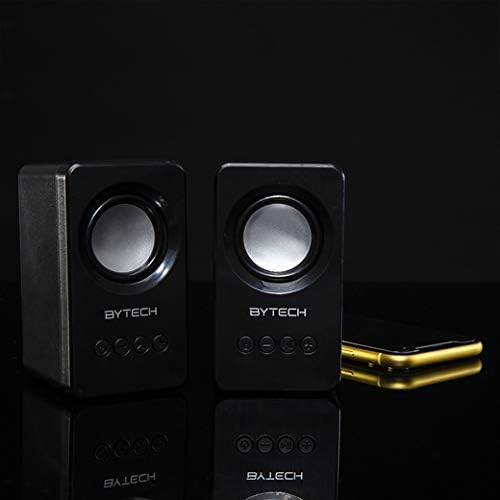
Image: The two Bytech Boost Link True Wireless Speakers positioned next to a smartphone, symbolizing their ability to connect wirelessly to each other and a device for stereo sound.
For a true stereo sound experience, you can pair both speakers together:
- Power on both Bytech Boost Link speakers. Do not connect them to your Bluetooth device yet.
- The speakers will automatically attempt to pair with each other. You will hear a confirmation sound when they are successfully linked for TWS. One speaker will become the master (left channel) and the other the slave (right channel).
- Once TWS paired, the master speaker will enter Bluetooth pairing mode (LED flashing).
- On your device, enable Bluetooth and search for "BYTECH BOOST LINK". Connect to this single entry.
- Begge højttalere vil nu afspille lyd i stereo.
- Note: If the speakers do not automatically pair, try double-pressing the Mode button on one of the speakers to initiate TWS pairing.
Betjening af FM-radio
- Power on the speaker(s).
- Tryk på Mode button repeatedly until you hear the FM radio prompt.
- For at automatisk scanne og gemme stationer skal du trykke på og holde Afspil/pause button. The speaker will scan and store available FM stations.
- Brug Forrige spor og Næste spor knapper til at navigere mellem gemte stationer.
Audio Playback and Volume Control
- Afspil/pause: Tryk kort på afbryderknappen.
- Næste nummer: Short press the Next Track/Volume Up button.
- Forrige nummer: Short press the Previous Track/Volume Down button.
- Lydstyrke op: Long press the Next Track/Volume Up button.
- Skrue ned for lyden: Long press the Previous Track/Volume Down button.
Opretholdelse
- Rensning: Use a soft, dry, lint-free cloth to clean the surface of the speakers. Do not use liquid cleaners, aerosols, or solvents.
- Opbevaring: Når højttalerne ikke er i brug i længere perioder, skal de opbevares køligt og tørt, væk fra direkte sollys og ekstreme temperaturer.
- Batteripleje: To prolong battery life, avoid fully discharging the battery frequently. Charge the speakers regularly, even if not in use.
Fejlfinding
| Problem | Mulig årsag | Løsning |
|---|---|---|
| Højttaleren tænder ikke. | Lavt batteri. | Oplad højttaleren helt. |
| Kan ikke parres via Bluetooth. | Speaker not in pairing mode; Device Bluetooth off; Too far from device. | Ensure speaker LED is flashing; Turn on Bluetooth on your device; Move speaker closer to device (within 10 meters). |
| Ingen lyd. | Volume too low; Speaker not connected; Incorrect mode. | Increase volume on speaker and device; Re-pair Bluetooth; Ensure correct mode (Bluetooth/FM). |
| TWS-parring mislykkes. | Speakers already connected to a device; Speakers too far apart. | Disconnect speakers from any device; Power off and on both speakers, then try TWS pairing again; Ensure speakers are close to each other. |
| Dårlig FM-radiomodtagelse. | Svagt signal; Interferens. | Relocate the speaker to an area with better reception; Extend the charging cable (can act as an antenna). |
Specifikationer
- Model: BY-AU-BS-152-BK
- Mærke: Bytech
- Forbindelse teknologi: Trådløs (Bluetooth)
- Lydudgangstilstand: Omgive
- Højttalertype: Surround Sound
- Særlige funktioner: Wireless Bluetooth, Bass Boost, FM Radio, True Wireless Stereo (TWS)
- Anbefalede anvendelser: Til musikafspillere
- Kompatible enheder: Laptop, tablet, smartphone
- Controller type: Knapper på enheden
- Pakkedimensioner: 20.7 x 16 x 9 cm
- Vægt: 560 g
Garanti og support
Bytech products are designed and manufactured to the highest quality standards. For information regarding warranty coverage, technical support, or service inquiries, please refer to the warranty card included with your purchase or visit the official Bytech webwebsted. Gem venligst din købsbevis til garantikrav.
For further assistance, please contact Bytech customer support.


