1. Introduktion
Thank you for choosing the Yaheetech Mid Mesh Back Office Chair. This manual provides essential information for the safe assembly, operation, and maintenance of your new office chair. Please read these instructions carefully before assembly and retain them for future reference.

Billede 1.1: Forside view of the Yaheetech Mid Mesh Back Office Chair, showcasing its mesh backrest, padded leather seat, and five-star base with casters.
2. Sikkerhedsoplysninger
- Sørg for, at alle dele er til stede og ubeskadigede før montering. Må ikke anvendes, hvis nogen af delene mangler eller er i stykker.
- Follow assembly instructions precisely. Incorrect assembly can lead to instability and injury.
- Stå ikke på stolen. Brug den kun til at sidde på.
- Overskrid ikke den maksimale vægtkapacitet på 265 pund.
- Hold børn væk fra samleområdet. Små dele kan være en kvælningsfare.
- Kontrollér regelmæssigt alle bolte og skruer for at sikre, at de er spændte.
3. Pakkens indhold
Before beginning assembly, verify that all components listed below are present in your package. Necessary tools and fittings are included.
- Ryglæn (1)
- Sædehynde (1)
- Armlæn (2)
- Gasløftecylinder (1)
- Gasliftdæksel (1)
- Five-Star Base (1)
- Hjul (5)
- Mekanismeplade (1)
- Hardwarepakke (skruer, skiver, unbrakonøgle)
4. Opsætnings- og monteringsvejledning
Assembly typically takes about 15 minutes for an adult. Follow these steps carefully.
- Fastgør hjul til basen: Sæt de fem hjul ind i hullerne for enden af hvert ben på femstjernefoden. Tryk godt til, indtil de klikker på plads.
- Indsæt gasløft: Place the gas lift cylinder into the center hole of the five-star base. Cover it with the gas lift cover.
- Fastgør mekanismepladen til sædet: Align the mechanism plate with the screw holes on the underside of the seat cushion. Ensure the front of the mechanism (with the lever) faces the front of the seat. Secure with screws using the provided Allen wrench.
- Fastgør armlæn til sæde: Attach the armrests to the sides of the seat cushion using the appropriate screws. Do not fully tighten yet.
- Attach Backrest to Armrests: Align the backrest with the armrests and secure with screws. Once all screws are in place for the armrests and backrest, tighten all screws firmly.
- Tilslut sædeenheden til gasliften: Placer forsigtigt det samlede sæde og ryglæn på gasliftcylinderen, og sørg for, at mekanismepladens midterhul flugter med toppen af gasliften. Tryk godt ned for at fastgøre.
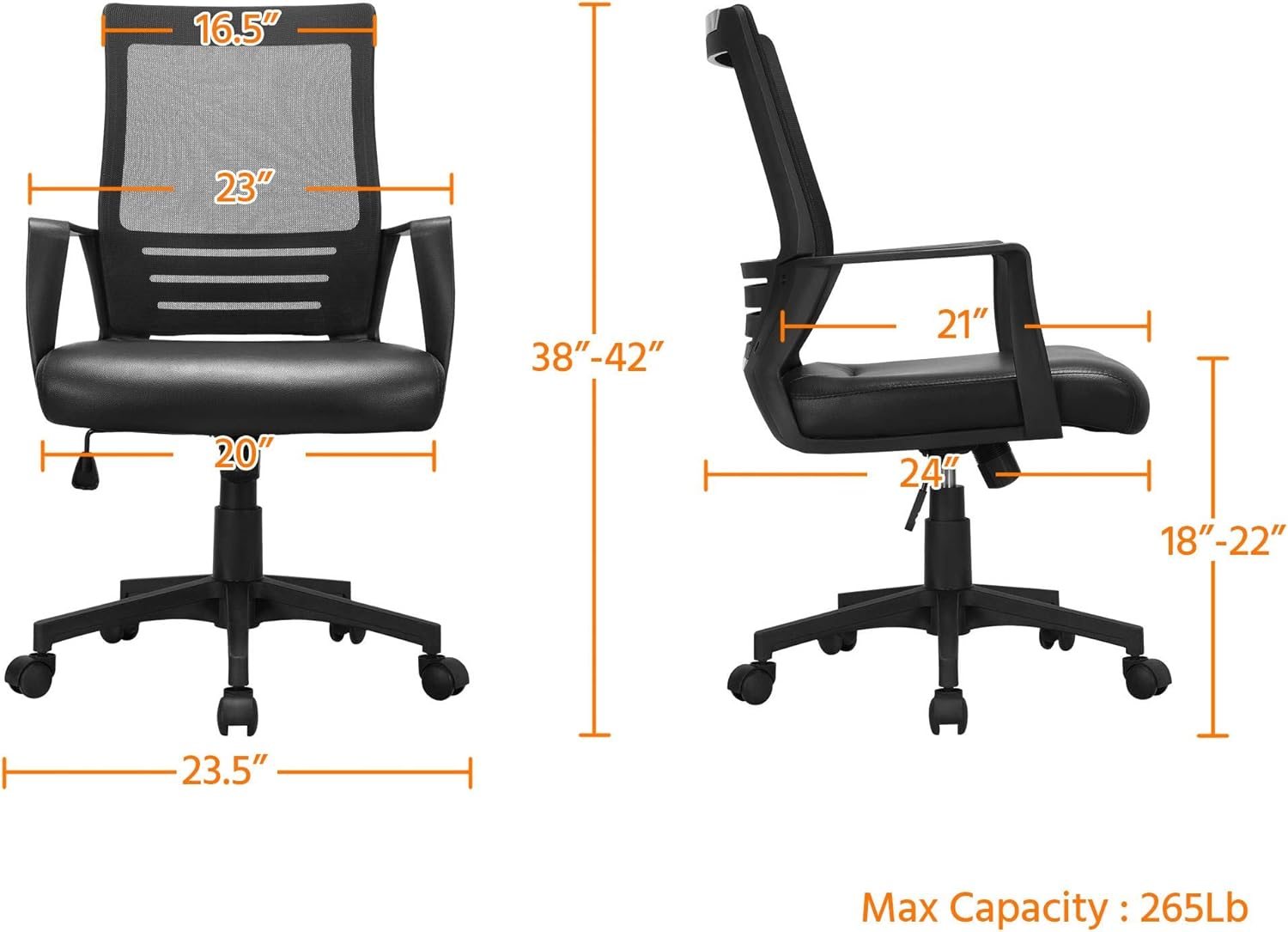
Image 4.1: Dimensional diagram of the Yaheetech office chair, illustrating height, width, and depth measurements, and maximum capacity of 265 lbs.
5. Betjeningsvejledning
Your Yaheetech office chair features several adjustable functions for personalized comfort.
5.1. Sædehøjdejustering
To adjust the seat height (from 18 to 22 inches):
- To raise the seat: While seated, lift the lever located on the right side of the seat. The seat will rise. Release the lever at the desired height.
- To lower the seat: While seated, lift the lever. Apply slight body weight to lower the seat. Release the lever at the desired height.
5.2. Tilt Function and Tension Adjustment
The chair features a rocking function and adjustable tilt tension.
- Activate/Deactivate Tilt: Pull the same lever (used for height adjustment) outwards to allow the chair to rock. Push the lever inwards to lock the chair in an upright position.
- Adjust Tilt Tension: Turn the round knob located beneath the seat (at the front of the mechanism plate). Turn clockwise to increase tension (making it harder to recline) or counter-clockwise to decrease tension (making it easier to recline).
5.3. 360° Swivel and Mobility
The chair is designed with 5 dual-wheel nylon casters for smooth 360° mobility. This allows for effortless movement across hard floors without scratching and without the need to stand up.

Image 5.1: Visual guide to the chair's adjustable features, including the lever for activating/deactivating tilt and adjusting seat height, and the knob for tilt tension.

Image 5.2: Illustration demonstrating the ergonomic lumbar support provided by the chair's design, conforming to the natural curve of the spine.
6. Vedligeholdelse
To ensure the longevity and appearance of your Yaheetech office chair, follow these simple maintenance guidelines:
- Rensning: Tør af med annonceamp cloth. For the PU leather seat, use a mild soap solution if necessary, then wipe dry immediately. Avoid harsh chemicals or abrasive cleaners.
- Inspektion: Periodically check all screws and bolts for tightness. Re-tighten if loose to maintain stability and safety.
- Hjul: Hold hjulene fri for hår og snavs for at sikre jævn rulning.

Image 6.1: Close-up of the PU leather seat, showing its texture and water-resistant properties, making it easy to clean.

Image 6.2: Detail of the mesh backrest, illustrating its breathable design for enhanced comfort during prolonged use.
7. Fejlfinding
Hvis du støder på problemer med din stol, kan du se følgende almindelige problemer og løsninger:
| Problem | Mulig årsag | Løsning |
|---|---|---|
| Stolen vakler eller er ustabil. | Løse skruer eller ujævn montering. | Kontrollér og spænd alle monteringsskruer. Sørg for, at stolen står på en flad og jævn overflade. |
| Sædehøjdejustering virker ikke. | Problem med gasløftecylinder eller funktionsfejl i håndtaget. | Sørg for, at håndtaget er helt aktiveret. Hvis problemet fortsætter, skal gasliften muligvis udskiftes. |
| Chair does not rock or tilt. | Tilt function locked or tension too high. | Pull the lever outwards to unlock the tilt. Turn the tension knob counter-clockwise to reduce tension. |
| Hjulene ruller ikke jævnt. | Affald sidder fast i hjulene. | Vend stolen om, og fjern hår, støv eller snavs fra hjulene. |
8. Specifikationer
| Feature | Detalje |
|---|---|
| Mærke | Yaheetech |
| Modelnavn | Mid Mesh Back Leather Padded Seat Computer Chair with Lumbar Support |
| Farve | Sort |
| Produktmål (D x B x H) | 24"D x 20"W x 42"H (Adjustable Height: 38-42") |
| Sædehøjdejustering | 18" - 22" |
| Maksimal vægtanbefaling | 265 pund |
| Rygstil | Solid bagside (mesh) |
| Speciel funktion | Adjustable, Ergonomic, Lumbar Support, Swivel |
| Materiale | PU Leather (Seat), Mesh (Back), Foam (Fill), Plastic (Base) |
| Møbelbasebevægelse | Swivel, Caster Wheels |
| Inkluderede komponenter | Casters, User Manual, Assembly Hardware |
| Produktplejevejledning | Tør Clean |
9. Garanti og support
Yaheetech is committed to providing quality products. For any questions, concerns, or assistance with your product, please contact Yaheetech customer support. Please refer to your purchase documentation for specific warranty details.
For yderligere hjælp, besøg venligst Yaheetech-butik på Amazon.


