1. Introduktion
Thank you for choosing the Lazmin112 V8 Bluetooth Mini Sound Mixer Board. This device is designed to enhance your audio experience for live broadcasting, music recording, karaoke, and other multimedia applications. It features a range of sound effects, voice changing capabilities, and versatile connectivity options for both computers and mobile devices. Please read this manual carefully to ensure proper setup and operation.
2. Sikkerhedsoplysninger
- Udsæt ikke enheden for vand eller overdreven fugt.
- Undgå ekstreme temperaturer.
- Forsøg ikke selv at skille enheden ad eller reparere den. Overlad al service til kvalificeret personale.
- Use only the provided charging cable and audio cables.
- Opbevares utilgængeligt for børn.
3. Pakkens indhold
Tjek venligst pakken for følgende varer:
- 1 x Lazmin112 V8 Sound Card
- 2 x Audio Cables
- 1 x ladekabel
- 1 x Brugermanual (dette dokument)
4. Produktet er slutview
The Lazmin112 V8 Sound Mixer Board features an intuitive layout with various knobs and buttons for controlling audio input, output, and effects.

Figur 4.1: Front view of the Lazmin112 V8 Sound Mixer Board, displaying the microphone and echo volume knobs, along with treble, bass, record, backing track, and monitor controls. Below these are buttons for various sound effects and voice changers.

Figur 4.2: Nærbillede view of the metallic control knobs for MIC, ECHO, TREBLE, BASS, RECORD, BACKING TRACK, and MONITOR, indicating their minimum and maximum settings.
4.1 Kontroller og indikatorer
- MIC (Min/Max) Knob: Justerer mikrofonens inputlydstyrke.
- ECHO (Min/Max) Knob: Controls the echo effect level.
- TREBLE knap: Adjusts the high-frequency audio level.
- BAS knap: Adjusts the low-frequency audio level.
- RECORD Knob: Controls the recording volume.
- BACKING TRACK Knob: Adjusts the volume of the background music.
- MONITOR-knap: Controls the volume of the monitor output (headphones).
- POWER -knap: Tænder/slukker enheden.
- Sound Effect Buttons: Buttons for various effects such as Reverb Delay, Pitch, Elimination, Crack, MC, Voice Overktv, Cheer, Din, Gunshot, 9277, Yell, Kiss, Laughter, Applause, Dindin, Giggle, Slash, PUBG.
4.2 Porte og forbindelser
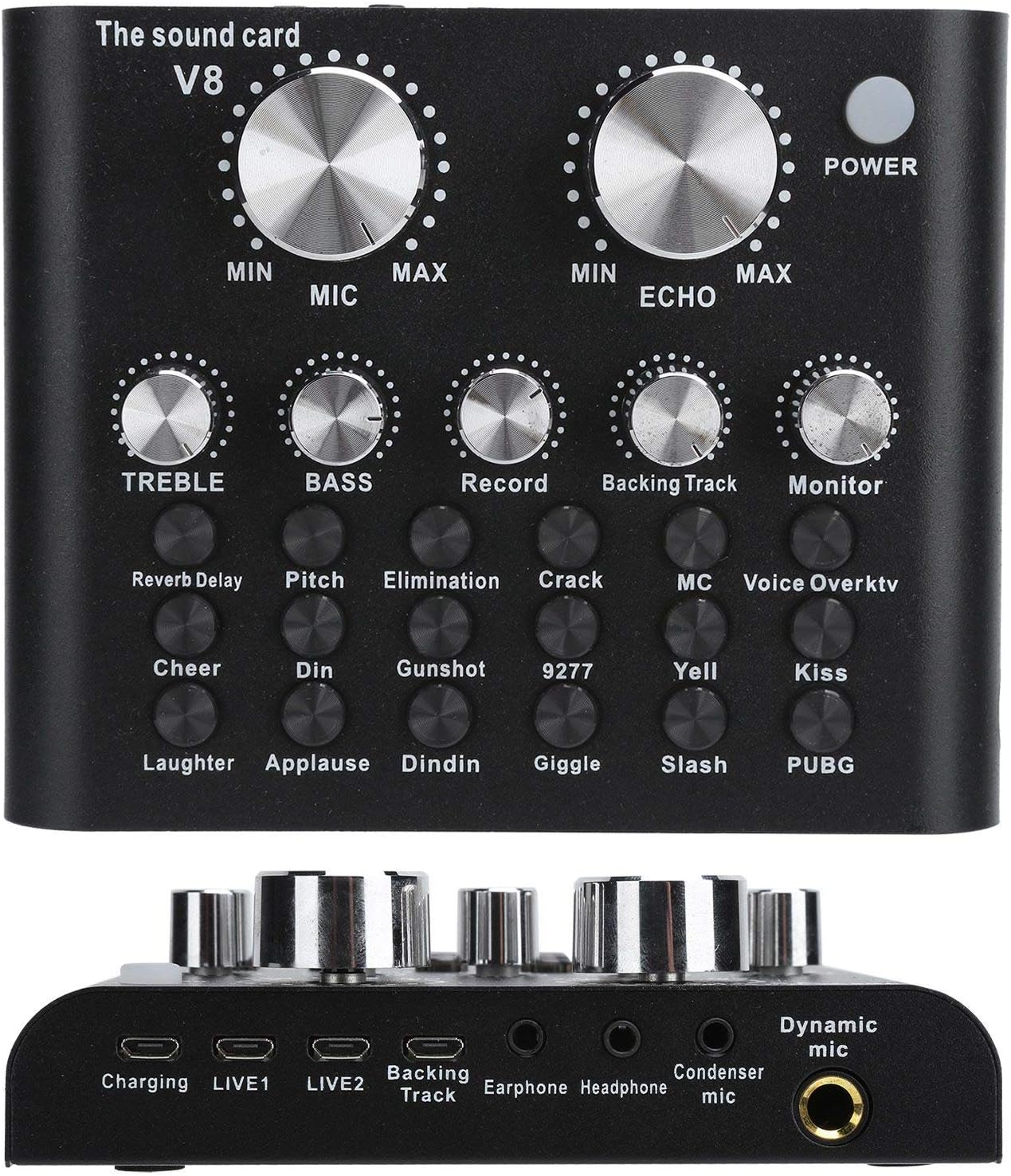
Figur 4.3: Bund view of the Lazmin112 V8 Sound Mixer Board, illustrating the Charging port, LIVE1, LIVE2, Backing Track, Earphone, Headphone, Condenser mic, and Dynamic mic ports.
- Opladningsport: USB port for charging the internal battery.
- LIVE1 / LIVE2 Ports: Output ports for connecting to mobile phones or other recording devices for live streaming.
- Backing Track Port: Input for connecting an external audio source for background music.
- Hovedtelefonport: Output for earphones.
- Hovedtelefonport: Output for headphones.
- Condenser Mic Port: Indgang til kondensatormikrofoner.
- Dynamic Mic Port: Input for dynamic microphones.
5. Opsætning
5.1 Opladning af enheden
- Connect the provided charging cable to the Opladningsport on the sound card.
- Tilslut den anden ende af opladningskablet til en USB-strømadapter (medfølger ikke) eller en computers USB-port.
- The indicator light will show charging status. Charge fully before first use.
5.2 Tilslutning af mikrofoner
- For condenser microphones, connect to the Condenser Mic Port.
- For dynamic microphones, connect to the Dynamic Mic Port.
5.3 Connecting to Mobile Devices for Live Broadcast/Recording
- Use one of the provided audio cables to connect the LIVE1 or LIVE2 port on the sound card to the 3.5mm audio jack of your mobile phone.
- If your phone does not have a 3.5mm jack, you may need an appropriate adapter (e.g., USB-C to 3.5mm or Lightning to 3.5mm, not included).
5.4 Tilslutning til en computer
The sound card can be connected to a computer via Bluetooth or a USB cable (for charging and data transfer, if supported by the computer's audio input).
- Bluetooth-forbindelse: Turn on the sound card and enable Bluetooth on your computer. Søg efter the device (e.g., "V8 Sound Card") and pair.
- USB-forbindelse: Connect the charging cable to the sound card's charging port and to a USB port on your computer. The computer should recognize it as an audio device.
5.5 Connecting Headphones/Earphones
Connect your headphones or earphones to the respective Hovedtelefonport or Port til øretelefoner for monitoring your audio.
5.6 Connecting Backing Track Source
Use an audio cable to connect an external audio source (e.g., another phone, MP3 player) to the Backing Track Port to play background music.
6. Betjeningsvejledning
6.1 Tænd/sluk
Tryk og hold på MAGT button for a few seconds to turn the device on or off.
6.2 Adjusting Volumes
- Drej på MIC knob to adjust your microphone input volume.
- Drej på Backingtrack knob to adjust the volume of your background music.
- Drej på OVERVÅGE knob to adjust the volume you hear through your headphones/earphones.
- Drej på OPTAGE knob to set the output recording volume.
6.3 Applying Sound Effects and Voice Changes
Press the dedicated buttons on the sound card to activate various sound effects and voice changing modes. Experiment with each button to find the desired effect:
- Reverb Delay, Pitch, Elimination, Crack, MC, Voice Overktv: These buttons modify your voice or add specific audio characteristics.
- Cheer, Din, Gunshot, 9277, Yell, Kiss, Laughter, Applause, Dindin, Giggle, Slash, PUBG: These buttons trigger specific sound effects.
6.4 Adjusting Tone
- Drej på DISKANT knob to make your voice or music sound brighter or sharper.
- Drej på BASS knob to make your voice or music sound deeper or fuller.
6.5 Brug af Bluetooth
Once paired with a mobile device or computer, you can stream audio wirelessly to the sound card for backing tracks or other audio input. Ensure the Bluetooth connection is stable for uninterrupted performance.
7. Vedligeholdelse
- Rensning: Brug en blød, tør klud til at rengøre enhedens overflade. Brug ikke flydende rengøringsmidler eller slibende materialer.
- Opbevaring: Store the sound card in a cool, dry place away from direct sunlight and extreme temperatures.
- Batteripleje: For at forlænge batteriets levetid bør du undgå at aflade batteriet helt ofte. Oplad enheden regelmæssigt, selvom den ikke er i brug i længere perioder.
8. Fejlfinding
| Problem | Mulig årsag | Løsning |
|---|---|---|
| No sound output from headphones. | Headphones not connected properly; Monitor volume too low; Device not powered on. | Ensure headphones are fully plugged in. Increase OVERVÅGE volume. Check if the device is powered on. |
| Mikrofon virker ikke. | Microphone not connected; MIC volume too low; Incorrect microphone type for port. | Check microphone connection. Increase MIC volume. Ensure condenser mic is in the condenser port and dynamic mic in the dynamic port. |
| No sound from backing track. | Backing track source not connected; Backing track volume too low; Source device volume too low. | Verify audio cable connection to Backing Track Port. Øge Backingtrack volume. Check volume on the external audio source. |
| Bluetooth-forbindelsen er ustabil eller ikke parret. | Device too far from sound card; Interference; Sound card not in pairing mode. | Move devices closer. Avoid sources of interference. Restart both devices and try pairing again. |
| Lydkvaliteten er dårlig eller forvrænget. | Volume levels too high (clipping); Loose connections; Faulty cables. | Reduce input/output volumes to prevent clipping. Check all cable connections. Try different cables if available. |
9. Specifikationer
| Feature | Detalje |
|---|---|
| Varetype | Lydkort |
| Mærke | Lazmin112 |
| Modelnummer | Lazmin112wusgkzq0o96061 |
| Batteritype | Li-ion genopladeligt batteri |
| Batterikapacitet | 1200mAh |
| Materiale | Metal |
| Farve | Sort |
| Forbindelsesteknologi | Bluetooth |
| Antal kanaler | 4 |
| Varens vægt | 15.2 ounces (432 gram) |
| Produktdimensioner | 0.39 x 0.39 x 0.39 tommer |
10. Garanti og support
This product comes with a standard manufacturer's warranty. For specific warranty terms and conditions, please refer to the documentation provided at the time of purchase or contact Lazmin112 customer support. If you encounter any issues not covered in this manual, please reach out to our support team for assistance.
For further support, please visit the official Lazmin112 webwebsted eller kontakt din forhandler.


