1. Introduktion
Thank you for choosing the Ctronics 5X Optical Zoom WiFi Outdoor Security Camera. This manual provides detailed instructions for the installation, operation, and maintenance of your camera. Please read this manual thoroughly before use to ensure proper functionality and safety. This camera is designed for outdoor surveillance, offering advanced features such as 5X optical zoom, human detection, auto-tracking, color night vision, and two-way audio.

Figur 1.1: Ctronics 5X Optical Zoom WiFi Outdoor Security Camera. This image shows the main unit of the camera with its dual antennas and lens array.
2. Sikkerhedsoplysninger
Overhold følgende sikkerhedsforanstaltninger for at forhindre skader på produktet eller personskade på dig selv eller andre:
- Ensure the power supply is stable and matches the camera's voltage-krav (12 volt).
- Do not expose the camera to extreme temperatures or humidity beyond its operating range.
- Avoid direct exposure of the lens to strong light sources, which may damage the sensor.
- Forsøg ikke at skille kameraet ad eller ændre det. Overlad al service til kvalificeret personale.
- Opbevar kameraet og dets tilbehør utilgængeligt for børn.
- Ensure proper mounting to prevent the camera from falling.
3. Pakkens indhold
Please check the package contents upon opening. If any items are missing or damaged, contact your retailer or Ctronics support.
- Ctronics 5X Optical Zoom WiFi Outdoor Security Camera
- Strømadapter
- Monteringsskruer og vægdyvler
- Vandtæt sæt til netværkskabel (hvis relevant)
- Hurtig startvejledning
4. Opsætning
4.1 Fysisk installation
- Vælg en placering: Select a suitable outdoor location with a clear view of the area you wish to monitor. Ensure the location has access to a power outlet.
- Montering: Use the provided mounting template (if included) to mark drill holes on the wall or ceiling. Drill the holes, insert wall plugs, and secure the camera bracket using the screws.
- Strømtilslutning: Connect the power adapter to the camera's power input and plug it into a power outlet.
4.2 Netværksforbindelse
The camera supports 2.4GHz Wi-Fi networks.
- Download appen: Download the "Ctronics" app from your smartphone's app store (iOS/Android). For PC users, download the HiP2P software for MAC/Windows.
- Indledende opsætning: Følg instruktionerne i appen for at tilføje dit kamera. Dette involverer typisk at scanne en QR-kode på kameraet eller manuelt indtaste dets ID.
- Wi-Fi-konfiguration: Tilslut kameraet til dit 2.4 GHz Wi-Fi-netværk via appen.

Figur 4.1: Broad Compatibility. This image illustrates the camera's compatibility with various devices and operating systems, including iOS, Android, Windows, and Mac OS, through the Ctronics Pro app and HiP2P Client software.
4.3 Installation af Micro SD-kort (valgfrit)
The camera supports a micro SD card up to 64GB for local storage of recordings.
- Locate the SD card slot on the camera (refer to the camera diagram in the quick start guide).
- Carefully insert the micro SD card into the slot until it clicks into place.
- Format the SD card via the camera's settings in the Ctronics app for optimal performance.
5. Betjening af kameraet
5.1 Panorering, vipning og zoom (PTZ)
The camera features motorized pan (355° horizontally) and tilt (90° vertically) functions, along with 5X optical zoom.
- Kontrollere: Use the Ctronics app to remotely control the camera's pan and tilt movements by swiping on the live view skærmen.
- Optisk zoom: Knib for at zoome på live view to activate the 5X optical zoom. The camera will auto-focus for clear detailed images.
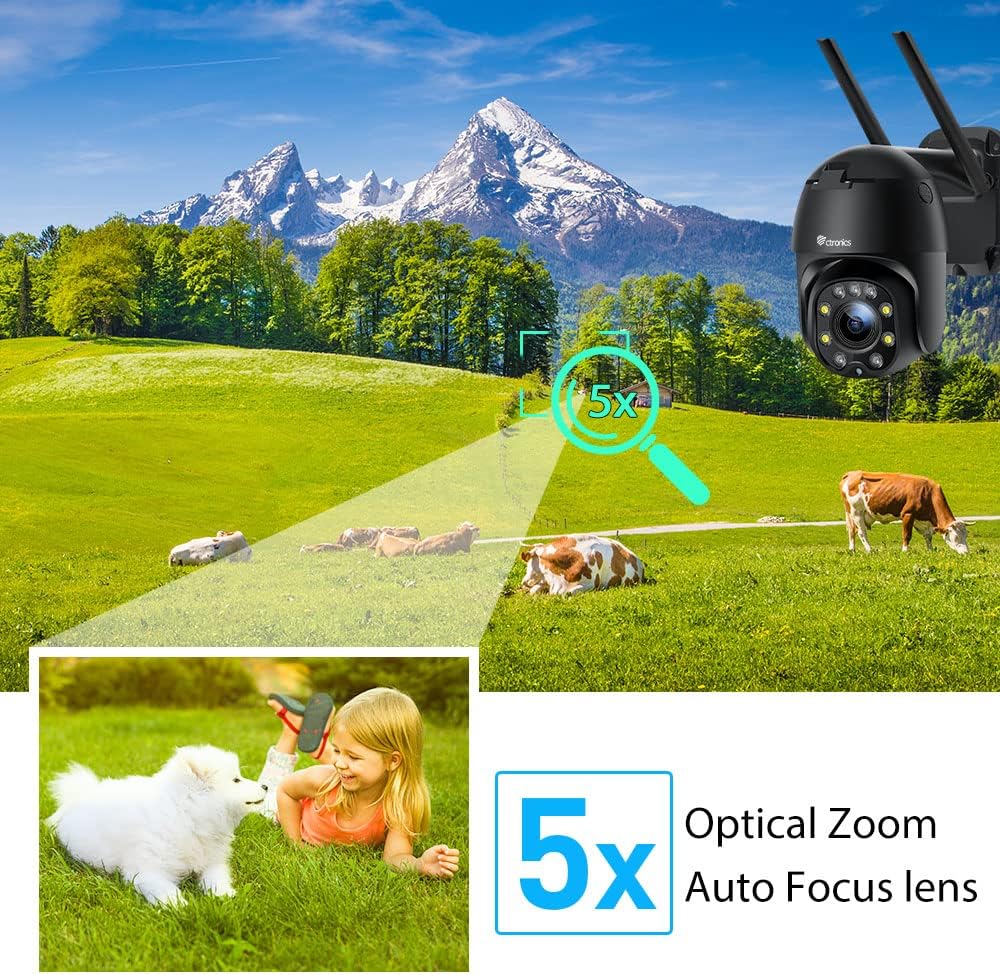
Figur 5.1: 5X Optical Zoom. This image demonstrates the camera's 5X optical zoom capability, allowing for detailed viewing of distant objects with auto-focus functionality.
5.2 Human Detection and Auto-Tracking
The camera utilizes AI algorithms to distinguish human movement from other triggers, reducing false alarms by up to 95%.
- Opdagelse: When a human is detected, the camera will automatically track their movement within its field of view.
- Advarsler: You will receive instant notifications via the app, FTP, or email.
- Indspilning: Detected events are recorded to the installed SD card.

Figur 5.2: Human Detection. This image illustrates how the camera's human detection feature accurately identifies people while ignoring non-human movements like pets, significantly reducing false alarms.

Figur 5.3: Auto Tracking. This image demonstrates the camera's auto-tracking capability, showing how it follows a detected subject's movement within its 355° horizontal and 90° vertical range.
5.3 HD 1080P & Night Vision
The camera provides 1920x1080P resolution for clear images and offers two night vision modes.
- Farve Night Vision: With 4 spotlights and 5 infrared lights, the camera can display vivid color images in total darkness up to 25 meters.
- Infrarødt nattesyn: Standard black and white infrared vision is also available.

Figur 5.4: Color Night Vision. This image illustrates the camera's ability to provide full-color video surveillance even in low-light or nighttime conditions.
5.4 Tovejslyd
Kommuniker med besøgende eller afskræk ubudne gæster ved hjælp af den indbyggede mikrofon og højttaler.
- Real-time Conversation: Use the Ctronics app to engage in real-time conversations.
- Støjreduktion: The camera features ambient noise reduction technology for clearer sound quality.

Figur 5.5: Two-Way Audio. This image depicts the camera's two-way audio functionality, allowing users to communicate with individuals near the camera via their smartphone.
5.5 Fjernadgang
View live footage and recordings from anywhere at any time using the Ctronics app or HiP2P software.
- Sørg for, at dit kamera er forbundet til internettet.
- Log in to your Ctronics app or HiP2P software account to access your camera feed.
6. Vedligeholdelse
Regelmæssig vedligeholdelse sikrer kameraets levetid og optimale ydeevne.
- Rensning: Tør forsigtigt kameralinsen og huset af med en blød kludamp klæde. Brug ikke skrappe kemikalier eller slibende rengøringsmidler.
- Firmwareopdateringer: Check the Ctronics app periodically for available firmware updates. Keeping the firmware updated ensures you have the latest features and security enhancements.
- Power Cycle: If the camera experiences minor issues, try power cycling it by unplugging and replugging the power adapter.
7. Fejlfinding
Dette afsnit omhandler almindelige problemer, du kan støde på.
| Problem | Mulig årsag | Løsning |
|---|---|---|
| Kamera offline | Ingen strøm; Wi-Fi afbrudt; Routerproblem | Check power connection; Reconnect Wi-Fi in app; Restart router |
| Dårlig billedkvalitet | Dirty lens; Network bandwidth; Low light | Clean lens; Check internet speed; Ensure sufficient lighting or use night vision |
| Falske alarmer | Sensitivity too high; Non-human movement | Adjust detection sensitivity in app; Ensure human detection is enabled |
| SD-kort optager ikke | SD card full/corrupted; Not formatted; Incorrect settings | Format SD card in app; Check recording settings; Replace SD card if faulty |
8. Specifikationer
Detailed technical specifications for the Ctronics CTIPC-285C-Z4B camera:
| Feature | Specifikation |
|---|---|
| Modelnummer | CTIPC-285C-Z4B |
| Dimensioner (L x B x H) | 11 x 17 x 30 cm |
| Vægt | 940 gram |
| Materiale | Acrylonitril Butadien Styren (ABS) |
| Strømtype | El-kabel |
| Voltage | 12 volt |
| Strømforbrug | 6 watt |
| Opløsning | 1920x1080P |
| Optisk zoom | 5X |
| Pan Range | 355° |
| Tilt rækkevidde | 90° |
| Nattesynsafstand | Ca.. 25 meter |
| Vandtæt vurdering | IP66 |
| Hukommelseskorttype | Micro SD |
| Maksimal hukommelseskapacitet | 64 GB |
| Kompatible enheder | Smartphone (iOS/Android), PC (MAC/Windows) |
9. Garanti og support
Ctronics products come with a standard warranty. For specific warranty terms and conditions, please refer to the warranty card included with your product or visit the official Ctronics website. If you encounter any issues not covered in this manual or require further assistance, please contact Ctronics customer support:
- Webwebsted: www.ctronics.com
- E-mail: Se din produktemballage eller webwebsted for support-e-mail.
- Telefon: Se din produktemballage eller webhjemmeside for supporttelefonnummer.
Please have your model number (CTIPC-285C-Z4B) and purchase information ready when contacting support.


