Varmilo VBS108 Lure Bot Mechanical Keyboard
Instruktionsmanual
Indledning
Thank you for choosing the Varmilo VBS108 Lure Bot Mechanical Keyboard. This keyboard is designed for versatility and durability, featuring triple mode connectivity (Bluetooth 5.0, 2.4GHz Wireless, and USB-C), high-quality PBT dye-sub keycaps, and Cherry MX Brown switches for a tactile typing experience. This manual provides detailed instructions for setup, operation, maintenance, and troubleshooting to ensure optimal performance and longevity of your keyboard.
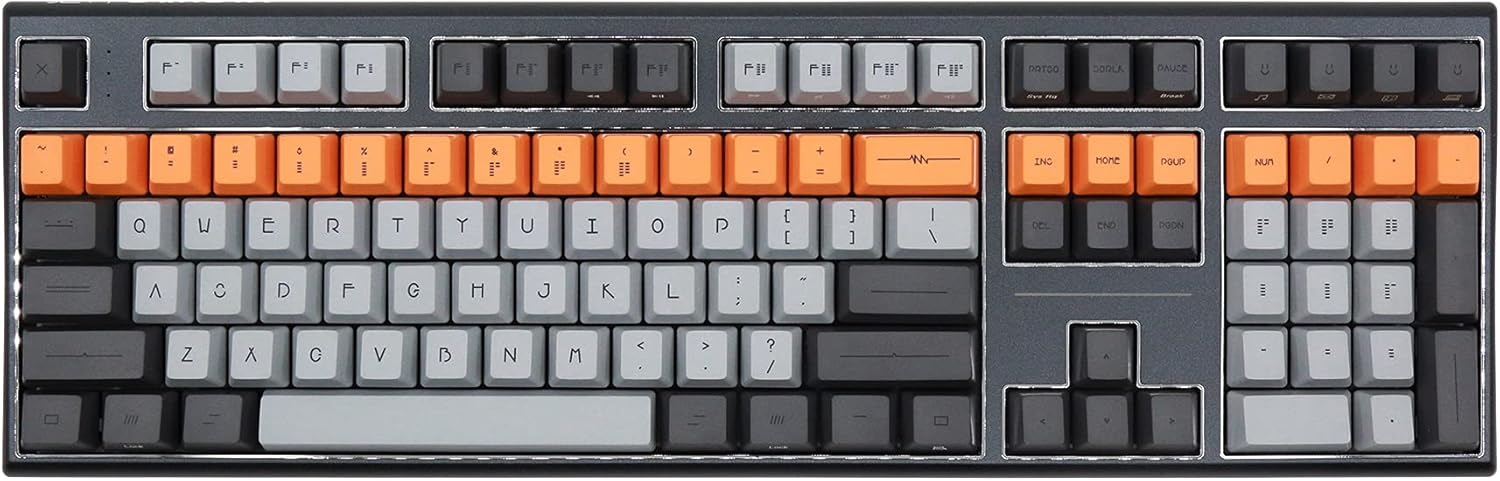
Figure 1: Varmilo VBS108 Lure Bot Mechanical Keyboard
Pakkens indhold
Sørg venligst for, at alle varer er til stede i pakken:
- Varmilo VBS108 Lure Bot Mechanical Keyboard
- USB-C til USB-A-kabel
- 2.4GHz Wireless Dongle (typically stored in the keyboard's battery compartment or a dedicated slot)
- Tasteaftrækker (kan være inkluderet)
- Brugervejledning (dette dokument)
Opsætning
The Varmilo VBS108 offers three connectivity modes: USB-C wired, 2.4GHz wireless, and Bluetooth 5.0.
1. USB-C kablet forbindelse
- Find USB-C-porten på tastaturet (normalt i den øverste kant).
- Tilslut den ene ende af det medfølgende USB-C-kabel til tastaturet.
- Tilslut den anden ende (USB-A) til en ledig USB-port på din computer.
- Tastaturet vil automatisk blive genkendt og klar til brug.
2. 2.4 GHz trådløs forbindelse
- Locate the 2.4GHz wireless dongle.
- Sæt donglen i en ledig USB-port på din computer.
- Ensure the keyboard is in 2.4GHz mode (refer to the keyboard's function key combinations or a physical switch if available).
- Tastaturet burde oprette forbindelse automatisk.
3. Bluetooth 5.0-forbindelse
- Ensure the keyboard is in Bluetooth pairing mode. This typically involves holding down a specific Fn key combination (e.g., Fn + 1, Fn + 2, or Fn + 3 for different profiles) until an indicator light flashes. Consult your keyboard's specific key legend for Bluetooth pairing.
- Åbn Bluetooth-indstillingerne på din computer eller enhed.
- Søg efter new devices and select "Varmilo VBS108" or a similar name from the list.
- Følg eventuelle anvisninger på skærmen for at fuldføre parringsprocessen.
Drift
The Varmilo VBS108 keyboard includes various function key combinations for enhanced control.
Function Key Combinations (Fn + Key)
- Fn + F1-F12: Multimedia controls (play/pause, volume up/down, mute, etc.). Refer to the keycap legends for specific functions.
- Fn + Win: Lås/oplås Windows-tast.
- Fn + Venstre Alt: Switch between macOS and Windows layouts (if supported).
- Fn + Q/W/E: Skift mellem Bluetooth profiles (hvis relevant).
- Fn + R: Skift til 2.4 GHz trådløs tilstand.
- Fn + T: Switch to USB-C wired mode.
- Fn + Backlight Keys: Adjust backlight brightness or effects (if applicable).
Adjustable Flip-out Feet
Tastaturet har 3-stage adjustable flip-out feet on the underside, allowing you to customize the typing angle for ergonomic comfort.

Figure 2: Adjustable Flip-out Feet
Opretholdelse
Proper maintenance ensures the longevity and performance of your Varmilo keyboard.
Rengøring af tastaturet
- Taster: Use a keycap puller to carefully remove keycaps. Clean them with a mild soap solution and a soft cloth, then rinse thoroughly and air dry completely before reattaching.
- Sag: Wipe the keyboard case with a soft, slightly damp, fnugfri klud. Undgå at bruge skrappe kemikalier eller slibende materialer.
- Mellem nøgler: Use compressed air to remove dust and debris from between the key switches. A small brush can also be used for stubborn particles.

Figure 3: PBT Dye-Sub Keycaps
Fejlfinding
If you encounter issues with your Varmilo VBS108 keyboard, try the following solutions:
- Tastaturet svarer ikke (kablet): Sørg for, at USB-C-kablet er korrekt tilsluttet til både tastaturet og computeren. Prøv en anden USB-port eller et andet kabel.
- Keyboard not responding (Wireless/Bluetooth):
- Kontroller batteriniveauet.
- Ensure the keyboard is in the correct mode (2.4GHz or Bluetooth).
- For 2.4GHz, ensure the dongle is properly inserted and try a different USB port.
- For Bluetooth, unpair and re-pair the keyboard with your device. Ensure your device's Bluetooth is enabled.
- Nøgler registreres ikke: Remove the keycap and check for any obstructions around the switch. Clean the area with compressed air.
- Intermitterende forbindelse: Ensure there are no major sources of interference (e.g., other wireless devices) near the keyboard or dongle.
- Firmwareopdatering: Check the official Varmilo website for any available firmware updates for your model, which can resolve known issues.
Specifikationer
| Feature | Detalje |
|---|---|
| Mærke | Varmilo |
| Model | VBS108 Lure Bot |
| Forbindelsesteknologi | Bluetooth 5.0, 2.4GHz Wireless, USB-C |
| Switch Type | Cherry MX Brown |
| Keycap materiale | PBT Dye-Sub |
| Antal nøgler | 104 |
| Kompatible enheder | PC |
| Farve | Cherry MX Brown (keyboard color scheme) |
| Speciel funktion | 3-Stage Adjustable Flip-out Feet |
Garanti og support
Varmilo products are designed for quality and reliability. For information regarding warranty coverage, technical support, or service, please refer to the warranty card included with your product or visit the official Varmilo webDu kan også kontakte den forhandler, hvor du købte produktet, for at få hjælp.


