1. Introduktion
This manual provides essential information for the correct installation, safe use, and maintenance of your Candy Smart CS 1410TXME/1-S washing machine. Please read these instructions carefully before using the appliance and retain them for future reference. Proper use ensures optimal performance and extends the lifespan of your washing machine.
2. Sikkerhedsoplysninger
Følg altid grundlæggende sikkerhedsforanstaltninger, når du bruger elektriske apparater, for at mindske risikoen for brand, elektrisk stød eller personskade.
- Sørg for, at apparatet er korrekt jordet.
- Lad ikke børn lege med apparatet.
- Never force the door open during a cycle.
- Tag stikket ud af apparatet, før du rengør eller udfører vedligeholdelse.
- Installer ikke apparatet i adamp miljø eller udendørs.
- Hold emballagemateriale utilgængeligt for børn.
3. Installation
Korrekt installation er afgørende for sikker og effektiv drift af din vaskemaskine.
3.1 Udpakning
Remove all packaging materials, including the polystyrene base and any inserts in the drum. Ensure all transit bolts are removed from the rear of the machine before use. Failure to remove transit bolts will cause severe vibration and damage.
3.2 Positionering og nivellering
Place the washing machine on a firm, flat floor. Adjust the feet to ensure the appliance is perfectly level. An unlevel machine can cause excessive noise and vibration.

Image: The Candy Smart CS 1410TXME/1-S washing machine positioned in a home environment.
3.3 Vandtilslutning
Connect the water inlet hose to a cold water tap with a 3/4" thread. Ensure the hose is securely fastened to prevent leaks. Do not reuse old hoses.
3.4 Afløbstilslutning
Position the drain hose at a height between 50 cm and 85 cm from the floor. Ensure the hose is not kinked or obstructed.
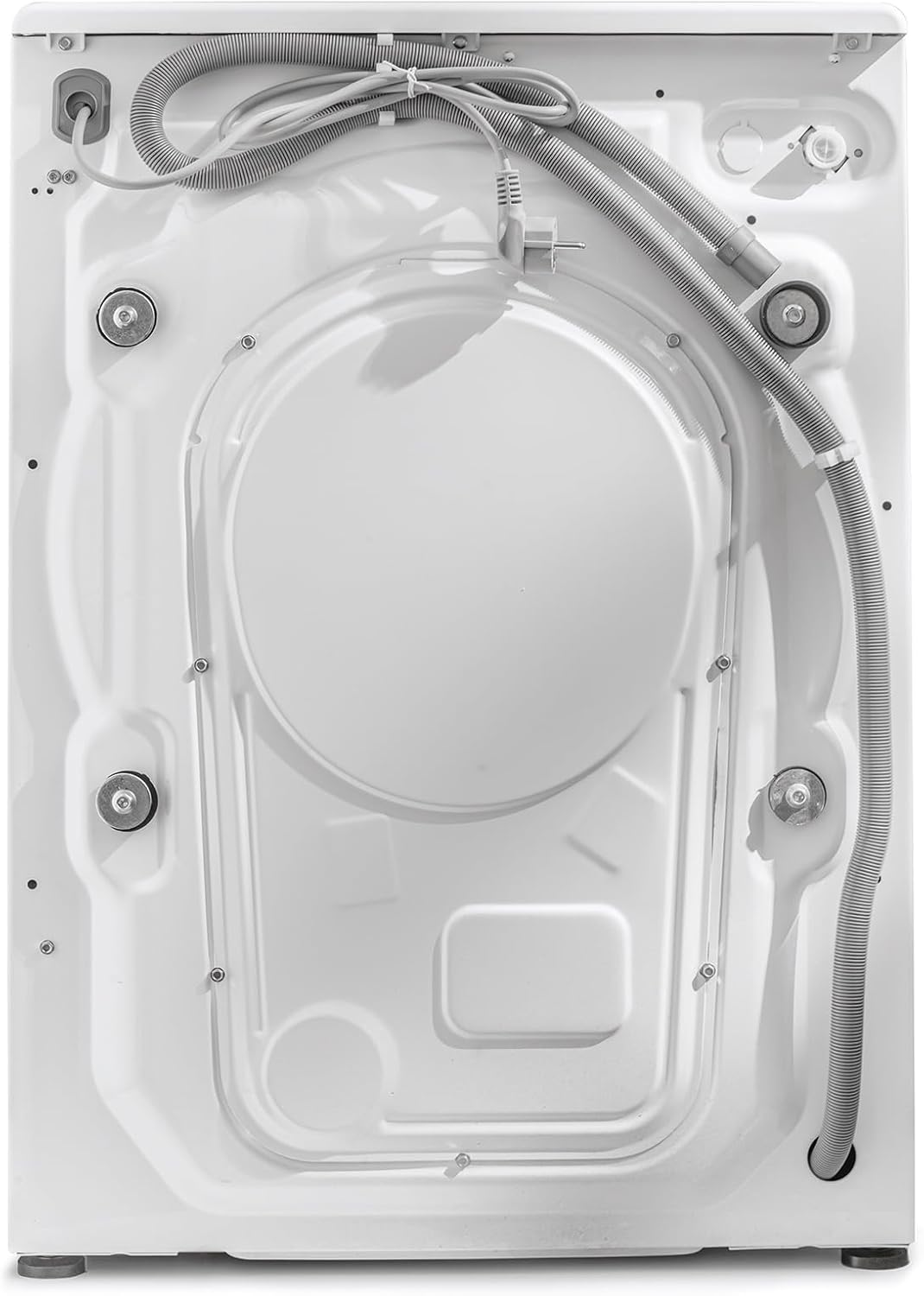
Billede: Bagside view of the washing machine, illustrating hose connections.
3.5 Elektrisk tilslutning
Sæt apparatet i en jordet stikkontakt. Sørg for, at lydstyrken er korrekt.tage og frekvens stemmer overens med specifikationerne på apparatets typeskilt. Brug ikke forlængerledninger eller multiadaptere.
4. Betjeningsvejledning
Familiarize yourself with the control panel and available programs for efficient washing.
4.1 Kontrolpanel overview
The control panel features a program selector dial, a digital display, and various function buttons.

Image: Digital display showing temperature, spin speed, and program indicators.

Image: Program selector dial with various wash cycle options.
4.2 Vaskeprogrammer
Your washing machine offers 16 standard programs, including specialized cycles for different fabric types and rapid wash options ranging from 14 to 59 minutes. The Active Motion Technology enhances detergent cleaning action for improved results.

Image: Features panel highlighting 10kg capacity, 1400 RPM, Active Motion System, and Rapid Cycles.
4.3 NFC Connectivity (Simply-Fi App)
The appliance features NFC connectivity, allowing you to connect your smartphone via the Candy Simply-Fi app. This enables you to download additional wash programs and access extra functionalities.
4.4 Ilægning af vasketøj
Åbn lågen, og læg vasketøj i tromlen. Overfyld ikke maskinen; den maksimale kapacitet er 10 kg. Luk lågen godt.

Image: The washing machine drum with the door open, ready for loading.
4.5 Vaskemiddelbeholder
Tilføj den passende mængde vaskemiddel og skyllemiddel til de dertil beregnede rum i dispenserskuffen.
4.6 Start af en vaskecyklus
- Turn the program selector dial to choose your desired wash program.
- Adjust temperature and spin speed using the corresponding buttons on the display, if desired.
- Tryk på knappen 'Start/Pause' for at starte cyklussen.
5. Vedligeholdelse
Regular maintenance helps ensure the longevity and efficiency of your washing machine.
5.1 Rengøring af ydersiden
Tør de udvendige overflader af med en blød, damp klæde. Brug ikke slibende rengøringsmidler eller opløsningsmidler.
5.2 Rengøring af vaskemiddelskuffen
Tag sæbeskuffen ud og rengør den med jævne mellemrum under rindende vand for at forhindre ophobning af rester.
5.3 Rengøring af filteret
The filter should be cleaned regularly to prevent blockages. Refer to the detailed instructions in the full user manual for filter access and cleaning procedures.
5.4 Care for the Drum
To prevent odors and mold, leave the washing machine door slightly ajar after each wash to allow the drum to air dry.

Image: Interior of the washing machine drum.
6. Fejlfinding
Dette afsnit omhandler almindelige problemer, du kan støde på. Ved mere komplekse problemer skal du kontakte en kvalificeret tekniker.
- Maskinen starter ikke: Kontroller, om netledningen er sat i stikkontakten, om døren er lukket korrekt, og om der er trykket på 'Start/Pause'-knappen.
- Vandet fyldes ikke: Sørg for, at vandhanen er åben, og at vandtilløbsslangen ikke er bøjet.
- Overdreven vibration: Verify that the transit bolts have been removed and the machine is level.
- Vand løber ikke ud: Check the drain hose for kinks or blockages, and clean the filter.
7. Specifikationer
Key technical specifications for the Candy Smart CS 1410TXME/1-S washing machine.
| Specifikation | Værdi |
|---|---|
| Mærke | Slik |
| Modelnummer | CS 1410TXME/1-S |
| Kapacitet | 10 kilo |
| Maksimal spinhastighed | 1400 RPM |
| Dimensioner (L x B x H) | 58 x 60 x 85 cm |
| Vægt | 65 kilo |
| Støjniveau (spin) | 78 dB |
| Energieffektivitetsklasse (ny) | A |
| Energiforbrug (pr. 100 cyklusser) | 51 kWh |
| Vandforbrug (pr. cyklus) | 51 liter |
| Forbindelse | NFC |
| Særlige funktioner | Child Safety, Active Motion Technology, Rapid Cycles |

Image: EU Energy Label for the appliance. For more details, visit the official EPREL-database.
8. Garanti og support
Your Candy Smart CS 1410TXME/1-S washing machine comes with a standard manufacturer's warranty. Please refer to the warranty card included with your purchase for specific terms and conditions. For technical support, spare parts, or service requests, please contact Candy customer service or visit their official webwebsted.


