1. Introduktion
This manual provides essential information for the safe and efficient operation of your DOOGEE S97 Pro Rugged Smartphone. Please read it thoroughly before using your device.

Image 1.1: The DOOGEE S97 Pro Rugged Smartphone, showcasing dens robuste design og display.
2. Enhed overview
The DOOGEE S97 Pro is a rugged smartphone designed for durability and performance. Key features include:
- Operativsystem: Android 11
- Processor: Helio G95 Octa Core 2.1GHz 12nm
- Hukommelse: 8 GB RAM + 128 GB ROM
- Batteri: 8500mAh Super Battery with 33W Fast Charging and 10W Wireless Charging
- Vise: 5.71-inch Corning Gorilla Glass
- Bagkamera: Samsung 48MP AI Main Camera (48MP + 8MP + 2MP + 2MP)
- Forreste kamera: 16 MP
- Særlige funktioner: 40m Rangefinder, IP68 Waterproof, Dustproof, Shockproof, NFC Support
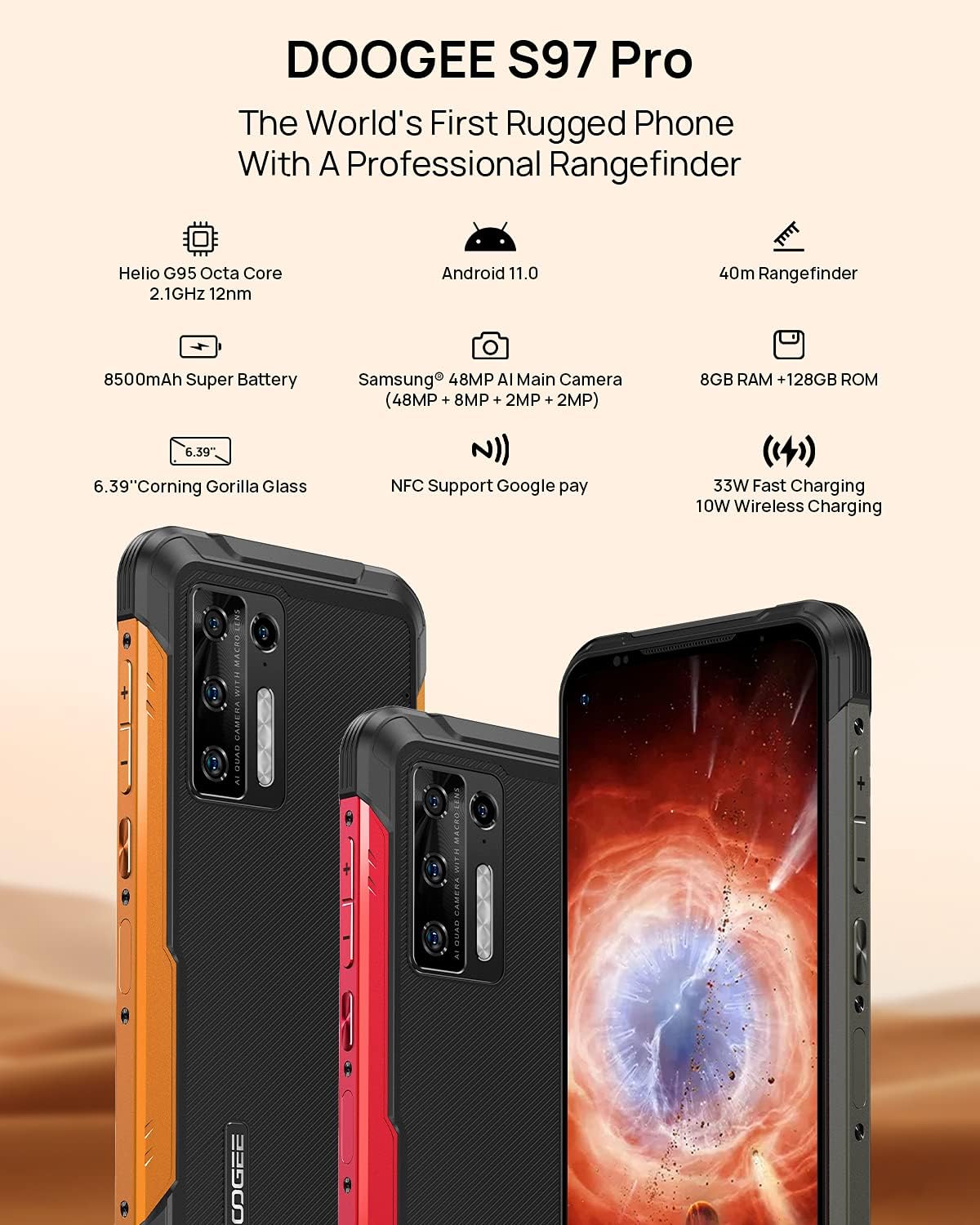
Image 2.1: Visual representation of the DOOGEE S97 Pro's main features, including processor, battery, camera, and display.
3. Opsætning
3.1 Installation af SIM -kort
- Find SIM-kortbakken på siden af din enhed.
- Brug det medfølgende SIM-kortudløserværktøj til at åbne bakken.
- Carefully place your Nano SIM card(s) into the designated slots. Ensure proper orientation.
- Gently push the SIM card tray back into the device until it is flush with the body.
Note: This device supports specific frequency bands. Please verify compatibility with your network carrier before use. The DOOGEE S97 Pro does not support certain CDMA network carriers such as Verizon, Sprint, Xfinity, and TracFone.
3.2 Indledende tænding
- Press and hold the Power button located on the side of the device until the DOOGEE logo appears.
- Følg vejledningen på skærmen for at fuldføre den indledende opsætning, herunder valg af sprog, Wi-Fi-forbindelse og opsætning af Google-konto.
4. Betjeningsvejledning
4.1 Grundlæggende navigation
- Back Function: Swipe from the left or right edge of the screen towards the center.
- Startskærm: Stryg op fra bunden af skærmen for at vende tilbage til startskærmen.
- Seneste apps: Swipe up from the bottom of the screen and hold briefly to view recent applications. Swipe left or right along the very bottom of the screen to scroll through recent apps.
- App Skuffe: The device does not feature a traditional app drawer. All installed applications are displayed on the home screen. Additional home screens are automatically added to the right as more apps are installed.
4.2 Kamerabrug
The DOOGEE S97 Pro is equipped with a versatile camera system:
- Bagkamera: 48MP main sensor, 8MP ultra-wide angle, 2MP portrait, and 2MP macro lens.
- Forreste kamera: 16 MP til selfies og videoopkald.
To access the camera, tap the Camera icon on your home screen. Select desired modes (Photo, Video, Portrait, Macro, etc.) from the interface.

Billede 4.1: Nærbillede view of the Samsung 48MP AI Quad Rear Camera system on the DOOGEE S97 Pro.
4.3 Rangefinder Functionality
The integrated 40m laser rangefinder allows for precise distance measurements. To use:
- Locate and open the 'Rangefinder' application on your device.
- Select the desired measurement mode (Length, Area, Volume, Pythagoras).
- Follow the on-screen instructions to aim the laser and take measurements.

Image 4.2: Screenshots of the DOOGEE S97 Pro's 40m Rangefinder application interface, showing various measurement modes.
4.4 Batteristyring
The DOOGEE S97 Pro features an 8500mAh battery. To optimize battery life and charging:
- Kablet opladning: Use the provided USB Type-C cable and a compatible 33W fast charger for optimal charging speed.
- Trådløs opladning: The device supports 10W wireless charging. Place the phone on a compatible wireless charging pad.
- Batterioptimering: Access battery settings to manage app power usage and enable power-saving modes.

Image 4.3: Illustration of the DOOGEE S97 Pro's 8500mAh Super Battery and charging capabilities.
4.5 Holdbarhedsfunktioner
The S97 Pro is built to withstand harsh environments:
- IP68-klassificering: Beskytter mod støvindtrængning og nedsænkning i vand op til 1.5 meters dybde i 30 minutter.
- Stødsikker: Designed to resist drops and impacts.
- Corning Gorilla Glass: Enhances screen durability against scratches and minor impacts.

Image 4.4: Demonstrations of the DOOGEE S97 Pro's waterproof, dustproof, and shockproof capabilities.
Video 4.5: An official video from DOOGEE showcasing the rugged features and capabilities of the S59 Pro smartphone.
4.6 Android 11-operativsystem
The device runs on Android 11, offering enhanced privacy controls, improved notification management, and a streamlined user experience.

Image 4.6: Visual representation of the Android 11 operating system interface on the DOOGEE S97 Pro.
5. Vedligeholdelse
5.1 Rengøring af din enhed
Due to its waterproof design, the DOOGEE S97 Pro can be cleaned with water. Ensure all ports are securely closed before rinsing. Use a soft, damp cloth to wipe the screen and body. Avoid harsh chemicals or abrasive materials.
5.2 Softwareopdateringer
Søg regelmæssigt efter og installer softwareopdateringer for at sikre optimal ydeevne, sikkerhed og adgang til nye funktioner. Naviger til Indstillinger > System > Systemopdatering for at tjekke for tilgængelige opdateringer.
6. Fejlfinding
Hvis du støder på problemer med din enhed, kan du bruge følgende almindelige løsninger:
- Enheden reagerer ikke: Tryk og hold tænd/sluk-knappen nede i cirka 10-15 sekunder for at fremtvinge en genstart.
- Problemer med netværksforbindelse: Verify your SIM card is correctly inserted. Check network settings (Indstillinger > Netværk og internet > MobilnetværkGenstart enheden.
- Opladningsproblemer: Ensure the USB cable and charger are securely connected and undamaged. Try a different charger or cable. For wireless charging, ensure the phone is correctly positioned on the charging pad.
- Fingerprint Sensor Inaccuracy: Sørg for, at din finger er ren og tør. Registrer dine fingeraftryk igen i Indstillinger > Sikkerhed > Fingeraftryk.
- Langsom ydeevne: Close unused applications. Clear cache (Indstillinger > Apps og notifikationer > Se alle apps > [Appnavn] > Lagerplads og cache > Ryd cache). Consider a factory reset as a last resort (Indstillinger > System > Nulstil indstillinger > Slet alle data (fabriksnulstilling)).
7. Specifikationer
| Feature | Detalje |
|---|---|
| Produktdimensioner | 6.41 x 3.19 x 0.63 tommer |
| Varens vægt | 12 ounces (340 gram) |
| Operativsystem | Android 11.0 |
| VÆDDER | 8 GB (Note: Product data shows 4GB RAM, but images and title indicate 8GB. This manual uses 8GB as per prominent product claims.) |
| Hukommelseslagringskapacitet | 128 GB |
| Skærmstørrelse | 5.71 tommer |
| Batterikapacitet | 8500 mioamp Hours (Note: Product data shows 10050 mAh, but images and title indicate 8500 mAh. This manual uses 8500 mAh as per prominent product claims.) |
| Trådløse kommunikationsteknologier | Mobil, Wi-Fi |
| Cellulær teknologi | LTE |
| Connector Type | USB Type C |
| Human Interface Input | Knapper |
| Hvad er der i kassen | USB kabel |
For detailed specifications, please refer to the product packaging or the official DOOGEE webwebsted.

Image 7.1: The DOOGEE S97 Pro highlighting its 8GB RAM and 128GB ROM, powered by a Helio G95 Octa Core processor.
8. Garanti og support
Your DOOGEE S97 Pro smartphone is covered by a manufacturer's warranty. Please refer to the warranty card included in your product packaging for specific terms and conditions, including warranty duration and coverage details.
For technical support, product inquiries, or service requests, please visit the official DOOGEE website or contact their customer service department. Contact information can typically be found on the DOOGEE webwebsted eller i produktemballagen.


