1. Introduktion
Thank you for choosing the ShinePick Kids Gaming Headphones, Upgraded Model. This manual provides detailed instructions for the proper setup, operation, and maintenance of your new headphones. Please read this manual thoroughly before use to ensure optimal performance and longevity of the product.

Image: A child wearing the ShinePick gaming headset while playing a video game, with icons highlighting key features such as dynamic 40mm drivers, noise reduction mic, adjustable design, in-line controller, ergonomic design, and tangle-free cord.
2. Pakkens indhold
Kontroller venligst pakkens indhold ved udpakning. Hvis der mangler eller er beskadigede dele, skal du kontakte kundesupport.
- ShinePick Kids Gaming Headphones (Upgraded Model)
- 3.5 mm lydkabel (integreret)
- 1-til-2 splitterkabel (til pc med separate lyd-/mikrofonstik)
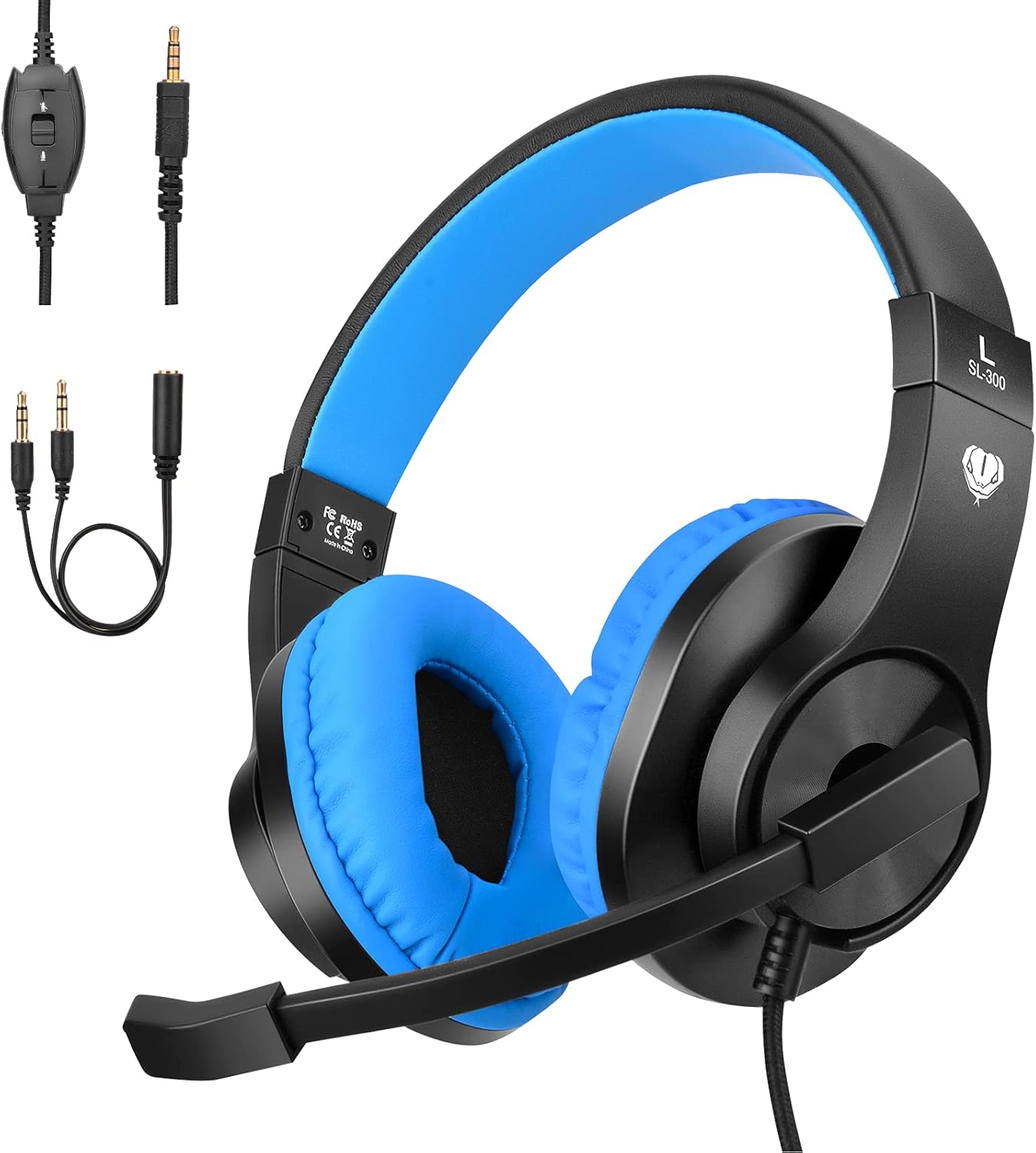
Image: The ShinePick Kids Gaming Headphones in blue and black, displayed alongside its integrated 3.5mm audio jack and the included 1-to-2 splitter cable, illustrating all components in the package.
3. Produktet er slutview
Familiarize yourself with the main components of your ShinePick Kids Gaming Headphones.
- Justerbart pandebånd: For en behagelig pasform på forskellige hovedstørrelser.
- Soft Over-Ear Pads: Designet til forlænget bærekomfort.
- Fleksibel mikrofon: Justerbar for optimal stemmeoptagelse.
- Inline-kontrol: Til justering af lydstyrke og mikrofonafbrydelse.
- 3.5 mm lydstik: Universalstik til forskellige enheder.

Image: A child wearing the ShinePick gaming headphones, with insets showing the twistable headband, adjustable headband mechanism, and skin-friendly leather earmuffs, emphasizing comfort and fit.

Image: A close-up of the in-line control unit on the headphone cable, clearly showing the volume adjustment wheel and the microphone ON/OFF switch.
4. Opsætningsvejledning
4.1 Connecting to Devices with a Single 3.5mm Jack (Audio + Mic)
- Locate the 3.5mm audio jack on your device (e.g., PlayStation 4/5, Xbox One S/X, Nintendo Switch, Laptop, Tablet, Cell Phone).
- Plug the integrated 3.5mm jack from the headphones directly into your device's audio port.
- Sørg for, at forbindelsen er sikker.
4.2 Connecting to Desktop Computers with Separate Audio and Microphone Jacks
- Connect the integrated 3.5mm jack from the headphones into the female end of the included 1-to-2 splitter cable.
- Plug the green-colored jack of the splitter into your computer's audio output port (usually marked with a headphone icon).
- Plug the red-colored jack of the splitter into your computer's microphone input port (usually marked with a microphone icon).
- Sørg for, at begge forbindelser er sikre.
4.3 Connecting to Older Xbox One Controllers
An extra Microsoft Adapter (not included) is required for connecting to older versions of the Xbox One controller that do not have a built-in 3.5mm jack.
- Connect the integrated 3.5mm jack from the headphones into the Microsoft Adapter.
- Plug the Microsoft Adapter into the expansion port on your Xbox One controller.

Image: A visual guide demonstrating the universal compatibility of the 3.5mm jack, showing connections to Xbox One (with adapter), PS4/PS5, Nintendo Switch/3DS, Tablets/Smartphones/iPads, and Laptops/Computers, along with the 1-to-2 splitter cable.
5. Betjeningsvejledning
5.1 Justering af lydstyrke
- Use the volume adjustment wheel located on the in-line control unit to increase or decrease the audio output.
- You may also need to adjust the volume settings on your connected device.
5.2 Brug af mikrofonen
- The microphone can be rotated up to 120 degrees for optimal positioning. Adjust it closer to your mouth for clearer voice pickup.
- To mute or unmute the microphone, use the ON/OFF switch on the in-line control unit.
- Ensure the microphone is enabled in your device's audio settings if you experience issues.

Image: A child wearing the ShinePick gaming headphones with the microphone positioned for speaking, engaged in an online class on a laptop, illustrating the 120-degree mic rotation feature.
6. Pleje og vedligeholdelse
- Rensning: Brug en blød, tør klud til at rengøre hovedtelefonerne. Brug ikke flydende rengøringsmidler eller slibende materialer.
- Opbevaring: Opbevar hovedtelefonerne et køligt, tørt sted væk fra direkte sollys og ekstreme temperaturer.
- Kabelpleje: Avoid sharp bends or excessive pulling on the cable to prevent damage. The cable is designed to be tangle-free.
- Ørepuder: The skin-friendly leather earpads can be gently wiped with a damp klud om nødvendigt, og tør derefter straks.
7. Fejlfinding
| Problem | Mulig løsning |
|---|---|
| Ingen lyd fra hovedtelefoner. |
|
| Mikrofon virker ikke. |
|
| Lydkvaliteten er dårlig eller forvrænget. |
|
| Hovedtelefoner er ubehagelige. |
|
8. Specifikationer
| Feature | Detalje |
|---|---|
| Modelnavn | Upgraded Model (CW63D-SP-US-3-123) |
| Mærke | ShinePick |
| Forbindelsesteknologi | Kablet (3.5 mm jack) |
| Driver størrelse | 40 mm dynamiske drivere |
| Frekvensområde | 20Hz-20KHz |
| Impedans | 32 Ohm |
| Støjkontrol | Active Noise Cancellation (for sound isolation) |
| Mikrofon | Included, Noise Reduction, 120° Rotatable |
| Kontroltype | In-line Volume Control, Mic ON/OFF Switch |
| Øreplacering | Over Ear |
| Materiale | Leather (earpads) |
| Varens vægt | 8.8 ounces (250 gram) |
| Kabelfunktion | Tangle-free, Long (over 6.8 feet) |
| Kompatible enheder | PlayStation 4/5, Xbox One (S/X), Nintendo Switch/3DS, Desktop PC, Laptop, Tablet, iPad, Cell Phone |

Billede: En eksploderet view diagram illustrating the components of the 40mm driver, emphasizing its role in providing premium sound, with waveforms showing noise reduction before and after processing.
9. Garanti og support
For warranty information or technical support, please refer to the product packaging or contact ShinePick customer service directly through their official channels. Keep your purchase receipt for warranty claims.
Fabrikant: ShinePick


