Indledning
This manual provides essential information for the proper installation, operation, and maintenance of your Zebronics Zeb-D370S DVD Player. Please read this manual thoroughly before using the device to ensure safe and efficient operation. Keep this manual for future reference.
Vigtige sikkerhedsoplysninger
- Udsæt ikke enheden for regn eller fugt for at forhindre brand eller elektrisk stød.
- Åbn ikke c'enasing. Overlad al service til kvalificeret personale.
- Sørg for tilstrækkelig ventilation omkring enheden. Bloker ikke ventilationsåbningerne.
- Use only the power adapter supplied with the unit or specified by the manufacturer.
- Undgå at placere enheden på ustabile overflader.
- Frakobl strømkablet under tordenvejr eller når apparatet ikke bruges i længere perioder.
Pakkens indhold
Bekræft at alle varer er til stede i pakken:
- Zebronics Zeb-D370S DVD Player Unit
- Fjernbetjening
- AV-kabel
- Strømkabel
- Instruktionsmanual
Produkt overview
The Zebronics Zeb-D370S is a versatile DVD player featuring a built-in stereo speaker and amplifier, HDMI, USB, and SD card support, and dual karaoke microphone inputs. It supports multiple formats and offers 5.1 channel, coaxial, and optical audio outputs.
Frontpanelets kontroller og porte
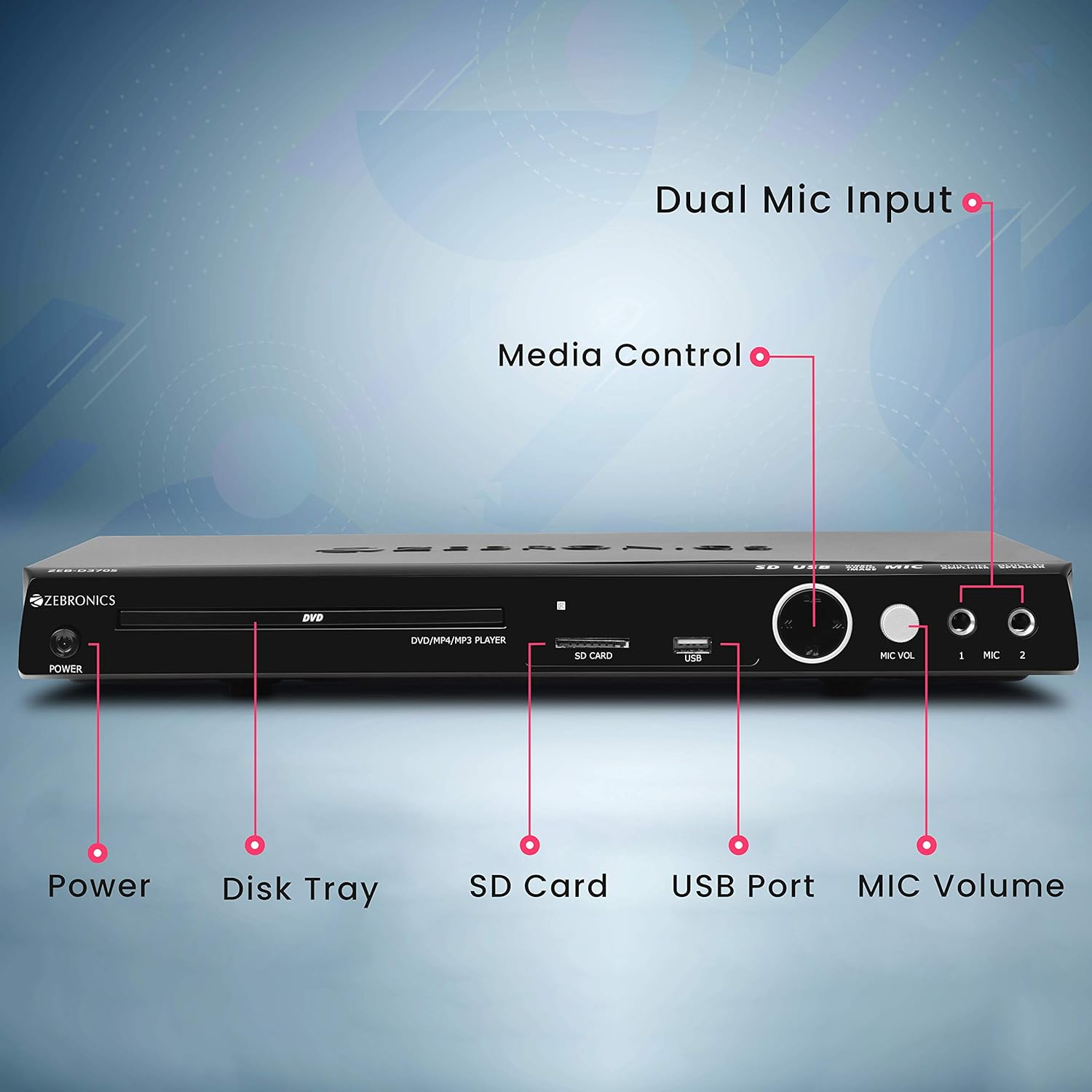
Front panel of the Zebronics Zeb-D370S DVD Player, showing the Power button, Disk Tray, SD Card slot, USB Port, MIC Volume control, and two Microphone inputs (MIC 1, MIC 2).
- Power knap: Tænder eller slukker for enheden.
- Disk Tray: For inserting DVDs, CDs, VCDs, and SVCDs.
- SD-kortplads: Til afspilning af medier files fra et SD-kort.
- USB-port: Til afspilning af medier files fra et USB-drev.
- MIC-lydstyrke: Justerer lydstyrken på de tilsluttede mikrofoner.
- MIC 1 & MIC 2: Inputs for connecting microphones for karaoke.
- Mediekontrolknapper: Play/Pause, Stop, Skip, etc.
Bagpaneltilslutninger

Rear panel of the Zebronics Zeb-D370S DVD Player, detailing the Coaxial Output, Optical Output, 5.1 Channel Output, HDMI port, Composite video output, Component video output, S-Video output, and Ext-Audio Output.
- HDMI udgang: For high-definition video and audio connection to a TV or display.
- Komposit videoudgang: Standardopløsningsvideoudgang.
- Komponentvideoudgang: Higher quality analog video output (YPbPr).
- S-videoudgang: Improved analog video output.
- Digital Audio Output (Optical & Coaxial): For connecting to external audio receivers or sound systems.
- Analog 5.1 Channel Output: For connecting to a 5.1 channel speaker system.
- Ext-Audio Output: Additional audio output connections.
- Højttaler output: Terminals for connecting external speakers, utilizing the built-in amplivligere.

Bag view of the Zebronics Zeb-D370S DVD Player highlighting the built-in amplifier, built-in speaker, and speaker output terminals.
Opsætningsinstruktioner
1. Strømtilslutning
- Ensure the DVD player is placed on a stable, flat surface with adequate ventilation.
- Connect the power cable to the AC input on the rear of the DVD player.
- Plug the other end of the power cable into a standard electrical outlet (110V - 260V AC).
2. Video Connection to TV/Display
Vælg en af følgende tilslutningsmetoder:
- HDMI (Recommended for best quality): Connect an HDMI cable from the HDMI output on the DVD player to an HDMI input on your TV.
- Komponentvideo: Connect component video cables (Red, Green, Blue) from the DVD player's component outputs to the corresponding inputs on your TV.
- Sammensat video: Connect a composite video cable (Yellow) from the DVD player's composite output to the yellow video input on your TV.
- S-video: Connect an S-Video cable from the DVD player's S-Video output to the S-Video input on your TV.
3. Lydtilslutning
Vælg en af følgende lydtilslutningsmetoder:
- HDMI: If using HDMI for video, audio will also be transmitted via the HDMI cable.
- 5.1 Channel Analog Output: Connect RCA cables from the 5.1 channel outputs (Front Left, Front Right, Center, Subwoofer, Surround Left, Surround Right) on the DVD player to a compatible 5.1 channel amplifier eller højttalersystem.
- Digital lyd (optisk/koaksial): Connect an optical or coaxial cable from the respective output on the DVD player to a digital audio input on your amplifier or home theater system for surround sound.
- Built-in Speaker Output: If using the built-in speakers, ensure no external speakers are connected to the 5.1 channel outputs unless desired.
4. Mikrofontilslutning (valgfrit)
- Plug your microphones into the MIC 1 and/or MIC 2 inputs on the front panel.
- Adjust the MIC Volume knob to control microphone audio levels.
Betjeningsvejledning

Zebronics Zeb-D370S DVD Player with a disc inserted, remote control, and a visual representation of content playing on a screen, illustrating its multimedia capabilities.
1. Diskafspilning
- Tryk på Magt knappen for at tænde DVD-afspilleren.
- Tryk på Åbn/luk knappen (normalt på fjernbetjeningen eller frontpanelet) for at åbne diskskuffen.
- Place a compatible disc (DVD Video, DVD+RW/-RW/+R/-R, Dual Layer Disc, CD Audio, CD-R/-RW, VCD, SVCD) onto the disc tray with the label side facing up.
- Tryk på Åbn/luk knappen igen for at lukke bakken. Afspilleren vil automatisk begynde afspilning eller vise en menu.
- Use the remote control for playback functions such as Play, Pause, Stop, Fast Forward, Rewind, and Chapter Skip.
2. USB/SD-medieafspilning
- Indsæt et USB-drev i USB-porten eller et SD-kort i SD-kortstikket på frontpanelet.
- The player should automatically detect the media and display a menu to browse files. If not, select the USB or SD source using the remote control's Kilde or Input knap.
- Naviger gennem din files (VOB, MP4, DIVX, AVI, MPEG-1, MPEG-2, 3GP, MP3, WMA, AAC, JPEG, TXT) using the remote control and press Spil for at starte afspilningen.
3. Karaoke-funktion
- Connect one or two microphones to the MIC 1 and MIC 2 inputs.
- Play a karaoke disc or a media file with instrumental tracks.
- Adjust the MIC Volume knob on the front panel to control the microphone audio level.
4. Avancerede funktioner
- CD-ripping: Convert audio CDs to digital formats (refer to on-screen menu for options).
- Picture Slideshow: View JPEG images from disc, USB, or SD card as a slideshow.
- Progressiv scanning: Provides a smoother, flicker-free image on compatible displays.
- Zoom IN/OUT: Magnify or reduce the displayed image during playback.
- High Speed Search: Quickly scan through disc or media content.
- Forældrelås: Restrict playback of certain content based on ratings.
- Øjeblikkelig genafspilning: Spring et par sekunder tilbage under afspilning.
- Disc Resume: Resume playback from where it was last stopped on a disc.
Opretholdelse
- Rengøring af enheden: Use a soft, dry cloth to clean the exterior of the DVD player. Do not use liquid cleaners or abrasive materials.
- Diskpleje: Håndter diske i kanterne. Hold dem rene og fri for ridser. Brug en blød, fnugfri klud til at tørre diske af fra midten og udad.
- Ventilation: Sørg for, at ventilationsåbningerne ikke er blokeret for at forhindre overophedning.
Fejlfinding
If you encounter issues with your DVD player, refer to the table below for common problems and solutions:
| Problem | Mulig årsag | Løsning |
|---|---|---|
| Ingen strøm | Strømkabel ikke tilsluttet; stikkontakten virker ikke | Kontroller strømkablets forbindelse; prøv en anden stikkontakt |
| Ingen videoudgang | Incorrect video cable connection; Incorrect input selected on TV | Ensure video cables are securely connected; Select the correct input source on your TV (e.g., HDMI 1, AV) |
| Ingen lydudgang | Incorrect audio cable connection; TV/amplifier volume too low; Mute activated | Check audio cable connections; Increase volume; Deactivate mute function |
| Disken afspilles ikke | Disc is dirty or scratched; Disc format not supported; Disc inserted incorrectly | Clean the disc; Ensure disc is compatible; Insert disc with label side up |
| USB/SD media not detected | USB drive/SD card not inserted correctly; Incompatible file format; Beskadiget medie | Reinsert USB/SD; Check supported file formats; Try a different USB/SD device |
Specifikationer

Dimensions of the Zebronics Zeb-D370S DVD Player: 360mm (width), 220mm (depth), and 50mm (height).
| Feature | Detalje |
|---|---|
| Modelnavn | Zeb D370S |
| Mærke | ZEBRONIK |
| Produktdimensioner | 28 x 39 x 82 mm (1.4 kg) |
| Opløsning | 1920 x 1080 (Supported resolutions: 480i/576i/480p/576p/720p/1080i/1080p) |
| Særlige funktioner | Surround Sound, Built-in Amplifier, Built-in Stereo Speaker, Karaoke Mic Input |
| Lydudgangstilstand | Stereo, Surround (2CH / 5.1CH / Virtual Surround Sound) |
| Konfiguration af højttalerens surroundlydkanal | 5.1 |
| Understøttede lydformater | Dolby Digital, MP3, WMA, AAC |
| Video Playback System | NTSC / PAL / AUTO |
| Connector Type | HDMI, USB, SD Slot, MIC 1 & MIC 2, Composite, Component, S-Video, Digital Audio Output (Optical & Coaxial), Analog 5.1Ch Output, Ext-Audio Output x 2 |
| Media Type (Playback Disc) | DVD Video, DVD+RW/-RW/+R/-R, Dual Layer Disc, CD Audio, CD-R/-RW, VCD, SVCD |
| Medier Files Understøttet | VOB, MP4, DIVX, AVI, MPEG-1, MPEG-2, 3GP, MP3, WMA, AAC, JPEG, TXT |
| Operation Voltage | 110V - 260V AC |
| Funktioner | CD Ripping, Picture SlideShow, Progressive scan, Zoom IN/OUT, High speed search, Parental lock, Instant replay, Disc resume |
Garanti og support
For warranty information, technical support, or service inquiries, please refer to the warranty card included with your product or visit the official Zebronics webForsøg ikke selv at reparere enheden.


