1. Introduktion
Tak for købetasing the JOYTRIP Auto Tracking Phone Holder, Model T2. This device is designed to enhance your video recording experience by automatically tracking your face or body, providing stable and dynamic footage without the need for manual adjustment or additional applications. It is ideal for video calls, live streaming, vlogging, and other hands-free video activities. Please read this manual thoroughly before use to ensure proper operation and maintenance.
2. Produktet er slutview
2.1 Nøglefunktioner
- Automatisk sporing: Recognizes and tracks faces or bodies with 360° rotation.
- Ingen app kræves: Features a built-in camera system for intelligent tracking, eliminating the need for external applications.
- Versatile Rotation: Offers 360° horizontal rotation and adjustable clip for various angles.
- Genopladeligt batteri: Integrated 2200 mAh lithium battery provides 6-8 hours of continuous operation.
- Stativkompatibilitet: Equipped with a standard 1/4" screw thread for mounting on tripods.
- Bærbart design: Compact and detachable for easy transport.
2.2 Pakkens indhold
Tjek venligst pakken for følgende varer:
- JOYTRIP Auto Tracking Phone Holder (Model T2)
- USB Charging Cable (Type-C, inferred)
- Brugervejledning (dette dokument)

Image 2.1: The JOYTRIP Auto Tracking Phone Holder with a smartphone mounted, showing a family video call. The device is black with a silver band.

Image 2.2: An illustration detailing the key functions of the phone holder, such as 360° rotation, face/body tracking, and tripod compatibility.
3. Opsætning
3.1 Opladning af enheden
- Locate the charging port on the device (usually at the back or side).
- Connect the provided USB charging cable to the device and a suitable USB power adapter (not included).
- The charging indicator light will illuminate (e.g., red) during charging and turn off or change color (e.g., green) when fully charged.
- A full charge typically takes approximately 3-4 hours and provides 6-8 hours of usage.
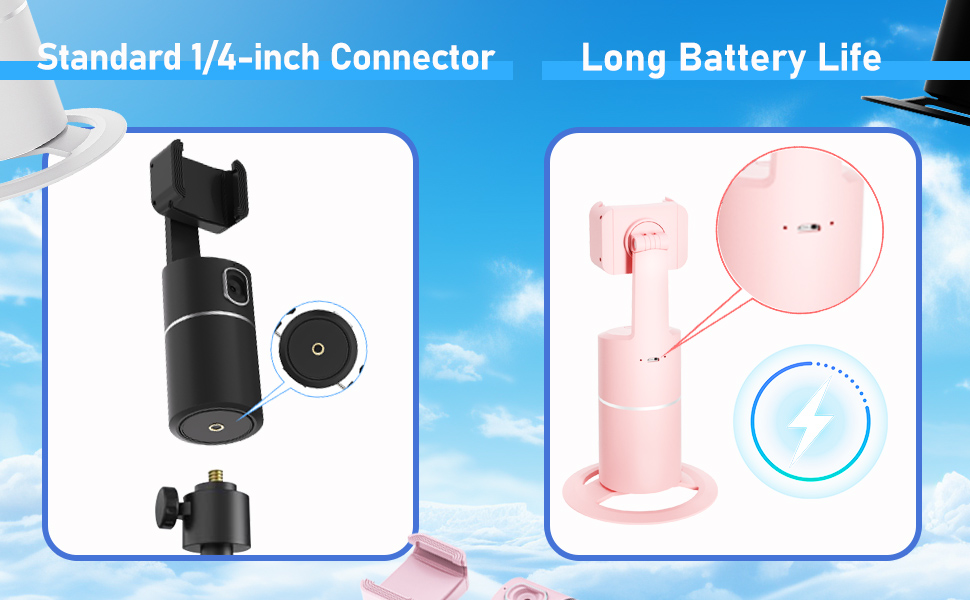
Image 3.1: Detail of the charging port and battery life indicator on the device.
3.2 Montering af din smartphone
- Gently pull open the phone clip on the top of the holder.
- Place your smartphone into the clip, ensuring it is securely held. The clip supports phones between 2 to 3.2 inches in width.
- Adjust the phone's position within the clip for optimal balance and camera alignment.

Image 3.2: Dimensions of the phone holder and how to adjust the phone clip.
3.3 Tænd/sluk
- To power on: Press and hold the power button (usually located on the front or top of the base) for a few seconds until the indicator light illuminates.
- Sådan slukker du: Tryk på tænd/sluk-knappen igen, og hold den nede, indtil indikatorlampen slukker.
4. Betjeningsvejledning
4.1 Automatisk sporing
- Ensure the device is powered on and your phone is securely mounted.
- Position yourself in front of the device's built-in camera. The device will automatically detect and begin tracking your face or body.
- The holder will rotate 360° horizontally to follow your movements.
- The device operates independently of your phone's camera or any specific app, allowing you to use any application for video calls, streaming, or recording.

Image 4.1: The phone holder automatically tracking a person during an exercise session.
4.2 Switching Between Horizontal and Vertical Modes
The phone holder allows for easy switching between horizontal (landscape) and vertical (portrait) orientations. Simply rotate your phone within the clip to the desired orientation. The device will continue to track.

Image 4.2: Demonstrates the phone holder supporting both horizontal and vertical phone orientations.
4.3 Montering af stativ
The base of the JOYTRIP Auto Tracking Phone Holder features a standard 1/4-inch screw thread. This allows you to mount the device onto most tripods or stands for increased height and stability.
- Locate the 1/4-inch screw thread at the bottom of the device.
- Screw the device onto your tripod's mounting plate until secure.
- Ensure the device is stable before mounting your phone.

Image 4.3: Detail of the 1/4-inch screw thread for tripod compatibility.
5. Vedligeholdelse
5.1 Rengøring
- Tør enheden af med en blød, tør klud.
- Brug ikke slibende rengøringsmidler, opløsningsmidler eller stærke kemikalier, da disse kan beskadige overfladen eller de indvendige komponenter.
- Keep the camera lens clean for optimal tracking performance.
5.2 Pleje af batterier
- For at forlænge batteriets levetid bør du undgå at aflade batteriet helt ofte.
- Charge the device regularly, even if not in use for extended periods (e.g., once every 3 months).
- Opbevar enheden et køligt, tørt sted væk fra direkte sollys og ekstreme temperaturer.
6. Fejlfinding
| Problem | Mulig årsag | Løsning |
|---|---|---|
| Enheden tænder ikke. | Lavt batteri. | Oplad enheden helt ved hjælp af det medfølgende USB-kabel. |
| Tracking is inconsistent or stops. |
|
|
| Telefonen holdes ikke sikkert fast. | Phone width exceeds clip capacity or is too small. | Ensure your phone's width is between 2 and 3.2 inches. Adjust the phone carefully within the clip. |
| Device does not rotate. | Tracking not activated or device malfunction. | Ensure the device is powered on and a subject is clearly in view of the camera. If the issue persists, contact customer support. |
7. Specifikationer
| Feature | Detalje |
|---|---|
| Modelnummer | T2 |
| Mærke | JOYTRIP |
| Produktdimensioner | 3.93 x 3.93 x 7.75 tommer (10 x 10 x 19.7 cm) |
| Varens vægt | 6.6 ounce (187 gram) |
| Batteri | 2200 mAh litium-ion (inkluderet) |
| Batterilevetid | 6-8 hours (continuous use) |
| Rotationsvinkel | 360 ° vandret |
| Felt af View (Linse) | 105° |
| Rotationshastighed | 42° i sekundet |
| Kompatibel telefonbredde | 2 - 3.2 inches (approx. 5 - 8.1 cm) |
| Stativtråd | Standard 1/4-inch screw thread |
| UPC | 797550711288 |
8. Garanti og support
For information regarding warranty coverage, please refer to the warranty card included with your purchase or contact the retailer where the product was acquired.
If you encounter any issues or have questions about your JOYTRIP Auto Tracking Phone Holder, please contact JOYTRIP customer support through their official webwebstedet eller de kontaktoplysninger, der følger med din produktemballage.


