1. Introduktion
Thank you for choosing the THOMSON Coffee Maker with Integrated Grinder, Model THCOG6. This appliance is designed to provide you with a rich and authentic coffee experience, whether you prefer freshly ground beans or pre-ground coffee. Its compact design and user-friendly features make it an ideal addition to any kitchen. Please read this manual carefully before using the appliance to ensure safe and optimal operation.
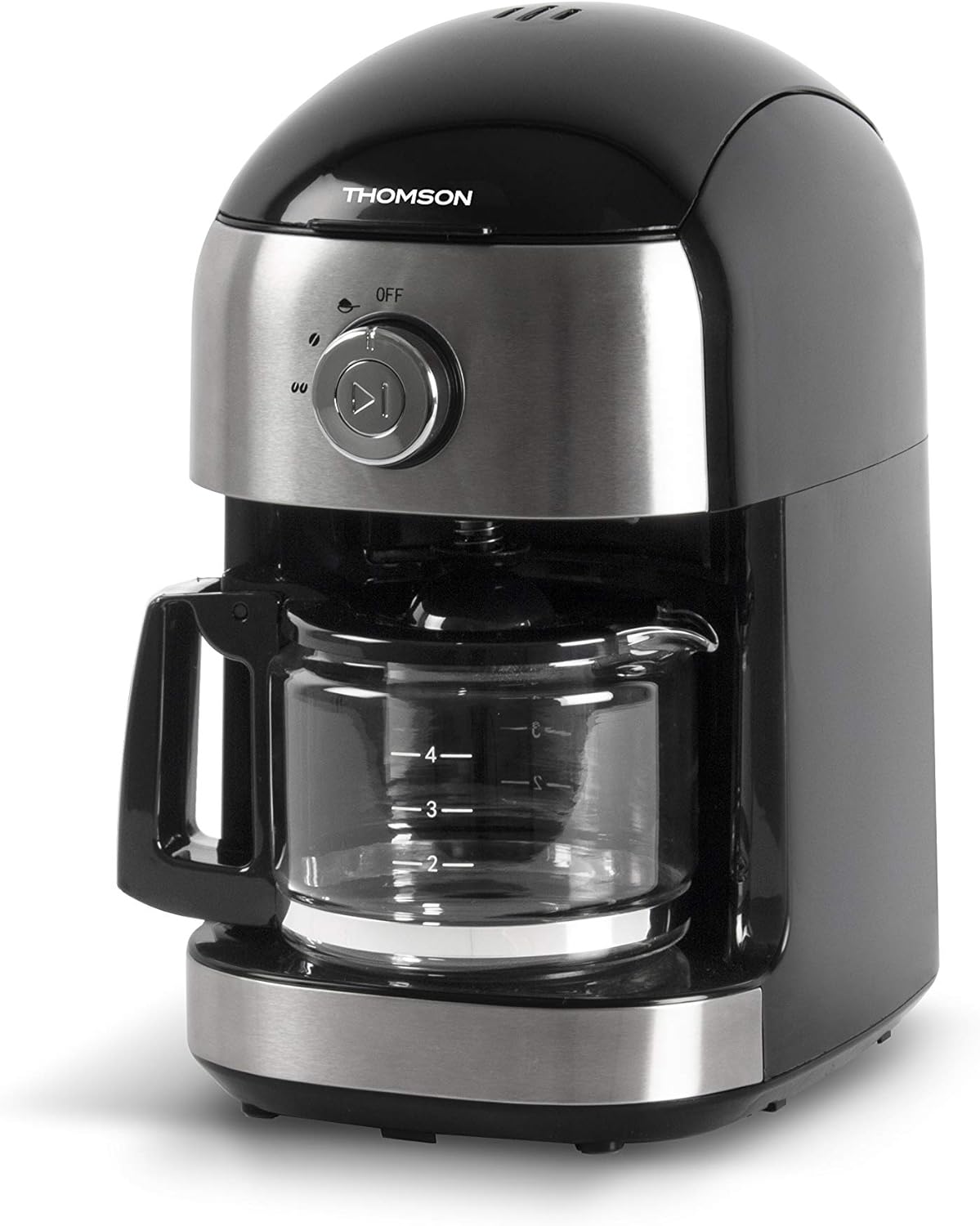
Billede 1.1: Forside view of the THOMSON Coffee Maker, showcasing its sleek black and stainless steel design with the glass carafe in place.
2. Sikkerhedsinstruktioner
To prevent personal injury or damage to the appliance, always observe basic safety precautions when using electrical appliances. Keep this manual for future reference.
- Læs alle instruktioner før brug.
- Nedsænk ikke apparatet, ledningen eller stikket i vand eller andre væsker.
- Tæt opsyn er nødvendigt, når et apparat bruges af eller i nærheden af børn.
- Træk stikket ud af stikkontakten, når det ikke er i brug, og før rengøring. Lad det køle af, før du sætter dele på eller af, og før du rengør apparatet.
- Betjen ikke noget apparat med en beskadiget ledning eller stik, eller efter at apparatet ikke fungerer korrekt eller er blevet beskadiget på nogen måde.
- Brug af tilbehør, der ikke er anbefalet af apparatets producent, kan resultere i brand, elektrisk stød eller personskade.
- Må ikke bruges udendørs.
- Lad ikke ledningen hænge ud over kanten af et bord eller bord, eller rør ved varme overflader.
- Må ikke placeres på eller i nærheden af en varm gas- eller elektrisk brænder eller i en opvarmet ovn.
- Sæt altid stikket i apparatet først, og sæt derefter ledningen i stikkontakten. For at afbryde forbindelsen skal du slukke for en vilkårlig knap og derefter tage stikket ud af stikkontakten.
- Brug ikke apparatet til andet end tilsigtet brug.
- Udvis ekstrem forsigtighed ved bortskaffelse af varm damp.
- Karaffen er kun beregnet til brug med dette apparat. Det må aldrig bruges på en rækkeplade.
- Placer ikke en varm kande på en kold eller våd overflade.
- Brug ikke en revnet kande eller en kande med et løst eller svækket håndtag.
- Rengør ikke karaffel med rensemidler, ståluldspuder eller andet slibende materiale.
3. Dele og komponenter
Familiarize yourself with the different parts of your THOMSON Coffee Maker.
- Låg
- Vandtank
- Bønnebeholder (med låg)
- Kværn samling
- Filterkurv (aftagelig)
- Control Dial (OFF / Grind / Brew)
- Start/Stop knap
- Glaskaraffel med håndtag
- Varmeplade
- Strømledning

Image 3.1: The coffee maker with its main removable components, including the water tank and filter basket, displayed separately for clarity.
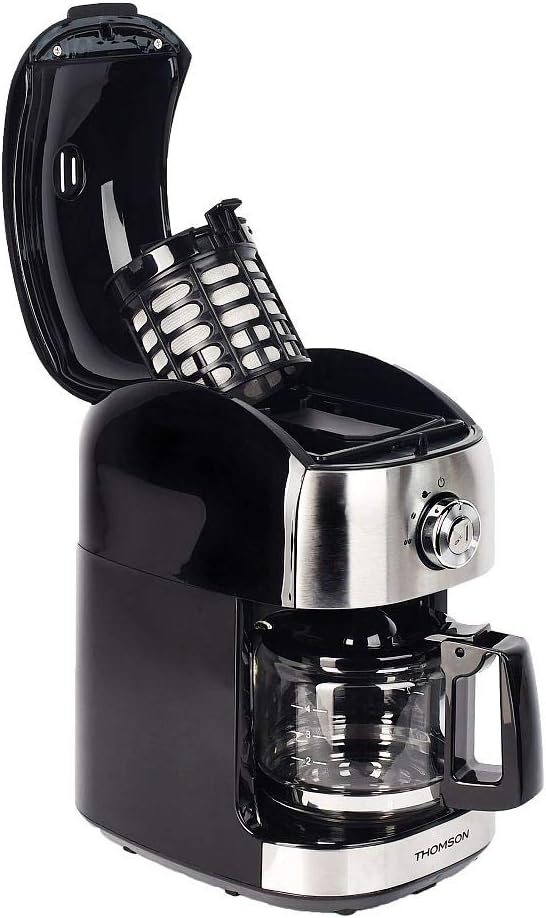
Billede 3.2: Top view of the coffee maker with the lid open, showing the internal filter basket and bean hopper area.
4. Opsætning
Før første brug, og for optimal ydeevne, skal du følge disse opsætningstrin:
- Udpakning: Carefully remove the coffee maker and all its components from the packaging. Retain packaging for future storage or transport.
- Rensning: Wash the glass carafe, filter basket, and water tank with warm, soapy water. Rinse thoroughly and dry. Wipe the exterior of the appliance with a damp klæde.
- First Use Cycle (Cleaning Cycle):
- Fill the water tank with clean water up to the MAX level (500 ml).
- Place the empty filter basket into its position.
- Stil glaskaraflen på varmepladen.
- Sæt apparatet i en passende stikkontakt (240V).
- Turn the control dial to the "Brew" position.
- Press the Start/Stop button to begin the brewing cycle without coffee.
- Allow the full cycle to complete. Discard the hot water.
- Repeat this process 2-3 times to ensure the appliance is thoroughly cleaned and free of any manufacturing residues.
- Placering: Place the coffee maker on a stable, flat, heat-resistant surface, away from the edge of the counter and out of reach of children. Ensure adequate ventilation around the unit.
5. Betjeningsvejledning
Your THOMSON Coffee Maker offers two brewing options: using whole coffee beans with the integrated grinder, or using pre-ground coffee.
5.1. Brewing with Whole Coffee Beans (Grind & Brew)
- Fyld vandtank: Open the lid and fill the water tank with fresh, cold water. The capacity is 500 ml, suitable for 4 to 6 cups. Do not exceed the MAX fill line.
- Tilsæt kaffebønner: Open the bean hopper lid and add up to 32g of whole coffee beans. Close the bean hopper lid securely.
- Indsæt filterkurv: Ensure the filter basket is correctly placed in its compartment.
- Sted Karaffel: Placer den tomme glaskande på varmepladen.
- Select Grind & Brew: Turn the control dial to the "Grind" position. This setting activates both the grinder and the brewing function.
- Begynd at brygge: Press the Start/Stop button. The grinder will activate first, grinding the beans, followed by the brewing process.
- Nyde: Once the brewing cycle is complete, the appliance will automatically switch to the keep-warm function for up to 30 minutes. Carefully remove the carafe to pour and serve.

Image 5.1: The THOMSON Coffee Maker positioned on a kitchen counter, accompanied by a freshly brewed cup of coffee, illustrating its use in a home environment.
5.2. Brewing with Pre-Ground Coffee
- Fyld vandtank: Open the lid and fill the water tank with fresh, cold water up to the desired level (max 500 ml).
- Tilsæt formalet kaffe: Place the desired amount of pre-ground coffee into the filter basket. Do not overfill.
- Indsæt filterkurv: Ensure the filter basket is correctly placed in its compartment.
- Sted Karaffel: Placer den tomme glaskande på varmepladen.
- Vælg brygning: Turn the control dial to the "Brew" position.
- Begynd at brygge: Press the Start/Stop button. The brewing process will begin immediately.
- Nyde: Once the brewing cycle is complete, the appliance will automatically switch to the keep-warm function for up to 30 minutes.
5.3. Anti-Drip System
The appliance features an anti-drip system, allowing you to temporarily remove the carafe during the brewing cycle to pour a cup of coffee. The flow of coffee will pause. Return the carafe to the warming plate within 20 seconds to prevent overflow from the filter basket.
5.4. Hold varm-funktionen
After brewing, the warming plate will keep your coffee warm for up to 30 minutes. After 30 minutes, the appliance will automatically shut off for safety and energy saving.
6. Vedligeholdelse og rengøring
Regular cleaning ensures optimal performance and extends the lifespan of your coffee maker. Always unplug the appliance and allow it to cool completely before cleaning.
- Karaffel og filterkurv: Wash the glass carafe and filter basket with warm, soapy water after each use. Rinse thoroughly and dry. These parts are not dishwasher safe.
- Ydre: Tør kaffemaskinens yderflader af med en blød, tør klud.amp klud. Brug ikke slibende rengøringsmidler eller skuresvampe, da de kan ridse overfladen.
- Grinder Assembly: Periodically clean the grinder assembly. Use a small brush to remove any residual coffee grounds from the bean hopper and grinder blades. Do not use water directly on the grinder.
- Afkalkning: Mineralaflejringer fra vand kan ophobes over tid og påvirke ydeevnen. Afkalk din kaffemaskine hver 2.-3. måned, eller oftere, hvis du har hårdt vand.
- Prepare a descaling solution by mixing white vinegar and water in a 1:2 ratio (e.g., 1 part vinegar to 2 parts water).
- Hæld opløsningen i vandtanken.
- Stil den tomme karaffel på varmepladen.
- Kør en bryggecyklus uden kaffe.
- After the cycle, let the solution sit in the carafe for 15 minutes.
- Kassér opløsningen, og skyl kanden og vandtanken grundigt.
- Run 2-3 cycles with fresh, clean water to remove any residual vinegar taste.
- Opbevaring: When not in use, store the coffee maker in a clean, dry place.
7. Fejlfinding
Hvis du støder på problemer med din kaffemaskine, kan du se følgende tabel for almindelige problemer og løsninger.
| Problem | Mulig årsag | Løsning |
|---|---|---|
| Kaffemaskine tænder ikke. | Ikke tilsluttet; strømmen er slukkettage; defekt stikkontakt. | Sørg for, at netledningen er sat korrekt i en stikkontakt, der virker. Kontroller din boligs afbryder. |
| Kaffe brygges ikke. | No water in tank; carafe not correctly placed; control dial not set to "Brew" or "Grind". | Fill water tank. Ensure carafe is properly seated on the warming plate. Set control dial to the correct position and press Start/Stop. |
| Kværnen virker ikke. | No beans in hopper; bean hopper lid not closed; grinder clogged. | Add coffee beans. Ensure bean hopper lid is securely closed. Clean the grinder assembly to remove any blockages. |
| Kaffen smager svagt eller vandig. | Insufficient coffee grounds/beans; too much water; appliance needs descaling; grind setting too coarse. | Increase amount of coffee. Use less water. Descale the appliance. If using beans, ensure the grinder is set to a finer grind (if adjustable, though this model has a fixed grind). |
| Kaffen løber over fra filterkurven. | Too much coffee grounds; carafe removed for too long; filter clogged. | Reduce amount of coffee. Return carafe quickly if removed. Clean filter basket thoroughly. |
| Høj støj under drift. | Normal grinding noise; foreign object in grinder; appliance needs descaling. | Grinding is naturally noisy. Check bean hopper for foreign objects. Descale the appliance if noise persists during brewing. |
Hvis problemet fortsætter efter at have prøvet disse løsninger, bedes du kontakte kundesupport.
8. Specifikationer
Key technical specifications for the THOMSON Coffee Maker (Model THCOG6):
| Feature | Detalje |
|---|---|
| Modelnummer | THCOG6 |
| Mærke | Thomson |
| Type | Filter Coffee Maker with Integrated Grinder |
| Kapacitet | 500 ml (approx. 4-6 cups) |
| Bønnebeholderkapacitet | 32 g |
| Magt | 680 watt |
| Voltage | 240V |
| Dimensioner (L x B x H) | 24 x 17 x 27 cm |
| Vægt | 2.1 kg |
| Materiale | Plast |
| Særlige funktioner | Keep Warm Function (up to 30 min), Anti-drip System, Mechanical Control |

Image 8.1: Diagram showing the dimensions of the coffee maker (24cm x 17cm x 27cm) and icons indicating its compatibility with coffee beans and ground coffee, along with the 30-minute keep-warm function.
9. Garanti og support
THOMSON products are manufactured to high-quality standards. This product is covered by a manufacturer's warranty against defects in materials and workmanship. The specific terms and duration of the warranty may vary by region. Please retain your proof of purchase for warranty claims.
For technical support, warranty inquiries, or spare parts, please contact your local THOMSON customer service or the retailer from whom you purchased the product. You may also visit the official THOMSON website for more information and contact details.
Kundeservice Kontakt: Refer to your regional THOMSON website or product packaging for specific contact information.


