1. Introduktion
This manual provides essential information for the safe and efficient operation, installation, and maintenance of your Klimaire 15,000 BTU PTAC Heat Pump Air Conditioner with a 5 kW electric heater. Please read this manual thoroughly before installation and use, and retain it for future reference.
2. Vigtige sikkerhedsinstruktioner
For at mindske risikoen for brand, elektrisk stød eller personskade skal du overholde følgende sikkerhedsforanstaltninger:
- Afbryd altid strømmen før service eller rengøring af enheden.
- Sørg for, at enheden er korrekt jordet.
- Betjen ikke enheden med en beskadiget ledning eller stik.
- Hold brændbare materialer væk fra enheden.
- Installation and repairs must be performed by qualified personnel.
- Bloker ikke luftindtag eller -udtag.
Denne enhed bruger R-32 kølemiddel. Håndteres forsigtigt, og sørg for korrekt ventilation under installation og service.
3. Pakkens indhold
Bekræft at alle varer er til stede i pakken:
- Klimaire 15,000 BTU PTAC Heat Pump Air Conditioner with 5 kW Electric Heater
- Trådløs fjernbetjening
- 3-prong grounding plug (Type LCDI 6-30P)
- Afløbssæt
- Kontrolpanel klistermærke
- Brugervejledning (dette dokument)

Image: Contents of the Klimaire PTAC package, including the main unit, remote, power plug, and drain kit.
4. Opsætning og installation
The Klimaire PTAC unit is designed for seamless replacement in most standard 42" x 16" slide-in wall sleeves. For new installations, a wall sleeve and rear grille are required (not included).
4.1 Kompatibilitet og dimensioner
The unit measures approximately 42" (Width) x 21" (Depth) x 16" (Height). Ensure your existing or new wall sleeve meets these dimensions for proper fit.
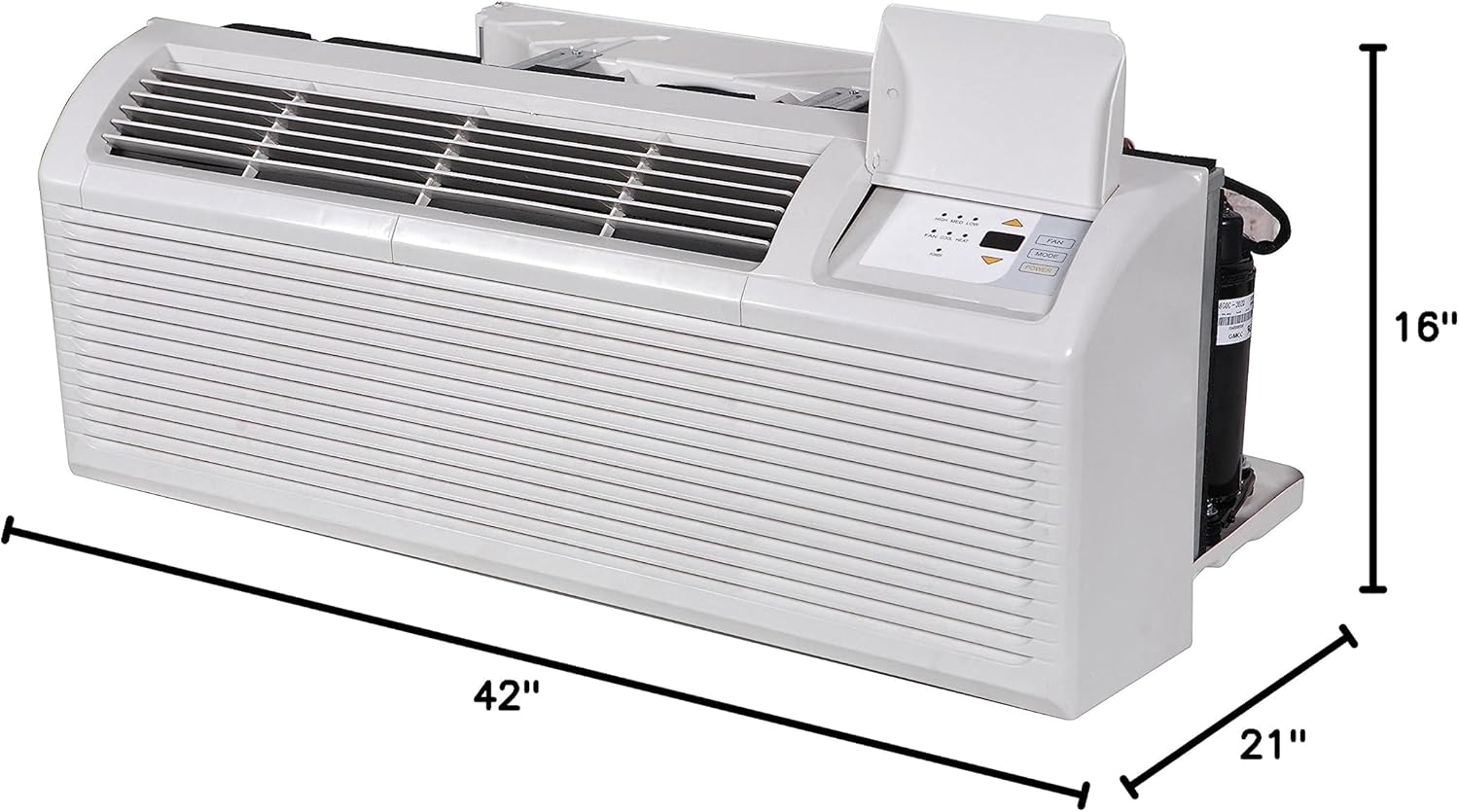
Image: Diagram illustrating the physical dimensions of the PTAC unit for installation reference.
4.2 Elektriske krav
This unit requires a 208-230V, single-phase, 60Hz power supply. It comes with a 30A, 3-prong grounding plug (Type LCDI 6-30P). Ensure your electrical outlet matches these specifications and is properly installed by a certified electrician.

Billede: Detaljeret view af den 30 Amp, 3-prong LCDI power plug and receptacle for the PTAC unit.
4.3 Drain Kit Installation
Install the included drain kit according to the separate instructions provided with the kit to ensure proper condensate drainage.
5. Betjeningsvejledning
5.1 Betjening af kontrolpanelet
The unit features a digital display control panel with push buttons for setting temperature, selecting modes, and adjusting fan speed. The LED display shows the set temperature and operational codes for troubleshooting.

Image: Close-up of the PTAC unit's digital control panel, showing temperature display and function buttons.
5.2 Fjernbetjeningsfunktioner
Use the wireless remote control to conveniently adjust settings from a distance. Functions include ON/OFF, Mode selection (Cool, Heat, Fan, Dry), Temperature adjustment, and Fan Speed control (High, Medium, Low, Auto).

Image: The wireless remote control for the Klimaire PTAC unit, detailing its buttons and display.
5.3 Wi-Fi Smart Control (Optional)
For enhanced control, the unit supports Wi-Fi connectivity. Download the NetHome Plus App to manage your PTAC unit from your smartphone. This feature allows access to all comfort settings remotely and integrates with smart home systems like Google Home and Alexa.

Image: Illustration of smartphone app control for the PTAC unit, highlighting Wi-Fi smart features and compatibility.
6. Vedligeholdelse
6.1 Filterrensning
The unit is equipped with long-lasting, washable polypropylene filters. Regularly clean the filters to maintain optimal performance and air quality. To clean, remove the front grille, slide out the filters, wash them with mild soap and water, rinse thoroughly, and allow them to dry completely before reinserting.

Image: Demonstration of cleaning the washable polypropylene filter of the PTAC unit.
6.2 Generel rengøring
Tør ydersiden af enheden af med en blød, damp klud. Brug ikke skrappe kemikalier eller slibende rengøringsmidler. Sørg for, at enheden er frakoblet, før du rengør den.
7. Fejlfinding
Før du kontakter service,view følgende almindelige problemer og løsninger:
| Problem | Mulig årsag | Løsning |
|---|---|---|
| Enheden tænder ikke | No power, tripped breaker, loose connection | Check power cord, reset circuit breaker, ensure plug is fully inserted. |
| Utilstrækkelig køling/opvarmning | Dirty air filter, blocked air vents, incorrect mode setting, room too large | Clean air filter, clear obstructions, select appropriate mode, ensure unit capacity matches room size. |
| Usædvanlig støj | Loose parts, foreign object, unit not level | Inspect for loose components, remove foreign objects, ensure unit is level. |
| Vandlækage | Blocked drain hose, improper installation of drain kit | Clear drain hose, verify drain kit installation. |
For issues not listed or if problems persist, contact Klimaire customer support.
8. Specifikationer
| Feature | Detalje |
|---|---|
| Mærke | Klima |
| Modelnummer | PTHP15H502-KC-3 |
| Kølekapacitet | 14,700/14,500 BTU/h |
| Heating Capacity (Heat Pump) | 13,500/13,200 BTU/h |
| Auxiliary Electric Heating Capacity | 15,000/12,200 BTU/h (5.0 kW) |
| EER | 10.6 |
| Strømkrav | 208-230V, Single-Phase, 60Hz |
| Stiktype | 30A, 3-prong grounding plug (Type LCDI 6-30P) |
| Kølemiddel | R-32 |
| Dimensioner (B x D x H) | 42 cm x 21 cm x 16 cm |
| Varens vægt | 113 pund |
| Støjniveau | 52.49 dB |
| Særlige funktioner | Anti Freeze Protection, Customization by Dip Switches, Easily Removable Filters, Fresh Air Intake, Quiet Operation, Wi-Fi Option |
For a complete list of specifications, refer to the detailed specification sheet available on the Klimaire website or the provided PDF user guide.

Image: Technical specifications table for Klimaire PTAC-KC Series, detailing performance and electrical data.
9. Garanti og support
For warranty information, please refer to the warranty card included with your product or visit the official Klimaire website. For technical support, troubleshooting assistance, or to inquire about replacement parts, please contact Klimaire customer service.
Officiel brugervejledning (PDF): Download PDF


