1. Introduktion
This manual provides comprehensive instructions for the installation, operation, and maintenance of your Aigo Warrior AK700 Max 700W Power Supply. Designed for high-performance desktop computers, this power supply unit (PSU) delivers stable and efficient power to your system components. Please read this manual thoroughly before installation and use to ensure proper functionality and safety.
2. Sikkerhedsoplysninger
Always observe the following safety precautions to prevent injury or damage to the product and other components:
- Ensure the power supply is disconnected from the main power outlet before installation or handling.
- Åbn ikke strømforsyningen casing. Høj volumentages are present inside, even when disconnected, and can cause electric shock.
- Installer strømforsyningen i et godt ventileret område for at forhindre overophedning.
- Brug kun de kabler, der følger med strømforsyningen.
- Undgå at udsætte enheden for fugt eller ekstreme temperaturer.
- Dette produkt er kun designet til indendørs brug.
3. Pakkens indhold
Bekræft at alle varer er til stede i din pakke:
- Aigo Warrior AK700 Max 700W Power Supply Unit
- AC strømledning
- Modular Cables (if applicable, otherwise fixed cables)
- Monteringsskruer
- Brugervejledning (dette dokument)
4. Produktet er slutview
The Aigo Warrior AK700 Max is a 700-watt power supply designed to meet the demands of modern gaming and high-performance computing systems. It features an energy-efficient design with a silent 12cm hydraulic bearing fan for optimal cooling and quiet operation. The unit incorporates a built-in Power Factor Correction (PFC) and a dual magnetic ring magnetic amplifier circuit, along with high-frequency low-resistance filter capacitors, to ensure a pure and stable current output. Multiple protection circuits are integrated to safeguard against overvoltage, overcurrent, overload, undervoltage, og kortslutninger.
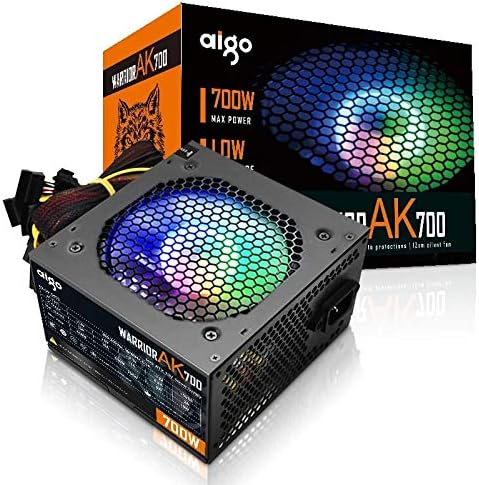
Figure 4.1: The Aigo Warrior AK700 Max 700W Power Supply, showcasing its RGB fan and retail packaging.
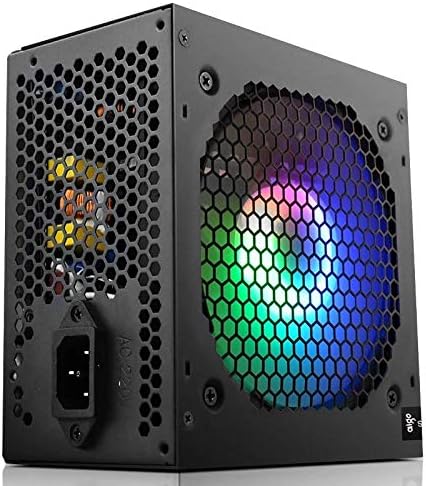
Figur 4.2: Side view of the power supply, highlighting the 12cm RGB cooling fan and honeycomb grille.

Figur 4.3: Bagside view of the power supply, illustrating the exhaust grille and AC power input socket.
5. Opsætning og installation
Follow these steps to properly install the Aigo Warrior AK700 Max power supply into your computer system:
- Forberedelse: Sørg for, at din computer er helt slukket og taget stikket ud af stikkontakten. Åbn computerens kabinet.
- Fjern den gamle strømforsyning (hvis relevant): Frakobl alle kabler fra din gamle strømforsyning, og fjern monteringsskruerne. Skub den forsigtigt ud af kabinettet.
- Installer ny strømforsyning: Gently slide the Aigo Warrior AK700 Max into the power supply bay of your computer case. Ensure the fan is oriented correctly for optimal airflow (usually facing down or up, depending on your case design).
- Sikker strømforsyning: Align the screw holes on the power supply with those on your case. Secure the power supply using the provided mounting screws.
- Tilslut kabler:
- 24-pin ATX Motherboard Connector: Connect the main 24-pin cable to your motherboard.
- CPU Power Connector (4+4 pin or 8-pin EPS): Connect the CPU power cable to the appropriate socket on your motherboard.
- PCIe Power Connectors (6+2 pin): Connect these to your graphics card(s) if required.
- SATA strømstik: Connect to your storage drives (HDDs, SSDs) and optical drives.
- Peripheral (Molex) Connectors: Connect to other peripherals as needed.
- Kabelstyring: Før kablerne pænt for at forbedre luftgennemstrømningen og æstetikken i dit kabinet.
- Luk sag: Når alle forbindelser er foretaget og verificeret, skal du lukke computerens kabinet.
- Tilslut vekselstrøm: Sæt netledningen i strømforsyningen og derefter i en stikkontakt.
6. Betjeningsvejledning
After successful installation, follow these steps to operate your computer system with the Aigo Warrior AK700 Max power supply:
- Tænd: Ensure the power switch on the back of the PSU is in the 'ON' (I) position. Press the power button on your computer case.
- Systemstart: Your computer should now power on and begin its boot sequence. The RGB fan on the power supply will illuminate.
- Sluk: To turn off your computer, use the operating system's shutdown function. For a complete power cycle, switch the PSU to the 'OFF' (O) position after shutting down the computer.
The intelligent temperature control design automatically adjusts the fan speed to maintain optimal cooling and extend the lifespan of the unit, ensuring quiet operation under various loads.
7. Vedligeholdelse
Korrekt vedligeholdelse sikrer strømforsyningens levetid og optimale ydeevne:
- Støvrensning: Periodically clean dust from the power supply's fan and vents using compressed air. Ensure the computer is powered off and unplugged before cleaning.
- Luftstrøm: Ensure that the power supply's intake and exhaust vents are not obstructed by cables or other components within the computer case.
- Miljøforhold: Operate the power supply in a clean, dry environment with adequate ventilation.
- Må ikke skilles ad: Forsøg aldrig at åbne strømforsyningsenheden. Der er ingen dele indeni, som brugeren kan servicere, og hvis du gør det, vil garantien blive ugyldig, og der er risiko for elektrisk stød.
8. Fejlfinding
If you encounter issues with your Aigo Warrior AK700 Max power supply, refer to the following common problems and solutions:
| Problem | Mulig årsag | Løsning |
|---|---|---|
| Computeren tænder ikke. |
|
|
| Systemet tænder, men lukker ned med det samme. |
|
|
| Ventilatoren drejer ikke eller larmer for meget. |
|
|
If the problem persists after attempting these solutions, please contact Aigo customer support for further assistance.
9. Specifikationer
Detailed technical specifications for the Aigo Warrior AK700 Max 700W Power Supply:
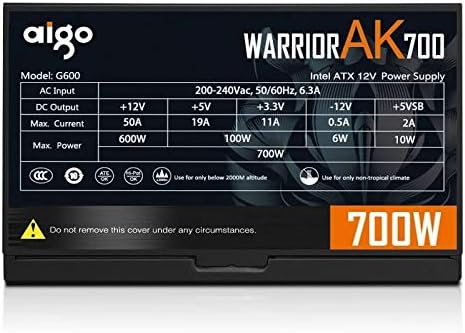
Figure 9.1: The specifications label found on the Aigo Warrior AK700 Max Power Supply.
| Feature | Detalje |
|---|---|
| Model | AK700 Max |
| Wattage | 700 watt |
| Formfaktor | ATX, ATX12V |
| Input bindtage | 220V (Minimum 220V, Maximum 220V) |
| Afkølingsmetode | Luftkøling |
| Fan størrelse | 120 Millimeters (Hydraulic Bearing) |
| Kompatible enheder | Personlig computer |
| Connector Type | SATA, PCIe (6+2 pin), ATX 24-pin, EPS 4+4 pin |
| Beskyttelsesfunktioner | Overvoltage, Overcurrent, Overload, Undervoltage, Short Circuit, Light Protection |
| Varens vægt | 1.9 kilo |
| Pakkedimensioner | 5 x 5 x 5 cm (omtrentligt) |
10. Garanti og support
For garantioplysninger og teknisk support henvises til den officielle Aigo-brugermanual. webwebstedet eller kontakt din lokale forhandler. Gem din købsbevis til garantikrav.
Aigo Official Webwebsted: www.aigocorp.com (Bemærk: Dette er en pladsholder URL som ingen officiel website was provided in the product data. Please refer to actual product documentation for correct contact information.)


