Indledning
This manual provides detailed instructions for the setup, operation, and maintenance of your Xoopar Mini Xboy Portable Bluetooth Speaker. Please read this manual thoroughly before using the product to ensure proper function and longevity.

Billede: Forside view of the Xoopar Mini Xboy Portable Bluetooth Speaker, showcasing its compact, character-like design with a mesh speaker grille on top.
Produkt overview
Hvad er der i æsken
- Xoopar Mini Xboy Portable Bluetooth Speaker
- Opladningskabel (USB)
- Instruktionsmanual
- Emoji Stickers (for customization)
Komponentidentifikation
Familiarize yourself with the various parts of your Mini Xboy speaker:
- Højttalergitter: Located on the top of the head.
- LED Light-Up Face: Illuminates during operation.
- Multifunktionsknap: Typically located on the back or side, used for power, pairing, and selfie remote.
- Opladningsport: Micro-USB or USB-C port for charging.
- Mikrofon: Til håndfri opkald.
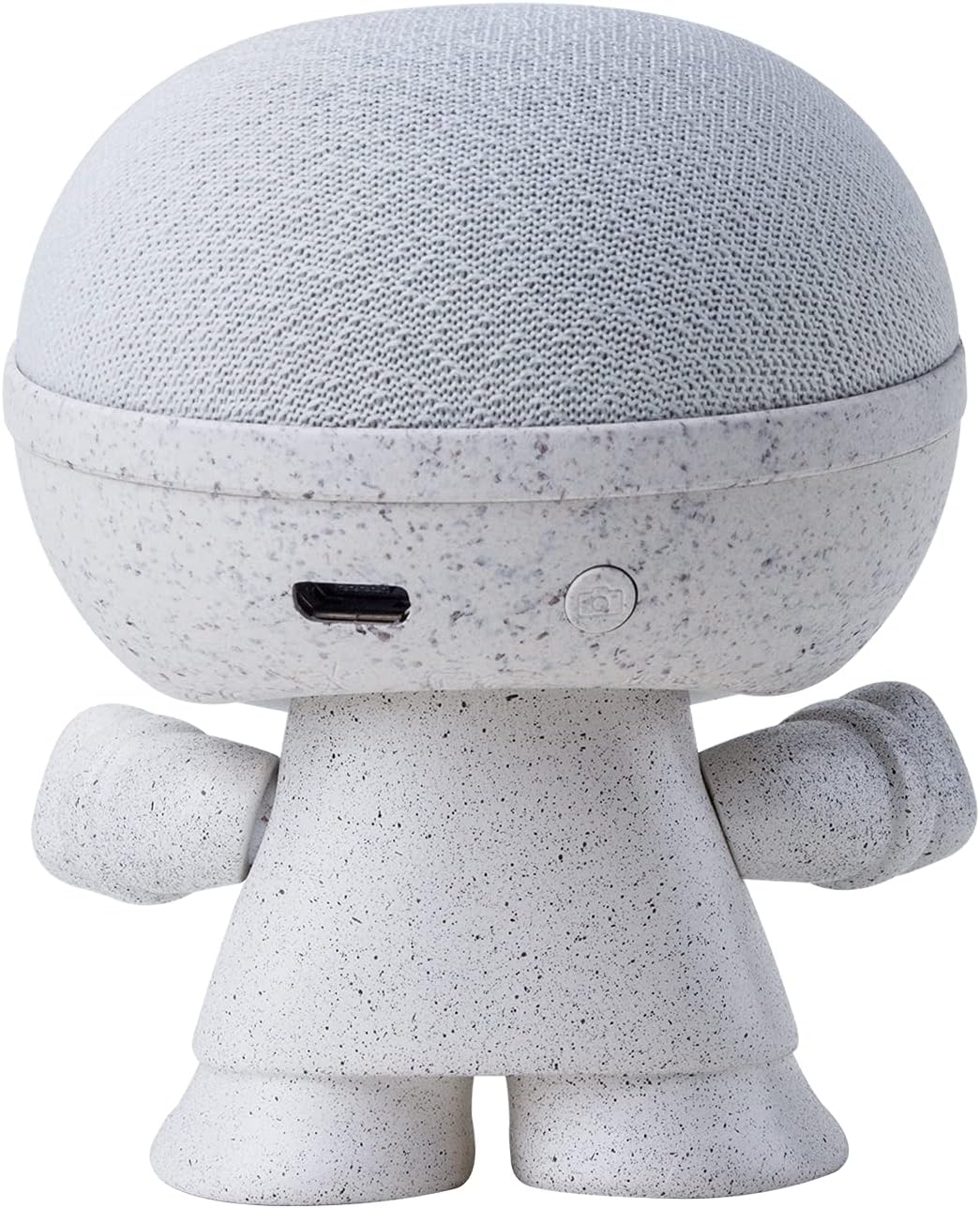
Billede: Bagside view of the Xoopar Mini Xboy speaker, highlighting the charging port and the multi-function button.
Opsætning
1. Opladning af højttaleren
Before first use, fully charge your Mini Xboy speaker. Connect the provided USB charging cable to the speaker's charging port and the other end to a USB power source (e.g., computer, wall adapter). The LED indicator will show charging status.
2. Tænd/sluk
- For at tænde: Press and hold the multi-function button for approximately 3 seconds. You will hear an audible prompt indicating the speaker is on.
- For at slukke: Press and hold the multi-function button for approximately 3 seconds. You will hear an audible prompt indicating the speaker is off.
3. Bluetooth-parring (enkelt højttaler)
- Ensure the Mini Xboy speaker is powered on and in pairing mode (indicated by a flashing LED).
- Aktiver Bluetooth på din smartphone, tablet eller computer.
- Søg efter available devices and select "XooparBoy Mini" from the list.
- Når der er oprettet forbindelse, hører du en bekræftelseslyd, og LED-indikatoren holder op med at blinke.
Video: This video demonstrates how to power on/off the Xoopar Mini Xboy speaker, connect it via Bluetooth to a smartphone, play music, and use the selfie remote function. It also shows how to pair two speakers for stereo sound.
Betjeningsvejledning
Musikafspilning
After successfully pairing your Mini Xboy speaker with your device, you can play music through any audio application. Control playback (play/pause, skip tracks) directly from your connected device.
Selfie Remote Function
The Mini Xboy speaker can act as a remote shutter for your smartphone camera:
- Sørg for, at højttaleren er forbundet til din telefon via Bluetooth.
- Åbn din telefons kameraapplikation.
- Press the multi-function button on the Mini Xboy speaker twice to trigger the camera shutter.
Stereo Pairing (TWS - True Wireless Stereo)
To enjoy enhanced stereo sound, you can pair two Mini Xboy speakers together:
- Ensure both Mini Xboy speakers are powered on and not connected to any device.
- On en of the speakers, quickly press the multi-function button three times. You will hear a pairing sound.
- The two speakers will automatically connect to each other. Once paired, you will hear a confirmation sound.
- Now, connect your device to one of the speakers (it will appear as "XooparBoy Mini" on your device's Bluetooth list). Both speakers will play audio in stereo.

Image: Two Xoopar Mini Xboy speakers positioned on a desk next to a laptop and smartphone, illustrating a stereo audio setup.
Opretholdelse
- Rengør højttaleren med en blød, tør klud. Brug ikke slibende rengøringsmidler eller opløsningsmidler.
- Avoid exposing the speaker to extreme temperatures, direct sunlight, or moisture. The speaker is not waterproof.
- Opbevar højttaleren på et køligt, tørt sted, når den ikke er i brug.
Fejlfinding
| Problem | Løsning |
|---|---|
| Højttaleren tænder ikke. | Sørg for, at højttaleren er fuldt opladet. Tilslut den til en strømkilde, og prøv igen. |
| Kan ikke parre med Bluetooth-enhed. |
|
| Ingen lyd eller lav lydstyrke. |
|
| Selfie remote not working. |
|
Specifikationer
| Mærke | puffe |
| Modelnavn | Mini XBOY |
| Varemodelnummer | XBOY81001.14WT |
| Højttaler type | Bærbar højttaler |
| Forbindelsesteknologi | Bluetooth |
| Trådløs kommunikationsteknologi | Bluetooth |
| Kompatible enheder | Smartphone, tablet, bærbar computer |
| Højttaler Maksimal udgangseffekt | 5 watt |
| Lydudgangstilstand | Mono (Stereo med TWS-parring) |
| Maksimal rækkevidde | 10 meter |
| Strømkilde | Batteridrevet (1 Lithium Polymer batteri inkluderet) |
| Kontrolmetode | Remote, Touch (via multi-function button) |
| Materiale | Recycled Plastic, Biodegradable Wheat Fiber |
| Produktdimensioner | 1.9" D x 1.9" B x 3.14" H |
| Varens vægt | 1.76 ounces (50 gram) |
| Er vandtæt | falsk |
Garanti og support
The Xoopar Mini Xboy Portable Bluetooth Speaker comes with a limited warranty. For detailed warranty information, please refer to the warranty card included with your product or visit the official Xoopar webwebsted.
For technical support or customer service, please contact Xoopar customer support through their official channels. Contact information can typically be found on the product packaging or the Xoopar webwebsted.


