1. Introduktion
The Peaktech P2170 is a digital LCR meter with Equivalent Series Resistance (ESR) measurement capabilities. Designed for both component testing in professional environments and for service and maintenance tasks, its compact design and advanced features ensure precise measurements.
Key features include an illuminated multifunction display with a bargraph and a high measurement frequency of up to 100 kHz. The device also supports PC connectivity for data storage and analysis using the included software.
2. Sikkerhedsoplysninger
Overhold altid følgende sikkerhedsforanstaltninger for at forhindre personskade eller beskadigelse af enheden:
- Læs hele manualen, før du bruger apparatet.
- Do not operate the meter if it appears damaged or if the insulation is compromised.
- Ensure correct battery installation and replacement.
- Undgå kontakt med spændingsførende kredsløb, når du tilslutter eller frakobler testledninger.
- Do not exceed the maximum input ratings specified for each function.
- Hold enheden tør og ren.
3. Produktet er slutview
The Peaktech P2170 LCR Meter is a handheld device designed for measuring inductance (L), capacitance (C), and resistance (R), along with other parameters like ESR, DCR, Dissipation Factor (D), Quality Factor (Q), and Phase Angle (θ).
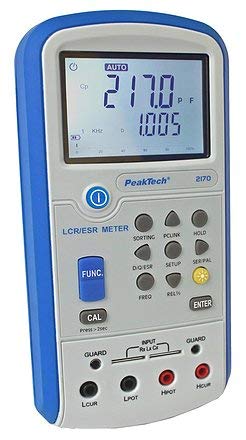
Figur 1: Forside view of the Peaktech P2170 LCR Meter, showing the display, function buttons, and input terminals.
3.1 Komponenter og tilbehør
Standardpakken indeholder følgende varer:
- Peaktech P2170 LCR Meter
- USB interface kabel
- PC-software
- Kelvin clips (test leads)
- Beskyttende bæretaske
- AAA batteries (6x 1.5V)
- Brugsanvisning
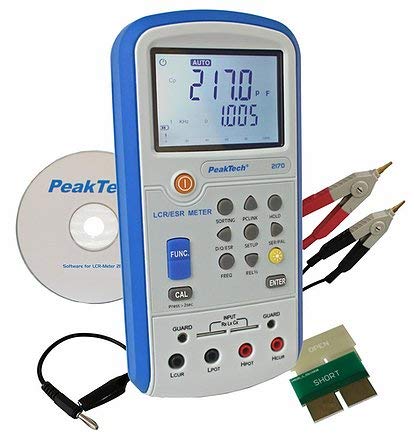
Figure 2: Peaktech P2170 LCR Meter shown with its included accessories, including Kelvin clips, USB cable, and software CD.
4. Opsætning
4.1 Batteriinstallation
The device operates on 6 x 1.5V AAA batteries. To install or replace batteries:
- Sørg for, at måleren er slukket.
- Find batteridækslet på bagsiden af enheden.
- Open the cover and insert 6 AAA batteries, observing the correct polarity markings.
- Luk batterirummets dæksel forsvarligt.
An optional 12V 500mA power adapter can also be used for external power.
4.2 Tilslutning af testledninger
Use the provided Kelvin clips for accurate measurements. Connect them to the input terminals as follows:
- Connect the red Kelvin clip to the Hpot og Hcur terminaler.
- Connect the black Kelvin clip to the Lpot og Lcur terminaler.
- For 2-wire measurements, connect the test leads to Hpot og Lpot.
- Ensure a secure connection to minimize measurement errors.
4.3 Software Installation (PC Link)
The included PC software allows for data logging and analysis. Follow these steps to install:
- Insert the software CD into your computer's optical drive.
- Følg instruktionerne på skærmen for at fuldføre installationen.
- Connect the meter to your PC using the supplied USB interface cable.
- Launch the software and establish communication with the device. Refer to the software's help documentation for detailed usage.
5. Betjeningsvejledning
5.1 Tænd/sluk
Tryk på MAGT button to turn the meter on or off.
5.2 Måletilstande
The P2170 supports various measurement modes. Press the FUNK button to cycle through the primary measurement parameters:
- Ls (Series Inductance)
- Cs (Series Capacitance)
- Lp (Parallel Inductance)
- Cp (Parallel Capacitance)
- DCR (DC Resistance)
- ESR (Equivalent Series Resistance)
- Rp (Parallel Resistance)
- D (Dissipation Factor)
- Q (Quality Factor)
- θ (Phase Angle)
The illuminated display will show the selected mode and measurement results.
5.3 Measurement Frequency Selection
Tryk på FREKV button to select the desired test frequency. Available frequencies include 100 Hz, 120 Hz, 1 kHz, 10 kHz, and 100 kHz. The chosen frequency will be displayed on the screen.
5.4 Dataholdefunktion
Tryk på HOLDE button to freeze the current measurement reading on the display. Press it again to release the hold function.
5.5 Kalibrering
To perform a calibration, ensure no component is connected to the input terminals. Press and hold the CAL button for approximately 2 seconds. Follow any on-screen prompts.
6. Vedligeholdelse
6.1 Rengøring
Tør målerens c afasing med en blød, damp klud. Brug ikke slibende rengøringsmidler eller opløsningsmidler. Sørg for, at enheden er slukket og frakoblet enhver strømkilde, før du rengør den.
6.2 Udskiftning af batteri
When the low battery indicator appears on the display, replace all 6 AAA batteries as described in Section 4.1.
6.3 Opbevaring
If the meter is not used for an extended period, remove the batteries to prevent leakage. Store the device in its protective carrying case in a cool, dry place, away from direct sunlight and extreme temperatures.
7. Fejlfinding
If you encounter issues with your Peaktech P2170, refer to the following common problems and solutions:
- Måleren tænder ikke: Check battery installation and ensure batteries are not depleted. Try replacing with new batteries.
- Unøjagtige aflæsninger:
- Sørg for, at testledningerne er korrekt tilsluttet og ikke er beskadigede.
- Perform a calibration (Section 5.5).
- Verify the correct measurement mode and frequency are selected for the component being tested.
- Ensure the component is properly connected to the Kelvin clips.
- PC-software opretter ikke forbindelse:
- Kontroller USB-kabelforbindelsen.
- Ensure the software drivers are correctly installed.
- Restart both the meter and the PC.
If the problem persists, contact Peaktech customer support.
8. Specifikationer
Detailed technical specifications for the Peaktech P2170 LCR Meter:
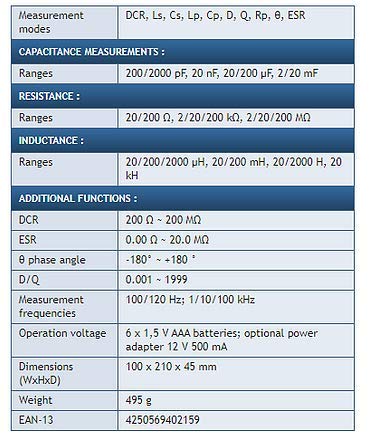
Figure 3: Detailed specifications table for the Peaktech P2170 LCR Meter, including measurement modes, ranges, frequencies, and physical characteristics.
| Parameter | Værdi |
|---|---|
| Måletilstande | DCR, Ls, Cs, Lp, Cp, D, Q, Rp, θ, ESR |
| Kapacitansområder | 200/2000 pF, 20 nF, 20/200 µF, 2/20 mF |
| Modstandsområder | 20/200 Ω, 2/20/200 kΩ, 2/20/200 MΩ |
| Inductance Ranges | 20/200/2000 µH, 20/200 mH, 20/2000 H, 20 kH |
| DCR Range | 200 Ω ~ 200 MΩ |
| ESR Range | 0.00 Ω ~ 20.0 MΩ |
| Phase Angle (θ) | -180° ~ +180° |
| D/Q Resolution | 0.001 ~ 1999 |
| Measurement Frequencies | 100/120 Hz; 1/10/100 kHz |
| Grundlæggende nøjagtighed | 0.3 % |
| Operation Voltage | 6 x 1.5 V AAA batteries; optional power adapter 12 V 500 mA |
| Dimensioner (BxHxD) | 100 x 210 x 45 mm |
| Vægt | 495 g |
| Fabrikant | Peaktech |
9. Garanti og support
For warranty information, technical support, or service inquiries, please contact Peaktech directly or refer to their official webwebstedet. Behold din købskvittering som købsbevis.


