Indledning
This manual provides detailed instructions for the setup, operation, and maintenance of your Avantree TWS116 Open-Ear Wireless Headphones. Please read thoroughly before use to ensure optimal performance and longevity of your device.

Image: Avantree TWS116 Open-Ear Wireless Headphones and Charging Dock. The image displays the two black open-ear headphones and their compact charging case.
Hvad er der i æsken
- Avantree TWS116 Open-Ear Wireless Headphones
- Opladningsetui
- USB-C ladekabel
- Brugervejledning (dette dokument)

Image: The contents of the Avantree TWS116 packaging, including the headphones, charging case, and USB-C cable.
Setup and Initial Pairing
- Oplad hovedtelefonerne: Before first use, place both earphones into the charging case. Connect the USB-C charging cable to the case and a power source. Allow approximately 3.5 hours for the charging case and 2.5 hours for the earphones to fully charge.
- Power On and Enter Pairing Mode: Remove both earphones from the charging case. They will automatically power on. Wait for either earphone's LED indicator to flash blue and red alternately, indicating pairing mode.
- Opret forbindelse til din enhed: On your Bluetooth-enabled device (e.g., smartphone, tablet, TV), go to the Bluetooth settings menu. Søg efter and select "Avantree TWS116" from the list of available devices.
- Bekræftelse: Once connected, both earphone LEDs will flash blue once every 8 seconds.
Note for TV Connection: If your TV is not Bluetooth-enabled, a separate Bluetooth transmitter (e.g., Avantree Oasis Plus or Audikast) is required. Ensure your TV's audio output format is set to PCM if using an optical audio connection.
Video: This video demonstrates the unboxing and initial pairing process of the Avantree TWS116 headphones with a smartphone.
Betjeningsvejledning
Iført øretelefoner
Place the earhook part horizontally along the top edge of your ear. Slide it back and downwards until the earphone rests gently against your outer ear. The open-ear design ensures comfort and awareness of surroundings.

Image: A person wearing the Avantree TWS116 headphone, demonstrating its comfortable open-ear fit.
Knap kontrol
The TWS116 features intuitive button controls on each earphone:
| Fungere | Handling |
|---|---|
| Afspil / pause | Click once on either side |
| Lydstyrke op / ned | Press & hold on the RIGHT / LEFT earphone respectively |
| Forrige / Næste spor | Click twice on the RIGHT / LEFT earphone respectively |
| Besvar / Afslut et opkald | Click once on either side |
| Aktiver Siri / Google Assistant (telefonafhængig) | Click three times on either side |

Image: A diagram illustrating the button functions on the left and right Avantree TWS116 earphones.
Mono & Stereo Modes
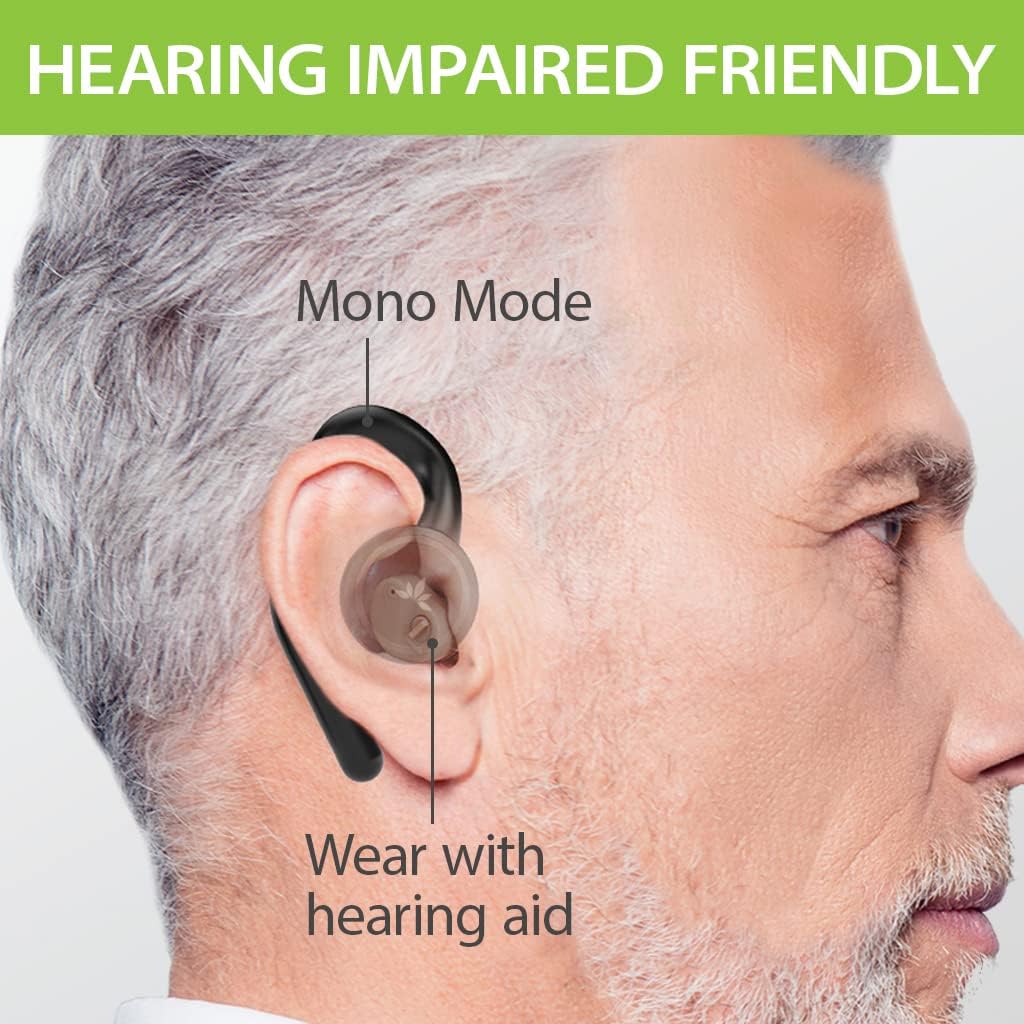
The Avantree TWS116 allows flexible use in either mono (single earbud) or stereo (both earbuds) mode. The earphones automatically detect which earbud you are using when removed from the charging case.

Image: An illustration showing the Avantree TWS116 earphones in both mono and stereo modes, highlighting their versatility.
Hearing Your Surroundings
The open-ear design of the TWS116 allows you to hear your audio while remaining aware of your ambient environment. This feature is beneficial for activities where situational awareness is important, such as walking outdoors or engaging in conversations.

Image: A person cycling outdoors while wearing Avantree TWS116 headphones, demonstrating the ability to stay aware of surroundings.
Video: This video illustrates how the open-ear design of the Avantree TWS116 headphones allows users to hear their surroundings while listening to audio.
Opretholdelse
- Rensning: Use a soft, dry cloth to clean the earphones and charging case. Avoid using liquids or abrasive cleaners.
- Opbevaring: Når de ikke er i brug, skal øretelefonerne opbevares i deres opladningsetui for at beskytte dem og holde dem opladede.
- Batteripleje: For at forlænge batterilevetiden skal du undgå at aflade øretelefonerne og opladningsetuiet helt ofte. Oplad dem regelmæssigt.
- Vandtæthed: These earphones are not water-resistant. Avoid exposure to water or excessive moisture.
Fejlfinding
Høretelefoner parrer eller forbinder ikke:
- Ensure both earphones are removed from the charging case and are powered on.
- Verify that the earphones are in pairing mode (LED flashing blue and red alternately).
- On your device, turn Bluetooth off and then on again. Try searching for "Avantree TWS116" and reconnecting.
- If connecting to a new device, ensure Bluetooth is turned off on any previously paired devices to avoid automatic reconnection.
No sound when used with a Bluetooth transmitter:
- Confirm that the earphones and the transmitter are correctly connected. The earphone LED indicators should flash blue once every 8 seconds when connected.
- If connecting to a TV, ensure the TV's digital sound format is set to PCM (if using an optical audio connection). Refer to your TV's settings menu or the transmitter's user manual for details.
For more detailed instructions and troubleshooting tips, visit the official Avantree support page: avantree.com/product-support/BTHS-TWS116-BLK
Specifikationer
| Feature | Detalje |
|---|---|
| Bluetooth version | 5.0 |
| Understøttet Profiles | HSP, HFP, A2DP, AVRCP |
| Driftsområde | Class 2, 10m / 33ft |
| Opladning Voltage | DC 5V / 0.5-2A |
| Opladningstid for øretelefoner | Ca. 2.5 timer |
| Opladningsetui Opladningstid | Ca. 3.5 timer |
| Spilletid | Up to 6 hours (earphones) |
| Taletid | Up to 7 hours (earphones) |
| Samlet spilletid (med opladningsetui) | Op til 63 timer |
| Høretelefonens dimensioner | 27.4 x 25.6 x 72 mm |
| Dimensioner på ladetaske | 43.6 x 54 x 89 mm |
| Earphone Net Weight | 15 g |
| Total Net Weight (with charging case) | 115 g |
| Højttaler diameter | 20 mm |
| Kontroltype | Knap kontrol |
| Øreplacering | Åbent øre |
Billede: En side view of the product packaging displaying detailed specifications for the Avantree TWS116.
Garanti og support
Avantree products come with a standard warranty. You can register your product within 30 days for an extended 24-month warranty. For warranty registration and further support, please visit:
- Støtte Webwebsted: support.avantree.com
- Product Specific Support: avantree.com/product-support/BTHS-TWS116-BLK
- E-mail support: support@avantree.com
- Phone Support (USA/CA): +1 800 232 2078
Please check the Warranty Card included in your package for specific details regarding your region.

Image: The product packaging highlighting the option to register for an extended 24-month warranty.


