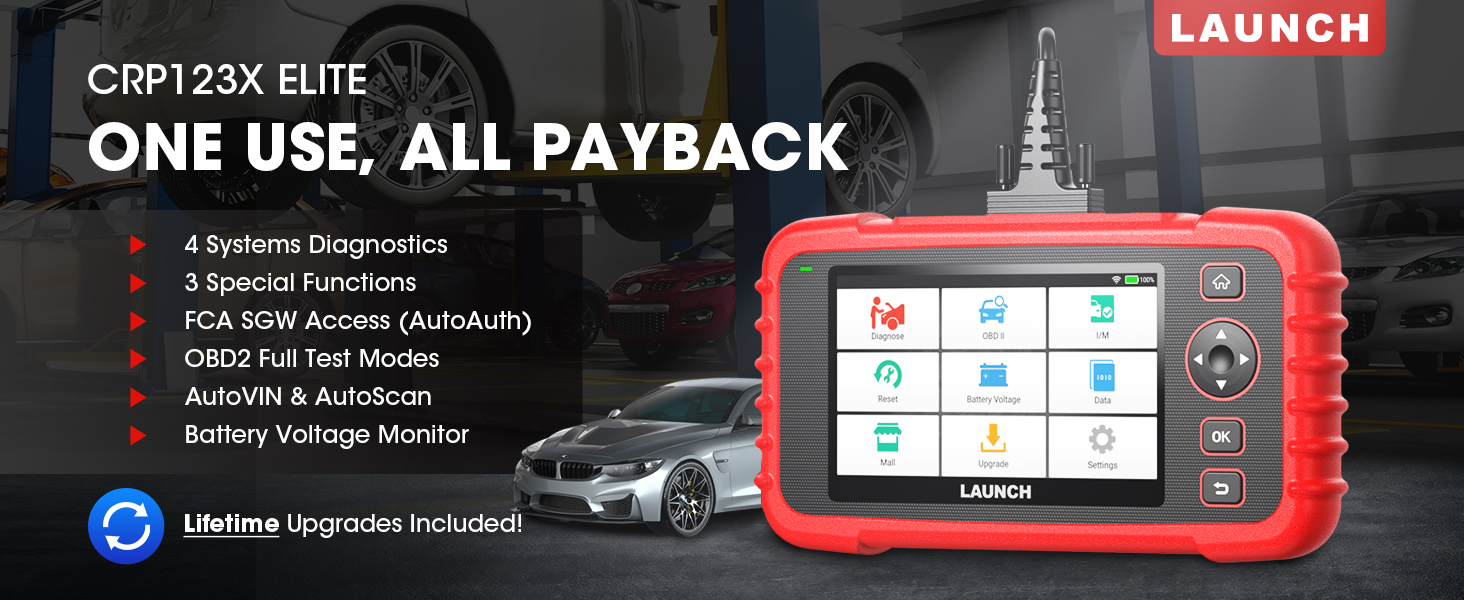
The LAUNCH CRP123X Elite is an advanced OBD2 diagnostic scan tool designed for comprehensive vehicle system analysis. It offers a wide range of functions including 4-system diagnostics (Engine, Transmission, ABS, SRS), 3 special reset services (Oil Reset, Electronic Throttle Relearn, Steering Angle Sensor Calibration), full OBD2 functions, AutoVIN technology, and lifetime free software updates via Wi-Fi. This manual provides detailed instructions for setting up, operating, and maintaining your CRP123X Elite scanner.
2. Nøglefunktioner
Livstids gratis softwareopdateringer: Ensures compatibility with future vehicles and systems, updated wirelessly via Wi-Fi.
3 Hottest Special Functions: Includes Oil Reset, Electronic Throttle Relearn (ETC Reset), and Steering Angle Sensor Calibration (SAS Reset).
4-Systemdiagnostik: Comprehensive diagnostics for Engine, Anti-lock Braking System (ABS), Supplemental Restraint System (SRS), and Transmission Control Module (TCM). Read and clear DTCs, view live data, and read ECU information.
Bred dækning af køretøjer: Supports over 72 car brands across US, EU, and Asia, including 2018+ FCA SGW (AutoAuth required).
AutoVIN og automatisk scanning: Automatically identifies vehicle information and quickly scans all modules in all systems for 2006+ vehicles.
All 10 OBD2 Test Modes: Supports all standard OBD2 functions for basic car issue diagnosis, including reading/clearing codes, live data, freeze frame, I/M readiness, O2 sensor test, EVAP system test, on-board monitor test, component test, and vehicle information retrieval.
Real-Time Voltage Monitor: Displays dynamic graphic representation of the car's battery voltage.
4-in-1 Graphic Live Data: Allows merging up to 4 PIDs data on one screen for easier analysis.
Deling af diagnostisk rapport: Save and share diagnostic reports for further analysis or record-keeping.
Brugervenligt design: Features a 5-inch HD touchscreen, Android 7.0 OS, 16GB memory, and anti-slip, shock-resistant casing.
3. Pakkens indhold
Bekræft at alle varer er til stede i din pakke:
LAUNCH CRP123X Elite Scanner (Red unit with 5-inch touchscreen)
DC 5V Charging Cable (USB cable)
OBD2 Cable (DB-15 diagnostic connector)
Carrying Bag (Black zippered case)
User Manual (Printed document)
Figure 3.1: LAUNCH CRP123X Elite Package Contents. This image displays the main scanner unit, a USB charging cable, an OBD2 diagnostic cable, a black carrying bag, and the printed user manual.
4. Opsætningsvejledning
4.1 Første opstart og opladning
Before first use, ensure the device is fully charged. Connect the provided DC 5V Charging Cable to the scanner's charging port and a suitable USB power adapter (not included) or computer USB port. The device will power on automatically or can be powered on by pressing the power button.
Figure 4.1: Scanner Ports and Buttons. This image highlights the 5V charging port, the DB-15 diagnostic connector, and the power button on the top side of the scanner.
4.2 Wi-Fi-forbindelse
Fra hovedmenuen skal du trykke på "Indstillinger".
Vælg "Wi-Fi" og tænd det.
Vælg dit ønskede Wi-Fi-netværk fra listen, og indtast adgangskoden, hvis du bliver bedt om det.
Når der er oprettet forbindelse, vises Wi-Fi-ikonet i statuslinjen.
4.3 Første softwareopdatering
It is recommended to perform a software update after connecting to Wi-Fi to ensure you have the latest vehicle coverage and functions.
Fra hovedmenuen skal du trykke på "Opgrader".
The system will check for available updates. Select all necessary updates and tap "Download".
Allow the updates to complete. The device may restart during this process.
Figure 4.2: One-Click Wi-Fi Update. This image illustrates the simple process of updating the scanner's software via a Wi-Fi connection, highlighting its ease of use compared to other methods.
5. Betjeningsvejledning
5.1 Tilslutning til køretøj
Locate the vehicle's OBD2 port, usually under the dashboard on the driver's side. Connect the provided OBD2 cable to the scanner and then to the vehicle's OBD2 port. Turn the vehicle's ignition to the "ON" position (engine off or running, depending on the test).
Figure 5.1: Scanner Connected to Vehicle. This image shows the LAUNCH CRP123X Elite scanner connected to a vehicle's diagnostic port, ready for operation.
5.2 System Diagnostics (Engine, ABS, SRS, Transmission)
The CRP123X Elite can diagnose four core vehicle systems:
Motorsystem: Læs og slet motorfejlkoder, view live data streams, and check engine light status.
ABS-bremsesystem (antiblokeringssystem): Diagnose ABS issues, read and clear ABS fault codes, and view ABS sensor data.
Supplerende sikkerhedssystem (SRS/Airbag): Read and clear airbag fault codes. Note: Crash data cannot be cleared from memory even with a new airbag.
Transmission Control Module (TCM): Diagnose transmission problems, read and clear transmission fault codes, and view transmission live data.
To perform a system diagnostic:
From the main menu, tap "Diagnose".
Select the vehicle make and model. The AutoVIN feature (for 2006+ vehicles) can automatically detect this.
Choose the system you wish to diagnose (e.g., "Engine", "ABS").
Vælg "Læs koder" for at view Diagnostic Trouble Codes (DTCs) or "Clear Codes" to erase them.
Vælg "View Data Stream" to monitor real-time sensor data.
Figure 5.2: 4 Systems Diagnostic Overview. This image visually explains the diagnostic capabilities for Engine, Transmission, SRS, and ABS systems, including reading/clearing codes and viewing data streams.Video 5.1: LAUNCH Code Reader - CRP123X OBD2 Scanner for Engine Transmission ABS SRS. This video demonstrates the diagnostic capabilities of the CRP123X scanner across engine, transmission, ABS, and SRS systems, showing how to read and clear codes and view live data.
5.3 Reset Functions (Oil, ETC, SAS)
The scanner supports three common reset services:
Olie nulstilling: Resets the oil life reminder after an oil change or maintenance service.
Electronic Throttle Relearn (ETC Reset): Relearns the electronic throttle body for optimal engine performance and smooth idle.
Steering Angle Sensor Calibration (SAS Reset): Calibrates the steering angle sensor after alignment or component replacement.
To perform a reset function:
From the main menu, tap "Reset".
Select the desired reset function (e.g., "Oil Reset").
Følg instruktionerne på skærmen for at fuldføre proceduren.
Figure 5.3: 3 Hottest Reset Functions. This image illustrates the three primary reset functions: Oil Reset, Electronic Throttle Control (ETC) Reset, and Steering Angle Sensor (SAS) Reset, which are crucial for vehicle maintenance.
5.4 All 10 OBD2 Test Modes
The CRP123X Elite supports all 10 modes of OBD2 testing, providing comprehensive diagnostic capabilities for emissions-related issues and general vehicle health:
Læs koder: Viser aktuelle, ventende og permanente diagnosticeringsfejlkoder (DTC'er).
Slet koder: Sletter DTC'er fra køretøjets computer og slukker fejlindikatoren Lamp (MIL).
Live datastrøm: Viser realtidsdata fra køretøjets sensorer i tekst- eller grafformat.
Frys rammedata: Viser et øjebliksbillede af driftsforholdene på det tidspunkt, hvor en emissionsrelateret fejl opstod.
O2-sensortest: Retrieves and displays O2 sensor monitoring test results.
Test af indbygget skærm: Henter testresultater for emissionsrelaterede drivlinjekomponenter og -systemer, der ikke overvåges kontinuerligt.
Test af fordampningssystem: Starter en test af fordampningsemissionskontrolsystemet.
Komponenttest: Tillader start af en lækagetest for køretøjets EVAP-system.
Køretøjsoplysninger: Henter køretøjets identifikationsnummer (VIN), kalibrerings-ID (CID) og kalibreringsverifikationsnummer (CVN).
Figure 5.4: Complete OBD2 Test Modes. This image displays icons and brief descriptions for each of the 10 OBD2 test modes, including Read Codes, Erase Codes, Live Data Stream, Freeze Frame, I/M Readiness, On-Board Monitor Test, O2 Sensor Test, EVAP System Test, Vehicle Information, and DTC Library.
5.5 Live Data Stream & Recording
The scanner can display live sensor data in various formats. You can select up to four data parameters to view simultaneously in a graphical format for easier comparison and analysis.
From the main menu, tap "Data".
Select "Live Data" and choose the parameters you wish to monitor.
Tap the "Record" icon to begin recording the data for later review.
Figure 5.5: 4-in-1 Live Data Stream. This image shows the scanner's ability to display multiple live data parameters simultaneously in a graphical format, along with options for data recording and playback.
5.6 Diagnostisk rapport
After completing a diagnostic session, you can generate and save a diagnostic report. This report can be printed via PC or emailed for record-keeping or sharing with a mechanic.
After a scan, navigate to "Data" and then "Diagnostic Report".
Det kan du view, playback, or share the report via email (requires Wi-Fi connection).
Figure 5.6: Diagnostic Report Generation and Sharing. This image highlights the scanner's capability to generate detailed diagnostic reports and offers options to print them via PC or share them electronically.
5.7 Real-Time Voltage Skærm
The scanner includes a feature to monitor the vehicle's battery voltage in real-time, displayed graphically.
From the main menu, tap "Battery Voltage".
Observer realtidsvolumentage readings and dynamic graphic.
Figure 5.7: Real-Time Voltage Monitor. This image demonstrates the scanner's ability to display the vehicle's battery voltage in real-time, including a dynamic graphical representation.
6. Vedligeholdelse
Rensning: Brug en blød, damp klud til at rengøre scannerens yderside. Brug ikke slibende rengøringsmidler eller opløsningsmidler.
Opbevaring: Store the device in its carrying bag in a dry, cool place away from direct sunlight and extreme temperatures.
Softwareopdateringer: Regularly connect the device to Wi-Fi and perform software updates to ensure optimal performance and access to the latest vehicle data and features.
Batteripleje: Charge the device regularly, even if not in frequent use, to maintain battery health. Avoid fully discharging the battery for extended periods.
7. Fejlfinding
Problem
Mulig årsag
Løsning
Enheden tænder ikke.
Lavt batteri; defekt forbindelse.
Charge the device fully. Ensure OBD2 cable is securely connected to vehicle and scanner.
Kommunikationsfejl med køretøjet.
Loose connection; vehicle not OBD2 compliant; ignition off; blown fuse in vehicle.
Check all connections. Verify vehicle is OBD2 compliant (1996 and newer for US). Turn ignition ON. Check vehicle's fuse for the OBD2 port.
Skærmen fryser, eller enheden reagerer ikke.
Softwarefejl; midlertidig systemfejl.
Press and hold the power button to force a restart. If issue persists, perform a factory reset (data will be lost).
Kan ikke oprette forbindelse til Wi-Fi.
Forkert adgangskode; uden for rækkevidde; netværksproblem.
Bekræft Wi-Fi-adgangskoden. Gå tættere på Wi-Fi-routeren. Genstart routeren.
For further assistance, please contact LAUNCH customer support.
8. Specifikationer
Feature
Detalje
Modelnummer
launch crp123x
Operativsystem
Android 7.0
Vise
5-inch HD Touch Screen (LCD touch screen)
Hukommelse
16 GB ROM, 2 GB RAM
CPU
1.5 GHz
Forbindelse
Wi-Fi
Produktdimensioner
10.24 x 3.15 x 7.48 tommer (7.48" L x 3.15" B x 10.24" H)
Vægt
2.36 pund
Sprog
English (and 9 other languages)
Første ledige dato
16. november 2020
Figure 8.1: Feature Comparison. This table compares the specifications of the CRP123X with other models, emphasizing its advantages in reset functions, wider coverage, Android OS, screen size, battery, memory, Wi-Fi update, AutoVIN, touchscreen, vehicle coverage, languages, system diagnosis, code search, online feedback, and battery voltage test.Figure 8.2: Wide Car Compatibility & Language Options. This image illustrates the extensive vehicle compatibility of the scanner, covering American, European, and Asian car brands, along with the availability of 10 language options.
9. Garanti og support
LAUNCH stands behind the quality of the CRP123X Elite scanner with an extended 5-year product quality backup. Enjoy free lifetime software updates to ensure compatibility with future vehicles and systems.
For technical assistance or any inquiries, please contact LAUNCH Support:
Gratis nummer: 1-888-756-2936
Åbningstider: Mandag - fredag, 9:00 - 6:00 EST
E-mail: Tech_Launchoriginal@outlook.com
LAUNCH also offers a 30-day money-back policy.
Figure 9.1: 24/7/365 Service & Multi-Language Menu. This image highlights the comprehensive customer support offered by LAUNCH, including one-on-one technical assistance, 100% original LAUNCH products, 5-year quality backup, and lifetime update included, along with support for multiple languages.
Relaterede dokumenter - CRP123X Elite
LAUNCH CRP123X OBD2-scanner: Vigtig information før køb Essentiel guide, der dækker 10 afgørende punkter for brugere af LAUNCH CRP123X OBD2-scanneren, herunder kompatibilitet, opdateringer, garanti, brugstips og inkluderet tilbehør. Lær om produktfunktioner, support og returpolitikker.
LAUNCH Creader Professional 123X Lynstartguide En hurtigstartguide til LAUNCH Creader Professional 123X, der beskriver den indledende opsætning, opladning og grundlæggende diagnosticeringsprocedurer.
Vejledning til opgraderingsproces for LANCÉR CReader VII+ En trin-for-trin guide til opgradering af LAUNCH CReader VII+ bildiagnoseværktøjet ved hjælp af et TF-kort eller USB-kabel. Inkluderer instruktioner til download, installation og registrering af software.
LAUNCH Creader Professional 123i Brugermanual - Omfattende guide Udforsk funktionerne og betjeningen af LAUNCH Creader Professional 123i-diagnoseværktøjet til biler. Denne brugermanual indeholder detaljerede instruktioner om køretøjsdiagnose, systemtjek, opdateringer og indstillinger.