Indledning
This manual provides detailed instructions for the safe and effective use of your DEPSTECH WF028-SJ Dual Lens Wireless Endoscope. Please read this manual thoroughly before operating the device to ensure optimal performance and longevity.
Produkt overview og funktioner
The DEPSTECH WF028-SJ is a high-definition wireless endoscope designed for inspecting hard-to-reach areas. It features dual lenses, adjustable LED lighting, and a flexible semi-rigid cable for versatile applications.
1080P Dual Lens with Split Screen
The endoscope is equipped with two 1080P cameras, allowing for inspection of areas from both front and side perspectives. The split-screen feature enables simultaneous viewing of both camera feeds on your mobile device. The front camera has a focal range of 3-8cm (1.2-3.1in), and the side camera has a focal range of 2-6cm (0.8-2.4in).
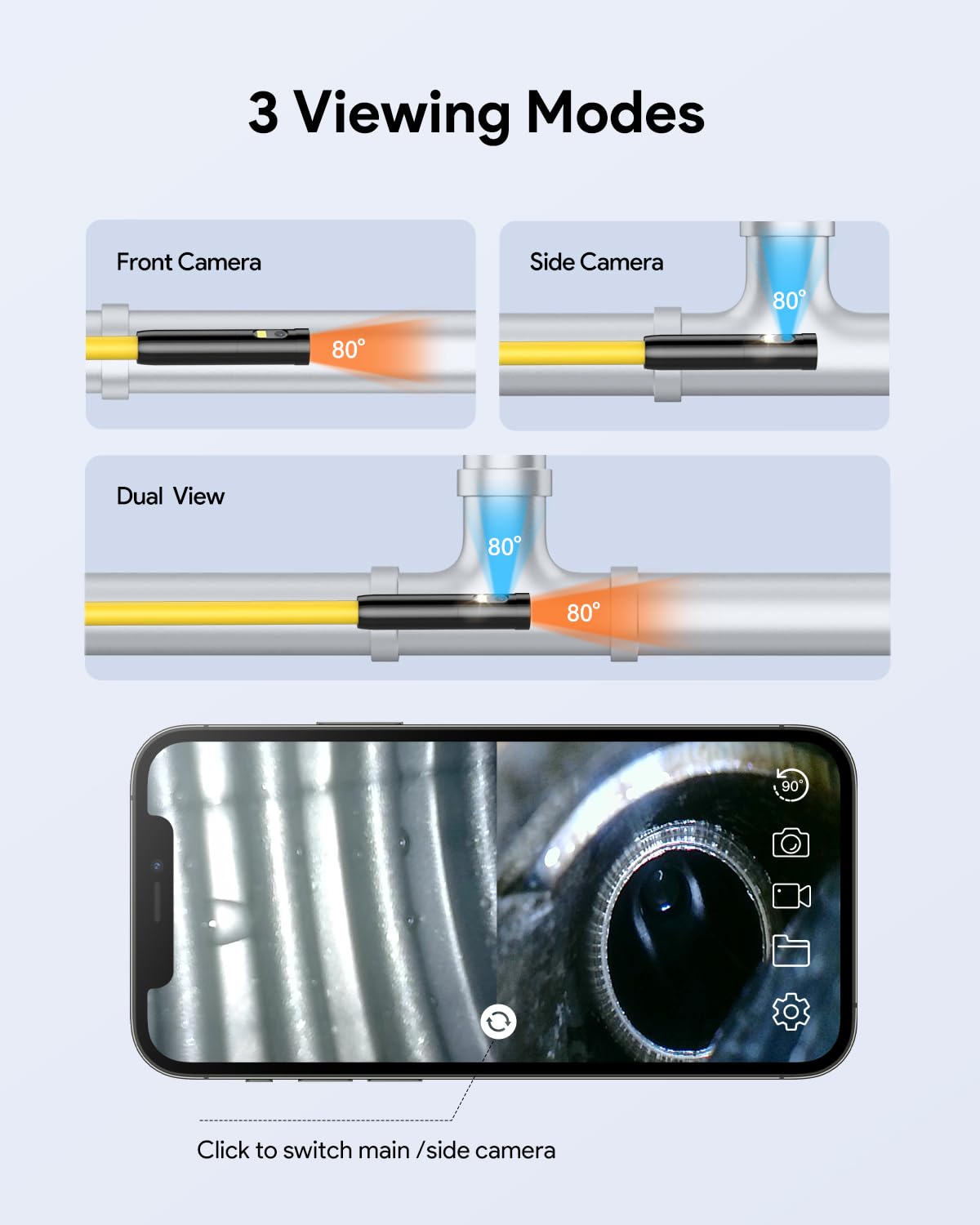
Illustration of the dual lens system and split-screen viewing kapacitet.
Flexible Semi-Rigid Snake Cable
The 16.5ft (5m) semi-rigid cable can be bent and held to the desired shape, providing flexibility for navigating complex spaces while maintaining stability for precise observation. The 7.9mm (0.31in) probe lens can access narrow and deep inspection areas.

Comparison of the semi-rigid cable's flexibility and shape retention.
IP67 Waterproof Probe with Adjustable LED Lights
The endoscope probe is IP67 waterproof, making it suitable for use in wet or submerged environments. Seven adjustable LED lights are integrated into the probe tip, providing illumination for clear visibility in dark or dimly lit inspection areas. The brightness can be adjusted to prevent overexposure.

The waterproof probe with adjustable LED lights for dark environments.
Helpful Attachments
The package includes a hook and a magnet attachment that can be affixed to the endoscope probe. These accessories enhance the utility of the device for retrieving small objects or navigating specific inspection scenarios.

The hook and magnet attachments for extended functionality.
Pakkens indhold
Bekræft, at alle nedenstående varer er til stede i din pakke:
- WiFi Endoscope (with integrated cable and probe)
- Brugermanual
- Opbevaringsboks til tilbehør
- Reset Snap Pins
- Krogfastgørelse
- Magnet vedhæftning
- USB til mikro USB kabel
- Pakkeæske

Contents of the DEPSTECH WF028-SJ endoscope package.
Opsætningsvejledning
Follow these steps to set up your DEPSTECH WF028-SJ endoscope:
- Download appen: Søg efter "DEPSTECH-View" on the Apple App Store (for iOS devices) or Google Play Store (for Android devices) and install the application.
- Turn on the WiFi Box: Locate the power button on the WiFi transmission box and press it to turn on the device. The indicator lights will illuminate.
- Opret forbindelse til WiFi: On your mobile device, go to your WiFi settings. Find the network named "DEPSTECH_XXXXXX" (where XXXXXX is a unique identifier) and connect to it. The default password is "12345678".
- Åbn appen: Once connected to the endoscope's WiFi network, open the "DEPSTECH-View" application. The live video feed from the endoscope should appear.
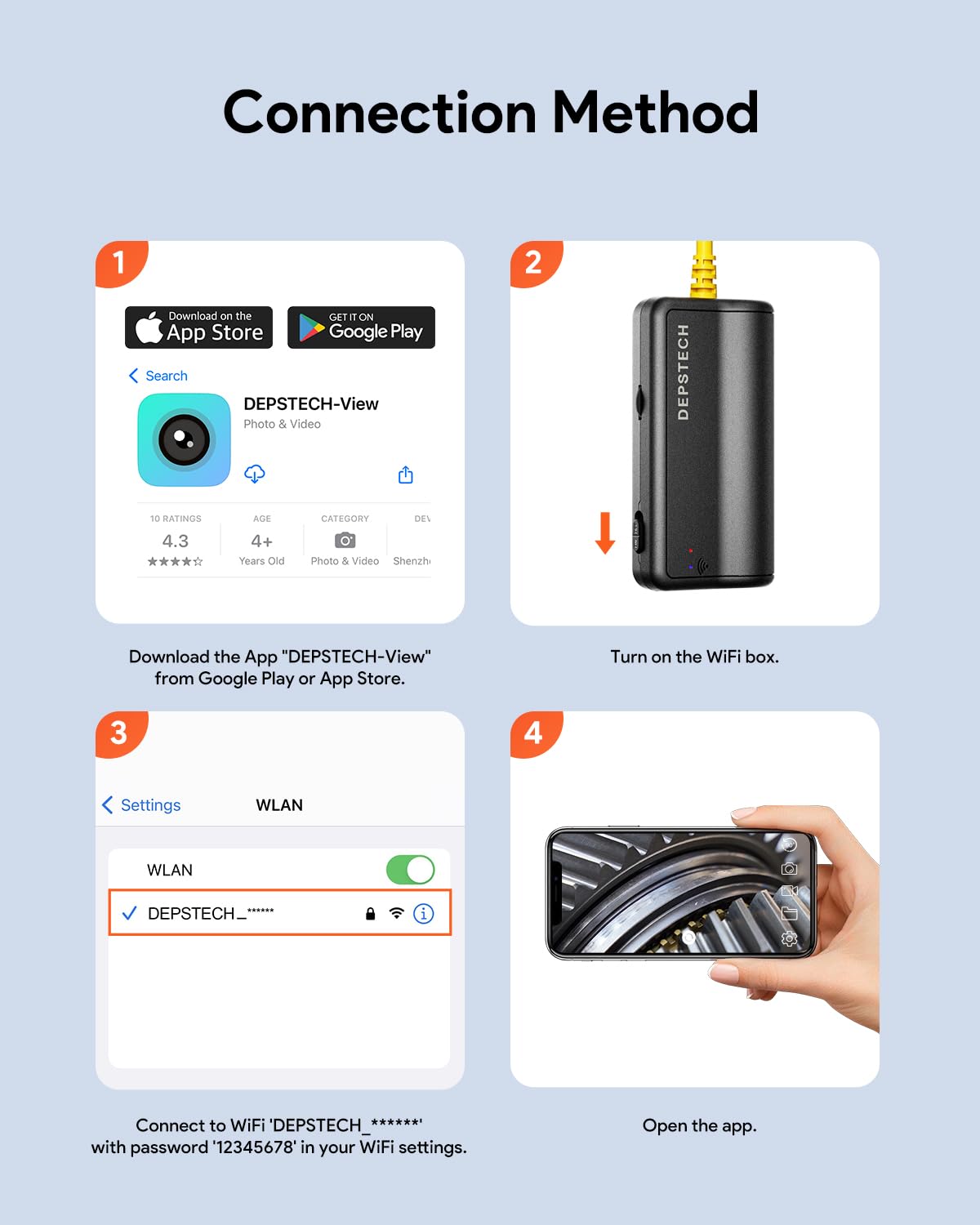
Visual guide for connecting the endoscope to your mobile device.
Kompatibilitet: The DEPSTECH WF028-SJ is compatible with iOS devices (iOS 9+) and Android devices (Android 7.0+). It does not support PC connections.

Device compatibility overview.
Betjeningsvejledning
Once connected, you can begin using your endoscope for inspection:
Viewi tilstande
The DEPSTECH-View app allows you to switch between three viewing-tilstande:
- Front View: Displays the feed from the primary front-facing camera.
- Side View: Displays the feed from the secondary side-facing camera.
- Split Screen (Dual View): Shows both front and side camera feeds simultaneously on a split screen, providing a comprehensive view of the inspection area.
You can switch between these modes with a single click within the mobile application. The app also allows for zooming to manually scale the interface for real-time viewing.

Understanding the different viewing modes available.
Justering af LED-lys
The endoscope features 7 adjustable LED lights. Use the roller on the WiFi box to control the brightness of these lights. Adjusting the brightness is crucial for optimal image clarity, especially in varying lighting conditions or when dealing with reflective surfaces.
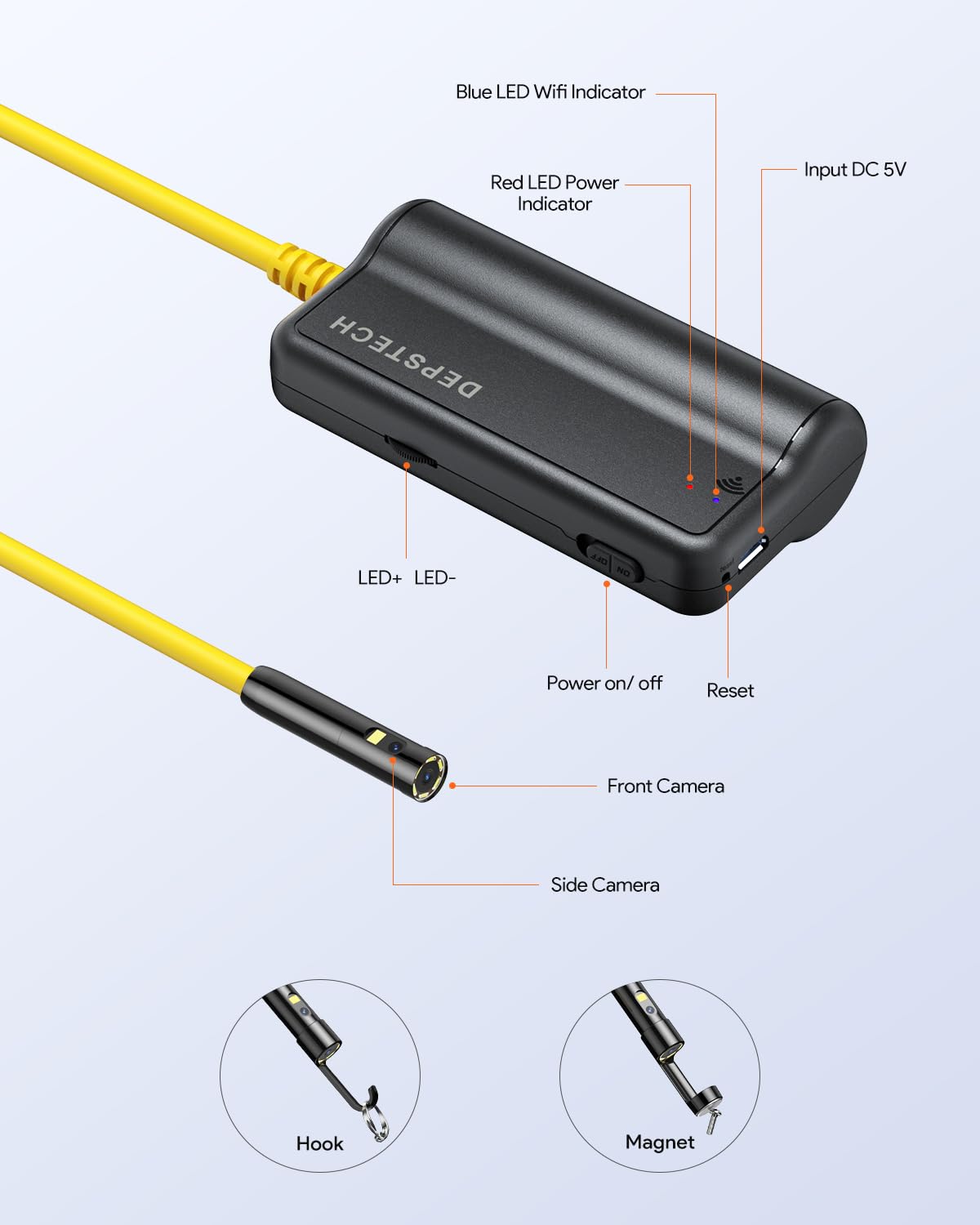
Location of LED brightness controls on the WiFi box.
Brug af vedhæftede filer
The included hook and magnet attachments can be screwed onto the end of the endoscope probe. These are useful for retrieving dropped items in tight spaces or for manipulating objects during inspection.
Attaching the hook and magnet accessories.
Typiske applikationer
The DEPSTECH WF028-SJ endoscope is suitable for a wide range of inspection projects, including but not limited to:
- Plumbing inspection (checking for leaks, rust, blockages)
- Machinery inspection
- Automobile repair and diagnostics
- Electrical diagnostics
- Inspecting hard-to-reach areas in homes or industrial settings (e.g., HVAC ducts, wall cavities, engine bays)
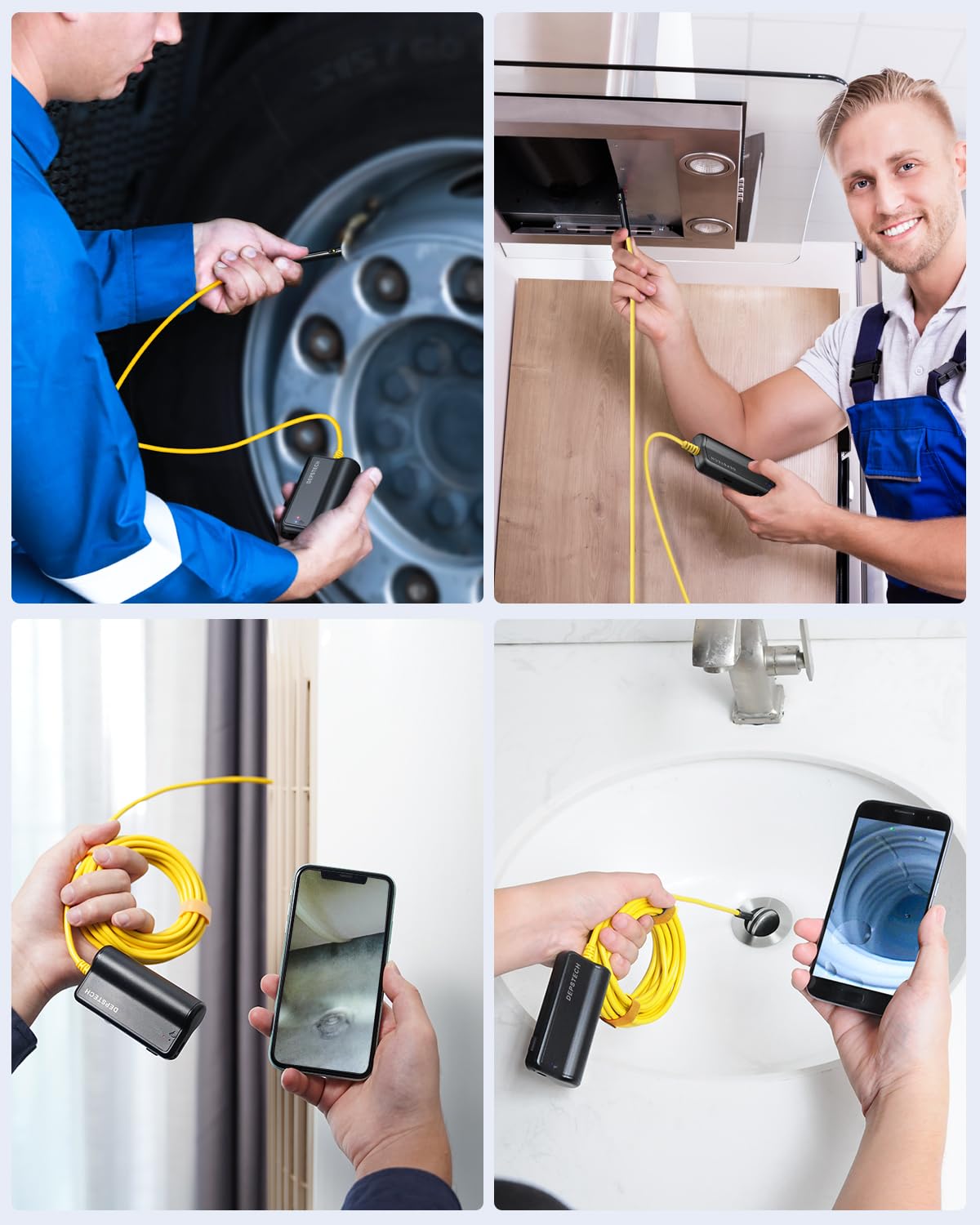
Examples of endoscope use in automotive, home, and plumbing inspections.

Inspecting an engine bay with the endoscope.

Using the endoscope for HVAC system inspection.

Inspecting a kitchen range hood vent.
Opretholdelse
Proper maintenance ensures the longevity and optimal performance of your endoscope:
- Rensning: After each use, especially in dirty or wet environments, gently wipe the probe and cable with a soft, damp cloth. For stubborn grime, a mild detergent can be used, followed by a clean water rinse. Ensure the probe tip is clean for clear images.
- Tørring: Always ensure the endoscope probe and cable are completely dry before storage, especially after being used in wet conditions.
- Opbevaring: Store the endoscope in its original accessory storage case in a cool, dry place, away from direct sunlight and extreme temperatures. Avoid kinking or sharply bending the cable during storage.
- Batteripleje: If the device will not be used for an extended period, it is recommended to charge the battery periodically to maintain its health.
Fejlfinding
If you encounter issues with your DEPSTECH WF028-SJ endoscope, refer to the following common troubleshooting steps:
| Problem | Mulig årsag | Løsning |
|---|---|---|
| No image on screen / App not connecting |
|
|
| Billedet er sløret eller mørkt |
|
|
| "Lens pull out" error (as reported by some users) |
|
|
For yderligere assistance henvises til den officielle Brugervejledning (PDF) or contact DEPSTECH customer support.
Specifikationer
| Feature | Detalje |
|---|---|
| Modelnummer | WF028-SJ |
| Videooptagelsesopløsning | 1080p |
| Linse diameter | 7.9 mm / 0.31 tommer |
| Kabellængde | 16.5FT (approx. 5 meters) |
| Frontkameraets fokusområde | 3-8 cm / 1.2-3.1 tommer |
| Sidekameraets fokusområde | 2-6 cm / 0.8-2.4 tommer |
| Vandtæt vurdering | IP67 (kun probe) |
| LED lys | 7 justerbare LED'er |
| Batteri | 1 lithium-ion batteri (medfølger) |
| Forbindelse | WiFi (for Android & iOS Phone or Tablet) |
| Farve | Lyse Gul |
| Pakkedimensioner | 6.42 x 6.22 x 1.97 tommer |
| Varens vægt | 1.01 pund |
Garanti og support
DEPSTECH provides customer support for their products. For any questions, technical assistance, or warranty claims, please refer to the official user manual or contact DEPSTECH directly.
Officiel brugermanual (PDF): Download her
Contact information for DEPSTECH support can typically be found on their official webwebstedet eller i produktemballagen.


