1. Introduktion
This manual provides instructions for the proper setup, operation, and maintenance of your Xtrike Me GH-509 Wired Stereo Gaming Headset. Please read this manual thoroughly before using the product to ensure optimal performance and longevity.
2. Produktet er slutview
The Xtrike Me GH-509 is a wired stereo gaming headset designed for immersive audio experiences across multiple platforms. It features a comfortable design, integrated microphone, and RGB backlight.
2.1 Komponenter
- Pandebånd: Self-adjusting for a comfortable fit.
- Ørekopper: Soft cushioned leather earcups with closed on-ear design for sound isolation.
- Mikrofon: Adjustable, omnidirectional microphone.
- Lydstyrkekontrol: Integrated on-ear volume control.
- Forbindelse: 2x 3.5mm jack (audio/mic) and USB for LED power.

Figure 1: Xtrike Me GH-509 Gaming Headset. This image displays the overall design of the headset, including the earcups, microphone, and headband.

Figure 2: Integrated Volume Control. This image shows a close-up of the volume roller located on the earcup, allowing for easy audio adjustment.
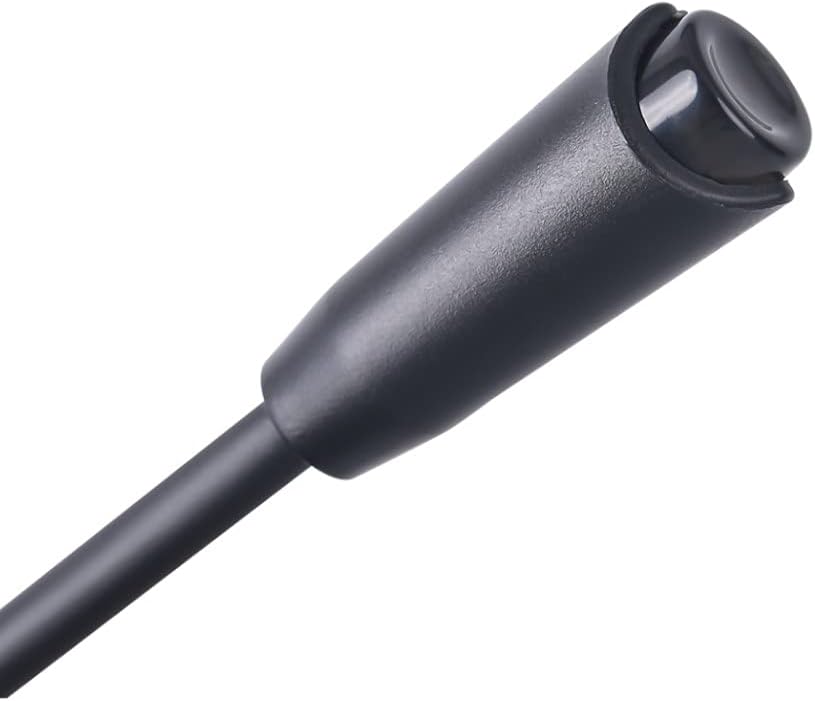
Figure 3: Adjustable Microphone. A detailed view of the flexible, omnidirectional microphone attached to the headset.
3. Opsætningsvejledning
The GH-509 headset offers broad compatibility with various gaming platforms and devices.
3.1 Tilslutning til pc
- Tilslut green 3.5mm jack to your PC's audio output port (headphone jack).
- Tilslut pink 3.5mm jack to your PC's microphone input port (mic jack).
- Sæt stikket i USB-stik into an available USB port on your PC to power the RGB backlight.
- Adjust audio settings in your operating system to ensure the headset is selected as the default playback and recording device.
3.2 Connecting to PS4 / Xbox One / Smartphone
- For devices with a single 3.5mm combo jack, use the included Y-splitter adapter (if provided) to combine the audio and microphone jacks into a single 3.5mm plug.
- Sæt stikket i 3.5 mm jack (or combined jack) into the controller or device's audio port.
- The USB connector is only for RGB lighting and is not required for audio/microphone functionality on these devices.
- Adjust audio settings on your console or smartphone as needed.
4. Betjeningsvejledning
4.1 Lydstyrkekontrol
Use the integrated volume roller located on the left earcup to adjust the audio output level. Roll it up to increase volume and down to decrease volume.
4.2 Brug af mikrofon
The flexible microphone can be positioned closer to your mouth for clear voice capture. Ensure the microphone is enabled in your device's audio settings.
4.3 RGB Backlight
The headset features an RGB backlight on the earcups. This lighting is powered via the USB connection. There is no separate control for the RGB lighting; it activates automatically when the USB is connected.
5. Vedligeholdelse
Korrekt pleje vil forlænge levetiden på dit headset.
- Rensning: Brug en blød, tør klud til at rengøre headsettet. For ørekopper, en let tør kludamp En klud kan bruges, men undgå for meget fugt. Brug ikke skrappe kemikalier eller slibende rengøringsmidler.
- Opbevaring: Opbevar headsettet et køligt, tørt sted væk fra direkte sollys og ekstreme temperaturer.
- Kabelpleje: Undgå skarpe bøjninger eller overdreven trækkraft i kablet for at forhindre skader.
6. Fejlfinding
6.1 Ingen lyd fra headsettet
- Sørg for, at 3.5 mm lydstikket er sat helt i den korrekte port.
- Check the volume control on the headset and your device; ensure it is not muted or set to minimum.
- Verify that the headset is selected as the default audio output device in your computer's sound settings or console's audio options.
- Test headsettet på en anden enhed for at udelukke et enhedsspecifikt problem.
6.2 Mikrofonen virker ikke
- Ensure the 3.5mm microphone jack (pink) is fully inserted into the correct port.
- Check that the microphone is not muted in your device's settings or application.
- Verify that the headset microphone is selected as the default input device in your computer's sound settings or console's audio options.
- Test mikrofonen på en anden enhed.
6.3 RGB Backlight Not Illuminating
- Sørg for, at USB-stikket er korrekt tilsluttet en strømforsynet USB-port.
- Prøv en anden USB-port.
7. Specifikationer

Figure 4: Technical Specifications. This infographic provides a summary of the headset's key technical details.
| Feature | Specifikation |
|---|---|
| Sund | Stereoanlæg |
| Frekvensrespons | 20 Hz - 20 kHz |
| Højttaler størrelse | 50 mm |
| Højttalerfølsomhed | 109 dB ± 3 dB |
| Højttalerimpedans | 21 Ω |
| Mikrofontype | Omnidirektionel |
| Mikrofon størrelse | 4.0 x 1.5 mm |
| Mikrofonfølsomhed | -42 dB ± 3 dB |
| Baggrundsbelysning | RGB |
| Stik | 2x 3.5 mm Jack, USB (for LED light) |
| Kabellængde | 2.1 m |
| OS Support | Windows 7 eller nyere |
| Vægt | 300 gram |
| Materiale | Læder (ørekopper) |
8. Garanti og support
For garantioplysninger og teknisk support henvises til den dokumentation, der fulgte med dit køb, eller besøg den officielle Xtrike Me. webwebsted. Gem din købsbevis til garantikrav.


