1. Introduktion
The Vgate VR800 OBD2 Scanner is a powerful and user-friendly diagnostic tool designed for automotive enthusiasts and professional mechanics alike. It provides comprehensive diagnostic functions for OBD-II/EOBD compliant vehicles, enabling users to quickly identify and resolve issues related to the Check Engine Light (CEL). This manual provides detailed instructions on how to set up, operate, and maintain your VR800 scanner to ensure optimal performance and accurate vehicle diagnostics.
2. Produktet er slutview
The Vgate VR800 is a handheld diagnostic device featuring a color LCD display, intuitive button layout, and a durable OBD-II connector cable. Its compact design allows for easy portability and use in various automotive environments.
2.1 nøglekomponenter
- LCD farveskærm: Provides clear and detailed diagnostic information.
- Navigationsknapper: Op, ned, venstre, højre pile til menunavigation.
- OK knap: Bekræfter valg.
- I/M-knap: Genvej til I/M-beredskabsstatus.
- Question Mark (?) Button: Provides help and DTC lookup information.
- Returknap: Navigerer tilbage til den forrige skærm.
- OBD-II-stik: Connects the scanner to the vehicle's diagnostic port.
- USB-port: For software updates and data printing.

3. Funktioner
The Vgate VR800 OBD2 Scanner offers a comprehensive set of features for vehicle diagnostics:
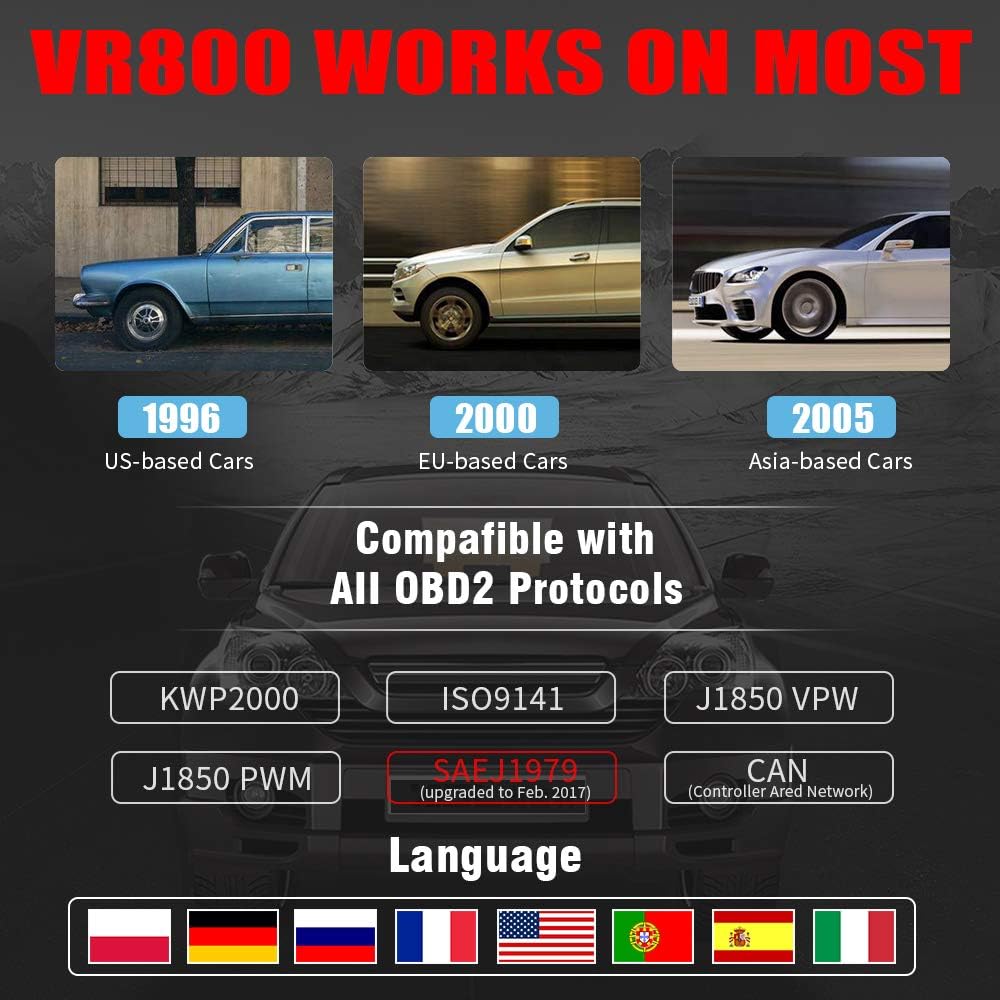
- All OBD2 Protocols Support: Compatible with ISO9141, KWP2000, J1850 PWM, J1850 VPW, and CAN protocols. Compliance with SAEJ1979 has been upgraded to the latest standards (February 2017).
- Bred kompatibilitet med køretøjer: Works with most American vehicles manufactured after 1996, European vehicles after 2000, and Asian vehicles after 2005. Applicable to OBD-II/CAN/EOBD-compliant vehicles, including light-duty trucks (6.5T or less), SUVs, and minivans.
- Smog Check Helper (I/M Readiness): Features Red-Yellow-Green LEDs and a built-in speaker to indicate readiness status for emissions testing. Dedicated I/M and '?' shortcut keys provide quick access to readiness checks.
- Full OBD Service Modes: Quickly reads and checks Diagnostic Trouble Codes (DTCs), views freeze frame data, reads live PCM data stream, performs On-Board Monitor tests, and displays live O2 sensor test data.
- Indbygget DTC-opslagsbibliotek: Allows accurate determination of the causes of the Check Engine Light.
- Accurate Battery Status Check: Reads real-time battery and voltage oplysninger.
- Flersproget support: Available in English, French, German, Italian, Spanish, Russian, Polish, and Portuguese.
- Data Logging and Printing: Supports data logging and connection to a PC for printing diagnostic data files.



4. Opsætning
Follow these steps to set up your Vgate VR800 OBD2 Scanner:
- Find OBD-II-porten: OBD-II-porten er typisk placeret under instrumentbrættet i førersiden af køretøjet. Se i bilens instruktionsbog, hvis du ikke kan finde den.
- Tilslut scanneren: Plug the VR800's OBD-II connector cable firmly into the vehicle's OBD-II port.
- Tænd: The scanner will automatically power on once connected to the vehicle's OBD-II port. No external power source or batteries are required as it draws power directly from the vehicle.
- Førstegangsopsætning (hvis du bliver bedt om det): If this is your first time using the scanner or after a factory reset, you may be prompted to select a language. Use the navigation buttons to select your preferred language and press OK.

5. Betjeningsvejledning
Once the scanner is connected and powered on, you can begin diagnosing your vehicle.
5.1 Navigering i menuen
Brug UP og NED arrow buttons to scroll through menu options. Press the OK knappen for at vælge en indstilling. Tryk på Retur for at gå tilbage til det forrige skærmbillede.
5.2 Aflæsning af diagnostiske fejlkoder (DTC'er)
- Fra hovedmenuen skal du vælge Læs DTC'er.
- The scanner will display any active or pending DTCs. Each code will have a brief description.
5.3 Clearing DTCs
Warning: Clearing DTCs will erase all diagnostic trouble codes from the vehicle's computer and may reset readiness monitors. Ensure you have addressed the underlying issue before clearing codes.
- Fra hovedmenuen skal du vælge Ryd DTC'er.
- Confirm your selection when prompted. The scanner will attempt to clear the codes.
5.4 I/M-beredskabsfunktion
The I/M Readiness function checks if the various emissions-related systems on the vehicle are operating correctly and if they have completed their self-tests.
- Tryk på den dedikerede JEG ER knappen på scanneren.
- The display will show the status of various monitors (e.g., O2 Sensor, EVAP, Catalyst). A green light indicates ready, yellow indicates pending, and red indicates not ready or a fault.
5.5 Viewmed live data
Live Data allows you to view Sensordata i realtid fra køretøjets motorstyringsenhed (ECU).
- Fra hovedmenuen skal du vælge Live data.
- Choose the specific data parameters you wish to view (e.g., engine RPM, vehicle speed, O2 sensor voltagog).
5.6 DTC-opslag
If you have a DTC and need more information, use the built-in DTC lookup library.
- Fra hovedmenuen skal du vælge DTC opslag eller tryk på ? button when a DTC is displayed.
- Enter the DTC code (if not already displayed) to get a detailed description and possible causes.
5.7 Batteristatuskontrol
To check your vehicle's battery voltage and status:
- Fra hovedmenuen skal du vælge Batteri.
- Scanneren viser det aktuelle batteriniveautage and an estimated charge percentage.
6. Vedligeholdelse
Proper maintenance ensures the longevity and accuracy of your Vgate VR800 scanner.
- Rensning: Brug en blød, tør klud til at rengøre scannerens yderside. Brug ikke slibende rengøringsmidler eller opløsningsmidler.
- Opbevaring: Opbevar scanneren et rent, tørt sted væk fra ekstreme temperaturer og direkte sollys.
- Softwareopdateringer: Regularly check for software updates to ensure compatibility with the latest vehicle models and diagnostic protocols. Updates can typically be performed by connecting the scanner to a PC via the USB port and using the provided update software.
7. Fejlfinding
If you encounter issues while using your Vgate VR800 scanner, refer to the following common problems and solutions:
- Scanneren tænder ikke:
- Sørg for, at OBD-II-stikket er korrekt tilsluttet køretøjets port.
- Kontroller, at køretøjets tænding er i ON-positionen (motoren kan være slukket).
- Kontroller bilens sikring til OBD-II-porten (se bilens instruktionsbog).
-
Relaterede dokumenter - VR800

Vgate iCar Pro BLE 4.0 hurtigstartguide til iOS og Android
Kom hurtigt i gang med din Vgate iCar Pro BLE 4.0 OBD-II-scanner. Denne vejledning dækker køretøjsoverholdelse, appinstallation, Bluetooth-parring til iOS og Android, understøttede OBD-parametre og fejlfinding for dit bildiagnoseværktøj.
Vgate vLinker BM+ Bluetooth OBD2 Scanner Lynstartguide
Trin-for-trin guide til at forbinde Vgate vLinker BM+ Bluetooth OBD2-scanneren til dit køretøj for diagnosticering og app-integration. Understøtter Android- og iOS-enheder.
Vgate iCar Pro BT3.0 hurtigstartguide til Android
Kom hurtigt i gang med din Vgate iCar Pro BT3.0 OBD-II-scanner til Android. Denne vejledning dækker køretøjsoverholdelse, understøttede protokoller, appopsætning, parring, fejlfinding og forståelse af diagnostiske koder.
Vgate iCar OBD II Adapter Brugermanual - Diagnostisk Værktøjsvejledning
Omfattende brugermanual til Vgate iCar OBD II-adapteren, der beskriver dens funktioner, specifikationer, understøttede protokoller, opsætningsvejledning og advarsler til bildiagnosticering.
Vgate iCar2 BT3.0 hurtigstartguide og OBDII-information
En omfattende guide til Vgate iCar2 BT3.0 Bluetooth OBDII-scanneren, der dækker køretøjskompatibilitet, app-support, tilslutningstrin, fejlfinding og forklaringer af OBDII-koder.
Vgate vLinker FD OBD-scanner Bluetooth hurtigstartguide
Kortfattet vejledning til opsætning og brug af Vgate vLinker FD OBD-scannerværktøjet med Bluetooth-forbindelse til Android- og Windows-enheder. Lær, hvordan du downloader appen, tilslutter og parrer enheden.