1. Introduktion
The ProForm Carbon T7 Smart Treadmill is designed to provide an effective and engaging cardiovascular workout experience in your home. Featuring a 7-inch HD touchscreen and integration with iFIT, this treadmill offers a variety of interactive training options. This manual provides essential information for the safe assembly, operation, maintenance, and troubleshooting of your Carbon T7 treadmill.

This image shows the ProForm Carbon T7 Smart Treadmill from a front-side angle, highlighting its console with a 7-inch HD touchscreen, the running deck, and the sturdy frame.
2. Vigtige sikkerhedsoplysninger
Before operating the ProForm Carbon T7 Smart Treadmill, please read all instructions carefully. Keep this manual for future reference. Failure to follow these instructions could result in injury or damage to the product.
- Rådfør dig altid med en læge, inden du påbegynder et træningsprogram.
- Placer løbebåndet på en plan overflade med mindst 2 meter (6.5 fod) fri plads bagved og 0.5 meter (1.6 fod) på hver side.
- Hold børn og kæledyr væk fra løbebåndet under drift.
- Brug ikke løbebåndet, hvis netledningen eller stikket er beskadiget, eller hvis det ikke fungerer korrekt.
- Brug passende træningstøj og sportssko. Undgå løstsiddende tøj, der kan sætte sig fast i bevægelige dele.
- Always use the safety key. Attach the clip to your clothing before starting the treadmill.
- Træd ikke op på eller ned fra løbebåndet, mens båndet bevæger sig.
- Do not attempt to adjust or repair the treadmill yourself. Contact qualified service personnel.
3. Montering
The ProForm Carbon T7 Treadmill requires assembly. For detailed, step-by-step 3D instructions, download the free Bilt app on your smartphone or tablet. Ensure all parts are present before beginning assembly. It is recommended to have two people for assembly due to the weight and size of the components.
- Unpack all components and place them on a clear, flat surface.
- Follow the instructions provided in the Bilt app or the included assembly guide.
- Ensure all bolts, nuts, and screws are securely tightened before use.

The ProForm Carbon T7 Smart Treadmill is shown in its upright, folded configuration, illustrating its SpaceSaver design for compact storage when not in use.
4. Betjening
4.1 Kom godt i gang
- Strømtilslutning: Sæt netledningen i en jordet stikkontakt.
- Sikkerhedsnøgle: Attach the safety key clip to your clothing and insert the safety key into the console. The treadmill will not operate without the safety key in place.
- Standing on the Treadmill: Stand on the foot rails, not the running belt, before starting your workout.
- Start af træning: Tryk på 'Start'-knappen på konsollen. Båndet vil begynde at bevæge sig med lav hastighed.
4.2 Using the Console and 7" HD Touchscreen
The Carbon T7 features a 7-inch HD interactive touchscreen display that allows you to stream iFIT workouts directly. The console also includes physical buttons for quick adjustments.
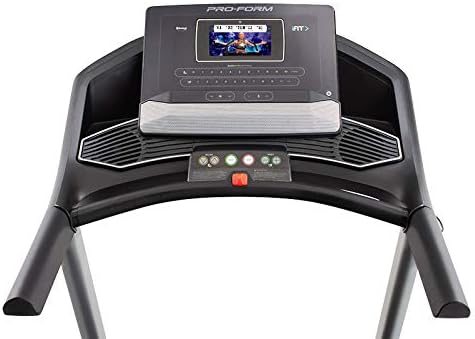
En detaljeret view of the treadmill's console, featuring the 7-inch HD touchscreen display, control buttons for speed and incline, and integrated speakers.
- Touchscreen-navigation: Use the touchscreen to browse iFIT workouts, adjust settings, and view workout metrics.
- QuickSpeed Controls: Use the 'Speed' buttons or quick-select buttons on the console to adjust the running belt speed from 0 to 10 MPH.
- Quick Incline Controls: Use the 'Incline' buttons or quick-select buttons to adjust the incline from 0% to 10%.
- Stop en træning: Press the 'Stop' button to pause or end your workout. Remove the safety key to fully power off the treadmill.
4.3 iFIT-integration
Your ProForm Carbon T7 Treadmill includes a 30-Day iFIT Family Membership. iFIT provides access to live workouts, studio classes, and global workouts led by expert personal trainers. With iFIT, your trainer can auto-adjust your treadmill's speed and incline for an optimized and immersive exercise experience.
- Activating iFIT: Follow the on-screen prompts on the 7-inch HD touchscreen to activate your iFIT membership.
- Træningsvalg: Browse the iFIT library for a wide range of workouts, including running, walking, and cross-training.
- Trainer Control: During iFIT workouts, the treadmill's speed and incline may automatically adjust according to the trainer's program. You can override these adjustments manually if needed.

A woman is shown actively running on the ProForm Carbon T7 Smart Treadmill, demonstrating its use in a typical home environment. The treadmill's running deck and console are visible.
5. Vedligeholdelse
Regular maintenance ensures the longevity and optimal performance of your ProForm Carbon T7 Treadmill.
- Rensning: Regularly wipe down the treadmill surfaces with a damp klæde. Undgå at bruge slibende rengøringsmidler eller opløsningsmidler.
- Rengøring af bælte: Periodically clean the running belt and the area beneath it to prevent debris buildup.
- Remsmøring: The running belt is pre-lubricated. Refer to the full product manual for specific lubrication instructions and frequency, typically required after a certain number of hours of use.
- Remjustering og spænding: Check the running belt for proper alignment and tension. Adjust as needed according to the detailed instructions in the full product manual.
- Inspektion af strømledning: Undersøg netledningen for eventuelle skader. Hvis den er beskadiget, skal du stoppe med at bruge den og kontakte kundesupport.
6. Fejlfinding
If you encounter issues with your ProForm Carbon T7 Treadmill, refer to the table below for common problems and solutions.
| Problem | Mulig årsag | Løsning |
|---|---|---|
| Løbebåndet tænder ikke. | Netledning ikke sat i; afbryder udløst; sikkerhedsnøgle ikke isat. | Sørg for, at netledningen er sat korrekt i. Kontroller husets afbryder. Sæt sikkerhedsnøglen helt ind i konsollen. |
| Løbebåndet bevæger sig ikke. | Safety key not inserted; 'Start' button not pressed; motor overload. | Insert safety key. Press 'Start'. If motor overload, reduce load and try again. |
| Bæltet glider eller tøver. | Remspændingen er for løs; remmen skal smøres. | Juster remspændingen i henhold til den fulde manual. Smør remmen om nødvendigt. |
| Konsolens display er tomt eller reagerer ikke. | Power issue; software glitch. | Ensure power is connected. Try unplugging the treadmill for 60 seconds and plugging it back in. If issue persists, contact customer support. |
7. Specifikationer
Key technical specifications for the ProForm Carbon T7 Smart Treadmill:
| Feature | Detalje |
|---|---|
| Modelnummer | PFTL87720 |
| Produktmål (L x B x H) | 186.69 cm x 89.41 cm x 146.05 cm (73.5" x 35.2" x 57.5") |
| Varens vægt | 97.98 kg (216 lbs) |
| Motor hestekræfter | 2.6 CHP (kontinuerlig hestekræfter) |
| Hastighedsområde | 0-10 MPH (0-16 KPH) |
| Hældningsområde | 0-10% Digital Quick Incline |
| Størrelse på slidbanebånd | 51 cm x 140 cm (20" x 55") |
| Vise | 7" HD Interactive Touchscreen |
| Vægt kapacitet | 300 lbs (136 kg) |
| Rammemateriale | Legeret stål |
| Strømkilde | Elektrisk med ledning |
| Særlige funktioner | SpaceSaver Design, ISO Flex Deck Cushioning |
8. Garanti og kundesupport
Your ProForm Carbon T7 Smart Treadmill is backed by a comprehensive warranty to ensure your peace of mind.
- Rammegaranti: 10 år
- Reservedele og arbejdsgaranti: 1 år
For warranty claims, technical assistance, or to order replacement parts, please contact ProForm customer support. Refer to the contact information provided in your product packaging or on the official ProForm webwebsted.


