Indledning
This manual provides comprehensive instructions for the safe and efficient use of your SUNMI M2 MAX Industrial Tablet, model TF700. Please read this manual thoroughly before operating the device and retain it for future reference.

Figur 1: Forside view of the SUNMI M2 MAX Industrial Tablet, showing its display with various application icons.
Opsætning
1. Udpakning og indledende inspektion
Fjern forsigtigt alle komponenter fra emballagen. Kontroller, at alle nedenstående dele er til stede og ubeskadigede:
- SUNMI M2 MAX Industrial Tablet (TF700)
- Strømadapter
- USB Type-C-kabel
- Hand Strap (optional, if included with your model)
2. Opladning af enheden
Before first use, fully charge the tablet. Connect the USB Type-C cable to the tablet's charging port and the other end to the power adapter. Plug the power adapter into a wall outlet. The charging indicator will illuminate.
The tablet is equipped with an 8360mAh non-removable lithium polymer battery. A full charge can provide over 12 hours of continuous operation.
3. Installing SIM Card and MicroSD Card (Optional)
The device supports MicroSIM or NanoSIM cards (Config 1) and an eSIM (Config 2). It also supports MicroSD cards up to 128GB for expanded storage.
- Find SIM-/MicroSD-kortstikket på siden af tabletten.
- Use the provided SIM ejector tool (if applicable) or a small paperclip to open the tray.
- Carefully place the SIM card(s) and/or MicroSD card into the tray according to the diagram on the tray.
- Skub forsigtigt bakken tilbage i åbningen, indtil den klikker på plads.

Figur 2: Bagside view of the SUNMI M2 MAX, highlighting the camera, pogo pin charging interface, and the location of the SIM/MicroSD card slot.
4. Attaching the Hand Strap (Optional)
If your model includes a hand strap, attach it to the designated points on the back of the tablet for secure handling during mobile operations.
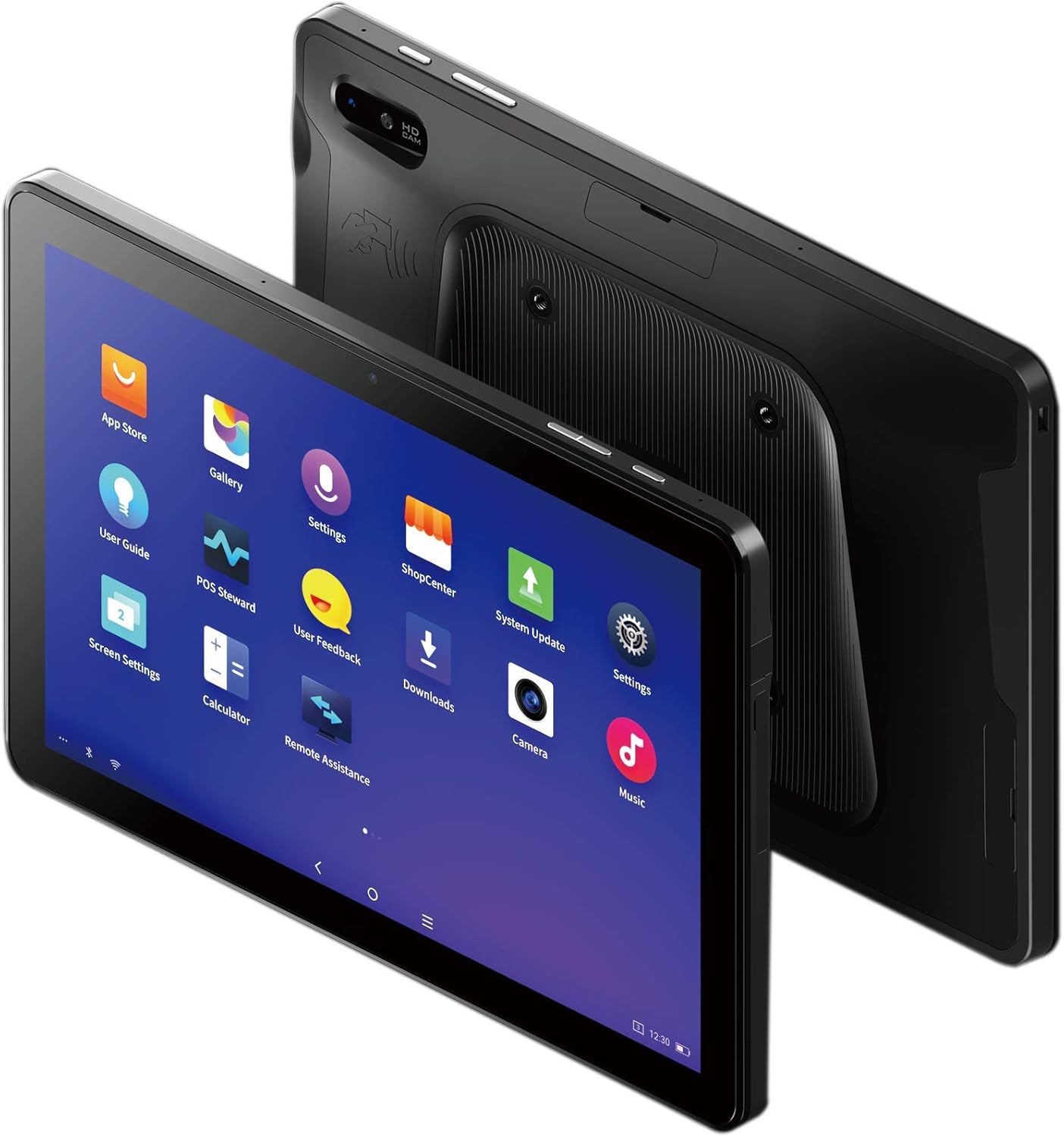
Figure 3: The SUNMI M2 MAX Industrial Tablet being held with an optional hand strap, demonstrating enhanced portability and secure grip.
Betjening af enheden
1. Tænd/sluk
- Tænd: Press and hold the Power button (located on the side) until the SUNMI logo appears on the screen.
- Sluk: Press and hold the Power button until a power-off menu appears. Select "Power Off" and confirm.
- Genstart: From the power-off menu, select "Restart" to reboot the device.
2. Grundlæggende navigation
The SUNMI M2 MAX runs on the Android operating system. Navigation is primarily touch-based:
- Tryk på: For at vælge et element eller åbne et program.
- Stryg: Til at rulle gennem lister eller skifte mellem skærme.
- Knib for at zoome: For at zoome ind eller ud på billeder eller web sider.
- Hjemknappen: Vender tilbage til startskærmen.
- Tilbage knap: Vender tilbage til den forrige skærm.
- Knappen Seneste apps: Viser nyligt brugte applikationer.
3. Tilslutning til netværk
The tablet supports Wi-Fi (2.4GHz/5GHz, 802.11 a/b/g/n/ac) and cellular networks (2G, 3G, 4G).
- Wi-Fi: Gå til Indstillinger > Netværk og internet > Wi-FiTænd Wi-Fi, vælg det ønskede netværk, og indtast adgangskoden, hvis det kræves.
- Mobildata: Sørg for, at der er isat et gyldigt SIM-kort. Gå til Indstillinger > Netværk og internet > Mobilnetværk to enable mobile data and configure APN settings if necessary.
- Bluetooth: Gå til Indstillinger > Forbundne enheder > Bluetooth to pair with Bluetooth devices (supports Bluetooth 5.0).
4. Using NFC
The SUNMI M2 MAX is equipped with NFC (Near Field Communication) for contactless transactions and data exchange. To use NFC, ensure it is enabled in settings and hold the tablet near a compatible NFC reader or device.
5. Kamerabetjening
The tablet features a 13 MP rear camera with flash and autofocus, and a 5 MP front camera. Open the "Camera" application to capture photos or record videos.
Opretholdelse
1. Rengøring af enheden
Brug en blød, fnugfri klud lidt dampened with water or a screen cleaner to wipe the display and exterior. Avoid using harsh chemicals, abrasive cleaners, or excessive moisture.
2. Batteripleje
- Avoid exposing the tablet to extreme temperatures (below -20°C or above 70°C).
- Lad ikke batteriet aflades helt ofte.
- Use only the original or certified compatible power adapter and cable.
3. Softwareopdateringer
Søg regelmæssigt efter og installer systemopdateringer for at sikre optimal ydeevne og sikkerhed. Gå til Indstillinger > System > Systemopdatering.
4. Miljøbeskyttelse
The SUNMI M2 MAX is designed with IP68 protection and a 1m drop specification, making it suitable for demanding environments. However, avoid intentional drops or prolonged submersion in water.
Fejlfinding
| Problem | Mulig årsag | Løsning |
|---|---|---|
| Enheden tænder ikke. | Lavt batteri; softwarenedbrud. | Oplad enheden i mindst 30 minutter. Tryk på tænd/sluk-knappen og hold den nede i 10-15 sekunder for at gennemtvinge genstart. |
| Kan ikke oprette forbindelse til Wi-Fi. | Incorrect password; Wi-Fi disabled; router issue. | Verify password. Ensure Wi-Fi is enabled in settings. Restart router. Forget and reconnect to the network. |
| Touchscreen reagerer ikke. | Midlertidig softwarefejl. | Tving genstart af enheden ved at holde tænd/sluk-knappen nede. |
| Applikationer går ned. | Insufficient RAM; app bug. | Close background apps. Clear app cache/data (Settings > Apps). Update the app. |
Specifikationer
The following table outlines the key technical specifications of the SUNMI M2 MAX Industrial Tablet (Model: TF700).

Figure 4: Comprehensive technical specifications for the SUNMI M2 MAX Industrial Tablet.
- Model: TF700
- Operativsystem: Android 9.0 (SUNMI OS)
- Processor: Kryo-260, Octa-core 2.2GHz (Qualcomm)
- Hukommelse: 3GB RAM + 32GB ROM (eMMC)
- Vise: 10.1-inch FHD, 1920x1200, Capacitive multitouch, Corning Gorilla Glass 3
- Kameraer: Front: 5MP FF; Rear: 13MP AF + Flashlight, supports 1D/2D barcode recognition
- NFC: Type-A&B card, Mifare card, Felica card, ISO/IEC 14443 and ISO/IEC 15693 compliant
- Speaker/MIC: 1W Speaker, 2x MIC
- PSAM-kortplads: 1x PSAM
- SIM-kortplads: 1x MicroSD (TF), 1x MicroSIM or 1x NanoSIM (TF700 Config 1), eSIM (TF700 Config 2)
- Netværk: 2G & 3G & 4G
- Wi-Fi: 2.4GHz/5GHz, 802.11 a/b/g/n/ac
- Bluetooth: Supports Bluetooth 2.1/3.0/4.2/5.0 (BLE)
- GPS: Supports AGPS, GPS, GLONASS, Beidou (Config 2)
- Sensor: Gravity sensor, light sensor, compass, Hall
- Knapper: 1x Power (lock screen), 2x Volume (+/-)
- Porte: 1x Type-C (supports OTG), 1x Audio Jack, 1x MicroSD (up to 128GB expansion)
- Batteri: Non-removable Lithium Polymer battery, 8360mAh
- Strømadapter: Input: AC 100-240V, Output: DC 5V/2A
- Dimensioner (LxBxH): 249.8 x 160 x 9.9 mm (0.39 x 6.3 x 9.84 tommer)
- Samlet vægt: 673 g (1.48 pund)
- Beskyttelse: IP68, 1m drop spec
- Driftstemperatur: -20°C til 55°C
- Opbevaringstemperatur: -40°C til 70°C
Garanti og support
For warranty information and technical support, please refer to the documentation provided with your purchase or visit the official SUNMI webwebsted. Gem din købsbevis til garantikrav.
SUNMI Official Webwebsted: www.sunmi.com


