Indledning
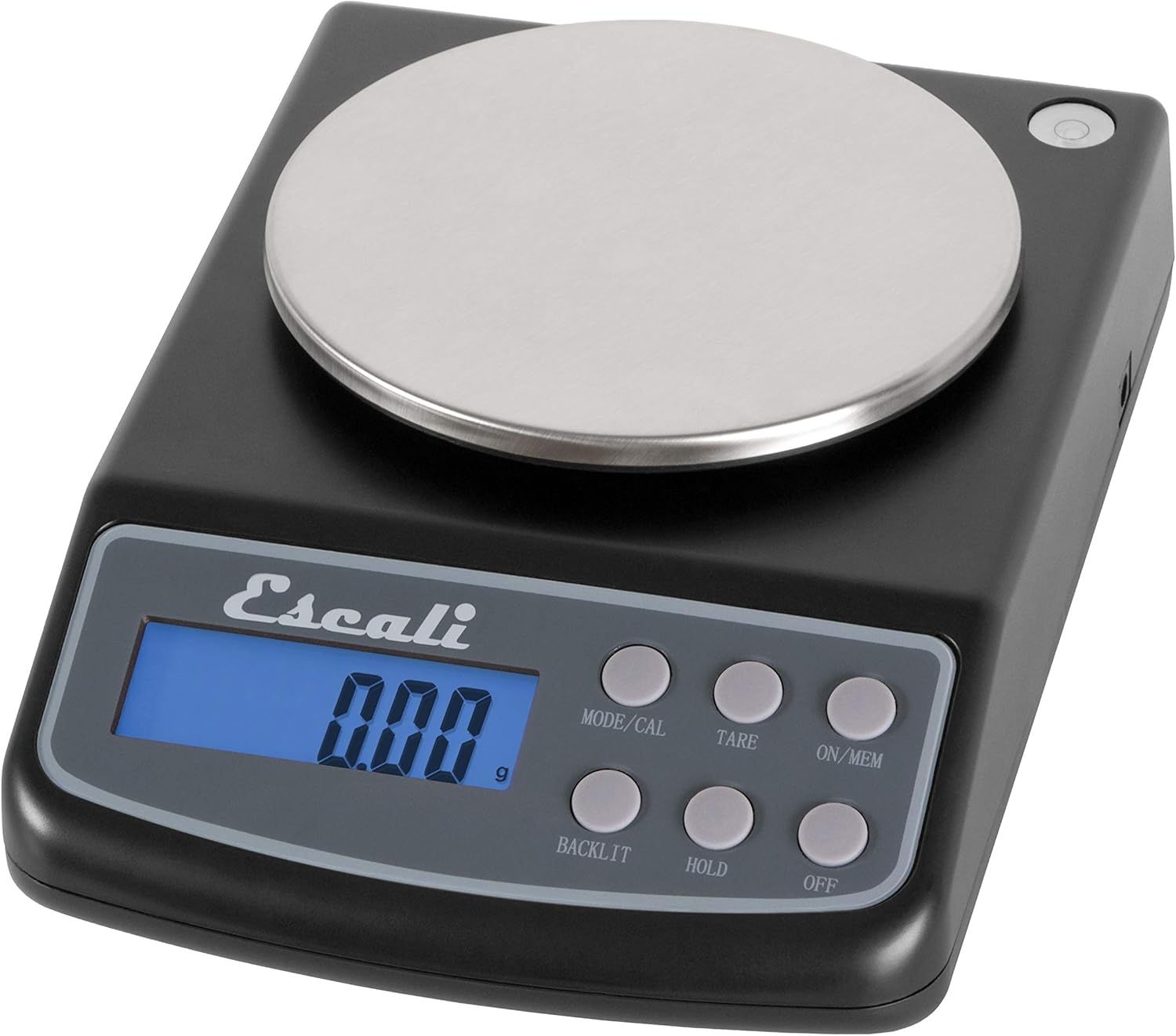
Billede: The Escali Lab Weight Scale L Series L125, showcasing its compact design with a black body, stainless steel platform, and digital display.
This manual provides detailed instructions for the proper setup, operation, and maintenance of your Escali Lab Weight Scale L Series, model L125. This precision digital scale is designed for accurate measurements in various units, featuring a removable stainless steel platform and multiple functions to assist with your weighing needs.
Please read this manual thoroughly before using your scale to ensure correct operation and to maximize its lifespan.
Pakkens indhold
- Escali Lab Weight Scale L125
- Removable Stainless Steel Weighing Platform
- 4 AA batterier
- Instruktionsmanual
Opsætning
1. Batteriinstallation
The Escali L125 scale operates on 4 AA batteries, which are included with your purchase.
- Find batterirummet på undersiden af vægten.
- Åbn batterirummets dæksel ved at skubbe eller løfte det.
- Insert 4 AA batteries, paying close attention to the polarity markings (+/-) inside the compartment.
- Luk batteridækslet ordentligt, indtil det klikker på plads.
2. Placering og nivellering
For accurate measurements, it is crucial to place the scale on a hard, flat, and stable surface. Avoid soft surfaces like carpets or uneven countertops. The scale is equipped with a built-in bubble level to help you achieve optimal leveling.

Billede: En detaljeret view of the integrated bubble level on the Escali L125 scale. Ensure the bubble is centered to confirm the scale is level, which is essential for precise weighing.
Adjust the scale's feet, if applicable, or reposition the scale until the bubble is perfectly centered within the level indicator. This minimizes measurement errors caused by an uneven surface.
3. Weighing Platform Installation
Carefully place the removable stainless steel weighing platform onto the scale's base. Ensure it is seated correctly and rests flat without any wobbling. The platform is designed for easy removal for cleaning.

Billede: The Escali L125 digital scale from the front, illustrating the correct placement of the removable stainless steel weighing platform and the ready-to-use digital display.
Betjeningsvejledning
1. Tænd/sluk
- For at dreje skalaen ON, tryk på ON / MEM button. The display will initialize and then show "0.00" when it is ready for use.
- For at dreje skalaen SLUKKET, tryk på SLUKKET knap.
2. Valg af enhed
The Escali L125 scale can measure in six different units. To change the unit of measure, press the MODE/CAL button repeatedly to cycle through the options:
- gram (g)
- Uns (oz)
- Grains (gr)
- Karat (ct)
- Pennyweights (dwt)
- Troy-ounces (oz t)
3. Tarafunktion
The Tare function allows you to subtract the weight of a container or previous items, enabling you to measure only the net weight of new additions.
- Place an empty container or the first item on the weighing platform.
- Wait for the weight reading to stabilize.
- Tryk på TARA button. The display will reset to "0.00", effectively zeroing out the weight of the container.
- Add the items you wish to weigh into the container. The display will show only the weight of these new items.
4. Hold Feature
The Hold feature is useful for weighing large or awkwardly shaped items that might obscure the display. It allows the weight reading to remain on the screen after the item is removed.
- Place an item on the scale.
- Once the weight reading stabilizes, press the HOLDE knap.
- You can now remove the item from the platform, and the last stable weight will remain displayed.
- To clear the held reading and return to normal weighing mode, press HOLDE igen, eller tryk på TARA.
5. Baggrundslysstyring
The scale features a blue backlight for improved visibility of the display in various lighting conditions.
- Tryk på BAGGRUNDSLYS button to toggle the display backlight on or off.
6. Parts Counting Feature
This function is designed to count multiple small items of uniform weight, such as coins, beads, or small components.
- Turn on the scale and ensure the display reads "0.00".
- Tryk og hold på MODE/CAL button until "CAL" appears, then release it.
- Trykke MODE/CAL again to enter the parts counting mode. The display will show a sample size, e.g., "PC 25".
- Brug TARA knap for at gennemgå tilgængelige sample sizes (e.g., 25, 50, 75, 100 pieces). Select the sample size that matches the number of items you will place on the scale for the sample.
- Placer det valgte antal sample pieces onto the weighing platform.
- Trykke MODE/CAL to confirm the sample. The display will now show the count of the sample stykker.
- Du kan nu tilføje flere elementer af samme type, og vægten viser det samlede antal.
- To exit parts counting mode, turn the scale off and then on again.

Billede: The Escali L125 scale in operation, accurately measuring a bowl of powdered ingredients. This demonstrates its utility for precise culinary or laboratory tasks.
Kalibrering
To maintain the highest level of accuracy, periodic calibration of your Escali L125 scale is recommended. This process requires a 500-gram calibration weight, which is not included with the scale and must be purchased separately.
- Sørg for, at vægten er vendt SLUKKET.
- Tryk og hold på MODE/CAL knappen, og tryk derefter samtidig på ON / MEM button. Release both buttons when "CAL" appears on the display.
- The display will show "0.00". Ensure the weighing platform is empty and clean.
- Tryk på MODE/CAL button again. The display will flash "500.00g" (or the specific calibration weight required).
- Carefully place a certified 500-gram calibration weight precisely in the center of the weighing platform.
- Wait for the display to show "PASS" and then automatically return to normal weighing mode. This indicates that the calibration process was successful.
- Remove the calibration weight from the platform.
Note: If the display shows "FAIL" or an error message, repeat the calibration process. Ensure the scale is on a stable, level surface and that there are no vibrations or air currents during calibration.
Opretholdelse
Rensning
- To clean the scale body, wipe it with a soft, slightly damp cloth. Do not use abrasive cleaners, harsh chemicals, or immerse the scale in water, as this can damage the electronic components.
- The stainless steel weighing platform is removable for easy cleaning. It can be washed with mild dish soap and water, then thoroughly dried before being placed back on the scale.
- Prevent liquids from entering the scale's housing or display area.
Opbevaring
Store your Escali L125 scale in a clean, dry environment at room temperature. Avoid areas with extreme temperature fluctuations, high humidity, or direct sunlight, which can affect the scale's performance and lifespan.
Udskiftning af batteri
If the display shows a low battery indicator (e.g., "Lo") or the scale fails to power on, it is time to replace the batteries. Refer to the "Battery Installation" section under Setup for detailed instructions on replacing the 4 AA batteries.
Fejlfinding
- Problem: Scale does not turn on.
- Løsning: Check if batteries are installed correctly with the correct polarity (+/-). Replace old batteries with new ones.
- Problem: Inaccurate or inconsistent readings.
- Løsning: Ensure the scale is placed on a hard, flat, and stable surface. Verify the scale is level using the built-in bubble level and adjust if necessary. Recalibrate the scale using a 500-gram calibration weight. Avoid placing the scale near strong electromagnetic fields, vibrating equipment, or in drafty areas.
- Problem: Display shows "EEEE" or "O-Ld".
- Løsning: This indicates an overload. The weight on the platform exceeds the scale's maximum capacity of 125 grams. Remove the item immediately to prevent damage to the scale's sensor.
- Problem: Display shows "UNST".
- Løsning: The scale is unstable. Ensure it is on a firm, level surface and free from any vibrations, air currents, or movement during weighing.
Specifikationer

Billede: An infographic highlighting the key specifications and features of the Escali L125 scale, including its capacity, measurement increments, available units, display type, and operational functions.
| Feature | Detalje |
|---|---|
| Modelnummer | L125 |
| Mærke | Escali |
| Kapacitet | 125 grams (g) / 4.4 ounces (oz) / 625 carats (ct) / 1930 grains (gn) / 4 oz t / 80 pennyweights (dwt) |
| Readout Accuracy / Increments | 0.01 g / 0.0005 oz / 0.05 ct / 0.2 gr / 0.005 dwt / 0.0005 oz t |
| Måleenheder | Grams, Ounces, Grains, Carats, Pennyweights, Troy-ounces |
| Weighing Platform Material | Rustfrit stål (aftageligt) |
| Display Type | Digital LCD with Blue Backlight |
| Særlige funktioner | Backlit Display, Hold Feature, Parts Counting, Tare Function, Memory |
| Strømkilde | 4 AA batterier (medfølger) |
| Produktdimensioner | 8 x 6 x 3 tommer |
| Varens vægt | 1.52 pund |
Garanti og support
For detailed warranty information and customer support, please visit the official Escali webwebstedet eller kontakt deres kundeserviceafdeling direkte. Det anbefales at gemme din købskvittering som købsbevis i tilfælde af garantikrav.
While some product descriptions or reviews may mention specific warranty periods, always consult the official documentation provided with your product or Escali's current customer support resources for the most accurate and up-to-date warranty terms and conditions.


