1. Introduktion
This manual provides detailed instructions for the setup, operation, and maintenance of your ABKO Hacker N550 Virtual 7.1 RGB Gaming Headset. Please read this manual thoroughly before using the product to ensure optimal performance and longevity.
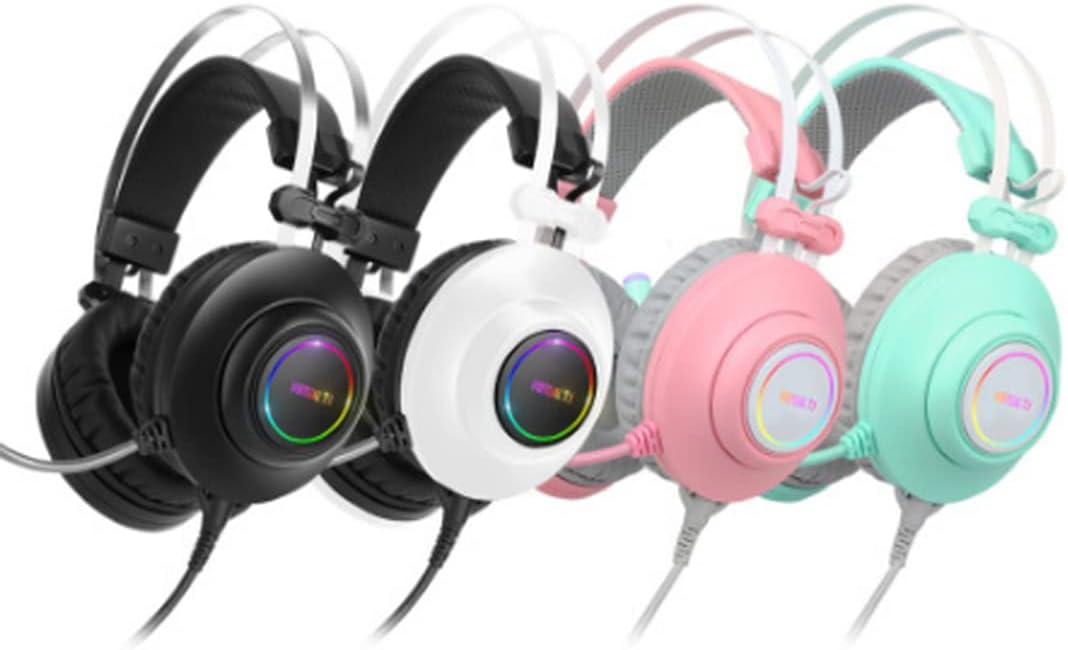
Image 1.1: The ABKO Hacker N550 Gaming Headset, available in various colors including black, white, pink, and mint, showcasing its design and RGB lighting on the earcups.
2. Pakkens indhold
Bekræft at alle varer er til stede i pakken:
- ABKO Hacker N550 Virtual 7.1 RGB Gaming Headset
- USB-kabel (integreret)
- Brugervejledning (dette dokument)
3. Nøglefunktioner
- Virtuel 7.1 Surround Sound: Experience immersive audio environments.
- ENC Microphone Noise Cancellation: Ensures clear communication by reducing background noise.
- 50 mm lyddrivere: Delivers powerful and precise sound.
- RGB LED belysning: Customizable lighting effects on the earcups.
- 3D Sound Effect: Enhances spatial audio perception.
- Specialized Software Support: Allows for advanced customization and control.
- Fleksibel mikrofon: Justerbar for optimal stemmeoptagelse.
- Comfortable Lightweight Design: Designet til længere tids brug.
- Vibrationseffekt: Provides tactile feedback for enhanced immersion.
- Multi-Controller: Convenient access to audio adjustments.
Video 3.1: En overview of the ABKO N550 Gaming Headset, highlighting its key features such as virtual 7.1 surround sound, 50mm drivers, noise cancellation, and RGB lighting.
4. Opsætningsvejledning
- Tilslut headsettet: Plug the USB connector of the ABKO Hacker N550 headset into an available USB port on your computer or gaming console.
- Driver Installation (Windows/macOS): For Windows and macOS, the necessary drivers should install automatically. If not, please visit the official ABKO webwebsted for download af drivere.
- Software installation: To unlock full features like Virtual 7.1, RGB customization, and 3D sound effects, download and install the specialized ABKO N550 software from the official ABKO webwebsted.
- Konfiguration af lydudgang: After connecting, ensure the ABKO N550 headset is selected as the default audio output and input device in your operating system's sound settings.

Image 4.1: The ABKO N550 headset displayed alongside its specialized software interface, illustrating the customization options available for audio and lighting settings.
5. Betjeningsvejledning
5.1. Basic Audio Control
- Lydstyrkejustering: Use the volume roller or buttons on the headset's multi-controller to adjust the master volume.
- Mikrofon mute: A dedicated button on the multi-controller allows you to mute or unmute the microphone. An indicator light may show the microphone status.
5.2. Advanced Features (via Software)
Once the ABKO N550 software is installed, you can access the following:
- Virtuel 7.1 Surround Sound: Activate or deactivate virtual 7.1 surround sound for positional audio.
- Equalizer-indstillinger: Tilpas lydprofiles for different game genres or media types.
- RGB-lysstyring: Change colors, patterns, and brightness of the RGB LEDs.
- Vibrationseffekt: Adjust the intensity or toggle the vibration feature.
- Mikrofonindstillinger: Fine-tune microphone sensitivity and noise cancellation levels.

Image 5.1: The ABKO N550 headset in pink, highlighting its comfortable earcups and flexible microphone, designed for extended gaming sessions.
6. Vedligeholdelse
- Rensning: Brug en blød, tør klud til at tørre headsettet af. For ørekopper, en let tør kludamp En klud kan bruges, men sørg for, at der ikke trænger fugt ind i højttalergitrene.
- Opbevaring: Opbevar headsettet et køligt, tørt sted væk fra direkte sollys og ekstreme temperaturer.
- Kabelpleje: Undgå skarpe bøjninger eller for meget træk i USB-kablet for at forhindre skader.
7. Fejlfinding
| Problem | Mulig årsag | Løsning |
|---|---|---|
| Ingen lyd fra headsettet | Incorrect audio output selected; Volume too low; Loose USB connection. | Check OS sound settings; Increase volume; Reconnect USB cable. |
| Mikrofon virker ikke | Microphone muted; Incorrect audio input selected; Software settings. | Unmute microphone; Check OS sound settings for input device; Adjust mic settings in ABKO software. |
| RGB-lys virker ikke | Software not installed or configured; USB power issue. | Install/configure ABKO software; Try a different USB port. |
| Vibration effect not active | Feature disabled in software; Content does not support vibration. | Enable vibration in ABKO software; Test with compatible media. |
8. Specifikationer
| Feature | Detalje |
|---|---|
| Modelnavn | N550 |
| Mærke | ABKO |
| Forbindelsesteknologi | Kablet (USB) |
| Hovedtelefonstik | USB |
| Audio driver type | Dynamisk Driver |
| Audio driver størrelse | 50 mm |
| Øreplacering | Over Ear |
| Formfaktor | Over Ear |
| Støjkontrol | Active Noise Cancellation (ENC for Mic) |
| Særlige funktioner | Lightweight, Noise Cancellation, Virtual 7.1, RGB LED, Vibration Effect |
| Kompatible enheder | Devices with USB audio output (computers, laptops, gaming consoles) |
| UPC | 639015035044 |
9. Garanti og support
ABKO products are manufactured to high quality standards. For information regarding warranty coverage, technical support, or service inquiries, please refer to the warranty card included with your product or visit the official ABKO webwebsted.
Official ABKO Webwebsted: www.abko.co.kr


