
SabineTek S610
SabineTek SmartMike+ S610 Wireless Bluetooth Microphone User Manual
Model: S610
1. Introduktion
This manual provides instructions for the proper use and maintenance of your SabineTek SmartMike+ S610 wireless Bluetooth microphone. Please read this manual thoroughly before operating the device to ensure optimal performance and longevity.
2. Pakkens indhold
Bekræft at alle varer er til stede i din pakke:
- SabineTek SmartMike+ S610 Wireless Bluetooth Microphone
- Ladekabel
3. Produktet er slutview
The SabineTek SmartMike+ S610 is an ultra-compact, lightweight (approximately 15.6g) wireless lavalier microphone designed for audio and video recording. It features Bluetooth 5.0 connectivity and multi-level noise cancellation.
3.1. Enhedskomponenter

Figur 1: eksploderede view of the SmartMike+ S610, showing the Qualcomm 5.0 chip, Apple MFi certification, power button, charging port, 3.5mm jack, and both unidirectional and non-directional microphone elements.
- Mikrofonelement: Captures audio. The device includes both unidirectional and non-directional microphone options.
- Power knap: Bruges til at tænde/slukke enheden og starte parring.
- Opladningsport: Til tilslutning af ladekablet.
- 3.5 mm jack: For connecting an external lavalier microphone or headphones for monitoring.
- Klip: Allows easy attachment to clothing.
3.2. Nøglefunktioner
- Trådløs forbindelse: Bluetooth 5.0 for stable connection up to 50 feet.
- Støjreduktion: Advanced multi-level noise cancellation algorithm to reduce environmental sounds.
- Portabilitet: Ultra-compact and lightweight design (15.6g) for easy clipping and transport.
- Batterilevetid: Integrated 110mAh lithium battery provides over 6 hours of operation on a full charge.
- App-integration: Designed to work with the SmartMike+ app for enhanced functionality.

Figur 2: Visual representation of algorithmic noise reduction, showing sound wave changes before and after processing.
4. Opsætning
4.1. Opladning af mikrofonen
- Connect the provided charging cable to the charging port on the SmartMike+ S610.
- Tilslut den anden ende af kablet til en USB-strømkilde (f.eks. computer, vægadapter).
- The indicator light will show charging status. A full charge typically takes approximately 1 hour.
4.2. Downloading the SmartMike+ App
The SmartMike+ S610 is designed to function optimally with the dedicated SmartMike+ application. Søg efter "SmartMike+" in your device's app store (Apple App Store for iOS, Google Play Store for Android). Note: App availability and functionality may vary by region and operating system version. It is recommended to verify app availability before purchase.
4.3. Parring med din smartphone
- Ensure the SmartMike+ S610 is charged.
- Press and hold the power button on the microphone until the indicator light flashes, indicating pairing mode.
- Aktiver Bluetooth på din smartphone.
- Open the SmartMike+ app. The app should detect the microphone and guide you through the pairing process.
- Bekræft parringsanmodningen på din smartphone.
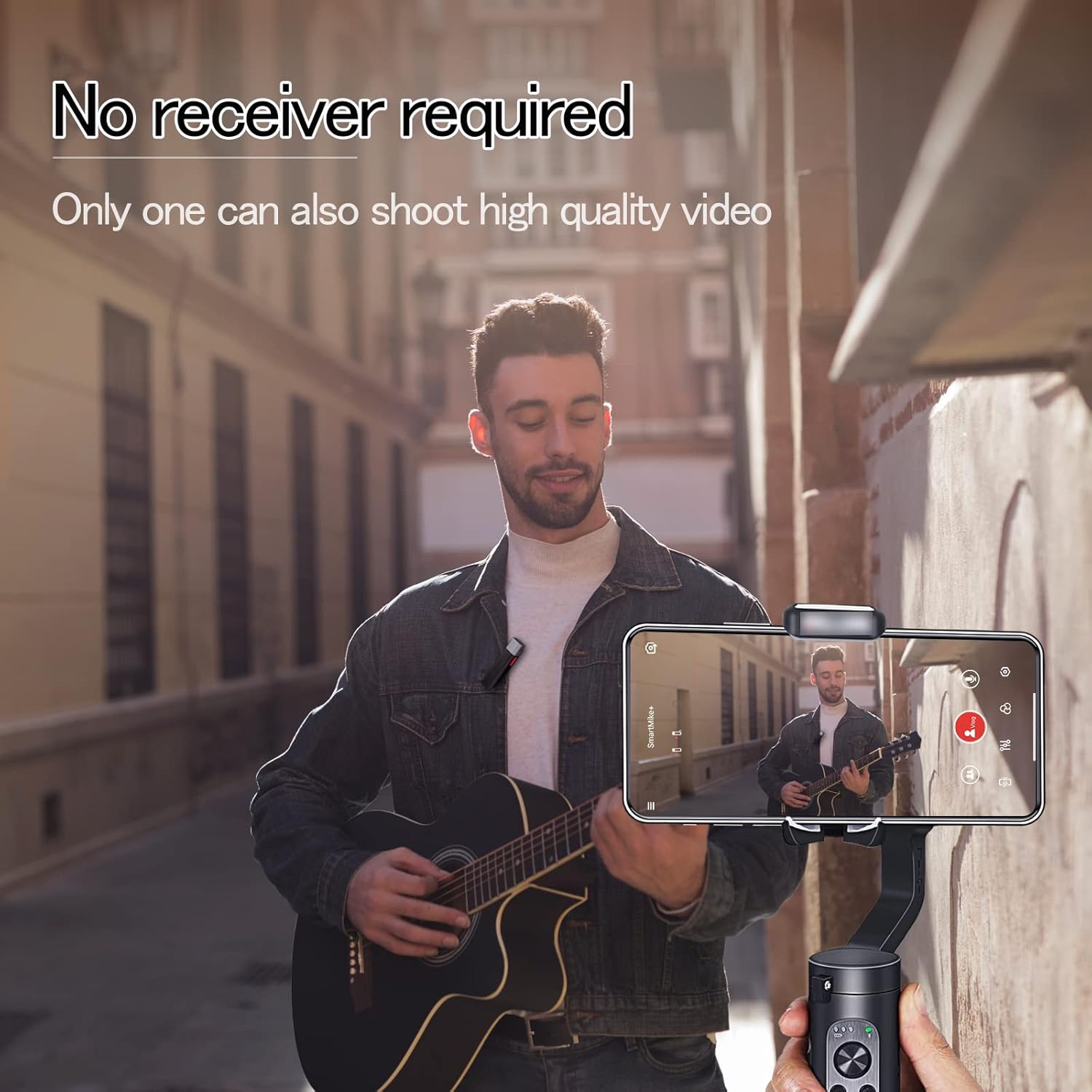
Figur 3: The SmartMike+ S610 clipped to clothing, recording audio directly to a smartphone without a separate receiver.
5. Betjening
5.1. Basic Audio Recording
- Once paired, open the SmartMike+ app.
- Select the desired recording mode (audio or video).
- Ensure the microphone is properly clipped to your collar or clothing, positioned for optimal sound capture.
- Press the record button within the app to begin recording.
- Tryk på optageknappen igen for at stoppe optagelsen.
5.2. Using App Features
The SmartMike+ app provides several features to enhance your recording experience:
- Støjreduktion: Adjust the multi-level noise cancellation settings within the app to minimize background noise.
- Teleprompter: The app includes a teleprompter function where text can be auto-scrolled, and speed, color, and size are adjustable.
- Audio Filters: Apply various audio filters to customize your sound.
- Overvågning: Use the 3.5mm jack to connect headphones for real-time audio monitoring during recording.
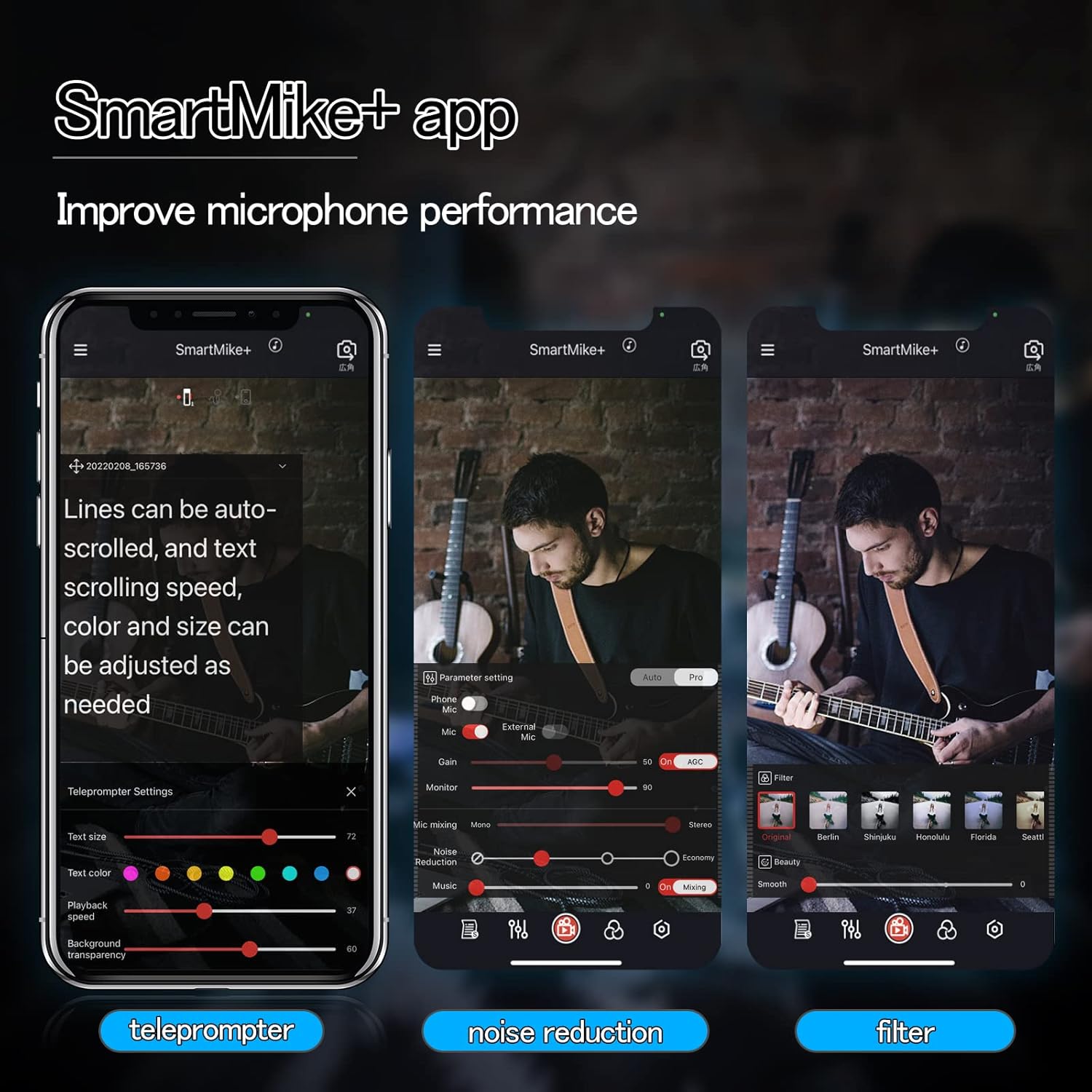
Figur 4: SmartMike+ app interface displaying teleprompter, noise reduction, and audio filter settings.
5.3. Using with Other Devices
While primarily designed for smartphone use with the SmartMike+ app, some users have reported success in pairing two SmartMike+ units to enable broader compatibility with other recording devices such as DSLRs or GoPros that accept a microphone input. This advanced setup may require specific configurations not detailed in this manual.
6. Vedligeholdelse
- Rensning: Brug en blød, tør klud til at rengøre mikrofonens yderside. Brug ikke flydende rengøringsmidler eller opløsningsmidler.
- Opbevaring: Opbevar mikrofonen et køligt, tørt sted væk fra direkte sollys og ekstreme temperaturer.
- Batteripleje: For at forlænge batteriets levetid bør du undgå at aflade enheden helt ofte. Oplad den regelmæssigt, selvom den ikke er i brug i længere perioder.
- Undgå fugt: Do not expose the microphone to water or high humidity.
7. Fejlfinding
7.1. Microphone Not Pairing
- Sørg for, at mikrofonen er opladet og tændt.
- Bekræft, at Bluetooth er aktiveret på din smartphone.
- Restart both the microphone and your smartphone.
- Try resetting the microphone (if a reset option is available, refer to manufacturer's webwebsted for specifikke instruktioner).
7.2. Dårlig lydkvalitet
- Check microphone placement; ensure it is not obstructed and is close enough to the sound source.
- Adjust noise reduction settings in the SmartMike+ app.
- Sørg for, at der ikke er stærke elektromagnetiske forstyrrelser i nærheden.
- Confirm the microphone is fully charged. Low battery can affect performance.
7.3. SmartMike+ App Issues
- App Not Found/Working: Some users have reported issues with the SmartMike+ app availability or functionality on certain app stores (e.g., Apple App Store, Google Play Store) or with specific operating system versions. Verify the app's current status and compatibility with your device's operating system.
- App nedbrud/fryser: Try restarting the app or reinstalling it. Ensure your smartphone's operating system is up to date.
- Microphone Not Recognized by App: Ensure the microphone is paired via Bluetooth before opening the app.
8. Specifikationer
| Feature | Detalje |
|---|---|
| Modelnavn | S610 |
| Mærke | SabineTek |
| Forbindelsesteknologi | Bluetooth 5.0 |
| Mikrofon formfaktor | Lavalier |
| Polar mønster | Omnidirektionel |
| Audio Følsomhed | 110 decibel |
| Signal-støjforhold | 70 dB |
| Varens vægt | 0.52 ounces (ca. 14.7 g) |
| Produktmål (L x B x H) | 2.36 x 0.39 x 0.39 tommer |
| Strømkilde | Battery Powered, Lithium Battery |
| Batteritype | 1 Lithium Polymer batteri (medfølger) |
| Kompatible enheder | Smartphone, Camera, Tablet |
| Materiale | Metal |
| Farve | Hvid |
| Anbefalede anvendelser | Streaming medier |
9. Garanti og support
For warranty information and technical support, please refer to the official SabineTek webwebstedet eller kontakt deres kundeservice direkte. Gem din købskvittering som købsbevis i tilfælde af garantikrav.
For yderligere hjælp, besøg: SabineTek Official Store
Relaterede dokumenter - S610
 |
Hohem MIC-01 Trådløs Lavalier Mikrofon Brugermanual V1.0 Brugermanual til Hohem MIC-01 trådløs lavaliermikrofon med detaljerede oplysninger om produktfunktioner, opsætning, betjening, specifikationer og garantioplysninger. Indeholder instruktioner til sendere, modtagere, opladning, parring, støjreduktion og mere. |
 |
Zebronics ZEB-WAVLET 50 trådløs mikrofon brugermanual: Funktioner, specifikationer og opsætningsvejledning Få detaljerede oplysninger om Zebronics ZEB-WAVLET 50 trådløse lavaliermikrofonsystem. Denne brugermanual dækker opsætning, funktioner, tekniske specifikationer, knapfunktioner og opladningsinstruktioner for optimal lydoptagelse. |
 |
Grenaro trådløs mikrofon brugermanual - S11-Pro & S13-Pro Brugermanual til trådløse mikrofoner Grenaro S11-Pro (enkeltkanal) og S13-Pro (dobbeltkanal). Indeholder oplysninger om opsætning, betjening og funktioner til professionel lydoptagelse, vlogging og livestreaming. Plug-and-play-funktionalitet. |
 |
USB Microphone User Manual User manual and safety instructions for the USB Microphone, covering setup, maintenance, and usage guidelines. |
 |
PQRQP GT16 trådløs lavaliermikrofon brugermanual Brugermanual til PQRQP GT16 trådløst lavaliermikrofonsystem, med detaljer om produktets funktioner, opsætning, betjening, specifikationer og emballage. |
 |
BSLIUFANG 4-in-1 Wireless Lavalier Microphone Instructions User guide for the BSLIUFANG 4-in-1 wireless lavalier microphone, detailing features, charging specifications, and device compatibility. |
Ask a question about this manual
Ask about setup, troubleshooting, compatibility, parts, safety, or missing instructions. Manuals+ will review the question and use this page’s manual context to help answer it.