1. Introduktion
The Pure Elan Connect is a versatile portable radio offering a wide range of listening options including DAB+, FM, and Internet Radio. It features Bluetooth 5.0 connectivity for streaming audio from external devices, a clear TFT color display, and can be powered by mains or batteries for portability. This manual provides detailed instructions for setting up, operating, and maintaining your Elan Connect radio.
2. Sikkerhedsoplysninger
- Udsæt ikke enheden for regn eller fugt for at forhindre brand eller elektrisk stød.
- Sørg for tilstrækkelig ventilation. Bloker ikke ventilationsåbningerne.
- Use only power adapters specified by the manufacturer. The unit does not include a power adapter; use a standard USB charger (5V, 0.5A to 2A output).
- Forsøg ikke at skille enheden ad eller ændre den. Overlad al service til kvalificeret personale.
- Holdes væk fra direkte sollys, varmekilder og stærke magnetfelter.
- When using batteries, ensure they are inserted with correct polarity. Remove batteries if the unit will not be used for a long period.
- Bortskaf batterier ansvarligt i henhold til lokale regler.
3. Pakkens indhold
Kontroller venligst, at alle varer er til stede:
- Pure Elan Connect Radio
- USB Charging Cable (Power adapter not included)
- Brugervejledning (dette dokument)
4. Produktet er slutview
Familiarize yourself with the main components of your Pure Elan Connect radio.
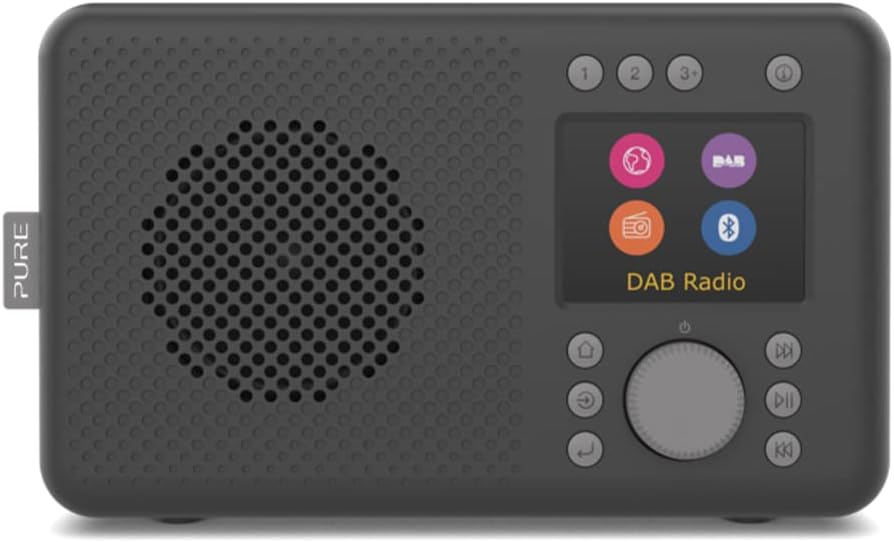
Figur 4.1: Front view of the Pure Elan Connect radio in Charcoal Black. It features a speaker grille on the left, a color TFT display on the right, and control buttons and a rotary dial below the display.

Figur 4.2: Bag view of the Pure Elan Connect radio. It shows the extendable telescopic antenna, a battery compartment cover, a 3.5mm headphone jack, and a micro USB power input port.

Figur 4.3: Dimensions of the Pure Elan Connect radio. The radio measures approximately 21.2 cm in length, 8.9 cm in width, and 12 cm in height.
5. Opsætning
5.1 Tænd
The Elan Connect can be powered using the supplied USB cable connected to a USB power adapter (not included) or by inserting 4 AA batteries (not included) into the battery compartment on the rear of the unit.
- Netstrøm: Connect the micro USB end of the cable to the 'Input 5V 2.0A' port on the back of the radio and the other end to a suitable USB power adapter. Plug the adapter into a wall socket.
- Batteristrøm: Open the battery compartment cover on the rear. Insert 4 AA batteries, ensuring correct polarity. Close the cover securely.
5.2 Guide til indledende opsætning
The first time you power on the radio, it will guide you through an initial setup wizard.
- Sprogvalg: Use the rotary dial to scroll through the available languages and press the dial to confirm your selection.
- Network Setup (for Internet Radio): The radio will prompt you to connect to a Wi-Fi network.
- Select 'Scan' to find available networks.
- Vælg dit Wi-Fi-netværk fra listen.
- Enter the Wi-Fi password using the rotary dial to navigate characters and press to select.
- Once connected, the radio will confirm the connection.
- Tid og dato: The radio can automatically set the time and date via DAB or Internet connection. You can also set it manually.
6. Betjeningsvejledning
Video 6.1: This video demonstrates the physical overview of the Pure Elan Connect radio, including its compact size, the extendable antenna, and the basic interaction with the rotary dial and display for selecting modes and adjusting volume.
6.1 Skift mellem tilstande
The Elan Connect supports multiple listening modes: Internet Radio, DAB+, FM, and Bluetooth. Press the 'Mode' button (usually labeled with a house icon or 'Menu') to cycle through the available modes or access the main menu to select your desired source.
6.2 Internetradio
Access thousands of internet radio stations from around the world.
- Select 'Internet Radio' from the mode menu.
- Du kan søge efter stationer efter placering, genre eller søge efter bestemte stationer.
- Use the rotary dial to navigate and select stations.
- To save a station as a preset, press and hold one of the preset buttons (1, 2, 3+) until the display confirms the save.
6.3 DAB+ radio
Nyd digitale radioudsendelser i høj kvalitet.
- Træk teleskopantennen helt ud for optimal modtagelse.
- Select 'DAB+' from the mode menu.
- Radioen scanner automatisk efter tilgængelige DAB+-stationer.
- Use the rotary dial to browse and select stations.
- Save stations to presets as described for Internet Radio.
6.4 FM radio
Tune into traditional FM broadcasts.
- Træk teleskopantennen helt ud.
- Select 'FM' from the mode menu.
- Use the rotary dial to manually tune or press the 'Scan' button to auto-scan for stations.
- Save stations to presets as described previously.
6.5 Bluetooth-forbindelse
Stream audio wirelessly from your smartphone, tablet, or other Bluetooth-enabled device.
- Select 'Bluetooth' from the mode menu. The radio will enter pairing mode and become discoverable.
- On your external device, enable Bluetooth and search for 'Pure Elan Connect'.
- Select the radio from the list to pair. Once paired, you can play audio through the radio's speaker.
6.6 Brug af forudindstillinger
The Elan Connect allows you to save up to 20 presets for each source (DAB+, FM, Internet Radio).
- Gem en forudindstilling: While listening to a station, press and hold one of the numbered preset buttons (1, 2, or 3+). If you press 3+, the display will show a list of available preset slots (3-20). Use the rotary dial to select a slot and press to confirm.
- Genkaldelse af en forudindstilling: Briefly press the corresponding numbered preset button (1, 2, or 3+). If you press 3+, use the rotary dial to select the desired preset from the list and press to confirm.
6.7 Display and Volume Control
- Bind: Rotate the main dial to adjust the volume level.
- Skærmens lysstyrke: Navigate to 'System Settings' > 'Display' to adjust the brightness level of the TFT color display.
7. Vedligeholdelse
- Rensning: Brug en blød, tør klud til at rengøre radioens overflade. Brug ikke slibende rengøringsmidler eller opløsningsmidler.
- Antenne: Håndter teleskopantennen forsigtigt for at undgå at den bøjer eller knækker.
- Softwareopdateringer: The radio supports over-the-air software updates. Check for updates periodically via 'System Settings' > 'Software Update' to ensure optimal performance and access to new features.
8. Fejlfinding
| Problem | Mulig årsag/løsning |
|---|---|
| Ingen strøm / Enheden tænder ikke. |
|
| Ingen lyd. |
|
| Poor DAB+/FM reception. |
|
| Cannot connect to Wi-Fi / Internet Radio not working. |
|
| Problemer med Bluetooth-parring. |
|
9. Specifikationer
| Feature | Specifikation |
|---|---|
| Modelnummer | 248482 |
| Dimensioner (L x B x H) | 21.2 x 8.9 x 12 cm |
| Vægt | 460 gram |
| Radio Tuners | DAB+, FM, internetradio |
| Bluetooth version | 5.0 |
| Vise | 2.4-tommer TFT-farveskærm |
| Forudindstillinger | 20 per source (DAB+, FM, Internet Radio) |
| Lydudgang | Integreret højttaler, 3.5 mm hovedtelefonstik |
| Strømkilde | Micro USB (5V, 0.5A-2A), 4x AA Batteries |
10. Garanti og support
Pure products are designed and manufactured to the highest standards. For warranty information and technical support, please refer to the official Pure webwebstedet eller kontakt din lokale forhandler.
Official Pure Webwebsted: www.pure.com
Gem venligst dit købsbevis for garantikrav.


