1. Introduktion
Thank you for choosing the ERAY Rechargeable LED Torch. This manual provides essential information for the safe and effective operation, maintenance, and troubleshooting of your device. Please read it thoroughly before use and retain it for future reference.

Image: The ERAY Rechargeable LED Torch, a powerful and versatile lighting device.
2. Produktet er slutview
2.1 Nøglefunktioner
- 6 lystilstande: Features front light with 3 brightness levels (High-Low-SOS) and side flood light with 3 brightness levels (High-Low-Red & Blue Flash Light) for diverse lighting needs.
- Batteri med høj kapacitet: Equipped with a 10800mAh rechargeable battery, providing up to 10 hours of continuous use in high brightness mode.
- USB-udgang: Functions as a power bank with a USB output port to charge mobile devices in emergency situations.
- Humaniseret design: Includes a comfortable handle and a detachable shoulder strap for easy portability. Can be mounted on a tripod or bicycle holder for hands-free operation.
- Holdbar og vandtæt: Constructed from high-quality metal alloy and ABS material, offering skid-proof, explosion-proof, and shockproof properties. IPX4 waterproof rating ensures reliability in outdoor environments.
- Long Irradiation Distance: Provides long-range visibility with an irradiation distance of up to 2600 feet (800m).
- Alsidig brug: Ideal for outdoor camping, hiking, fishing, walking, car inspection, and emergency situations.
2.2 Pakkens indhold
Kontroller venligst pakken for at sikre, at alle varer er til stede:
- 1x ERAY Rechargeable LED Torch Lantern
- 1 x USB-kabel
- 1x skulderrem
- 1x brugermanual

Image: The ERAY LED Torch, USB cable, and shoulder strap included in the package.
2.3 Produktdiagram
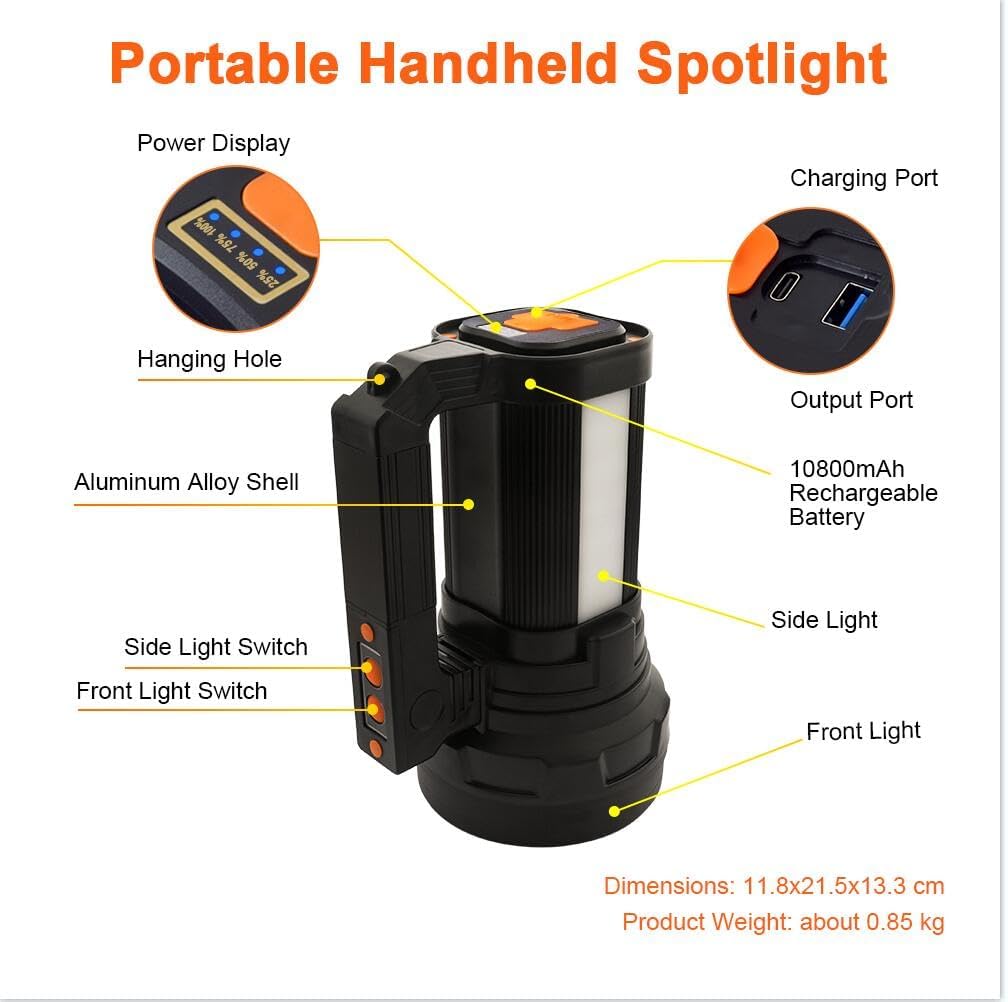
Image: Labeled diagram of the ERAY LED Torch showing components like Power Display, Charging Port, Output Port, Hanging Hole, Aluminum Alloy Shell, Side Light Switch, Front Light Switch, Side Light, and Front Light.
Familiarize yourself with the components:
- Power Display: Angiver den resterende batteriprocenttage.
- Opladningsport: For recharging the torch.
- Output Port (USB): Til opladning af eksterne enheder.
- Hængende hul: For attaching to a hook or tripod.
- Skal af aluminiumslegering: Holdbart ydre casing.
- Side Light Switch: Controls the side floodlight modes.
- Front Light Switch: Controls the main spotlight modes.
- Sidelys: Provides wide-angle illumination.
- Forlygte: Provides focused, long-distance illumination.
3. Opsætning
3.1 Indledende opladning
Before first use, fully charge the ERAY LED Torch. This ensures optimal battery performance and longevity.
- Locate the Charging Port on the device.
- Connect the provided USB cable to the Charging Port and plug the other end into a compatible USB power adapter (not included) or a computer USB port.
- The Power Display will show the charging progress (25%, 50%, 75%, 100%).
- Once the display shows 100%, the torch is fully charged. Disconnect the cable.

Image: The ERAY LED Torch connected via USB cable for charging, with a mobile phone also charging from its USB output, demonstrating its power bank function.
4. Betjeningsvejledning
4.1 lystilstande
The ERAY LED Torch offers 6 distinct lighting modes, controlled by separate switches for the front and side lights.
Front Light Modes (Spotlight)
Brug Forlygtekontakt to cycle through these modes:
- Høj lysstyrke: For maximum illumination and long-distance visibility.
- Lav lysstyrke: For energy saving or closer range tasks.
- SOS Flash-tilstand: Til nødsignalering.

Image: Illustration showing the three front light modes: High Brightness, Low Brightness, and SOS Flash Mode, with estimated lighting times.
Side Floodlight Modes
Brug Side Light Switch to cycle through these modes:
- Høj lysstyrke: For wide-area illumination.
- Lav lysstyrke: For ambient lighting or extended use.
- Red & Blue Flash Light: For emergency warning or signaling.

Image: Illustration showing the three side light modes: High Brightness, Low Brightness, and Emergency Light (Red & Blue Flash), with estimated lighting times.
4.2 Powerbankens funktion
The ERAY LED Torch can serve as a portable power bank to charge your mobile devices.
- Locate the USB Output Port on the bottom of the torch.
- Connect your device's charging cable to the USB Output Port.
- The torch will begin charging your device.
- Monitor your device's charging status. Disconnect once charging is complete or if the torch's battery is low.
5. Vedligeholdelse
5.1 Rengøring
- Wipe the torch with a soft, damp klæde. Brug ikke slibende rengøringsmidler eller opløsningsmidler.
- Ensure the charging and output ports are free from dust and debris.
5.2 Opbevaring
- Store the torch in a cool, dry place away from direct sunlight and extreme temperatures.
- If storing for extended periods, charge the battery to approximately 50% every 3-6 months to maintain battery health.
5.3 Pleje af batterier
- Undgå at aflade batteriet helt ofte.
- Udsæt ikke batteriet for ild eller høje temperaturer.
- Hvis batteriet ser beskadiget eller hævet ud, skal du straks stoppe med at bruge det og bortskaffe det korrekt i henhold til lokale regler.

Image: The ERAY LED Torch being splashed with water, demonstrating its IPX4 waterproof rating.
6. Fejlfinding
If you encounter issues with your ERAY LED Torch, please refer to the table below for common problems and solutions.
| Problem | Mulig årsag | Løsning |
|---|---|---|
| Torch does not turn on | Low battery; Switch malfunction | Charge the torch fully; Ensure switches are pressed firmly. |
| Lyset er svagt eller flimrer | Low battery; LED issue | Recharge the torch; If problem persists, contact customer support. |
| Torch not charging | Faulty cable/adapter; Dirty charging port | Try a different USB cable and adapter; Clean the charging port gently. |
| Powerbank-funktionen virker ikke | Torch battery too low; Device cable issue | Ensure torch has sufficient charge; Try a different charging cable for your device. |
7. Specifikationer
| Feature | Detalje |
|---|---|
| Mærke | ERAY |
| Modelnummer | E135 |
| Produktdimensioner | 23 x 16 x 13.3 cm |
| Varens vægt | 890 g |
| Batterikapacitet | 10800mAh litium-ion (inkluderet) |
| Lyskildetype | LED |
| Lysstrøm | 13000 Lumen |
| Bestrålingsafstand | Op til 800 meter (2600 fod) |
| Vandtæt vurdering | IPX4 |
| Materiale | Metal Alloy and ABS |
| Voltage | 5 volt |
8. Garanti og support
ERAY products are manufactured to high-quality standards. For information regarding warranty coverage, please refer to the warranty card included with your purchase or contact the retailer where you purchased the product. If you require technical assistance or have questions not covered in this manual, please contact ERAY customer support through the official webwebsted eller din købsplatform.


