Indledning
The Cisco Business CBS250-48T-4X Smart Switch is designed to provide powerful network performance, security, and reliability for small business networks. This smart switch combines essential network features with ease of management, making it an ideal solution for expanding your network infrastructure.
Nøglefunktioner omfatter:
- 48 Gigabit Ethernet-porte: Giver ample connectivity for numerous devices.
- 4 x 10GE SFP+ Uplink Ports: Offers high-speed fiber connectivity for network backbone or server connections.
- Forenklet styring: Intuitive Cisco Business Dashboard or on-box User Interface for easy network operations and lifecycle management.
- Forbedret sikkerhed: Features IEEE 802.1X port security, Denial-of-Service (DoS) attack prevention, and extensive Access Control Lists (ACLs) to protect your network.
- Kompakt design: An elegant and compact form factor suitable for various installation environments, including retail stores, offices, and classrooms.
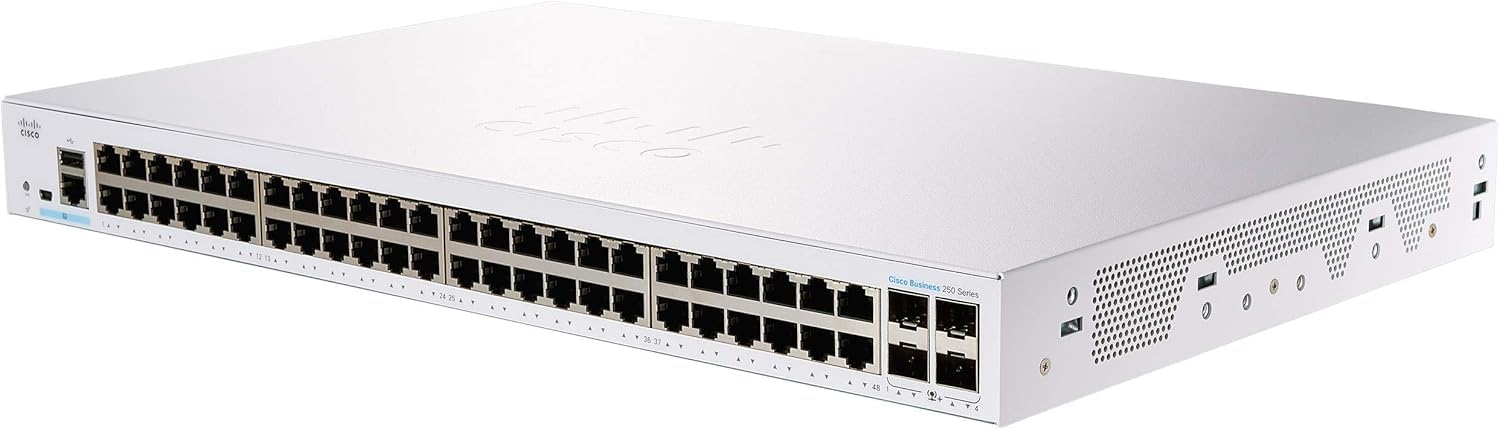
Billede: Forside view of the Cisco Business CBS250-48T-4X Smart Switch, showing the 48 Gigabit Ethernet ports and 4 SFP+ uplink ports. The device is white with the Cisco logo on the top and front.
Opsætning
This section outlines the basic steps for setting up your Cisco Business CBS250-48T-4X Smart Switch. For detailed instructions, refer to the official Quick Start Guide and User Manual.
Pakkens indhold
Sørg for, at alle komponenter er til stede i pakken:
- Cisco Business CBS250-48T-4X Smart Switch
- Netledning eller adapter
- Monteringsudstyr (til rack- eller vægmontering)
- Hurtig startvejledning
Installationstrin
- Fysisk placering: Choose a suitable location for the switch. Ensure adequate ventilation and maintain proper operating temperature (up to 40 degrees Celsius). The compact design allows for flexible placement.
- Montering: Use the provided mounting hardware to install the switch in a rack, on a wall, or place it on a desktop.
- Strømtilslutning: Tilslut netledningen til afbryderen og derefter til en jordforbundet stikkontakt.
- Netværksforbindelser:
- Connect your network devices (computers, servers, access points) to the 48 Gigabit Ethernet ports using standard Ethernet cables.
- For high-speed uplinks or connections to other network segments, use SFP+ transceivers and fiber optic cables in the 4 x 10GE SFP+ ports.
- Indledende konfiguration: The switch can be configured via its on-box User Interface (Web UI) or through the Cisco Business Dashboard. Refer to the Quick Start Guide for initial access details (e.g., default IP address).
For advanced setup and network integration, consult the comprehensive Cisco Business 250 Series Smart Switch User Guide (PDF).
Betjening af kontakten
Once installed and configured, the Cisco Business CBS250-48T-4X Smart Switch operates as a central component of your network, facilitating data flow between connected devices.
Netværksforbindelse
- Ethernet-porte: The 48 Gigabit Ethernet ports automatically detect the speed and duplex mode of connected devices (10/100/1000 Mbps).
- SFP+ porte: The 10 Gigabit SFP+ ports support various SFP+ transceivers for fiber optic connections, enabling high-bandwidth uplinks to core network devices or servers.
Management interface
The switch can be managed through its web-based graphical user interface (GUI) or via the Cisco Business Dashboard. These interfaces allow you to:
- Monitor port status and network traffic.
- Konfigurer VLAN'er til netværkssegmentering.
- Implement Quality of Service (QoS) to prioritize critical traffic.
- Manage security features like 802.1X and ACLs.
- Opdater firmware.
Sikkerhedsfunktioner
The switch incorporates several security features to protect your network:
- IEEE 802.1X Port Security: Authenticates devices connecting to the network, preventing unauthorized access.
- Denial-of-Service (DoS) Attack Prevention: Helps protect the network from common DoS attacks, ensuring network uptime.
- Adgangskontrollister (ACL'er): Allows granular control over network traffic, filtering packets based on various criteria to enhance security and prevent unauthorized access.
Opretholdelse
Proper maintenance ensures the longevity and optimal performance of your Cisco Business CBS250-48T-4X Smart Switch.
- Miljøforhold: Ensure the switch is operated within its specified temperature and humidity ranges. Avoid placing it in direct sunlight or near heat sources.
- Ventilation: Do not obstruct the ventilation openings on the switch. Ensure adequate airflow around the device to prevent overheating.
- Rensning: Rengør regelmæssigt ydersiden af kontakten med en blød, tør klud. Brug ikke flydende rengøringsmidler eller rengøringsmidler på sprayform.
- Firmwareopdateringer: Tjek regelmæssigt Cisco-supporten website for firmware updates. Applying the latest firmware can improve performance, add new features, and address security vulnerabilities.
- Kabelstyring: Hold netværkskablerne organiseret og korrekt fastgjort for at forhindre utilsigtede afbrydelser eller beskadigelse.
Fejlfinding
This section provides basic troubleshooting steps for common issues. For more complex problems, refer to the official user manual or contact Cisco support.
Ingen strøm
- Kontroller, at netledningen er korrekt tilsluttet til afbryderen og stikkontakten.
- Kontroller om stikkontakten fungerer ved at tilslutte en anden enhed.
- Ensure the power switch (if present) is in the ON position.
Ingen netværksforbindelse
- Check the Ethernet cables connecting devices to the switch ports. Ensure they are properly seated and not damaged.
- Observe the link/activity LEDs on the switch ports. A solid green or amber light typically indicates a valid link, while blinking indicates activity. No light suggests a cable or device issue.
- Verify the network settings (IP address, subnet mask, gateway) on the connected devices.
- If using SFP+ ports, ensure the correct transceivers are used and fiber optic cables are clean and properly connected.
- Få adgang til kontaktens web UI to check port status and configuration.
Langsom netværksydelse
- Check for excessive network traffic or broadcast storms using the switch's monitoring tools.
- Ensure all devices are operating at their optimal speed (e.g., Gigabit Ethernet for Gigabit ports).
- Verify duplex settings are consistent between the switch port and the connected device.
- Consider implementing QoS (Quality of Service) to prioritize critical applications.
Specifikationer
Detailed technical specifications for the Cisco Business CBS250-48T-4X Smart Switch:
| Feature | Specifikation |
|---|---|
| Modelnummer | CBS250-48T-4X |
| Switch Type | Smart Switch |
| Antal havne | 48 x 10/100/1000 Gigabit Ethernet, 4 x 10GE SFP+ |
| Interface Type | Ethernet, SFP+ |
| Dataoverførselshastighed | 88 Gigabit pr. sekund (switchingkapacitet) |
| Dimensioner (LxBxH) | 17.32 x 11.33 x 1.73 tommer |
| Varens vægt | 12.42 pund |
| Etui materiale | Metal |
| Øverste temperaturvurdering | 40 grader Celsius |
| Fabrikant | CISCO |
| UPC | 889728295116 |
| Første ledige dato | 7. oktober 2020 |
Garanti og support
The Cisco Business CBS250-48T-4X Smart Switch comes with Limited Lifetime Protection, hvilket giver ro i sindet omkring din investering.
For comprehensive support, including detailed documentation, software downloads, and technical assistance, please refer to the official Cisco resources:
- Officiel brugervejledning: Access the full Cisco Business 250 Series Smart Switch User Guide (PDF) for in-depth information on configuration, management, and advanced features.
- Cisco-support: Besøg embedsmanden Cisco-butik på Amazon eller den primære Cisco webwebsted for produktsupport, ofte stillede spørgsmål og kontaktoplysninger.
Always ensure you are consulting official Cisco documentation and support channels for the most accurate and up-to-date information.


