1. Introduktion
Tak for købetasing the LEMEGA MSY5 Music System. This device integrates a CD player, FM digital radio, internet radio, Spotify Connect, Bluetooth speaker, USB player, and alarm clock functions. This manual provides essential information for safe and efficient use of your new music system. Please read it thoroughly before operation and retain it for future reference.
2. Vigtige sikkerhedsoplysninger
Overhold følgende sikkerhedsforanstaltninger for at forhindre elektrisk stød, brand eller beskadigelse af enheden:
- Udsæt ikke dette apparat for regn eller fugt.
- Bloker ikke nogen ventilationsåbninger.
- Sørg for, at strømadapteren er let tilgængelig.
- Brug kun tilbehør/tilbehør specificeret af producenten.
- Træk stikket ud af apparatet under tordenvejr, eller når det ikke skal bruges i længere perioder.
- Overlad al service til kvalificeret servicepersonale.
3. Pakkens indhold
Bekræft at alle varer er til stede i pakken:
- LEMEGA MSY5 musiksystem
- Strømadapter
- Fjernbetjening
- Brugermanual (dette dokument)
4. Produktet er slutview
4.1 Frontpanel og betjeningselementer
The front panel features the display, CD slot, and primary control buttons/knobs for navigation and playback.
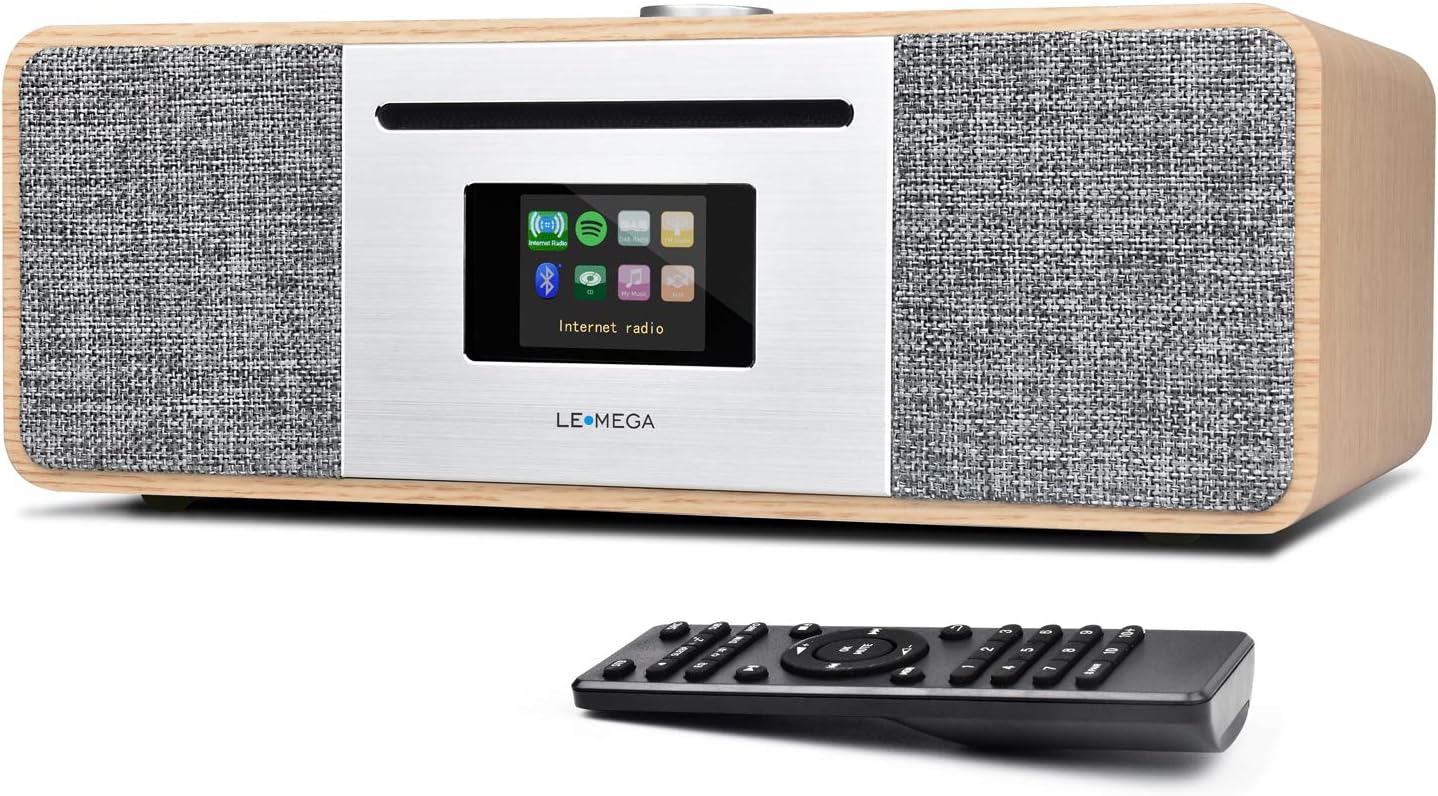
Billede: Forside view of the LEMEGA MSY5 Music System, showcasing the display, CD slot, and control knob, with the remote control positioned in front.
4.2 Bagpaneltilslutninger
The rear panel provides various ports for power, external audio input, USB devices, and the FM antenna.

Billede: Detaljeret view of the LEMEGA MSY5's rear panel, labeling connections for Mains Power, Aux Input, USB Charging, USB MP3, Headphone Output, and Antenna.
5. Indledende opsætning
5.1 Strømtilslutning
- Connect the supplied power adapter to the DC 12V/3A input port on the rear of the MSY5.
- Sæt strømadapteren i en stikkontakt.
5.2 Antenneopsætning
Træk teleskopantennen helt ud for optimal FM-radiomodtagelse.
5.3 First-Time Use Wizard
Upon first power-on, the system will guide you through initial settings:
- Sprogvalg: Vælg dit foretrukne sprog.
- Netværksopsætning: Connect to your Wi-Fi network for Internet Radio and Spotify Connect functionality. Select your network and enter the password.
- Tid og dato: Set the current time and date. This can often be synchronized automatically via the internet.
6. Betjeningsvejledning
6.1 Valg af tilstand
Use the 'Mode' button on the unit or remote control to switch between available sources: CD, Internet Radio, FM Radio, Bluetooth, USB, and Aux In.

Image: Graphic illustrating the MSY5 Music System's core features: CD Player, Internet Radio, Spotify, Bluetooth, and FM Radio.
6.2 CD-afspiller
- Vælg 'CD'-tilstand.
- Gently insert a CD into the slot until it is pulled in automatically.
- Playback will begin automatically. Use the Play/Pause, Skip Forward, and Skip Backward buttons for control.
- For at skubbe en CD ud, tryk på Eject-knappen.

Image: The LEMEGA MSY5 Music System on a table, highlighting its slot-in CD player and the included remote control.
6.3 Internet Radio & Spotify Connect
- Vælg tilstanden 'Internetradio'.
- Browse stations by location, genre, or search.
- To use Spotify Connect, ensure your MSY5 is connected to the same Wi-Fi network as your smartphone/tablet. Open the Spotify app, select a song, and choose your MSY5 as the playback device.

Image: The LEMEGA MSY5 Music System displaying an internet radio station on its screen, emphasizing its smart streaming capabilities.
6.4 FM Digital Radio
- Vælg 'FM'-tilstand.
- Perform an auto-scan to find available stations or tune manually.
- Gem dine yndlingsstationer som forudindstillinger for hurtig adgang.
6.5 Bluetooth -parring
- Select 'Bluetooth' mode on the MSY5. The display will show 'Pairing'.
- On your smartphone or tablet, enable Bluetooth and search for 'LEMEGA MSY5'.
- Select the device to pair. Once connected, you can stream audio from your device to the MSY5.

Image: A smartphone displaying a music app, wirelessly connected via Bluetooth to the LEMEGA MSY5 Music System, which is also shown charging a device via USB.
6.6 USB-afspilning og -opladning
- Indsæt et USB-drev, der indeholder MP3 files i USB-porten på bagpanelet.
- Select 'USB' mode. The system will automatically detect and play audio files.
- The USB port can also be used to charge compatible devices.
6.7 Hjælpeindgang
Connect an external audio device (e.g., an MP3 player) to the 'AUX IN' port on the rear panel using a 3.5mm audio cable. Select 'Aux In' mode to play audio from the connected device.
6.8 Clock and Alarms
The MSY5 features a clock and dual independent alarms. Access these settings through the system menu to set wake-up times, alarm sources (radio, CD, buzzer), and snooze duration.

Image: The LEMEGA MSY5 Music System on a bedside table, with a person sleeping in the background, illustrating its dual alarm clock and sleep/snooze functions.
6.9 Lydindstillinger
Customize your audio experience by adjusting Treble, Bass, and Loudness levels. You can also select from preset equalizer modes such as POP, Classic, Jazz, Rock, and Normal via the system menu.
7. Vedligeholdelse
7.1 Rengøring af enheden
Wipe the exterior of the MSY5 with a soft, dry cloth. Do not use abrasive cleaners or solvents. Ensure the unit is unplugged before cleaning.
7.2 CD-pleje
Handle CDs by their edges. Clean discs with a soft, lint-free cloth, wiping from the center outwards. Avoid touching the playing surface.
8. Fejlfinding
| Problem | Mulig årsag | Løsning |
|---|---|---|
| Ingen strøm | Strømadapteren er ikke tilsluttet; stikkontakten er ikke aktiv. | Kontrollér strømadapterens forbindelse; prøv en anden stikkontakt. |
| Ingen lyd | Lydstyrken er for lav; forkert kilde er valgt; hovedtelefoner er tilsluttet. | Increase volume; select correct input source; disconnect headphones. |
| Kan ikke oprette forbindelse til Wi-Fi | Forkert adgangskode; uden for rækkevidde; routerproblem. | Verify password; move unit closer to router; restart router. |
| CD'en afspiller ikke | CD inserted incorrectly; disc scratched/dirty; incompatible disc type. | Reinsert CD correctly; clean or replace disc; ensure it's a standard CD/CD-R/CD-RW. |
| Bluetooth-parring mislykkes | Device not in pairing mode; MSY5 not in Bluetooth mode; device too far. | Ensure both devices are in pairing mode; move devices closer. |
9. Specifikationer
- Model: MSY5
- Mærke: LEMEGA
- Pakkedimensioner: 16.5 x 12 x 9 tommer
- Varens vægt: 10.83 pund (4.92 kilo)
- Forbindelse teknologi: Auxiliary, Bluetooth, IR, USB, Wi-Fi
- Tuner teknologi: Internet Radio, FM
- Understøttede radiobånd: FM
- Særlige funktioner: Internet Radio, Spotify Connect, WiFi Connectivity, CD Player, USB Player, USB Charging, Clock Alarms, Remote & App Control
- Strømkilde: Elektrisk med ledning
- Inkluderede komponenter: Owner's Manual, Power Adapter
10. Garanti og support
LEMEGA products are designed and manufactured to the highest quality standards. For detailed warranty information and technical support, please refer to the warranty card included with your product or visit the official LEMEGA website. You may also contact LEMEGA customer service directly for assistance.
Online support: Visit the LEMEGA Store on Amazon


