Indledning
The Amazon Echo Show 5 (2nd Gen, 2021 release) is a smart display designed to simplify your daily routines and enhance your connected home experience. This certified refurbished device has been tested and certified to function like new, offering all the features of a new unit.
With Alexa built-in, you can manage your day, stay entertained, and connect with others using just your voice. The compact 5.5-inch screen provides visual feedback for alarms, timers, news, video calls, and more.

Image: The Echo Show 5 on a nightstand, illustrating its use as a smart display for time and daily information.
Opsætning
Setting up your Echo Show 5 is a straightforward process. The device is designed for simple setup, allowing you to connect to your Wi-Fi network with ease.
Hvad er der i æsken:
- Echo Show 5-enhed
- Glacier White power adapter (15W) with cable (4.9 ft.)
- Hurtig start guide
Indledende opsætningstrin:
- Tilslut: Connect the power adapter to your Echo Show 5 and plug it into a wall outlet.
- Følg instruktionerne på skærmen: The device will power on and guide you through the initial setup process on its touch screen.
- Opret forbindelse til Wi-Fi: Select your Wi-Fi network from the list and enter the password. The Echo Show 5 supports dual-band 802.11a/b/g/n/ac Wi-Fi networks.
- Log ind på Amazon-konto: Log in with your Amazon account credentials.
- Tilpas indstillinger: Customize settings such as time zone, device name, and privacy preferences.
- Download Alexa-appen: For full functionality and advanced controls, download the Alexa app on your Fire OS, Android, or iOS device. The app is also accessible via a web browser.
Amazon's Wi-Fi simple setup technology helps streamline the connection process, making it easier to get your device up and running quickly.
Betjening af dit Echo Show 5
The Echo Show 5 offers a wide range of functionalities, primarily controlled by voice commands to Alexa and through its interactive touch screen.
Daglig assistance:
- Alarms & Timers: Set alarms and timers with voice commands.
- Calendar & News: Check your calendar, get news updates, and view vejrudsigter.
- Rutiner: Create routines to automate actions, such as gradually turning on compatible lights in the morning.
Smart Home Control:
Manage compatible smart home devices using the interactive display, your voice, or motion detection.
- Indbygget kamera: Use the 2 MP camera to look in on your home when you're away.
- Enhedskontrol: Control lights, cameras, and other smart devices.

Image: A man carrying a laundry basket, with an Echo Show 5 in the foreground, demonstrating how the device can be used to control smart home devices, possibly through motion detection.
Meddelelse:
- Videoopkald: Make video calls to friends and family who have the Alexa app or an Echo device with a screen using the 2 MP camera.
- Meddelelser: Send announcements to other compatible devices in your home.

Image: The Echo Show 5 displaying an active video call, highlighting its communication capabilities.
Underholdning:
- Streaming: Play TV shows and movies from services like Prime Video and Netflix on the 5.5-inch screen.
- Musik og lyd: Stream music from Amazon Music, Apple Music, Spotify, and others.
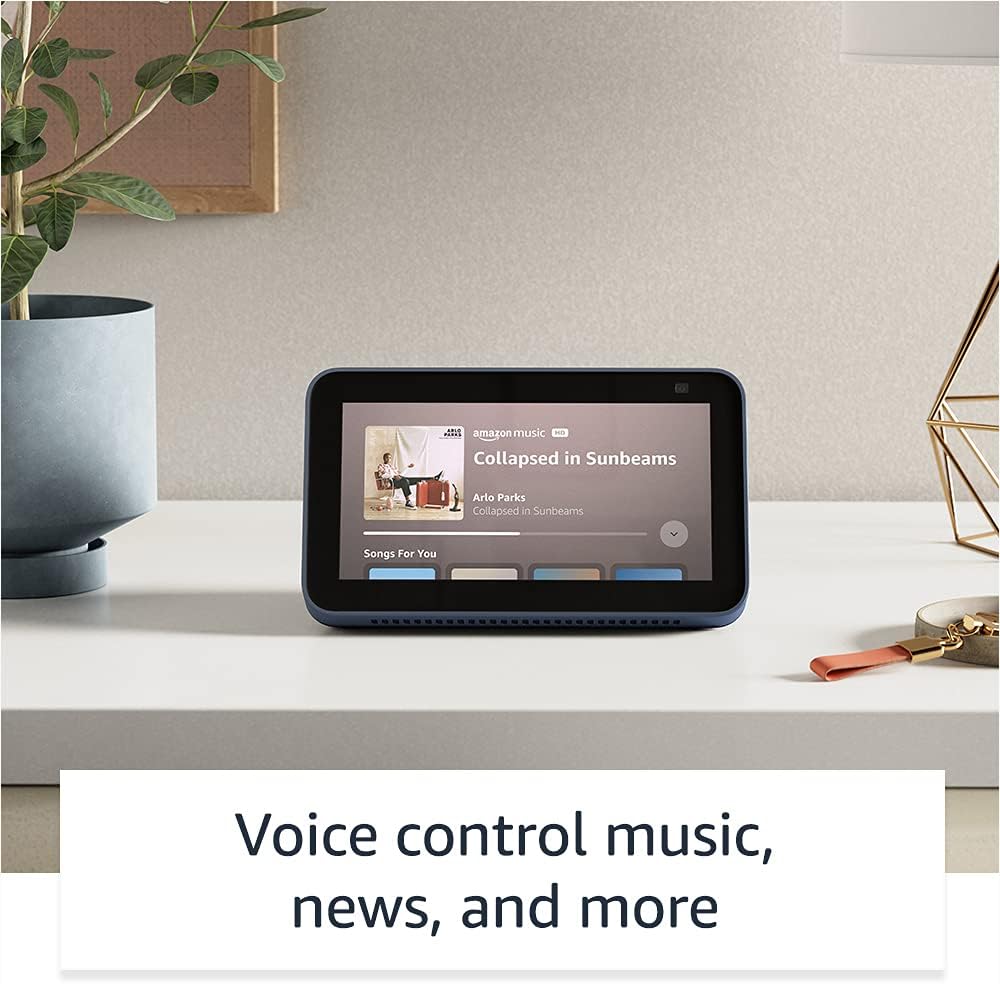
Image: The Echo Show 5 displaying a music playback screen, demonstrating its entertainment features.
Personalisering:
- Digital fotoramme: Use Amazon Photos to turn your home screen into a digital photo frame.

Image: The Echo Show 5 displaying a personal photo, illustrating its use as a digital photo frame.
Privatlivsfunktioner:
Echo Show 5 er designet med flere lag af privatlivskontroller:
- Mic/Camera Off Button: A physical button to electronically disconnect the microphones and camera.
- Indbygget kameraudløser: A physical shutter to cover the camera lens.
- Voice Recording Controls: Evne til view og slet dine stemmeoptagelser.
- Wake Word-teknologi: The device only begins listening after detecting your chosen wake word.
- Streamingindikatorer: Visual indicators show when audio or video is being streamed to the cloud.

Billede: Et nærbillede view of the Echo Show 5's top, highlighting the physical camera shutter button for privacy control.
Tilgængelighedsfunktioner:
The Echo Show 5 includes various accessibility features to personalize Alexa to your abilities. These can be accessed via Indstillinger → Tilgængelighed på din enhed.
- Tryk til Alexa: Interager med Alexa via berøring via skærmfliser eller et tastatur.
- Adaptiv lytning: Giver mere tid til at afslutte talen, før Alexa svarer.
- Foretrukken talehastighed: Styr hvor hurtigt eller langsomt Alexa taler.
- Undertekster: Alexa Captioning, Call Captioning og Closed Captioning leverer tekst til understøttet indhold.
- Vis og fortæl: Helps identify products for users who are blind or visually impaired.
- StemmeView Skærmlæser: Giver adgang for blinde eller synshandicappede brugere.
- Skærmforstørrelse: Zoom ind/ud og panorer rundt på skærmen.
- Giv besked når du er i nærheden: Afspiller notifikationslyde, når den registreres i nærheden af enheden.
- Kindle Læs højt: Alexa kan læse dine Kindle-bøger højt.
- Tekst i realtid: Skriv livetekst under et videoopkald.
- Yderligere indstillinger for farveinversion, farvekorrektion, anmodningslyd og mere.
Opretholdelse
The Certified Refurbished Echo Show 5 has undergone rigorous testing and certification to ensure it looks and works like new. Regular maintenance is minimal.
- Rensning: Tør forsigtigt skærmen og enhedens yderside af med en blød, fnugfri klud. Undgå slibende rengøringsmidler eller spray.
- Softwareopdateringer: Ensure your device is connected to Wi-Fi to receive automatic software security updates, which are guaranteed for at least four years after the device is last available for purchase as a new unit.
Fejlfinding
Hvis du støder på problemer med din Echo Show 5, kan du overveje følgende generelle fejlfindingstrin:
- Power Cycle: Unplug the device from the power outlet, wait for 30 seconds, and then plug it back in.
- Tjek Wi-Fi-forbindelse: Ensure your Wi-Fi network is active and the device is connected. You can check network status in the device settings.
- Verify Internet Connectivity: Confirm your internet service is working by testing other devices on the same network.
- Check Microphone/Camera: Ensure the mic/camera off button is not activated and the camera shutter is open if you are trying to use these features.
- Alexa app: Use the Alexa app on your smartphone or tablet to manage device settings, check for updates, and access further support resources.
- Stemmekommandoer: Speak clearly and ensure you are within range of the device's microphones.
For more detailed troubleshooting or specific issues, refer to the help section within the Alexa app or visit the official Amazon support webwebsted.
Specifikationer
| Feature | Detalje |
|---|---|
| Størrelse | 5.8" x 3.4" x 2.9" (148 mm x 86 mm x 73 mm) |
| Vægt | 14.5 oz (410 gram) |
| Vise | 5.5” touchskærm |
| Kamera | 2 MP kamera med indbygget lukker |
| WiFi-forbindelse | Dual-band wifi (802.11a/b/g/n/ac). Does not support ad-hoc networks. |
| Bluetooth-forbindelse | A2DP support for audio streaming; AVRCP for voice control of connected mobile devices. PIN-code speakers not supported. |
| Lyd | Indbygget 1.65" fuldspektret højttaler |
| Processor | MediaTek MT 8163 |
| Generation | Echo Show 5 (2nd Gen) - 2021 release |
| Sprog | Alexa taler engelsk og spansk |
Garanti og support
Your Certified Refurbished Echo Show 5 comes with the same limited warranty as a new device. For specific details regarding your warranty, please refer to the documentation included with your device or visit the official Amazon website for Certified Refurbished Amazon devices.
For customer support, troubleshooting, and to manage your device settings, utilize the Alexa app on your compatible smartphone or tablet. You can also find extensive support resources and FAQs on the Amazon support webwebsted.
Softwaresikkerhedsopdateringer: This device receives guaranteed software security updates until at least four years after the device is last available for purchase as a new unit on Amazon's webwebsteder.
Relaterede dokumenter - Echo Show 5 (2. generation, 2021-udgivelse)
 |
Amazon Echo Show 8 (2. generation) hurtigstartguide En guide til at komme i gang med din Amazon Echo Show 8 (2. generation), der dækker opsætning, funktioner og privatliv. |
 |
Amazon Echo Show 8 (2. generation) brugervejledning En omfattende brugervejledning til Amazon Echo Show 8 (2. generation), der beskriver opsætning, privatlivsfunktioner, stemmekommandoer og tips til brug af Alexa. |
 |
Retningslinjer for brug af Amazon Echo og Alexa-mærker for eksterne partnere Officielle retningslinjer for eksterne partnere om korrekt brug af Amazon Echo- og Alexa-brandaktiver, herunder logoer, typografi, farver og repræsentation i marketingmaterialer. Sikre brandkonsistens og integritet. |
 |
Amazon Echo Show 8 (2. generation) hurtigstartguide: Opsætning og funktioner Lær, hvordan du konfigurerer og bruger din Amazon Echo Show 8 (2. generation). Denne guide dækker enhedens funktioner, privatlivskontroller og vigtige Alexa-kommandoer til daglige opgaver. |
 |
Amazon Echo Show 5 (2. generation) hurtigstartguide En hurtigstartguide til Amazon Echo Show 5 (2. generation), der dækker opsætning, privatlivsfunktioner og grundlæggende brug med Alexa. |
 |
Amazon Echo Show 5 (2. generation) hurtigstartguide Kom godt i gang med din Amazon Echo Show 5 (2. generation). Denne guide dækker opsætning, enhedsfunktioner, privatlivskontroller og hvordan du bruger Alexa til underholdning, smart home og kommunikation. |