1. Introduktion
This manual provides essential instructions for the setup, operation, and maintenance of your LEMEGA MSY2 Compact Hi-Fi Music System. Please read this manual thoroughly before using the device to ensure proper functionality and safety. The LEMEGA MSY2 is an all-in-one music system featuring DAB/DAB+ and FM radio, a CD player, Bluetooth connectivity, USB playback and charging, and a dual alarm clock.
2. Sikkerhedsoplysninger
- Udsæt ikke enheden for regn eller fugt for at forhindre brand eller elektrisk stød.
- Sørg for tilstrækkelig ventilation. Bloker ikke ventilationsåbningerne.
- Brug kun den strømadapter, der følger med enheden.
- Forsøg ikke at skille enheden ad eller ændre den. Overlad al service til kvalificeret personale.
- Undgå at placere enheden i nærheden af varmekilder eller i direkte sollys.
3. Pakkens indhold
Bekræft at alle elementer er til stede:
- LEMEGA MSY2 musiksystem
- Fjernbetjening
- Strømadapter
- Brugermanual
4. Produktet er slutview
The LEMEGA MSY2 combines multiple audio sources in a compact design.
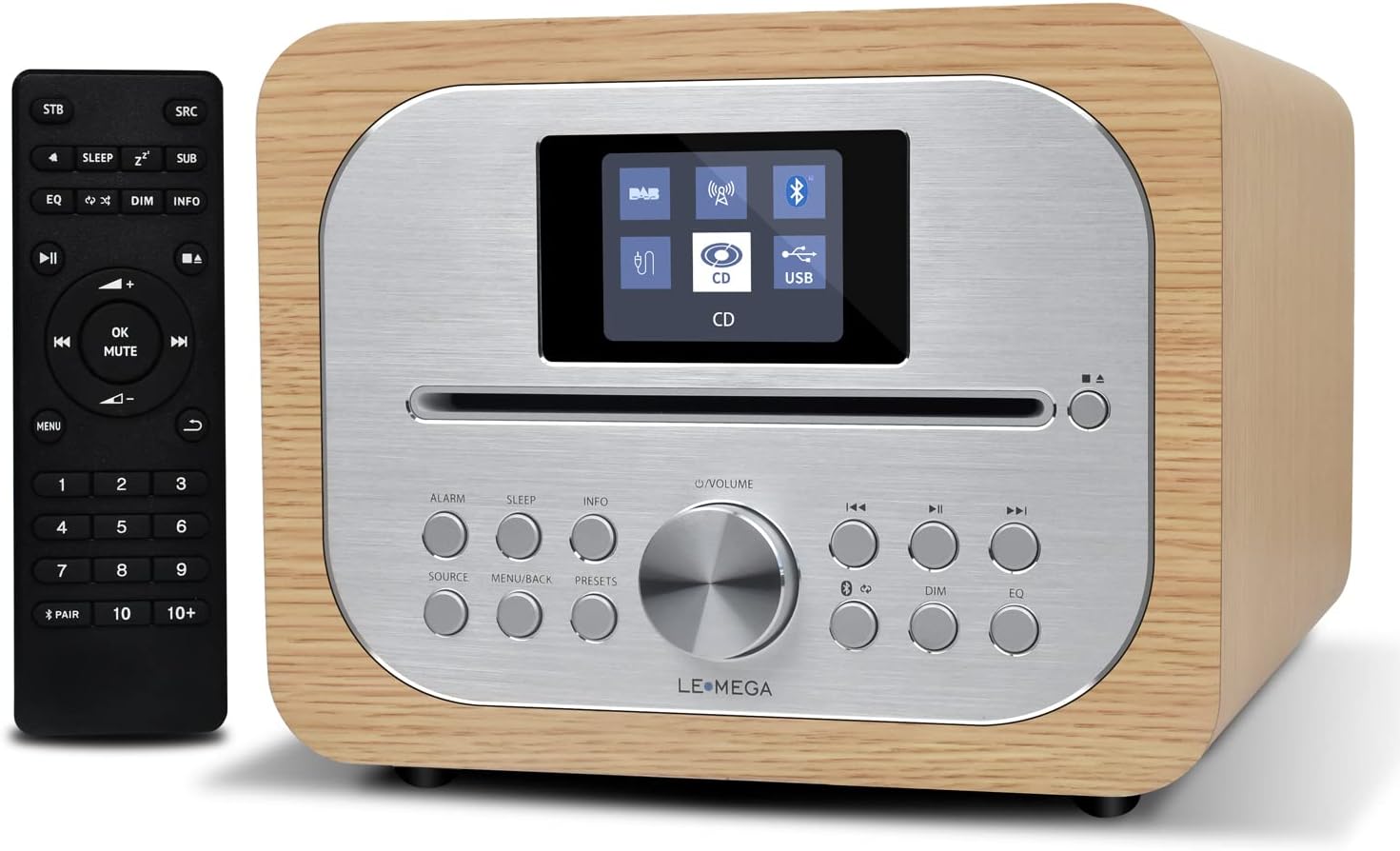
The LEMEGA MSY2 music system, featuring a wooden casing, silver front panel with a color display, control buttons, and a CD slot. The accompanying remote control is shown to the left.

En overview of the LEMEGA MSY2's capabilities, including CD playback, DAB/DAB+ digital radio, Bluetooth connectivity, FM radio, USB charging, and dual alarm functionality.
Kontrol på frontpanelet:
- Skærm: Shows current mode, track information, time, etc.
- CD-plads: Til isætning af lyd-cd'er.
- Kontrolknapper: Power, Source, Menu, Presets, Alarm, Sleep, Info, Dim, EQ, Play/Pause, Skip, Volume.
- Drejeknap: Til lydstyrkekontrol og menu-navigation.
Tilslutninger bagpanel:
- Antenne: Udtrækkelig teleskopantenne til radiomodtagelse.
- USB-porte: Two dedicated USB ports for MP3 playback and 1A USB charging.
- AUX-IN-port: Til tilslutning af eksterne lydkilder.
- Hovedtelefonudgang: 3.5 mm jackstik til privat lytning.
- DC IN: Strømindgang.
5. Opsætning
5.1 Strømtilslutning
- Connect the supplied power adapter to the DC IN port on the rear of the MSY2.
- Sæt adapteren i en stikkontakt.
5.2 Antenne
For optimal DAB/DAB+ and FM radio reception, fully extend the telescopic antenna.
5.3 Første opstart og automatisk scanning
- Tryk på Magt for at tænde enheden.
- Upon first use, the system may automatically perform a scan for available DAB/DAB+ and FM stations. This process is quick and sets up your favorite stations for easy access.
6. Betjeningsvejledning
6.1 Generelle kontroller
- Bind: Rotate the main knob or use the +/- knapper på fjernbetjeningen.
- Kilde: Tryk på Kilde button to switch between DAB, FM, CD, Bluetooth, USB, and AUX-IN modes.
- Menu: Tryk på Menu button to access settings for the current mode.
6.2 DAB/DAB+ radio

The LEMEGA MSY2 unit on a kitchen counter, with its screen showing 'Digital Radio' and station information, illustrating its DAB/DAB+ and FM radio capabilities.
- Vælge DAB tilstand ved hjælp af Kilde knap.
- The system will scan for available stations.
- Brug Springe buttons (forward/backward) or the rotary knob to navigate through the station list.
- Press the rotary knob or OK on the remote to select a station.
- Presets: For at gemme en station skal du trykke på og holde Forudindstillinger button. Select a preset number (1-20) and confirm. To recall a preset, briefly press the Forudindstillinger button and select the desired station.
6.3 FM radio
- Vælge FM tilstand ved hjælp af Kilde knap.
- Tryk og hold på Springe buttons to auto-scan for the next available station. Briefly press to fine-tune.
- Presets: Saving and recalling FM stations works similarly to DAB radio (20 presets available).
6.4 CD-afspiller

The LEMEGA MSY2 music system on a desk, with its screen indicating 'CD Playing' and track details. The remote control is visible nearby, emphasizing the slot-in CD player and remote functionality.
The MSY2 supports CD, CD-R, and CD-RW discs.
- Vælge CD tilstand ved hjælp af Kilde knap.
- Gently insert a CD into the slot. The unit will automatically load and begin playback.
- Brug Afspil/pause, Springe (fremad/bagud), og Stop knapperne på enheden eller fjernbetjeningen til at styre afspilningen.
6.5 Bluetooth-tilstand

The LEMEGA MSY2 unit on a table, wirelessly streaming music from a smartphone via Bluetooth, while simultaneously charging another smartphone through its USB port.
- Vælge Bluetooth tilstand ved hjælp af Kilde knappen. Displayet viser "Parring".
- Aktiver Bluetooth på din smartphone eller tablet, og søg efter tilgængelige enheder.
- Select "LEMEGA MSY2" from the list to pair. Once connected, you can stream audio wirelessly.
6.6 USB-afspilning og -opladning
The MSY2 features two USB ports for MP3 file playback and 1A USB charging.
- MP3-afspilning: Indsæt et USB-drev, der indeholder MP3 files into one of the USB ports. Select USB mode. The unit will automatically detect and play MP3 files.
- USB-opladning: Connect your device (e.g., smartphone) to the other USB port for charging.
6.7 AUX-IN
Connect an external audio device (e.g., MP3 player) to the AUX-IN port using a 3.5mm audio cable. Select AUX-IND tilstand for at afspille lyd fra den tilsluttede enhed.
6.8 Equalizer-indstillinger

The LEMEGA MSY2 unit on a coffee table, with its dimensions (20cm width, 28cm depth, 16cm height) indicated. The screen shows equalizer settings, demonstrating personalized audio adjustments.
Juster lydudgangen efter dine præferencer:
- Tryk på EQ knappen på enheden eller fjernbetjeningen.
- Use the navigation buttons or rotary knob to select from various equalizer presets (e.g., Normal, Classic, Jazz, Pop, Rock) or a custom setting.
6.9 Alarm Clock, Snooze, and Sleep Timer

The LEMEGA MSY2 unit on a bedside table, displaying a clock face on its screen, highlighting its dual alarm, sleep, and snooze functions.
The MSY2 features two independent alarms.
- Indstilling af alarmer: Tryk på Alarm button. Follow the on-screen prompts to set alarm time, source (buzzer, DAB, or FM), and frequency (daily, weekdays, weekends).
- Udsæt: Når en alarm lyder, skal du trykke på Snooze knappen for midlertidigt at slå den fra.
- Sleep timer: Tryk på Sove button to set a timer for the unit to automatically turn off after a specified duration.
6.10 Skærmindstillinger
Adjust the display brightness:
- Tryk på Dim button to cycle through brightness levels (low, medium, high) or access display settings via the menu.
7. Vedligeholdelse
- Rensning: Brug en blød, tør klud til at rengøre enheden. Brug ikke slibende rengøringsmidler eller opløsningsmidler.
- CD-pleje: Hold cd'er i kanterne. Rengør snavsede cd'er med en blød, fnugfri klud, og tør af fra midten og udad.
- Opbevaring: Hvis enheden opbevares i længere tid, skal den afbrydes fra strømforsyningen.
8. Fejlfinding
| Problem | Mulig årsag | Løsning |
|---|---|---|
| Ingen strøm | Strømadapteren er ikke tilsluttet, eller der er en defekt stikkontakt. | Kontrollér strømtilslutningerne. Prøv en anden stikkontakt. |
| Dårlig radiomodtagelse | Antennen er ikke strakt ud, eller signalet er svagt. | Fully extend the telescopic antenna. Reposition the unit for better signal. |
| CD'en afspiller ikke | CD inserted incorrectly, dirty, or unsupported format. | Ensure CD is inserted correctly. Clean the CD. Verify CD type (CD, CD-R, CD-RW only). |
| Bluetooth-parring mislykkedes | Device too far, Bluetooth not enabled, or already paired. | Ensure device is within range. Enable Bluetooth on your device. Forget previous pairings and try again. |
| Ingen lyd | Lydstyrken er for lav, lydløs aktiveret, eller der er valgt forkert kilde. | Increase volume. Check if mute is active. Ensure correct audio source is selected. |
9. Specifikationer
| Feature | Detalje |
|---|---|
| Mærke | LEMEGA |
| Modelnummer | 4K-ED4922 |
| Forbindelsesteknologi | Hjælpefunktion, Bluetooth |
| Understøttede standarder | CD, CD-R, CD-RW, DAB/DAB+, FM, MP3 (via USB) |
| Højttaler type | Stereoanlæg |
| Antal højttalere | 2 |
| Lydudgangstilstand | Stereoanlæg |
| Strømkilde | Powered by mains adapter (not battery) |
| USB-opladningsudgang | 1A |
| Vise | 2.4 tommer farveskærm |
10. Garanti og support
For warranty information and technical support, please refer to the documentation included with your purchase or visit the official LEMEGA webwebsted. Gem din købsbevis til garantikrav.


