1. Produktet er slutview
The Ortizan Bluetooth Speaker X20 is a portable wireless speaker designed to deliver high-quality audio with deep bass. It features Bluetooth 5.0 connectivity, IPX6 waterproof rating, and a power bank function for charging other devices. This manual provides detailed instructions for its setup, operation, and maintenance.

Billede 1.1: Forside view of the Ortizan Bluetooth Speaker X20, showcasing dens cylindriske design og kontrolpanel.
2. Pakkens indhold
Tjek venligst pakken for følgende varer:
- Ortizan Bluetooth Speaker X20
- Portable Soft Cord
- Opladningskabel (USB-C)
- Brugermanual
3. Kontroller og indikatorer
Gør dig bekendt med højttalerens knapper og porte for optimal brug.
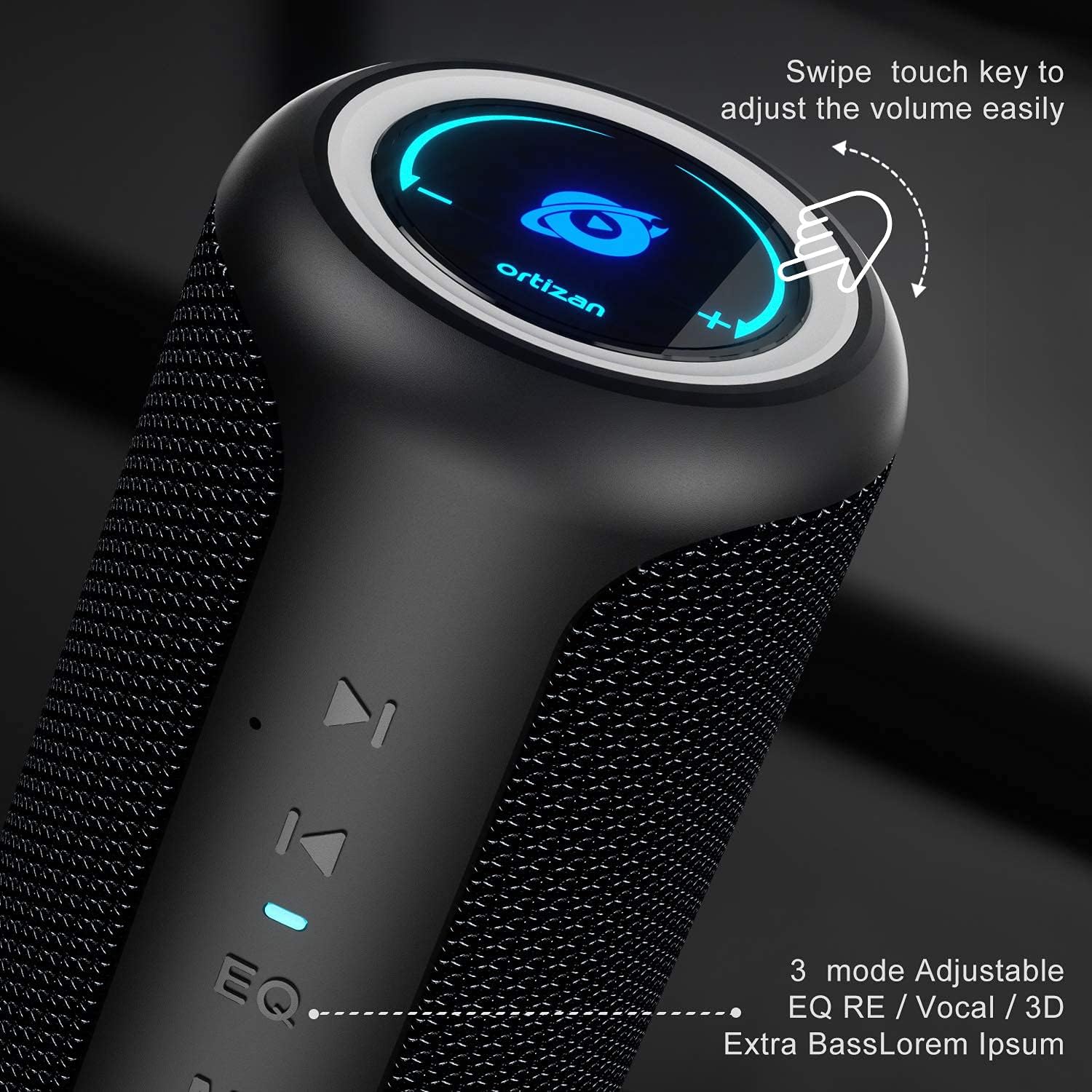
Billede 3.1: Nærbillede view of the speaker's control panel, highlighting the touch-sensitive volume ring and EQ button.
- Tænd/sluk-knap (⑂): Tryk og hold nede for at tænde/slukke.
- Tilstandsknap (M): Press to switch between Bluetooth, AUX, and TF Card modes.
- EQ-knap (EQ): Press to cycle through sound effects (Balanced, 3D, Deep Bass).
- Afspil/Pause (⏸)Tryk for at afspille eller sætte lyd på pause.
- Forrige nummer (⏮): Press to go to the previous track.
- Next Track (⏴): Press to go to the next track.
- Volumenringning: Swipe clockwise to increase volume, counter-clockwise to decrease volume.
- USB-port: For power bank function.
- TF kort slot: For playing music from a MicroSD card.
- AUX-indgang: Til kablet lydforbindelse.
- Type-C opladningsport: Til opladning af højttaleren.
4. Opladning af højttaleren
Before first use, fully charge the speaker. A full charge provides up to 15 hours of playtime at moderate volume.
- Connect the provided USB-C charging cable to the Type-C port on the speaker.
- Tilslut den anden ende af kablet til en USB-strømadapter (medfølger ikke) eller en computers USB-port.
- Opladningsindikatorlampen lyser under opladning og slukker, når den er fuldt opladet.

Image 4.1: Visual representation of the speaker's 15-hour playtime capability after a full charge.
5. Bluetooth-parring
Følg disse trin for at forbinde din højttaler til en Bluetooth-aktiveret enhed.
- Power on the speaker by pressing and holding the Power button. The Bluetooth indicator will flash, indicating it is in pairing mode.
- Aktiver Bluetooth på din enhed (smartphone, tablet osv.) og søg efter tilgængelige enheder.
- Select "Ortizan X20" from the list of devices.
- Once connected, the Bluetooth indicator will stop flashing and remain solid. You can now play audio through the speaker.
6. Ægte trådløs stereo (TWS) parring
To achieve a stereo surround sound experience, you can pair two Ortizan X20 speakers together.
- Sørg for, at begge højttalere er tændt og ikke er forbundet til nogen anden Bluetooth-enhed.
- On one speaker (this will be the primary speaker), press and hold the Play/Pause button for 2-3 seconds until you hear a prompt sound.
- The two speakers will automatically search for and connect to each other. Once connected, you will hear a confirmation sound, and the Bluetooth indicator on the primary speaker will flash, while the secondary speaker's indicator will be solid.
- Now, connect your device to the primary speaker via Bluetooth as described in Section 5. The audio will play in stereo across both speakers.

Image 6.1: Diagram illustrating two Ortizan X20 speakers wirelessly paired for an immersive 360-degree surround sound experience.
7. Betjening af højttaleren
7.1. Tænd/sluk
- Tryk på tænd/sluk-knappen og hold den nede i cirka 3 sekunder for at tænde eller slukke for højttaleren.
7.2. Lydstyrkekontrol
- Swipe your finger clockwise along the top ring to increase the volume.
- Swipe your finger counter-clockwise along the top ring to decrease the volume.
7.3. Afspilningskontrol
- Tryk på knappen Afspil/pause for at afspille eller sætte det aktuelle nummer på pause.
- Press the Previous Track button (⏮) to go to the beginning of the current track or to the previous track.
- Press the Next Track button (⏴) to skip to the next track.
7.4. EQ-tilstande
The speaker offers three equalizer modes to customize your listening experience.
- Press the EQ button to cycle through the modes: Balanceret, 3D Surround, og Dyb bas.

Image 7.1: The speaker's design, emphasizing the EQ button for selecting different audio effects.
8. Powerbank-funktion
The Ortizan X20 can be used to charge other devices in an emergency.
- Tilslut din enheds opladningskabel til USB-A-udgangsporten på højttaleren.
- Højttaleren vil begynde at oplade din enhed.

Image 8.1: The Ortizan X20 speaker connected via USB to a smartphone, demonstrating its power bank functionality.
9. Andre tilslutningsmuligheder
In addition to Bluetooth, the speaker supports AUX-in and TF card playback.

Image 9.1: Icons representing the speaker's compatibility with various devices and input methods, including built-in mic, TF card, AUX-in, Bluetooth 5.0, and hands-free calling.
9.1. AUX-indgangstilstand
- Connect a 3.5mm audio cable (not included) from your audio source to the speaker's AUX-in port.
- Press the Mode button (M) to switch to AUX mode. The speaker will automatically play audio from the connected device.
9.2. TF-korttilstand
- Indsæt et MicroSD-kort (TF) med MP3-lyd files ind i TF-kortåbningen.
- Press the Mode button (M) to switch to TF Card mode. The speaker will automatically begin playing music from the card.
10. Oplysninger om vandtæthed (IPX6)
The Ortizan X20 speaker features an IPX6 waterproof rating, meaning it is protected against high-pressure water jets from any direction. This makes it suitable for outdoor use and environments where it might be exposed to splashes or rain.
- GØR IKKE immerse the speaker in water.
- Sørg for, at alle portdæksler er forsvarligt lukket, før højttaleren udsættes for vand.
- After exposure to water, wipe the speaker dry with a soft cloth.

Image 10.1: The speaker shown with water droplets, indicating its waterproof capabilities. Note: The product is rated IPX6.
11. Vedligeholdelse
Korrekt vedligeholdelse sikrer din højttalers levetid.
- Rensning: Use a soft, dry cloth to clean the speaker. Do not use abrasive cleaners or solvents.
- OpbevaringOpbevar højttaleren et køligt og tørt sted væk fra direkte sollys og ekstreme temperaturer.
- Batteripleje: If not used for extended periods, charge the speaker at least once every three months to maintain battery health.
12. Fejlfinding
Hvis du støder på problemer med din højttaler, kan du se følgende almindelige problemer og løsninger.
| Problem | Mulig årsag | Løsning |
|---|---|---|
| Højttaleren tænder ikke. | Lavt batteri. | Oplad højttaleren helt. |
| Kan ikke parres via Bluetooth. | Speaker not in pairing mode; device's Bluetooth off; too far from device. | Ensure speaker is in pairing mode (flashing indicator). Turn device's Bluetooth off/on. Move speaker closer to device (within 20m). |
| Ingen lyd eller lav lydstyrke. | Lydstyrken på højttaleren eller enheden er for lav; forkert inputtilstand. | Increase volume on both speaker and connected device. Press 'M' button to select correct input mode (Bluetooth, AUX, TF Card). |
| TWS-parring mislykkes. | Højttalere er allerede tilsluttet andre enheder; forkert parringsprocedure. | Sørg for, at begge højttalere er frakoblet fra andre enheder. Følg TWS-parringstrinene nøje (afsnit 6). |
| Powerbank-funktionen virker ikke. | Speaker battery too low; incorrect cable. | Ensure speaker has sufficient charge. Use a compatible charging cable for your device. |
13. Specifikationer
Technical details of the Ortizan Bluetooth Speaker X20.
| Feature | Detalje |
|---|---|
| Mærke | Ortizan |
| Modelnavn | KWSS4548 (X20) |
| Forbindelsesteknologi | Bluetooth 5.0 |
| Wireless Range | Up to 20 meters (66 feet) without barriers |
| Maksimal højttalerudgangseffekt | 40 watt |
| Frekvensrespons | 20 Hz - 16,000 Hz |
| Lydudgangstilstand | Stereoanlæg |
| Vandtæt vurdering | IPX6 |
| Strømkilde | Batteridrevet (1 litium-ion-batteri inkluderet) |
| Spilletid | Op til 15 timer (ved moderat lydstyrke) |
| Kompatible enheder | Smartphone, TV, Laptop, etc. |
| Indtastningsmuligheder | Bluetooth, AUX-in, TF Card |
| Materiale | Silicone TPU |
| Produktmål (L x B x H) | 18 x 18 x 27 cm |
| Vægt | 830 gram |
14. Sikkerhedsoplysninger
Læs og følg venligst disse sikkerhedsretningslinjer:
- Udsæt ikke højttaleren for ekstreme temperaturer eller direkte sollys i længere perioder.
- Undgå at tabe eller udsætte højttaleren for kraftige stød.
- Hold højttaleren væk fra medicinsk udstyr, da den indeholder magneter.
- Forsøg ikke selv at skille ad, reparere eller modificere højttaleren. Kontakt kvalificeret servicepersonale.
- Bortskaf højttaleren og dens batteri på en ansvarlig måde i henhold til lokale regler.
15. Garanti og support
Ortizan products are designed and manufactured to the highest quality standards. For warranty information or technical support, please refer to the contact details provided on the product packaging or the official Ortizan webwebsted. Gem din købsbevis til garantikrav.


