Produkt overview
The Metrel MI 2885 Master Q4 is a sophisticated 3-phase power quality analyzer designed for comprehensive electrical system analysis and troubleshooting. It is engineered to automatically record critical data and waveforms related to voltage events such as dips and swells, and allows users to configure up to seven optional triggers for capturing specific quantities.
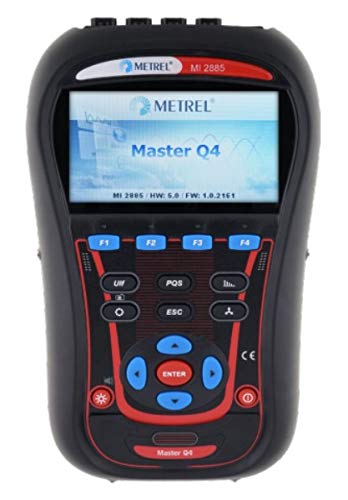
Front view of the Metrel MI 2885 Master Q4 Power Quality Analyzer, showing its display and control buttons.
This instrument is an essential tool for professionals requiring detailed insights into power quality, including harmonic analysis, energy consumption, and event recording. Its robust design and extensive measurement capabilities make it suitable for a wide range of industrial and scientific applications.
Inkluderet udstyr
The MI 2885 Master Q4 package includes all necessary components to begin power quality analysis immediately. Please verify all items are present upon unboxing.
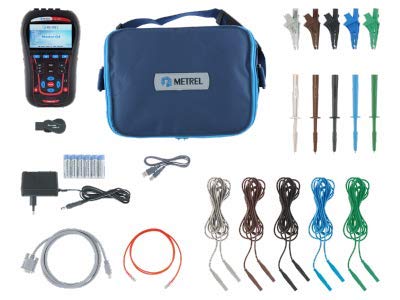
The Metrel MI 2885 Master Q4 Power Quality Analyzer shown with its comprehensive set of included accessories, such as test probes, crocodile clips, measurement leads, power adapter, and carrying bag.
- Instrument Master Q4
- Test probes (brown, black, grey, green, blue), 5 pieces
- Crocodile clips (brown, black, grey, green, blue), 5 pieces
- Voltage measurement leads (brown, black, grey, green, blue), 5 pieces
- Labels for color coding
- MicroSD memory card 8.0GB
- MicroSD kortlæser
- PC SW PowerView3 software
- RS232, USB, and Ethernet patch cables
- Strømforsyningsadapter
- 1.2 V NiMH rechargeable batteries, 6 pieces
- Blød bæretaske
- Brugsanvisning
- Kalibreringscertifikat
Opsætning
Before operating the MI 2885 Master Q4, ensure proper setup to guarantee accurate measurements and safe operation.
Installation og opladning af batteri
- Find batterirummet på bagsiden af instrumentet.
- Insert the 6 provided 1.2 V NiMH rechargeable batteries, observing correct polarity.
- Connect the power supply adapter to the instrument and a suitable power outlet to charge the batteries before first use.
MicroSD-kort installation
- Locate the MicroSD card slot, typically on the side or bottom of the device.
- Insert the 8.0GB MicroSD card until it clicks into place. This card is essential for data logging and storage.
Initial Connection and Configuration
- Tænd for enheden ved at trykke på den udpegede tænd/sluk-knap.
- Follow the on-screen prompts for initial language and time zone settings.
- For PC connectivity, install the PowerView3 software on your computer. Connect the analyzer using the provided RS232, USB, or Ethernet patch cable.
Operating the Analyzer
The MI 2885 Master Q4 offers a wide range of measurement functions for comprehensive power quality analysis.
Målefunktioner
The analyzer is capable of performing the following measurements:
- Voltage: TRMS, peak, crest factor (4-channels).
- Strøm: TRMS, peak, crest factor (4-channels).
- Magt: Active, reactive, apparent.
- Power Measurements: Fully compliant with IEEE 1459 (active, non-active, fundamental, harmonic, load unbalance).
- VFD: Variable Frequency Drives analysis.
- Unbalance and Flicker Measurement.
- Harmonic and Interharmonic Analysis: Up to 50th harmonics, THD measurement.
- Energi: Active, reactive, generated, consumed.
- Event Capturing: Recording of power supply events (shutdowns, interruptions, swells, dips).
- Inrush Currents: Monitoring and recording.
- Waveform/Inrush Display: Snapshot and recording.
- Power Quality Analysis: According to EN 50160.
- Alarmoptagelse: Up to 7 adjustable alarms.
- Temperaturmåling.
- Photo-voltaic Inverter Efficiency Measurements.
- Effektfaktor: cos φ.
Udførelse af en måling
- Connect the appropriate test probes, crocodile clips, or current clamps to the measurement points of the electrical system. Ensure secure and correct connections for all 4 voltage and 4 current channels.
- Navigate through the instrument's menu using the control buttons to select the desired measurement function (e.g., Voltage, Harmonics, Power Quality).
- Configure measurement parameters such as recording interval, trigger levels for events, and alarm thresholds as needed.
- Initiate the measurement. The device will begin recording data to the MicroSD card.
- Review real-time data on the display.
- Stop the measurement once sufficient data has been collected.
Data Analysis with PowerView3 Software
The included PowerView3 PC software is crucial for detailed analysis of recorded data.
- Remove the MicroSD card from the analyzer or connect the analyzer directly to your PC.
- Insert the MicroSD card into the card reader connected to your PC, or establish a direct connection.
- Start PowerView3 software.
- Import the recorded data files.
- Utilize the software's features to generate reports, analyze trends, and visualize waveforms and events.
Opretholdelse
Regular maintenance ensures the longevity and accuracy of your MI 2885 Master Q4 Power Quality Analyzer.
Rensning
- Wipe the instrument's exterior with a soft, damp klæde. Brug ikke slibende rengøringsmidler eller opløsningsmidler.
- Ensure all ports and connectors are free from dust and debris.
Batteripleje
- Recharge batteries regularly, especially if the instrument will be stored for an extended period.
- If the instrument is not used for a long time, remove the batteries to prevent leakage.
Opbevaring
- Store the analyzer and its accessories in the provided soft carrying bag to protect them from physical damage and environmental factors.
- Opbevares på et køligt, tørt sted, væk fra direkte sollys og ekstreme temperaturer.
Kalibrering
- The instrument comes with a calibration certificate. For continued accuracy, periodic re-calibration by an authorized service center is recommended according to local regulations or usage frequency.
Fejlfinding
This section provides solutions to common issues you might encounter with your MI 2885 Master Q4.
| Problem | Mulig årsag | Løsning |
|---|---|---|
| Instrumentet tændes ikke. | Low or depleted batteries; Incorrect battery installation; Faulty power adapter. | Ensure batteries are fully charged and correctly inserted. Try powering on with the power adapter connected. If issues persist, replace batteries or contact support. |
| Measurement readings are inaccurate or erratic. | Loose or incorrect probe connections; Incorrect measurement settings; Environmental interference; Instrument requires calibration. | Check all connections. Verify measurement settings match the application. Move away from strong electromagnetic fields. Consider sending the instrument for re-calibration. |
| Data not saving to MicroSD card. | MicroSD card full; MicroSD card not properly inserted; Corrupted MicroSD card. | Check available space on the MicroSD card. Reinsert the card. Try formatting the card (this will erase all data) or use a different MicroSD card. |
| Cannot connect to PC via PowerView3. | Incorrect cable connection; Driver issues; Software not installed correctly. | Ensure the correct cable (USB, RS232, Ethernet) is securely connected. Reinstall PowerView3 software and ensure drivers are up to date. Try a different USB port or cable. |
If you encounter problems not listed here or if the suggested solutions do not resolve the issue, please refer to the full instruction manual or contact Metrel customer support.
Specifikationer
The following are key technical specifications for the Metrel MI 2885 Master Q4 Power Quality Analyzer.
- Model: MI 2885 Master Q4
- Mærke: Metrel
- Strømkilde: Battery Powered (1.2 V NiMH rechargeable batteries)
- Voltage Channels: 4 channels, 0 ... 1000 Vrms (CAT III / 1000 V)
- Current Channels: 4 channels, supports automatic clamp anerkendelse
- Hukommelse: 8.0GB MicroSD memory card
- Overholdelse: IEC 61000-4-30 Class S (0.1%), EN 50160
- Harmonic Analysis: Up to 50th harmonics
- PC-software: MagtView3
- Forbindelse: RS232, USB, Ethernet
- Dato først tilgængelig: 15. september 2020
For a complete list of detailed technical specifications, including measurement ranges, accuracy, and environmental conditions, please refer to the comprehensive technical documentation provided with your instrument or available on the manufacturer's webwebsted.

A detailed technical specifications sheet for the Metrel MI 2885 Master Q4, outlining functions, inputs, current inputs, and recorder details.
Garanti og support
The Metrel MI 2885 Master Q4 Power Quality Analyzer comes with a manufacturer's warranty and dedicated support resources.
Garantioplysninger
Dette produkt er omfattet af en 2-year (24-month) warranty from the manufacturer, Metrel. This warranty covers defects in materials and workmanship under normal use. Please retain your proof of purchase for warranty claims.
Kundesupport
For technical assistance, troubleshooting, or warranty claims, please contact Metrel customer support. Refer to the contact information provided in the full instruction manual or visit the official Metrel webwebstedet for de mest opdaterede supportoplysninger.
You may also find additional resources, FAQs, and software updates on the Metrel support portal.


