1. Introduktion
This user manual provides comprehensive instructions for the installation, operation, and maintenance of your ABSOSO Double Din Car Stereo System. This 7-inch HD touchscreen MP5 car player features Bluetooth connectivity, PhoneLink compatibility (CarPlay/Android Auto), support for rear and front view cameras, AM/FM radio, and various media input options including USB, SD, and AUX. Please read this manual thoroughly before using the product to ensure proper functionality and safety.
2. Vigtige sikkerhedsoplysninger
Overhold altid følgende sikkerhedsforanstaltninger for at forhindre personskade eller beskadigelse af enheden:
- Professionel installation anbefales: Due to the complexity of car electrical systems, professional installation is highly recommended. Incorrect wiring can cause damage to the unit or vehicle.
- Strømforsyning: Sørg for, at enheden er tilsluttet en 12V DC strømforsyning med negativ jordforbindelse.
- Undgå vand og fugt: Udsæt ikke enheden for vand eller overdreven fugt.
- Temperatur: Operate the unit within the specified temperature range.
- Kørselssikkerhed: Betjen ikke enheden på en måde, der distraherer dig fra kørslen. Prioritér altid trafiksikkerhed.
- Rengøring af skærm: Use a soft, dry cloth to clean the touchscreen. Avoid abrasive cleaners.
- Ventilation: Sørg for tilstrækkelig ventilation omkring enheden for at forhindre overophedning.
3. Hvad er inkluderet
Bekræft, at alle nedenstående komponenter er til stede i din pakke:
- 1 x 7-inch Double Din Bluetooth CarPlay Radio
- 1 x backup kamera
- 1 x Backup Camera Cable
- 1 x IR fjernbetjening
- 1 x fjernbetjening til rat
- 1 x Wires Harness
- 1 x monteringssæt
- 1 x Brugermanual (dette dokument)

Figur 3.1: All components included in the ABSOSO Double Din Car Stereo System package. This image displays the main head unit, backup camera, two remote controls (IR and steering wheel), wiring harnesses, mounting brackets, and the user manual.
4. Opsætning og installation
4.1. Kontrol før installation
- Ensure your vehicle has a double din opening (approximately 7 x 4 inches).
- Frakobl køretøjets negative batteripol, inden monteringen påbegyndes, for at forhindre kortslutninger.
- Gather necessary tools: wire strippers, crimpers, electrical tape, screwdrivers.
4.2. Ledningsdiagram og dimensioner
Refer to the following diagrams for proper wiring connections and unit dimensions. Incorrect wiring can damage the unit or vehicle's electrical system.
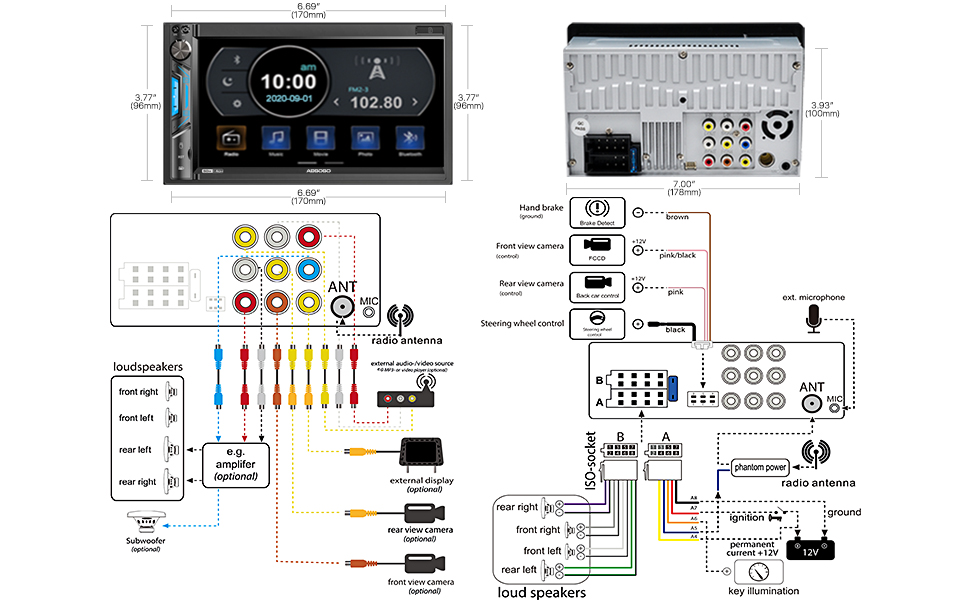
Figur 4.1: Detailed wiring diagram and physical dimensions of the ABSOSO Double Din Car Stereo. This diagram illustrates connections for power, speakers, camera inputs, steering wheel controls, and auxiliary inputs/outputs. Dimensions are provided in both inches and millimeters for precise fitting.
- Strømforbindelser:
- Yellow wire: Constant 12V (Battery)
- Red wire: ACC (Ignition Switched 12V)
- Black wire: Ground
- Højttalerforbindelser: Connect speaker wires according to the diagram, ensuring correct polarity for each speaker (Front Left, Front Right, Rear Left, Rear Right).
- Kamera input: Connect the backup camera to the "Rear View Camera Input" (usually a yellow RCA jack). The reverse trigger wire (often pink/brown) should be connected to the vehicle's reverse light circuit.
- Ratstyring: Connect the steering wheel control wires (Key1, Key2) to your vehicle's steering wheel control interface, if applicable.
- Antenne: Connect the vehicle's radio antenna to the unit's antenna input.
4.3. Montering af enheden
Once wiring is complete, carefully slide the unit into the double din opening in your dashboard. Secure it using the provided mounting brackets and screws. Ensure the unit is firmly seated and does not obstruct any vehicle controls.
5. Betjeningsvejledning
5.1. Grundlæggende kontroller og brugerflade

Figur 5.1: The main interface of the ABSOSO Double Din Car Stereo, showing the 7-inch HD touchscreen with various application icons, physical buttons, and a rotary knob. This image also displays the included remote controls and backup camera.
- Tænd/sluk-knap/lydstyrkeknap: Tryk for at tænde/slukke. Drej for at justere lydstyrken.
- Hjemknappen: Vender tilbage til hovedmenuen.
- Indstillingsikon: Access system settings (audio, display, general).
- Touchskærm: Navigate menus and select options by touching the screen.
- Multicolor Buttons: The unit features 7 customizable multicolor buttons for enhanced aesthetics.
5.2. Bluetooth-forbindelse
Den indbyggede Bluetooth muliggør håndfri opkald og trådløs lydstreaming.

Figur 5.2: Illustration of the Bluetooth features, including hands-free calling with a dial pad, music streaming interface, and voice navigation prompts displayed on the stereo screen.
- On the stereo, go to the Bluetooth menu.
- Aktiver Bluetooth på din mobilenhed, og søg efter tilgængelige enheder.
- Select "ABSOSO" (or similar name) from the list on your phone.
- Bekræft parringskoden, hvis du bliver bedt om det.
- Når du er tilsluttet, kan du foretage/modtage opkald og streame lyd trådløst.
5.3. PhoneLink (CarPlay / Android Auto / MirrorLink)
Connect your smartphone for integrated navigation, music, and other apps. Note: Only compatible with Android 11.0 or below, and iPhone XR, iPhone 8 Plus or below via original charging cable. This unit is not a GPS unit itself.

Figur 5.3: Displays the CarPlay, Android Auto, and MirrorLink interfaces on the stereo screen, showing navigation, music playback, and voice assistant interaction (Siri, Google Assistant). A user is shown interacting with the system while driving.
- Connect your smartphone to the unit's USB port using a high-quality USB cable (preferably the original charging cable for iPhones).
- The unit should automatically detect and launch CarPlay or Android Auto.
- Follow any on-screen prompts on both the stereo and your phone to complete the connection.
- For MirrorLink, ensure your phone supports the feature and follow the specific instructions provided by your phone manufacturer.
5.4. Medieafspilning (USB/SD/AUX)
Enjoy your favorite audio and video files fra forskellige kilder.
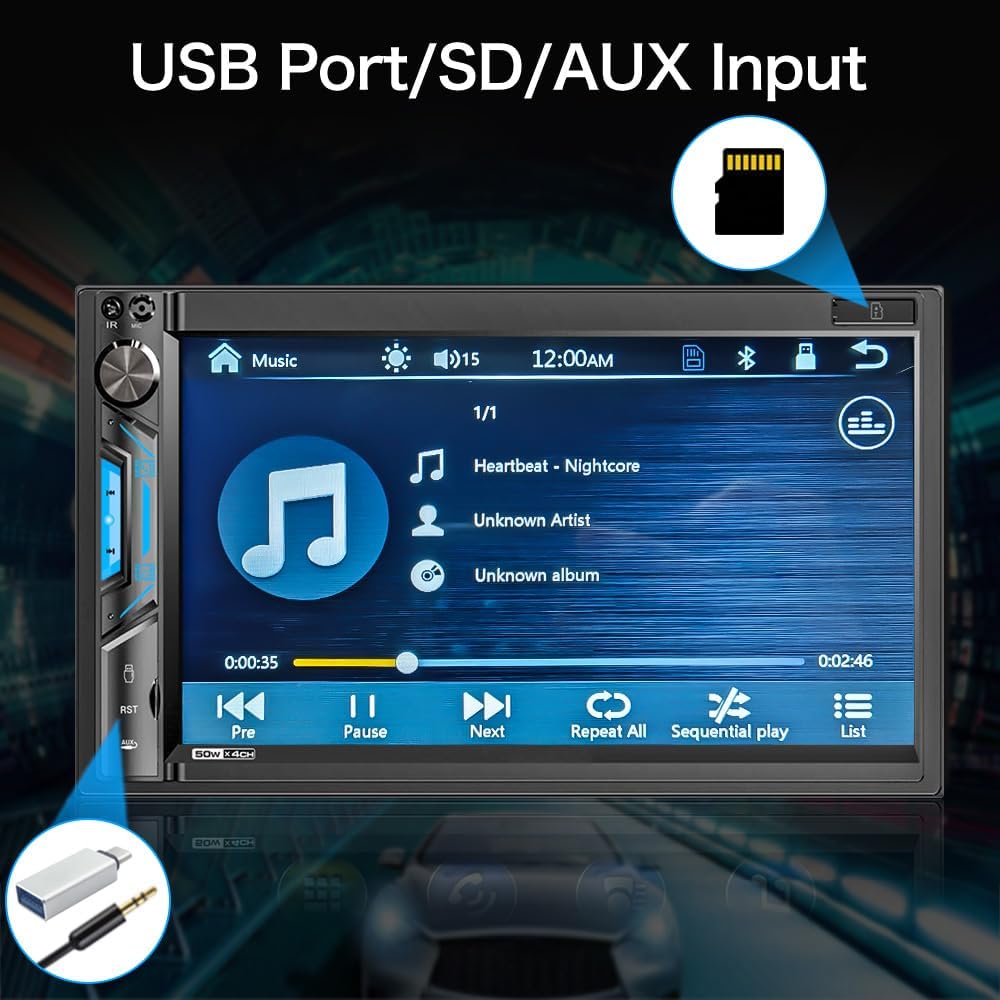
Figur 5.4: Nærbillede view of the stereo screen showing a music playback interface, with visual cues pointing to the USB port and SD card slot. This highlights the unit's capability to play media from external storage.
- USB: Insert a USB drive into the USB port. The unit will automatically detect and display playable media files.
- SD-kort: Insert an SD card into the SD card slot. The unit will access media files gemt på kortet.
- AUX-indgang: Connect an external audio device (e.g., MP3 player) to the 3.5mm AUX input jack using an audio cable. Select "AUX" as the source on the stereo.
- Understøttede formater:
- Audio: MP3, WMA, AVI, MKV, MP4, WMV, RMVB, MPEG
- Video: RM, RMVB, DVD(VOB), VCD(DAT), MP1, MP2, DIVX, XVID, MP4, H263, H264, FLV, 3GP, SWF, AVI, ASF, MJPEG
5.5. AM/FM-radio
Stil ind på dine yndlingsradiostationer.

Figur 5.5: The AM/FM radio interface on the stereo screen, showing frequency display, station presets, and tuning controls. The image emphasizes the unit's ability to support both AM and FM bands with 30 total station presets.
- Vælg ikonet "Radio" i hovedmenuen.
- Brug skærmknapperne til at søge efter stationer, indstille manuelt eller vælge mellem forudindstillede stationer.
- The unit supports 30 total station presets.
5.6. Bag og foran View Kamera
The unit supports automatic display of camera feeds when reversing or manually selecting the front camera.

Figur 5.6: Depicts the stereo screen displaying a rear view camera feed, showing parking lines and a clear view behind the vehicle. An image of a car with a backup camera is also shown, illustrating the camera's function.
- When the vehicle is shifted into reverse, the unit will automatically display the rear camera feed.
- Ensure the backup camera is properly installed and connected to the "Rear View Camera Input" and the reverse trigger wire.
- If a front camera is installed, it can typically be accessed through a dedicated icon on the main menu or settings.
5.7. Ratbetjening (SWC)
Program your vehicle's steering wheel controls to operate the stereo.
- Go to the "Settings" menu on the stereo.
- Navigate to "Steering Wheel Control" or "SWC Learning".
- Follow the on-screen instructions to assign functions (e.g., volume up/down, track next/previous) to your steering wheel buttons.
- Press and hold each button on your steering wheel while selecting the corresponding function on the stereo's screen to program it.
6. Vedligeholdelse
- Rengøring af skærmen: Brug en blød, fnugfri klud til forsigtigt at tørre berøringsskærmen af. Ved genstridige pletter, tør let afampRengør kluden med vand eller et skærmsikkert rengøringsmiddel. Spray ikke rengøringsmiddel direkte på skærmen.
- Generel rengøring: Use a dry, soft cloth to wipe the unit's body. Avoid using harsh chemicals or abrasive materials.
- Softwareopdateringer: Check the ABSOSO official webbesøg webstedet regelmæssigt for at se om der er tilgængelige firmwareopdateringer for at sikre optimal ydeevne og kompatibilitet.
7. Fejlfinding
If you encounter issues with your stereo, refer to the following common problems and solutions:
| Problem | Mulig årsag | Løsning |
|---|---|---|
| Ingen strøm | Forkert ledningsføring; Sprunget sikring; Løs forbindelse. | Check power (Yellow, Red, Black) wires. Verify fuse. Ensure all connections are secure. |
| Ingen lyd | Incorrect speaker wiring; Volume too low; Mute enabled; Incorrect audio source. | Check speaker connections and polarity. Increase volume. Disable mute. Select correct audio source. |
| Bluetooth forbinder ikke | Bluetooth not enabled on device; Device not in pairing mode; Interference. | Ensure Bluetooth is on and discoverable. Restart both devices. Clear previous pairings. |
| CarPlay/Android Auto virker ikke | Incorrect USB cable; Phone OS version incompatible; App issues. | Use original USB cable. Check phone OS compatibility (Android 11.0 or below, iPhone XR/8 Plus or below). Restart phone and stereo. |
| Bakkamera viser ikke | Camera not powered; Incorrect video input; Reverse trigger wire not connected. | Check camera power supply. Verify RCA video connection. Ensure reverse trigger wire is connected to reverse light. |
| Dårlig radiomodtagelse | Antenne ikke tilsluttet; Område med svagt signal; Beskadiget antenne. | Ensure antenna is securely connected. Try tuning in a different location. Inspect antenna for damage. |
If the problem persists after attempting these solutions, please contact ABSOSO customer support for assistance.
8. Specifikationer
| Feature | Detalje |
|---|---|
| Modelnummer | CA71BT |
| Skærmstørrelse | 7 tommer HD touchskærm |
| Skærmopløsning | 1080P Video Playback Support |
| Forbindelse | Bluetooth, PhoneLink (CarPlay/Android Auto/MirrorLink), USB, SD, AUX |
| Bluetooth version | Built-in Bluetooth for hands-free calling and audio streaming |
| PhoneLink Compatibility | Android 11.0 or below, iPhone XR, iPhone 8 Plus or below (via original charging cable) |
| Kamera support | Bag og foran View Camera Input (Waterproof HD rear camera included) |
| Radio Tuner | AM/FM Radio with 30 Presets |
| Understøttede lydformater | MP3, WMA, AVI, MKV, MP4, WMV, RMVB, MPEG |
| Understøttede videoformater | RM, RMVB, DVD(VOB), VCD(DAT), MP1, MP2, DIVX, XVID, MP4, H263, H264, FLV, 3GP, SWF, AVI, ASF, MJPEG |
| Strømudgang | 200 watt (peak) |
| før-amp Udgange | Ja |
| Subwoofer udgange | Ja |
| Ratkontrol | Understøttet |
| Dimensioner (produkt) | 7 x 3 x 4 tommer |
| Vægt | 2.56 pund |
| Strømforsyning | 12V DC (negativ jord) |
9. Garanti og support
ABSOSO is committed to providing excellent customer service. Your ABSOSO Bluetooth car stereo comes with professional technical support.
- Kundeservice: For any questions, issues, or technical assistance, please contact ABSOSO customer service.
- User Manual & FAQ: This professional user manual and a comprehensive FAQ section are available to assist you.
- 24-timers teknisk support: 24-hour technical support is available before and after sales for purchases made through Amazon.com.
- Garantioplysninger: Please refer to your purchase documentation or contact customer support for specific warranty terms and conditions.
For the most up-to-date support information, please visit the official ABSOSO store on Amazon or contact them directly.
ABSOSO Store Link: Visit the ABSOSO Store on Amazon