1. Introduktion
Produkt overview
The AfterShokz OpenMove are bone conduction headphones designed for comfort and situational awareness. They transmit audio through your cheekbones, leaving your ears open to ambient sounds. The headphones feature Bluetooth 5.0 connectivity and multiple EQ modes to optimize your listening experience for various activities.

Figur 1: En vinklet view of the AfterShokz OpenMove bone conduction headphones in slate grey, showcasing deres lette, åbne øredesign.
Pakkens indhold
Kontroller venligst, at alle varer er til stede i din pakke:
- AfterShokz OpenMove Headphones
- USB-C ladekabel
- Ørepropper
- Dedicated Pouch
- User Manual (English version)
2. Opsætning
Opladning af hovedtelefoner
Before initial use, fully charge your headphones to ensure optimal battery performance.
- Connect the USB-C charging cable to the charging port located on the headphones.
- Tilslut den anden ende af kablet til en USB-strømadapter (medfølger ikke) eller en computers USB-port.
- The LED indicator will illuminate to show the charging status. A complete charge typically takes approximately 2 hours.
Parring med en Bluetooth-enhed
Follow these steps to connect your headphones to your smartphone, tablet, or other Bluetooth-enabled device:
- Sørg for, at hovedtelefonerne er slukket.
- Press and hold the power button for 5-7 seconds until the LED indicator flashes red and blue alternately. This indicates the headphones are in pairing mode.
- Aktiver Bluetooth på din enhed, og søg efter tilgængelige enheder.
- Select "OpenMove by AfterShokz" from the list of detected devices.
- Når parringen er gennemført, lyser LED-indikatoren konstant blåt.
3. Betjeningsvejledning
Hovedtelefonkontrol
The AfterShokz OpenMove headphones feature intuitive controls for managing audio playback and calls.

Figur 2: En detaljeret view of the control buttons located on the right transducer arm, including volume and multi-function controls.
| Knap/funktion | Handling |
|---|---|
| Power knap | Press and hold to Power On/Off; Single press to Play/Pause audio; Single press to Answer/End Call. |
| Lydstyrke op (+) | Single press to Increase Volume; Long press to skip to Next Track. |
| Skrue ned (-) | Single press to Decrease Volume; Long press to go to Previous Track. |
| Multi-function Button (often combined with power) | Double press to Activate Voice Assistant; Triple press to Change EQ Mode. |
EQ-tilstande
The OpenMove headphones offer three distinct equalizer modes to optimize audio for different content and listening environments.
- Standardtilstand: This mode is suitable for general outdoor listening, providing a balanced audio experience.
- Vokal tilstand: Designed to enhance human voices, making it ideal for listening to audiobooks, podcasts, and radio broadcasts.
- Earplug Mode: When used with the included earplugs, this mode provides a more immersive listening experience. It is suitable for noisy environments such as airplanes or trains, or for enjoying movies and games at home.
Iført hovedtelefoner
For optimal sound quality and comfort, position the headphones correctly.
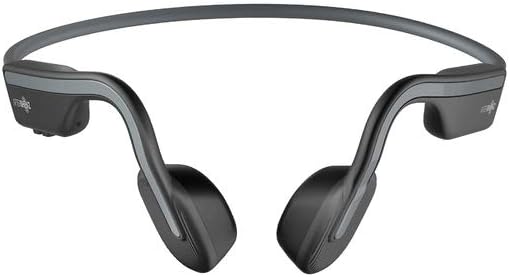
Figur 3: Forside view of the AfterShokz OpenMove headphones, illustrating how the band rests behind the head and the transducers sit on the cheekbones.
Position the transducers on your cheekbones, just in front of your ears. The flexible band should rest comfortably behind your head. Ensure a snug fit for optimal sound transmission and clarity.
4. Vedligeholdelse
Rensning
For at bevare dine hovedtelefoners levetid og hygiejne:
- Tør hovedtelefonerne af med en blød, damp klæde.
- Do not use harsh chemicals or abrasive cleaners, as these can damage the materials.
- Sørg for, at opladningsporten er helt tør, før du tilslutter opladningskablet.
Opbevaring
When not in use, store your headphones properly:
- Store the headphones in the dedicated pouch provided to protect them from dust, scratches, and minor impacts.
- Avoid storing the headphones in environments with extreme temperatures (very hot or very cold) or high humidity.
5. Fejlfinding
Fælles problemer og løsninger
If you encounter any problems with your AfterShokz OpenMove headphones, refer to the table below for potential solutions.
| Spørgsmål | Mulig løsning |
|---|---|
| Hovedtelefonerne tændes ikke. | Charge the headphones fully. Ensure the charging cable is securely connected. |
| Ingen lyd fra hovedtelefoner. | Ensure the headphones are powered on and successfully paired with your device. Check the volume level on both the headphones and your connected device. |
| Kan ikke parres med en enhed. | Ensure the headphones are in pairing mode (LED flashing red and blue). Turn off and then on Bluetooth on your device. Try restarting both the headphones and your device. |
| Dårlig lydkvalitet eller lav lydstyrke. | Adjust the position of the transducers on your cheekbones for a better fit. Experiment with different EQ modes. Ensure there are no obstructions between the headphones and your device. |
| Hovedtelefoner oplader ikke. | Verify that the USB-C charging cable is properly connected to both the headphones and a working power source. Try a different USB port or power adapter. |
6. Specifikationer
Tekniske specifikationer
Detailed technical specifications for the AfterShokz OpenMove headphones:
| Feature | Specifikation |
|---|---|
| Modelnummer | AFT-EP-000022 |
| Højttaler type | Knogleledningstransducere |
| Frekvensrespons | 20Hz - 20,000Hz |
| Følsomhed | 100 ± 3dB |
| Mikrofonfølsomhed | -40 dB ± 3 dB |
| Bluetooth version | 5.0 |
| Understøttet Profiles | A2DP, AVRCP, HSP, HFP |
| Wireless Range | Op til 10 meter (33 fod) |
| Batterilevetid | Op til 6 timer |
| Opladningstid | Cirka 2 timer |
| Vægt | 29 gram (1.02 ounce) |
| Vandmodstandsniveau | Vandtæt |
| Forbindelsesteknologi | Trådløs (Bluetooth) |
| Inkluderede komponenter | Headphones, USB-C Cable, Earplugs, Pouch |
7. Garanti og support
Garantioplysninger
For detailed information regarding the product warranty, including terms, conditions, and duration, please refer to the official AfterShokz website or the warranty card included with your purchase. It is recommended to retain your proof of purchase for warranty claims.
Kundesupport
If you encounter any issues or have questions not addressed in this manual, please visit the AfterShokz support page on their official website. You can also contact their customer service team for further assistance.


