1. Introduktion
This manual provides detailed instructions for the installation, operation, and maintenance of your LUMI PRO Universal PANNING Motorized TV Wall Mount, model PLB-M03G. This electric wall mount is designed to automatically move your TV, offering optimal viewing angles with the convenience of remote control.
The PLB-M03G allows your television to swing out up to 90 degrees, enabling you to find the perfect viewing position from various locations within your room. Its innovative design includes a learn mode function, allowing integration with your existing TV remote for seamless control.
2. Sikkerhedsoplysninger
Please read all instructions carefully before installation and use. Failure to do so may result in personal injury or property damage. Keep this manual for future reference.
- Ensure the wall structure can support the combined weight of the mount and your television.
- Overskrid ikke beslagets maksimale vægtkapacitet.
- Use only the provided mounting hardware. If any parts are missing or damaged, contact customer support.
- Hold børn og kæledyr væk under installationen.
- Forsøg ikke at ændre beslaget.
- Ensure all cables are properly managed to prevent pinching or damage during movement.
3. Produktfunktioner
- Kraftig motor: Engineered for stable, strong, and durable performance.
- Kabelstyring: Integrated system to elegantly conceal cables attached to the display.
- Built-In Level Adjustment: Ensures precise and perfect positioning of your television.
- Programmable Memory Settings: Allows for presetting favorite viewing positions for ease of use and ideal angle recall.
- Automatic Panning: TV automatically swings out up to 90 degrees with remote control.
4. Pakkens indhold
Kontroller venligst, at alle komponenter er til stede, før installationen påbegyndes:
- Motorized TV Wall Mount Assembly
- Fjernbetjening
- Monteringssæt (skruer, ankre, skiver, afstandsstykker)
- Strømadapter
- Instruktionsmanual
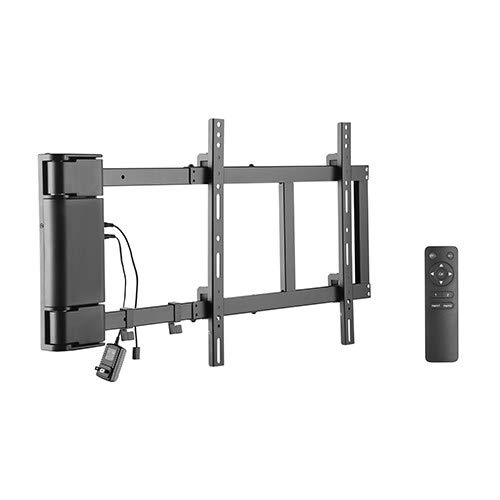
Figure 4.1: The LUMI PRO Motorized TV Wall Mount (PLB-M03G) and its accompanying remote control. The image displays the main mount assembly, including the motorized arm and the separate handheld remote.
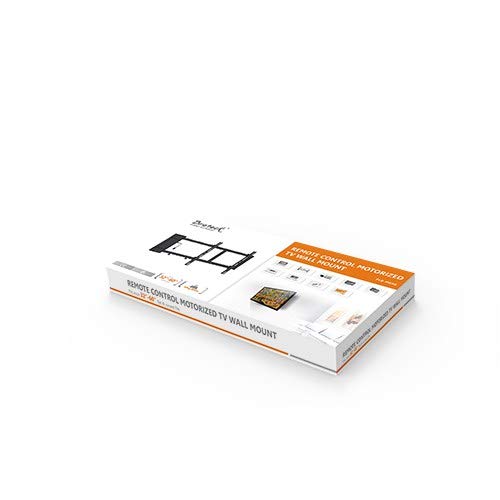
Figure 4.2: The retail packaging for the LUMI PRO Motorized TV Wall Mount. The box features an image of the mount and highlights key features, indicating a complete product package.
5. Opsætning og installation
Professional installation is recommended for optimal safety and performance. Ensure you have the necessary tools (drill, stud finder, level, screwdriver) before starting.
5.1 Forberedelse af væggen
- Locate suitable wall studs or use appropriate anchors for concrete/brick walls.
- Mark the desired mounting height and position on the wall. Use a level to ensure accuracy.
5.2 Mount Assembly and Wall Attachment
- Attach the wall plate of the mount to the marked positions using the provided screws and anchors. Ensure it is securely fastened and level.
- Assemble any necessary components of the motorized arm as per the detailed diagrams in the included paper manual.
5.3 TV Bracket Attachment
- Attach the TV brackets to the back of your television using the appropriate VESA screws and spacers. Ensure the brackets are centered and securely tightened.
- Carefully lift the TV and hook the TV brackets onto the mount's arms. Secure the TV to the mount using the safety screws or locking mechanisms.
5.4 Kabeltilslutning
- Connect the power adapter to the motorized mount and plug it into a power outlet.
- Route all TV and mount cables through the integrated cable management system to ensure they are tidy and protected during movement.
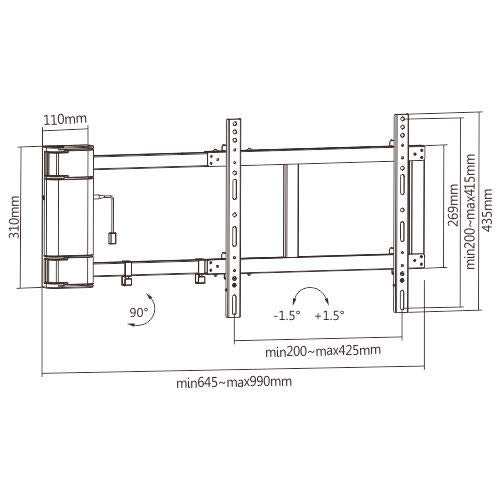
Figure 5.1: Technical drawing illustrating the dimensions of the LUMI PRO Motorized TV Wall Mount. Key measurements such as height (310mm), width (min 645mm - max 990mm), and VESA compatibility ranges (min 200mm - max 425mm horizontal, min 200mm - max 415mm vertical) are shown, along with the 90-degree panning capability.
6. Betjeningsvejledning
The PLB-M03G mount is designed for intuitive operation using the included remote control.
6.1 Grundlæggende bevægelse
- Tryk på 'OUT' button on the remote to extend the TV from the wall.
- Tryk på 'IN' button to retract the TV towards the wall.
- The mount will automatically stop at its fully extended or retracted positions.
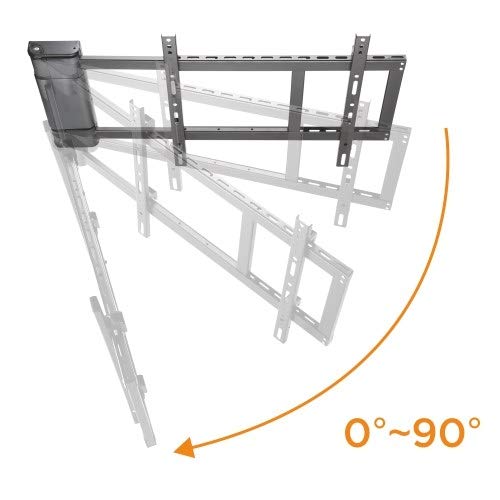
Figure 6.1: Illustration demonstrating the 0 to 90-degree panning motion of the LUMI PRO Motorized TV Wall Mount. The image shows the mount extending and rotating, highlighting its ability to adjust the viewing angle significantly.
6.2 Programmerbare hukommelsesindstillinger
The mount features programmable memory settings to store your preferred viewing stillinger.
- Move the TV to your desired position using the 'OUT' or 'IN' buttons.
- Press and hold one of the numbered memory buttons (e.g., 'M1', 'M2') on the remote until you hear a beep or see an indicator light flash, confirming the position is saved.
- To recall a saved position, simply press the corresponding memory button.
6.3 Learn Mode Function (for TV Remote Integration)
The PLB-M03G can learn commands from your existing TV remote control.
- Refer to the specific instructions in the detailed paper manual for entering 'learn mode'.
- Follow the prompts to program the mount to respond to specific buttons on your TV remote for 'IN' and 'OUT' movements.
7. Vedligeholdelse
Regular maintenance ensures the longevity and safe operation of your motorized TV wall mount.
- Rensning: Tør holderen af med en blød, tør klud. Brug ikke slibende rengøringsmidler eller opløsningsmidler.
- Inspektion: Kontrollér regelmæssigt alle skruer og forbindelser for at sikre, at de forbliver stramme.
- Kabelstyring: Ensure cables are not pinched or frayed, especially during movement. Adjust if necessary.
- Motordrift: Listen for any unusual noises during operation. If you notice anything abnormal, discontinue use and refer to the troubleshooting section or contact support.
8. Fejlfinding
If you encounter issues with your motorized TV wall mount, refer to the following common problems and solutions:
| Problem | Mulig årsag | Løsning |
|---|---|---|
| Mounten bevæger sig ikke. | Ingen strøm; Fjernbetjeningens batteri er lavt/dødt; Fjernbetjeningen er ikke parret. | Check power connection; Replace remote batteries; Refer to manual for remote pairing instructions. |
| Mount moves erratically or stops. | Obstruction; Overload; Loose connection. | Check for obstructions; Ensure TV weight is within limits; Verify all connections are secure. |
| Fjernbetjeningen reagerer ikke. | Battery issue; Remote out of range; Interference. | Replace batteries; Move closer to the mount; Reduce potential interference sources. |
| TV'et er ikke i vater efter installation. | Initial installation not level; Adjustment needed. | Use the built-in level adjustment feature to fine-tune the TV's horizontal position. |
Hvis problemet fortsætter efter at have forsøgt disse løsninger, bedes du kontakte kundesupport.
9. Specifikationer
| Feature | Specifikation |
|---|---|
| Mærke | LUMI |
| Modelnummer | PLB-M03G |
| Monteringstype | Vægmontering |
| Bevægelsestype | Swivel (Motorized Panning) |
| Materiale | Metal |
| Maksimal kompatibel størrelse | Up to 60 Inches (TV size) |
| Panning Vinkel | Op til 90 grader |
| Niveaujustering | Built-in, +/- 1.5 degrees |
| Kabelstyring | Ja |
10. Garanti og support
Your LUMI PRO Universal PANNING Motorized TV Wall Mount (PLB-M03G) comes with a 3-års garanti fra købsdatoen. Denne garanti dækker fabrikationsfejl og sikrer, at produktet er fri for materiale- og fabrikationsfejl ved normal brug.
For warranty claims, technical support, or any inquiries regarding your product, please contact LUMI customer service through the official brand website or your point of purchase. Please have your model number (PLB-M03G) and proof of purchase ready when contacting support.


