Indledning
This manual provides essential information for setting up, operating, maintaining, and troubleshooting your HP 240 G7 Laptop, Model 1S5F1PA#ACJ. Please read this guide thoroughly to ensure proper use and to maximize the lifespan of your device.

Billede: Forside view of the HP 240 G7 Laptop with the screen displaying the Windows operating system desktop.
Pakkens indhold
Bekræft, at følgende varer er inkluderet i din produktpakke:
- HP 240 G7 Laptop (Model 1S5F1PA#ACJ)
- AC-strømadapter og netledning
- Dokumentation (hurtigstartguide, garantioplysninger)
Produkt overview
Familiarize yourself with the physical features and ports of your HP 240 G7 Laptop.
Venstre side komponenter

Image: Left side of the laptop, illustrating the various ports and connectors.
- AC strømstik: Til tilslutning af strømadapteren.
- RJ-45 (Ethernet) Port: Til kablede netværksforbindelser.
- HDMI 1.4b Port: Til tilslutning til eksterne skærme eller projektorer.
- USB 3.1 Gen 1-porte (x2): Til tilslutning af højhastigheds-USB-enheder.
- Kombinationsstik til hovedtelefoner/mikrofon: For connecting a headset or external audio devices.
Højre side komponenter
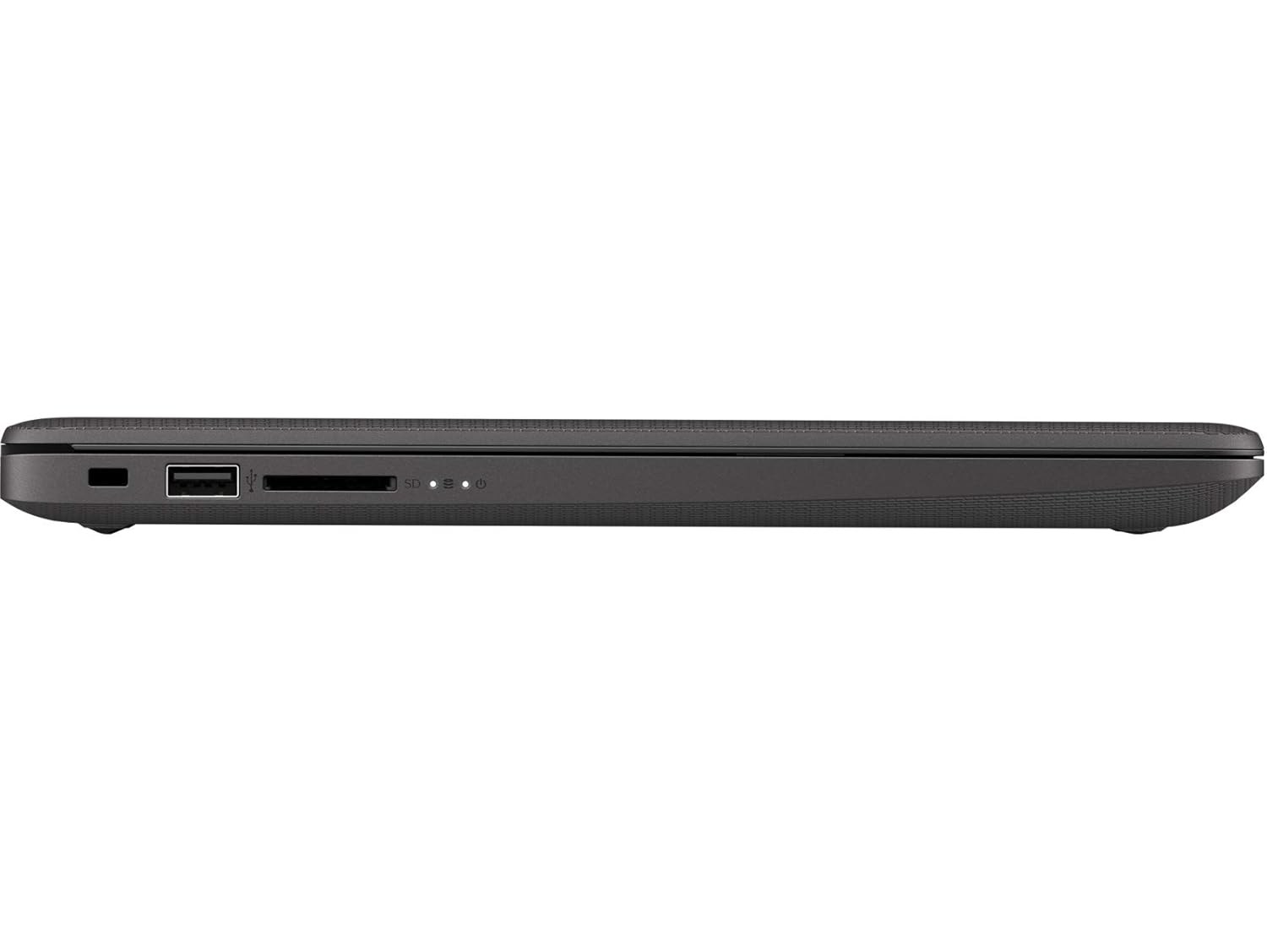
Image: Right side of the laptop, illustrating the USB port and media card reader.
- Sikkerhedslåseplads: Til fastgørelse af et sikkerhedskabel.
- USB 2.0-port: Til tilslutning af standard USB-enheder.
- Multi-Format Digital Media Reader: Understøtter SD-, SDHC- og SDXC-hukommelseskort.
Top og bagside Views

Billede: Top-down view of the laptop with the lid closed, showing the HP logo.

Billede: Vinklet view of the laptop's back, highlighting the textured finish and HP logo.
The top cover features the HP logo. The back of the laptop is designed for durability and aesthetics.
Opsætning
- Tilslut strøm: Plug the AC power adapter into the laptop's AC power connector and then into a wall outlet.
- Første gang tændt: Åbn låget på den bærbare computer, og tryk på tænd/sluk-knappen. Den bærbare computer vil begynde sin oprindelige opstartssekvens.
- Opsætning af operativsystem: Følg instruktionerne på skærmen for at fuldføre Windows 10 Pro-opsætningen, herunder valg af sprog, netværksforbindelse og oprettelse af brugerkonto.
Drift
Strømstyring
- Tænd: Tryk på tænd/sluk-knappen, der er placeret på tastaturdækket.
- Luk ned: Klik på Start-knappen, og derefter på Tænd/sluk > Luk ned.
- Sove mode: Klik på Start-knappen, derefter på Tænd/sluk > Slumretilstand, eller luk låget på den bærbare computer.
Tastatur og touchpad
- Tastatur: Use the integrated keyboard for typing. Function keys (F1-F12) provide shortcuts for various system functions when pressed with the Fn key.
- Touchpad: The touchpad supports multi-touch gestures for navigation, scrolling, and zooming. Refer to Windows settings for customization.
Forbindelse
- Wi-Fi: Connect to wireless networks via the Realtek RTL8822CE 802.11a/b/g/n/ac (2x2) Wi-Fi adapter. Access Wi-Fi settings through the Windows taskbar.
- Bluetooth: Pair Bluetooth 5 compatible devices such as headphones or mice. Manage Bluetooth devices in Windows settings.
- Eksterne skærme: Connect an external monitor or projector using the HDMI 1.4b port. Press Windows-tasten + P til at administrere visningstilstande.
Opretholdelse
- Rensning: Brug en blød, fnugfri klud lidt dampened with water or a screen cleaner to clean the display and exterior surfaces. Avoid harsh chemicals.
- Batteripleje: To prolong battery life, avoid extreme temperatures. Periodically allow the battery to discharge partially before recharging.
- Softwareopdateringer: Søg regelmæssigt efter og installer Windows-opdateringer og HP-driveropdateringer for at sikre optimal ydeevne og sikkerhed.
- Data backup: Sikkerhedskopier regelmæssigt vigtige data til et eksternt drev eller cloud-lagring for at forhindre datatab.
Fejlfinding
Dette afsnit omhandler almindelige problemer, du kan støde på med din HP 240 G7 bærbare computer.
System Performance Issues
- Langsom ydeevne: If the system feels slow, check for background applications consuming resources. Ensure sufficient free space on the hard drive. Consider upgrading RAM if performance remains an issue for your usage.
- Laptop Not Booting: Ensure the power adapter is securely connected and the battery has sufficient charge. Try performing a hard reset by holding the power button for 15 seconds. If the issue persists, contact HP Support.
Display og grafik
- Whitish/Dull Screen: Adjust display brightness and contrast settings in Windows. Ensure display drivers are up to date. Note that the display resolution is 1366 x 768, which may appear less sharp compared to higher-resolution screens.
- Ingen visning: If the screen is black, try connecting an external monitor to verify if the issue is with the laptop's internal display. Restart the laptop.
Overophedning
- Overdreven varme: Ensure the laptop's vents are not obstructed. Use the laptop on a hard, flat surface to allow for proper airflow. Avoid operating in direct sunlight or hot environments. If a specific area, like the palm rest, feels excessively hot, this could indicate internal component heat. Ensure all system drivers and BIOS are updated.
For further assistance, refer to the HP support webwebsted eller kontakt deres kundeservice.
Specifikationer
| Feature | Detalje |
|---|---|
| Modelnavn | HP 240 G7 |
| Varemodelnummer | 1S5F1PA#ACJ |
| Processor | Intel Core i3-1005G1 (1.2 GHz base, up to 3.4 GHz with Intel Turbo Boost, 4 MB L3 Cache, 2 Cores) |
| VÆDDER | 4 GB DDR4-2666 SDRAM (1 x 4 GB) |
| Opbevaring | 1 TB 5400 RPM SATA HDD |
| Vise | 14-inch Diagonal, HD (1366 x 768), Anti-glare, 220 Nits, 45% NTSC |
| Grafik | Intel UHD-grafik |
| Operativsystem | Windows 10 Pro |
| Trådløs forbindelse | Realtek RTL8822CE 802.11a/b/g/n/ac (2x2) Wi-Fi and Bluetooth 5 Combo |
| Havne | 2x USB 3.1 Gen 1, 1x USB 2.0, 1x HDMI 1.4b, 1x RJ-45, 1x Headphone/Microphone Combo, 1x AC Power, 1x Multi-Format Digital Media Reader |
| Dimensioner (B x D x H) | 33.5 x 23.4 x 1.99 cm |
| Vægt | 1.52 kg |
| Batteri | Lithium Battery, 4.9 Watt Hours |
Garanti og support
Your HP 240 G7 Laptop comes with a standard manufacturer's warranty. Please refer to the warranty documentation included in your package for specific terms and conditions.
For technical support, driver downloads, or service inquiries, please visit the official HP support website or contact HP customer service. You can find more information and resources on the HP-butik på Amazon or the main HP webwebsted.