1. Introduktion
The UNIWA E1801 is a user-friendly mobile phone designed with large buttons and a clear display, making it ideal for seniors. It features essential functions such as calling, messaging, FM radio, MP3/MP4 playback, and a built-in flashlight. This manual provides comprehensive instructions for setting up, operating, and maintaining your device.
2. Sikkerhedsoplysninger
- Enheden må ikke skilles ad eller modificeres.
- Brug kun originale eller godkendte batterier og opladere.
- Undgå at udsætte telefonen for ekstreme temperaturer, direkte sollys eller fugt.
- Keep the phone away from medical devices to prevent interference.
- Bortskaf telefonen og batteriet ansvarligt i henhold til lokale regler.
3. Pakkens indhold
Kontroller venligst pakkens indhold ved udpakning. Hvis der mangler eller er beskadigede dele, skal du kontakte din forhandler.
- UNIWA E1801 Mobile Phone
- BL-5C 800mAh batteri
- Oplader
- Brugervejledning (dette dokument)
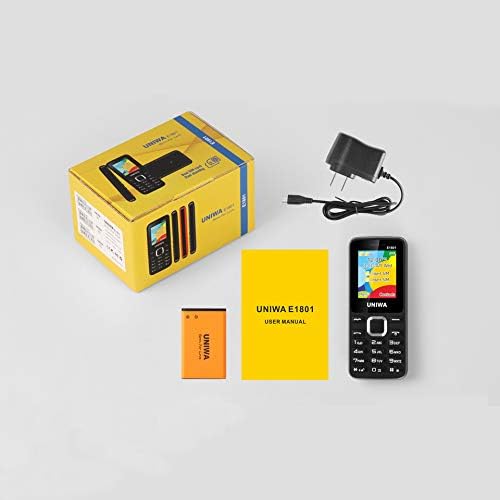
Image: Contents of the UNIWA E1801 package, showing the phone, battery, charger, and user manual neatly arranged next to the product box.
4. Produktet er slutview
Familiarize yourself with the physical components of your UNIWA E1801 phone.

Image: The UNIWA E1801 mobile phone held in a hand, showcasing its compact size, large keypad, and clear color display with the UNIWA logo.
- Vise: 1.77-inch QQVGA screen (160 x 128 pixels) for clear visibility.
- Tastatur: Large, ergonomic buttons with clear numbering for easy dialing and navigation.
- Navigationstaster: Plated navigation keys for intuitive menu control.
- Bagkamera: 0.08 MP camera for basic photo capture.
- Højttaler: Integrated 2030 box speaker for loud and clear audio.
- Lommelygte: Indbygget LED-lommelygte for nemheds skyld.
- Non-slip Frame: Textured frame design for a secure grip.

Billede: Et nærbillede view of the UNIWA E1801's keypad, highlighting the ergonomic design and the metallic finish of the central navigation keys.

Image: The UNIWA E1801 phone with an inset showing the detailed texture of its non-slip frame, designed for a secure grip.

Image: The rear of the UNIWA E1801 phone, with an overlay illustrating the powerful 2030 box speaker and its sound projection.
5. Opsætning
5.1. Installing SIM Cards
The UNIWA E1801 supports dual SIM cards, allowing you to use two different numbers simultaneously.
- Fjern bagcoveret på telefonen.
- Find SIM-kortpladserne.
- Carefully insert your SIM cards into the designated slots with the gold contacts facing down.
- Sørg for, at SIM-kortene sidder korrekt i.

Image: The back of the UNIWA E1801 phone with the cover removed, clearly showing the two SIM card slots and an illustration of two SIM cards.
5.2. Installation af batteriet
- After inserting the SIM cards, place the BL-5C 800mAh battery into the battery compartment, aligning the gold contacts.
- Gently press down until the battery is securely in place.
- Sæt bagdækslet på igen, og sørg for, at det klikker på plads.
5.3. Opladning af telefonen
Oplad telefonens batteri helt før første brug.
- Tilslut opladeren til opladningsporten på telefonen.
- Sæt opladeren i en stikkontakt.
- Batteriindikatoren på skærmen viser opladningsstatus.
- Når den er fuldt opladet, skal du frakoble opladeren.
6. Betjeningsvejledning
6.1. Tænd/sluk
- For at tænde: Tryk på tænd/sluk-knappen/afslut opkald, og hold den nede, indtil skærmen lyser.
- For at slukke: Tryk på tænd/sluk-knappen/afslut opkald, og hold den nede, indtil sluk-mulighederne vises, og vælg derefter "Sluk".
6.2. Foretage opkald
- Indtast telefonnummeret ved hjælp af tastaturet fra standbyskærmen.
- Tryk på den grønne opkaldsknap for at starte opkaldet.
- For at afslutte et opkald skal du trykke på den røde Afslut opkald-knap.
6.3. Afsendelse af beskeder
- Gå til "Menu" > "Beskeder" > "Skriv besked".
- Indtast din besked ved hjælp af tastaturet.
- Indtast modtagerens telefonnummer, eller vælg fra kontakter.
- Tryk på "Send".
6.4. Brug af FM-radioen
Telefonen har en trådløs FM-radio.
- Gå til "Menu" > "FM-radio".
- Select "Auto search" to find available stations.
- Use the navigation keys to switch between stations.

Image: The UNIWA E1801 phone displaying its FM radio interface, showing a frequency of 142.2 MHz, with musical notes and a classic radio in the background, indicating its wireless FM capability.
6.5. Brug af lommelygten
The built-in flashlight can be easily activated.
- Typically, a dedicated button or a long press on a specific key (refer to your phone's quick guide) activates the flashlight.
- Alternatively, access it via "Menu" > "Tools" > "Flashlight".

Image: The UNIWA E1801 phone with a bright beam of light emanating from its top, illustrating the built-in flashlight function.
6.6. Andre funktioner
- MP3/MP4 Playback: Supports multimedia playback. Transfer files to a TF card (up to 16GB, not included) and access them via the "Multimedia" menu.
- Telefonbog: Gem op til 300 kontakter.
- Værktøjer: Includes games, calendar, alarm clock, calculator, world clock, and recorder.
7. Vedligeholdelse
- Rensning: Brug en blød, tør klud til at rengøre telefonens overflade. Brug ikke flydende rengøringsmidler eller aerosoler.
- Opbevaring: Opbevar telefonen et køligt og tørt sted, væk fra direkte sollys og ekstreme temperaturer.
- Batteripleje: Avoid fully discharging the battery frequently. Charge it regularly to prolong its lifespan.
8. Fejlfinding
| Problem | Mulig årsag | Løsning |
|---|---|---|
| Telefonen tænder ikke. | Batteriet er lavt eller ikke installeret korrekt. | Oplad batteriet. Sørg for, at batteriet er korrekt isat. |
| Kan ikke foretage eller modtage opkald. | Intet SIM-kort, SIM-kort ikke isat korrekt, eller intet netværkssignal. | Ensure SIM card is inserted. Check network signal strength. Contact your service provider. |
| Dårlig lydkvalitet. | Low volume, poor network signal, or speaker/microphone obstruction. | Adjust volume. Move to an area with better signal. Clean speaker/microphone openings. |
| Batteriet aflades hurtigt. | Hyppig brug, baggrundsapplikationer eller gammelt batteri. | Reducer skærmens lysstyrke. Luk ubrugte applikationer. Overvej at udskifte batteriet, hvis det er gammelt. |
9. Specifikationer
| Feature | Detalje |
|---|---|
| Modelnummer | E1801 |
| Dimensioner | 108 x 45 x 14 mm |
| Vægt | 68 g |
| CPU | SC6531E |
| Network Band | 2G: GSM850/900/1800/1900 MHz, GPRS |
| SIM-kort | Dobbelt SIM-kort, dobbelt standby |
| Telefonbogskapacitet | 300 poster |
| Vise | 1.77 inch QQVGA, 160 x 128 pixels |
| Kamera | 0.08 MP Rear Camera, 640 x 480 pixels |
| Multimedier | MP3, MP4 |
| Hukommelse | Supports TF card up to 16 GB (max) |
| Bluetooth | V2.1 |
| Batteri | BL-5C 800mAh |
| Taletid | Op til 240 minutter |
| Standby tid | Op til 200 timer |
| Sprog | English, Russian, Hebrew, Arabic, French, Spanish, Polish, German, Italian, Portuguese, Chinese |
| Funktioner | Games, Calendar, Alarm Clock, Calculator, World Clock, Flashlight, E-book, WAP, Recorder |
10. Garanti og support
Your UNIWA E1801 mobile phone comes with a standard manufacturer's warranty. Please refer to the warranty card included in your package for specific terms and conditions.
For technical support, troubleshooting assistance, or warranty claims, please contact your point of purchase or the official UNIWA customer service. Keep your purchase receipt as proof of purchase.
For more information, visit the official UNIWA webwebstedet eller kontakt deres supportkanaler.


