1. Introduktion
Thank you for choosing the LOXJIE D30 Audio DAC and Headphone Amplifier. This device is designed to deliver high-fidelity audio performance, featuring an ES9068AS DAC chip, XMOS for advanced digital audio processing, and support for PCM up to 32bit/768kHz, MQA, and DSD512. It also includes Bluetooth 5.0 with APT-X for wireless connectivity and is JAS Hi-Res certified. This manual provides essential information for setting up, operating, and maintaining your D30 unit.
2. Sikkerhedsinstruktioner
- Do not disassemble or modify the unit. Unauthorized modifications may result in electric shock or product malfunction.
- Udsæt ikke enheden for vand, fugt eller for høj luftfugtighed.
- Avoid placing the unit near heat sources, direct sunlight, or in poorly ventilated areas.
- Use only the specified power adapter and cables provided with the unit.
- Sørg for korrekt ventilation omkring enheden for at forhindre overophedning.
- Hold enheden væk fra stærke magnetiske felter.
- Unplug the power cord during lightning storms or when unused for extended periods.
3. Pakkens indhold
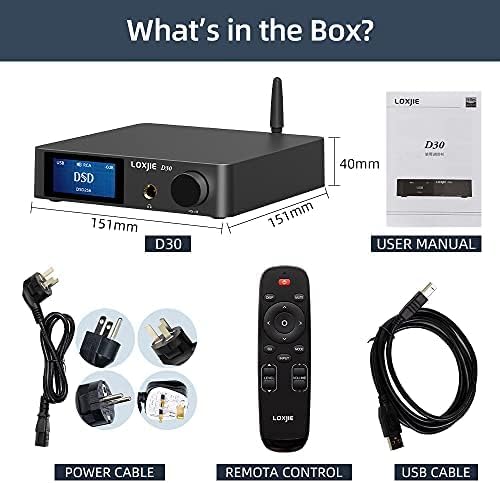
Billedbeskrivelse: En overhead view of the LOXJIE D30 Audio DAC and Headphone Amplifier package contents. It shows the D30 unit, a user manual, a remote control, a power cable with various international plug adapters, and a USB cable.
- LOXJIE D30 Unit
- Fjernbetjening
- Power Cable with Adapters
- USB kabel
- Brugermanual
4. Produktet er slutview
4.1 Frontpanel

Billedbeskrivelse: En frontvinkel view of the LOXJIE D30 Audio DAC and Headphone Amplifier. The front panel features a digital display showing "USB DSD DSD256", a 6.35mm headphone jack, and a multi-function knob labeled "VOL/MENU". An antenna is visible on the top right.
- Skærm: Viser aktuel indgang, sample rate, volume level, and menu options.
- 6.35 mm hovedtelefonudgang: Til tilslutning af hovedtelefoner.
- Multi-function Knob (VOL/MENU):
- Drej for at justere lydstyrken.
- Press to enter/exit menu.
- Rotate in menu to navigate options.
- Tryk på for at bekræfte valget.
4.2 Bagpanel
Billedbeskrivelse: A rear-angle view of the LOXJIE D30 Audio DAC and Headphone Amplifier. The rear panel features various input and output ports including RCA (L/R) inputs, Coaxial input, Optical input, USB input, SW OUT (subwoofer output), RCA (L/R) line outputs, speaker terminals (Right/Left), and a power input with a switch. A Bluetooth antenna is also visible.
- RCA (L/R) Inputs: Til analoge lydkilder.
- Koaksial indgang: Til digitale lydkilder.
- Optisk indgang: Til digitale lydkilder.
- USB-indgang: For connecting to a computer (PCM 32bit/768kHz, DSD512).
- SW UD: Subwoofer output.
- RCA (L/R) Line Outputs: Til tilslutning til ekstern ampløftere eller elektriske højttalere.
- Speaker Terminals (Right/Left): For connecting passive speakers.
- Bluetooth-antenne: For wireless Bluetooth 5.0 connectivity.
- Power Input & Switch: For connecting the power cable and turning the unit on/off.
5. Opsætning
- Strømtilslutning: Connect the provided power cable to the D30's power input and then to a wall outlet. Ensure the power switch is in the OFF position before connecting.
- Antenne installation: Screw the Bluetooth antenna firmly into its connector on the rear panel.
- Lydkildeforbindelse:
- USB: Connect a USB cable from your computer to the D30's USB input. Install necessary drivers if prompted by your operating system.
- Optisk/koaksial: Tilslut din digitale lydkilde (f.eks. cd-afspiller, tv) til den tilsvarende optiske eller koaksiale indgang.
- Bluetooth: Ensure the antenna is connected. Select Bluetooth input on the D30, then pair with your device (see Operating Instructions).
- RCA-indgang: Connect analog audio sources using RCA cables.
- Udgangsforbindelse:
- Hovedtelefoner: Plug your 6.35mm headphones into the front panel jack.
- Højttalere/Amplivligere: Connect passive speakers to the speaker terminals or an external amplifier/powered speakers to the RCA Line Outputs.
- subwoofer: Connect a subwoofer to the SW OUT port.
- Tænd: Flip the power switch on the rear panel to the ON position. The display will light up.
6. Betjeningsvejledning
- Valg af input: Press the multi-function knob or use the remote control to cycle through available inputs (USB, Optical, Coaxial, Bluetooth, RCA).
- Lydstyrkekontrol: Rotate the multi-function knob or use the volume buttons on the remote control to adjust the output volume. The volume for headphone and line outputs are independent and will switch automatically when changing output modes.
- Output Mode Switching: The D30 automatically switches between headphone output and line output when headphones are plugged in or removed.
- Bluetooth-parring:
- Select Bluetooth input on the D30.
- On your source device (e.g., smartphone), search for Bluetooth devices and select "LOXJIE D30".
- Once paired, the display will show "BT Connected".
- To clear Bluetooth pairing history, navigate to the setup menu and select "BT Clear".
- Menu Navigation (EQ, Treble, Bass, Color):
- Press the multi-function knob to enter the setup menu.
- Rotate the knob to navigate through options like "Output", "EQ", "Treble", "Bass", "Color", etc.
- Press the knob to select an option. Rotate again to adjust the value or setting.
- Press and hold the knob to exit the menu.
- MQA/DSD Playback: The D30 supports MQA full decoding and DSD512 playback via compatible inputs (e.g., USB). Ensure your source software is configured for MQA/DSD output.
7. Vedligeholdelse
- Rengør enheden med en blød, tør klud. Brug ikke slibende rengøringsmidler eller opløsningsmidler.
- Hold enheden fri for støv og snavs.
- Sørg for, at alle forbindelser er sikre og fri for korrosion.
8. Fejlfinding
| Problem | Mulig årsag | Løsning |
|---|---|---|
| Ingen strøm | Strømkabel ikke tilsluttet; Strømafbryder slukket | Check power cable connection; Turn on power switch |
| Ingen lydudgang | Incorrect input selected; Volume too low; Output device not connected or faulty | Select correct input; Increase volume; Check connections to headphones/speakers |
| Problemer med Bluetooth-forbindelse | Device not paired; Out of range; Interference | Ensure D30 is in Bluetooth mode and discoverable; Re-pair device; Move closer to D30; Clear BT history |
| Forvrænget lyd | Kildelydkvalitet; Forkert sample rate; Cable issues | Check source audio; Verify sample rate settings; Replace cables if necessary |
9. Specifikationer
| Feature | Detalje |
|---|---|
| DAC-chip | ESS ES9068AS |
| USB-kompatibilitet | PCM 32bit / 768 kHz, DSD512 |
| MQA-support | Full MQA decoding (Optical and Coaxial inputs) |
| Bluetooth version | 5.0 with APT-X HD (up to 24bit/48kHz) |
| Udgange | 6.35mm Headphone Jack, RCA Line Out, SW Out, Speaker Terminals |
| THD+N | As low as 0.0001% (-120dB) |
| Varens vægt | 1.03 kilo (2.26 pund) |
| Dimensioner | 10.71 x 9.29 x 3.03 tommer (pakke) |
| Strømkilde | AC Power (via adapter) |
| Output Wattage | 165 Watts (for speaker output) |
10. Garanti og support
LOXJIE products are designed and manufactured to the highest quality standards. For warranty information, technical support, or service inquiries, please refer to the warranty card included in your package or visit the official LOXJIE webwebstedet. Behold din købskvittering som købsbevis.


