1. Introduktion
Tak for købetasing Moukey MAMP3 Stereo Power Amplifier. This device is designed to provide high-quality audio amplification for various applications, including home theater, karaoke, and general sound systems. It features multiple input options, including Bluetooth 5.0, USB/SD card playback, FM radio, and microphone inputs. Please read this manual thoroughly before use to ensure proper operation and to maximize your listening experience.

Image: The Moukey MAMP3 amplifier integrated into a home entertainment setup with speakers and a TV.
2. Sikkerhedsinstruktioner
- Do not expose this appliance to rain or moisture to prevent fire or shock hazards.
- Åbn ikke c'enasing. Der er ingen dele indeni, som kan serviceres af brugeren. Overlad al service til kvalificeret personale.
- Sørg for tilstrækkelig ventilation. Bloker ikke ventilationsåbningerne.
- Brug kun den strømadapter, der følger med enheden.
- Keep the unit away from heat sources, direct sunlight, and strong magnetic fields.
- Rengør kun med en tør klud.
3. Pakkens indhold
Kontroller venligst, at alle varer er til stede:
- Moukey MAMP3 Stereo Power Amplivligere
- Remote Control (requires 1 CR2 battery, included)
- FM antenne
- Strømadapter (DC 12V/3A)
- Brugermanual
4. Produktet er slutview
4.1 Frontpanel

Image: Front panel of the Moukey MAMP3 amplifier and included remote control.
- Afbryderen: Tænder/slukker enheden.
- USB-port: Til USB-flashdrev (op til 32 GB).
- SD/MMC-kortslot: For SD/MMC cards (up to 16GB).
- MIC1/MIC2 Inputs: 1/4" (6.35mm) microphone inputs.
- MIC VOL: Justerer mikrofonens lydstyrke.
- EKKO: Justerer mikrofonens ekkoeffekt.
- DISKANT: Adjusts high-frequency audio.
- BAS: Adjusts low-frequency audio.
- MASTERVOLUME: Main volume control for all audio outputs.
- MODE knap: Switches between input modes (Bluetooth, FM, USB, SD, AUX).
- Digital LED-skærm: Viser aktuel tilstand, sporinformation og FM-frekvens.
- Control Buttons (Play/Pause, Next/Previous, CH+/CH-, Repeat): For media playback and FM radio tuning.
4.2 Bagpanel

Image: Rear panel connections of the Moukey MAMP3 amplivligere.
- AUDIO INPUT (RCA L/R): Connect external audio sources like CD players, DVD players, or tape drives.
- POWER DC INPUT (12V/3A): Tilslut den medfølgende strømadapter.
- FM ANTENNE: Tilslut den medfølgende FM-antenne for radiomodtagelse.
- LYDUDGANG (højttalerterminaler): Connect passive bookshelf speakers.
5. Opsætning
- Højttalerforbindelse: Connect your passive bookshelf speakers to the AUDIO OUTPUT terminals on the rear panel. Ensure correct polarity (red to red, black to black).
- FM-antennetilslutning: Screw the included FM antenna into the FM ANTENNA port on the rear panel. Extend the antenna for optimal reception.
- Lydindgangsforbindelse (valgfrit): If using an external audio source (e.g., CD player), connect its RCA output to the AUDIO INPUT (RCA L/R) on the rear panel.
- Mikrofontilslutning (valgfrit): If using microphones for karaoke, plug them into the MIC1 or MIC2 1/4" (6.35mm) inputs on the front panel.
- Strømtilslutning: Connect the provided power adapter to the POWER DC INPUT (12V/3A) on the rear panel, then plug the adapter into a wall outlet.
6. Betjeningsvejledning
6.1 Tænd/sluk
Tryk på Strømafbryder på frontpanelet for at tænde amptænd eller sluk for apparatet. LED-displayet lyser, når enheden er tændt.
6.2 Indgangsvalg
Tryk på MODE button on the front panel or the remote control to cycle through available input sources: Bluetooth (BT), FM Radio, USB, SD, and AUX (RCA input).
6.3 Bluetooth-betjening

Image: Connecting a smartphone via Bluetooth to the Moukey MAMP3 amplivligere.
- Skift til amplivligere til Bluetooth (BT) mode using the MODE button. The LED display will show "BLUE" and flash, indicating it's ready for pairing.
- Aktiver Bluetooth på din smartphone, tablet eller computer, og søg efter tilgængelige enheder.
- Vælg "Moukey M"AMP3" from the list of devices to pair. Once connected, the "BLUE" indicator will stop flashing.
- Du kan nu afspille lyd fra din enhed via amplifier. The effective range for Bluetooth is approximately 12 meters.
6.4 USB/SD-kortafspilning

Image: USB and SD card inputs on the Moukey MAMP3 amplivligere.
- Insert a USB flash drive (up to 32GB) into the USB-port or an SD/MMC card (up to 16GB) into the SD/MMC-kortplads.
- De amplifier will automatically switch to USB or SD mode and begin playing compatible audio files (e.g., MP3). If it doesn't, press the MODE knappen for at vælge den korrekte kilde.
- Use the Play/Pause, Next/Previous, and Repeat buttons on the front panel or remote control to manage playback.
6.5 FM-radiofunktion
- Skift til amplivligere til FM radio mode using the MODE button.
- Tryk på AUTO button (or Play/Pause button) to automatically scan and save available FM stations.
- Brug CH+ og CH- knapperne til at navigere gennem de gemte stationer.
- For manual tuning, use the Next/Previous buttons to fine-tune the frequency.
6.6 Mikrofon- og karaokefunktioner

Image: Microphone input jacks on the Moukey MAMP3 amplivligere.
- Plug your microphones into the MIC1 or MIC2 input.
- Juster mikrofonens lydstyrke ved hjælp af MIC VOL knop.
- Adjust the echo effect for the microphones using the EKKO knop.
- The BASS and TREBLE knobs will affect both music and microphone audio.
6.7 Tone and Master Volume Control
- Brug BASS og DISKANT knobs to adjust the low and high frequencies of the audio output.
- De MASTER VOLUME knob controls the overall output volume of the amplivligere.
7. Fejlfinding
| Problem | Mulig årsag | Løsning |
|---|---|---|
| Ingen strøm | Strømkabel ikke tilsluttet; Strømafbryder slukket | Ensure power cable is securely connected and power switch is on. |
| Ingen lydudgang | Incorrect input selected; Volume too low; Speaker wires loose | Select correct input mode; Increase MASTER VOLUME; Check speaker connections. |
| Bluetooth forbinder ikke | Not in Bluetooth mode; Device too far; Already paired with another device | Switch to BT mode; Move device closer (within 12m); Disconnect from other devices. |
| Dårlig FM -modtagelse | Antenne ikke strakt ud; Område med svagt signal | Extend FM antenna fully; Try repositioning the antenna or unit. |
| USB/SD-kort afspiller ikke | Incorrect format; Card/drive not inserted correctly; Unsupported capacity | Sikre files are MP3; Reinsert card/drive; Check capacity (USB max 32GB, SD max 16GB). |
8. Specifikationer
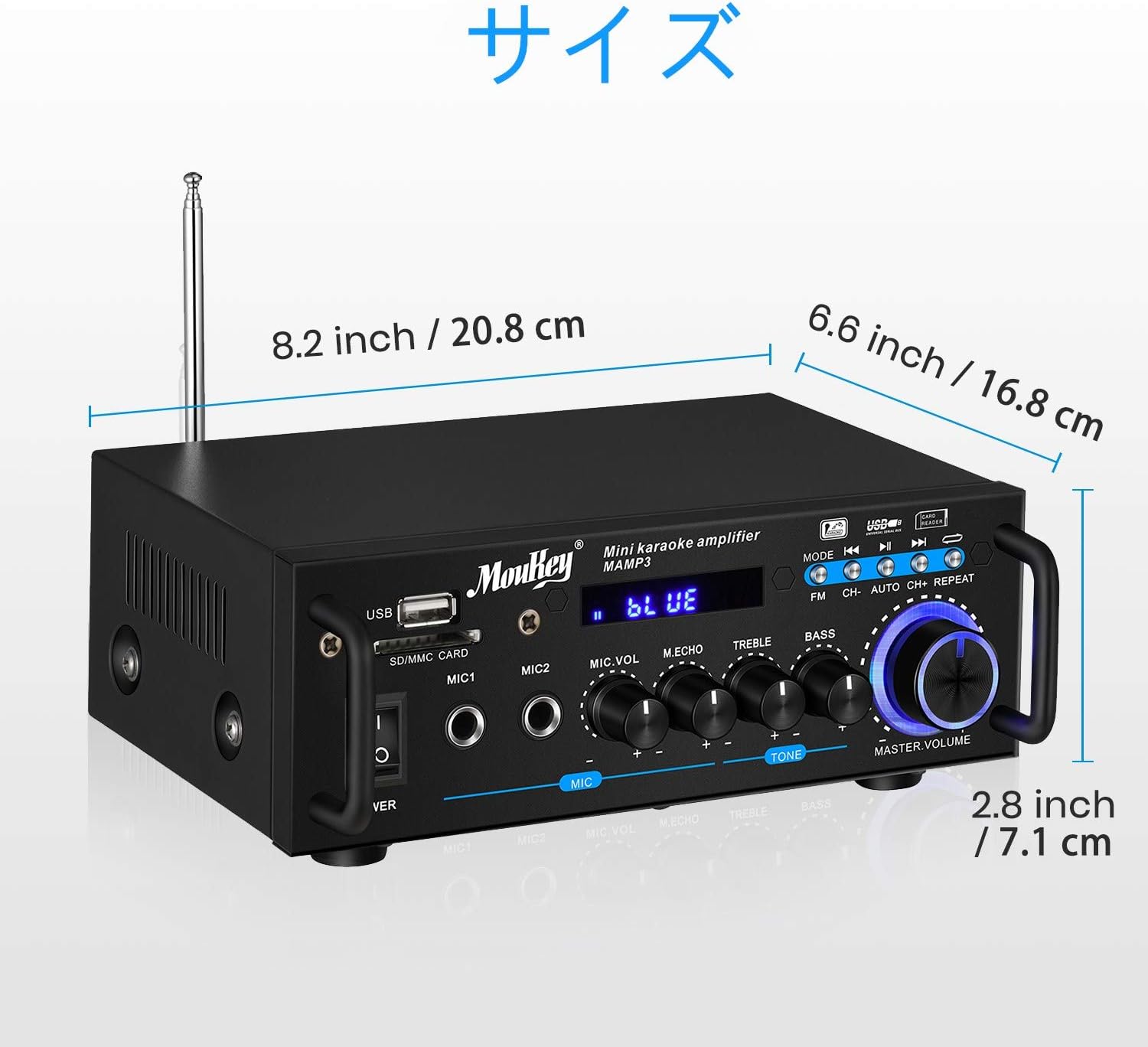
Image: Dimensions of the Moukey MAMP3 amplivligere.
- Model: MAMP3
- Strømudgang: 100W (peak)
- Strømkilde: Corded Electric (DC 12V/3A adapter)
- Bluetooth version: 5.0
- Bluetooth Range: Op til 12 meter
- USB-understøttelse: Op til 32 GB
- SD-kort support: Op til 16 GB
- Mikrofonindgange: 2 x 1/4" (6.35mm)
- Lydindgange: 1 x RCA (L/R)
- Lydudgange: 2 x Speaker Terminals (L/R)
- FM-radiofrekvens: 76.1-108 MHz (may vary by region)
- Fjernbetjenings batteri: 1 x CR2 (inkluderet)
- Dimensioner: Approximately 20.8 cm (W) x 16.8 cm (D) x 7.1 cm (H) / 8.2 in (W) x 6.6 in (D) x 2.8 in (H)
9. Vedligeholdelse
- Rensning: Wipe the unit with a soft, dry cloth. Do not use liquid cleaners or aerosols.
- Opbevaring: Når den ikke er i brug i længere perioder, skal den opbevares ampOpbevar apparatet på et køligt, tørt sted, væk fra direkte sollys og ekstreme temperaturer.
- Ventilation: Sørg for, at ventilationsåbningerne er fri for støv og snavs for at forhindre overophedning.
10. Garanti og support
Moukey products are designed for reliability and performance. For warranty information, technical support, or service inquiries, please refer to the warranty card included with your product or visit the official Moukey webwebsted. Gem venligst din købsbevis til garantikrav.
For further assistance, you may contact Moukey customer support through their official channels.


