Indledning
Thank you for choosing the WEKOME D6 Desktop Mini Bluetooth Speaker. This compact and portable speaker delivers clear sound quality and offers versatile connectivity options. This manual provides detailed instructions on how to set up, operate, and maintain your speaker to ensure optimal performance.
Produkt overview

Figur 1: Front view of the WEKOME D6 Mini Bluetooth Speaker, highlighting its compact cylindrical design and control panel.
The WEKOME D6 is a palm-sized desktop speaker designed for portability and ease of use. It features Bluetooth connectivity for wireless audio streaming and a TF card slot for direct music playback. Its robust design ensures clear audio output for various compatible devices.
Nøglefunktioner:
- Bluetooth-forbindelse: Seamless wireless pairing with smartphones, tablets, and laptops.
- Kompakt design: Palm-sized for easy portability.
- Klar lydkvalitet: Delivers crisp and clear audio.
- Lang batterilevetid: 500 mAh battery provides approximately 4-5 hours of playback.
- Udvidet rækkevidde: Bluetooth transmission distance of up to 10 meters (33 feet).
- TF-kortunderstøttelse: Maximum support for 32GB TF (MicroSD) cards for direct music playback.
- Udgangseffekt: Speaker maximum output power of 10 Watts.
Pakkens indhold
Tjek venligst pakken for følgende varer:
- WEKOME D6 Desktop Mini Bluetooth Speaker
- USB opladningskabel
- Brugervejledning (dette dokument)
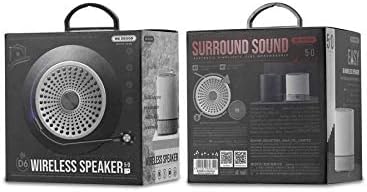
Figur 2: Retail packaging of the WEKOME D6 Mini Bluetooth Speaker, illustrating the product's branding and key information on the box.
Opsætning
1. Opladning af højttaleren:
- Tilslut den lille ende af USB-opladerkablet til opladningsporten på højttaleren.
- Tilslut den anden ende af USB-kablet til en USB-strømadapter (medfølger ikke) eller en computers USB-port.
- The charging indicator light will illuminate during charging and turn off once fully charged. A full charge typically takes 2-3 hours.
2. Tænd/sluk:
- For at tænde: Tryk og hold på Power-knap i et par sekunder, indtil du hører en lydmeddelelse eller ser en indikatorlampe.
- For at slukke: Tryk og hold på Power-knap igen i et par sekunder.
3. Bluetooth-parring:
- Ensure the speaker is powered on and in Bluetooth pairing mode (it will usually enter this mode automatically upon first power-on or if no device is connected). The indicator light will typically flash rapidly.
- Aktiver Bluetooth på din enhed (smartphone, tablet, bærbar computer), og søg efter tilgængelige enheder.
- Select "WEKOME D6" from the list of found devices.
- Once paired, the speaker will provide an audible confirmation, and the indicator light will stop flashing and remain solid.
- Højttaleren genopretter automatisk forbindelse til den sidst parrede enhed, når den tændes, hvis enhedens Bluetooth er aktiveret og inden for rækkevidde.
4. TF Card Insertion:
- Locate the TF card slot on the speaker.
- Gently insert a TF (MicroSD) card (up to 32GB) with pre-loaded music fileind i åbningen, indtil den klikker på plads.
- The speaker will automatically switch to TF card playback mode if a card is detected.
Betjening af højttaleren
Kontrolknapper:
Refer to Figure 1 for the location of the control buttons.
- Power knap: Tryk og hold for at tænde/slukke.
- Knap til lydstyrke op / Næste nummer (+):
- Kort tryk: Øg lydstyrken.
- Langt tryk: Spring til næste nummer.
- Afspil/pause knap (||): Kort tryk for at afspille eller sætte musik på pause.
- Knap til lydstyrke ned / Forrige nummer (-):
- Kort tryk: Skru ned for lydstyrken.
- Langt tryk: Gå til det forrige nummer.
- Mode Button (Dot between + and Play/Pause): Short press to switch between Bluetooth mode and TF card mode (if a TF card is inserted).
Opretholdelse
- Rensning: Brug en blød, tør klud til at rengøre højttalerens overflade. Brug ikke slibende rengøringsmidler, alkohol eller andre kemiske opløsningsmidler, da disse kan beskadige overfladen.
- Opbevaring: Opbevar højttaleren et køligt, tørt sted væk fra direkte sollys og ekstreme temperaturer.
- Batteripleje: For at forlænge batteriets levetid bør du undgå at aflade højttaleren helt ofte. Oplad højttaleren regelmæssigt, selvom den ikke er i brug i længere perioder.
- Vandtæthed: This speaker is not water-resistant. Avoid exposure to liquids.
Fejlfinding
| Problem | Mulig årsag | Løsning |
|---|---|---|
| Højttaleren tænder ikke. | Lavt batteri. | Oplad højttaleren helt. |
| Ingen lyd. | Volume too low; Speaker not paired; Incorrect mode. | Increase volume; Ensure speaker is paired; Switch to correct mode (Bluetooth/TF card). |
| Kan ikke parre med Bluetooth-enhed. | Højttaler ikke i parringstilstand; Enhedens Bluetooth er slået fra; For langt fra højttaleren. | Ensure speaker is in pairing mode; Turn on device Bluetooth; Move device closer to speaker (within 10M). |
| Music stops playing from TF card. | TF card not inserted correctly; Corrupted files; Unsupported format. | Reinsert TF card; Check TF card for errors; Ensure music fileer i et understøttet format (f.eks. MP3). |
Specifikationer
| Mærke | WEKOME |
| Modelnavn | D6 |
| Forbindelsesteknologi | Bluetooth |
| Højttaler type | Desktop Mini Speaker |
| Højttaler Maksimal udgangseffekt | 10 watt |
| Batterikapacitet | 500 mAh (approx. 4-5 hours playback) |
| Transmissionsafstand | 10 meter (33 fod) |
| TF-kortstøtte | Op til 32 GB |
| Kompatible enheder | Bærbar computer, smartphone, tablet |
| Monteringstype | Bordplade |
| Pakkedimensioner | 12.4 x 11.4 x 7.6 cm |
| Vægt | 210 g |
Garanti og support
For warranty information and technical support, please refer to the warranty card included with your product or contact WEKOME customer service through their official website or authorized retailers. Keep your purchase receipt as proof of purchase for warranty claims.


