1. Produktet er slutview
The Sharp Digital Clock is designed for simplicity and convenience, featuring a clear green LED display and dual USB FastCharge ports for charging your devices. It includes an alarm function and a battery backup system to retain settings during power outages.

Figur 1: Forside view of the Sharp Digital Clock, highlighting the large green LED display and dual USB charging ports.
2. Opsætningsvejledning
2.1 Strømtilslutning
Connect the provided power adapter to the DC IN jack located at the back of the clock. Plug the other end into a standard electrical outlet. The display will illuminate, and the clock will be ready for time setting.
2.2 Batteribackup (valgfrit)
For battery backup functionality, which retains time and alarm settings during a power outage, install two (2) AAA batteries (not included) into the battery compartment located on the bottom of the unit. During battery backup, the display will go blank to conserve power, but settings will be preserved.
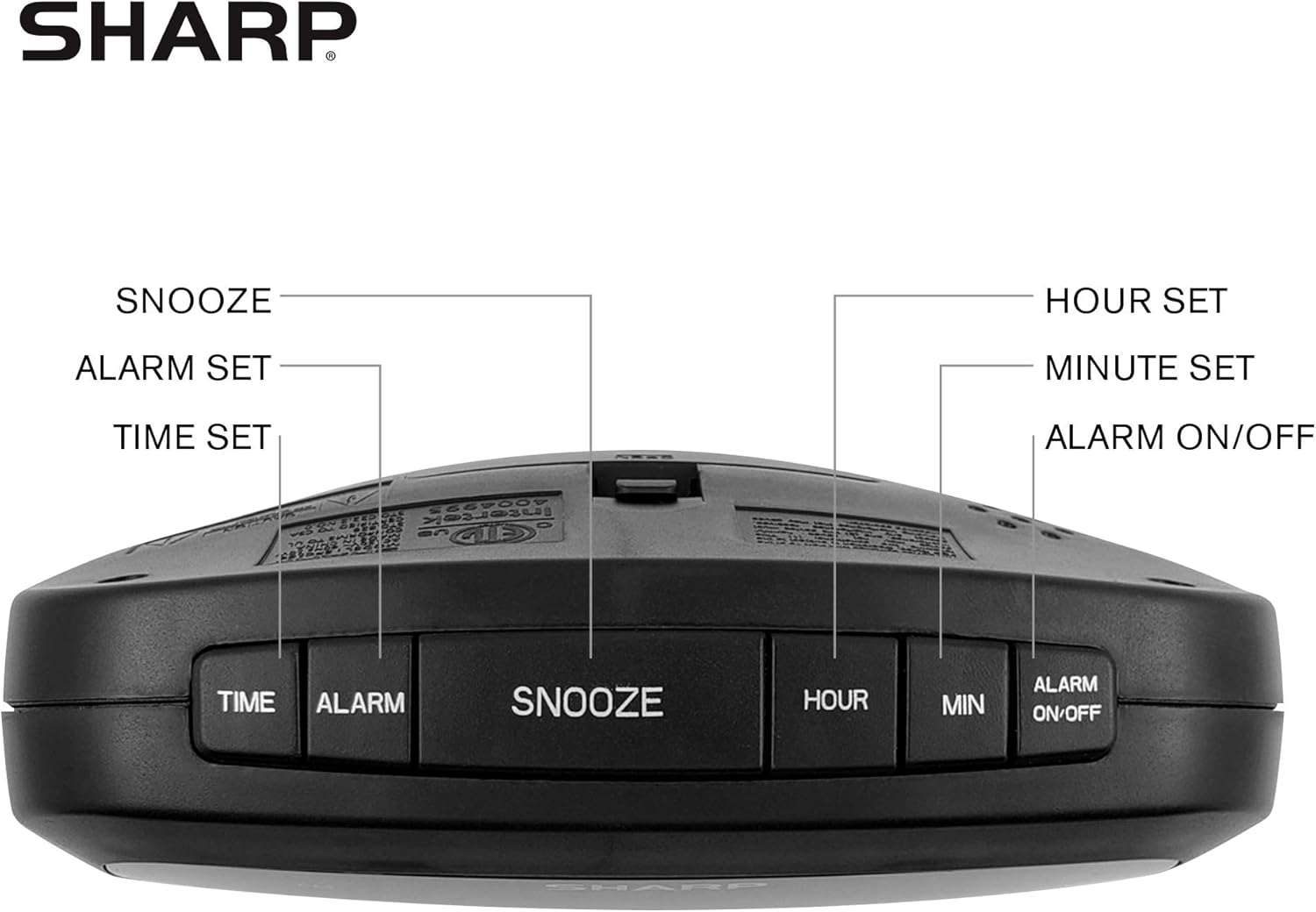
Figure 2: Underside of the clock with the battery compartment visible, requiring 2 AAA batteries for backup.
3. Betjeningsvejledning
The clock features intuitive top-mounted buttons for easy operation.

Figure 3: Top panel of the clock with clearly labeled buttons for time, alarm, snooze/dimmer, hour, minute, and alarm on/off.
3.1 Indstilling af klokkeslæt
- Tryk og hold på TID knappen, indtil timecifrene begynder at blinke.
- Tryk på TIME knappen for at justere timetallet. Vær opmærksom på PM-indikatoren, hvis du indstiller et PM-tidspunkt.
- Tryk på MIN knappen for at justere minutterne.
- Tryk på TID knappen igen for at bekræfte og gemme tiden.
3.2 Indstilling af alarmen
- Tryk og hold på ALARM knappen, indtil alarmens timecifre begynder at blinke.
- Tryk på TIME knappen for at justere alarmtiden.
- Tryk på MIN knappen for at justere alarmens minutter.
- Tryk på ALARM knappen igen for at bekræfte og gemme alarmtidspunktet.
- For at aktivere eller deaktivere alarmen skal du trykke på ALARM TIL / FRA button. An alarm indicator light will appear on the display when the alarm is active.
3.3 Snooze and Dimmer Function
- Når alarmen lyder, skal du trykke på den store SNOOZE / DIMMER button to temporarily silence the alarm for a few minutes.
- To adjust the brightness of the green LED display, repeatedly press the SNOOZE / DIMMER button when the alarm is not sounding. Cycle through bright, medium, and low brightness settings.
3.4 Using the USB Charging Ports
The clock is equipped with two 2 AMP USB charging ports on the front, allowing you to conveniently charge your smartphone or other USB-powered devices directly from the clock.

Figure 4: The clock demonstrating its dual USB charging capability with two smartphones connected.
- Simply connect your device's USB charging cable to one of the USB ports on the front of the clock.
- Ensure your device is compatible with 2 AMP charging for optimal speed.
4. Vedligeholdelse
To ensure the longevity and proper functioning of your Sharp Digital Clock, follow these simple maintenance guidelines:
- Rensning: Wipe the clock with a soft, dry cloth. Do not use abrasive cleaners, waxes, or solvents as they may damage the finish.
- Placering: Placer uret på en stabil, flad overflade væk fra direkte sollys, varmekilder og overdreven fugtighed.
- Udskiftning af batteri: If using the battery backup, replace the AAA batteries annually or when the clock consistently loses time during power interruptions.
5. Fejlfinding
| Problem | Mulig årsag | Løsning |
|---|---|---|
| Urdisplayet er tomt. | Ingen magt eller magt outage. | Ensure the power adapter is securely plugged into the clock and a working electrical outlet. If there was a power outage, check if backup batteries are installed and functional. |
| Alarmen lyder ikke. | Alarm ikke indstillet eller ikke aktiveret. | Verify that the alarm time is correctly set and that the alarm indicator light is visible on the display (press ALARM ON/OFF). |
| USB-porte oplader ikke enheder. | Device incompatibility or faulty cable. | Ensure your device is compatible with USB charging. Try a different USB cable. Confirm the clock is powered on. |
| Skærmen er for lys/mørket. | Lysstyrkeindstillingen skal justeres. | Press the SNOOZE/DIMMER button repeatedly to cycle through brightness levels (bright, medium, low). |
6. Produktspecifikationer
- Mærke: Skarp
- Model: B08H3STVWG
- Skærmtype: Digital Green LED
- Strømkilde: Elektrisk med ledning
- Batteri-sikkerhedskopi: 2 x AAA batterier (medfølger ikke)
- USB-porte: 2 x 2 AMP USB FastCharge Ports
- Produktdimensioner: 5.95 cm B x 2.3 cm H
- Varens vægt: 9.59 ounce
- Farve: Grøn led
- Materiale: Plast
- UPC: 049353005089
7. Garanti og support
This Sharp Digital Clock comes with a limited warranty. For detailed warranty information, product support, or to purchase accessories, please visit the official Sharp webwebstedet eller kontakt deres kundeservice. Du kan også besøge Sharp Store på Amazon.
Gem venligst din købskvittering i tilfælde af garantikrav.


