Produkt overview
Thank you for choosing the Brightever Set of 2 Touch Control Table Lamps. These versatile lamps are designed to enhance your living space with convenient lighting and charging capabilities. Featuring a sleek metal base and a white fabric lampshade, they offer 3-way dimmable lighting, dual USB charging ports, and an AC outlet, making them ideal for bedrooms, living rooms, offices, and study areas.

Image: The Brightever Touch Control Table Lamps, highlighting their touch control feature and integrated USB charging ports.
Sikkerhedsinstruktioner
Læs venligst alle instruktioner omhyggeligt inden montering og brug. Gem denne manual til senere brug.
- Tag altid stikket ud af lamp from the power outlet before cleaning, changing the light bulb, or performing any maintenance.
- Brug ikke denne lamp in wet locations or near water.
- Sørg for, at voltage of your power supply matches the lamp's krav (120V).
- Use only A19 LED bulbs with an E26 base. Do not exceed the maximum compatible wattage of 100 Watts (for incandescent equivalent).
- Behold lamp væk fra brændbare materialer.
- Denne lamp er kun til indendørs brug.
- Forsøg ikke at adskille eller modificere lampOverlad al service til kvalificeret personale.
Opsætningsvejledning
Follow these steps to assemble your Brightever table lamp:
- Udpak komponenter: Carefully remove all parts from the packaging. You should have the lamp base, lampshade, and two A19 LED bulbs.
- Vedhæft Lampskygge:
- Skru fastgørelsesringen af lamp holder on the base.
- Place the fabric lampskygge på lamp holder.
- Skru fastgørelsesringen tilbage på l'etamp holder til at fastgøre lampskygge.
- Installer pære: Screw the provided A19 LED bulb into the E26 socket until it is snug.
- Tilslut til strøm: Tilslut lamp's power cord into a standard 120V AC wall outlet.

Billede: Lamp dimensions and bulb type, illustrating key features for setup.
Betjeningsvejledning
Your Brightever table lamp er designet til brugervenlighed:
Touch Control Dimmable Lighting:
Lamp features a highly sensitive touch control sensor integrated into its metal base and pole. Simply tap any metal part of the lamp to cycle through the brightness settings:
- Første tryk: Low brightness setting (ideal for soft ambient light).
- Andet tryk: Medium brightness setting (suitable for general illumination).
- Tredje tryk: High brightness setting (perfect for reading or task lighting).
- Fjerde tryk: Drejer l'enamp SLUKKET.
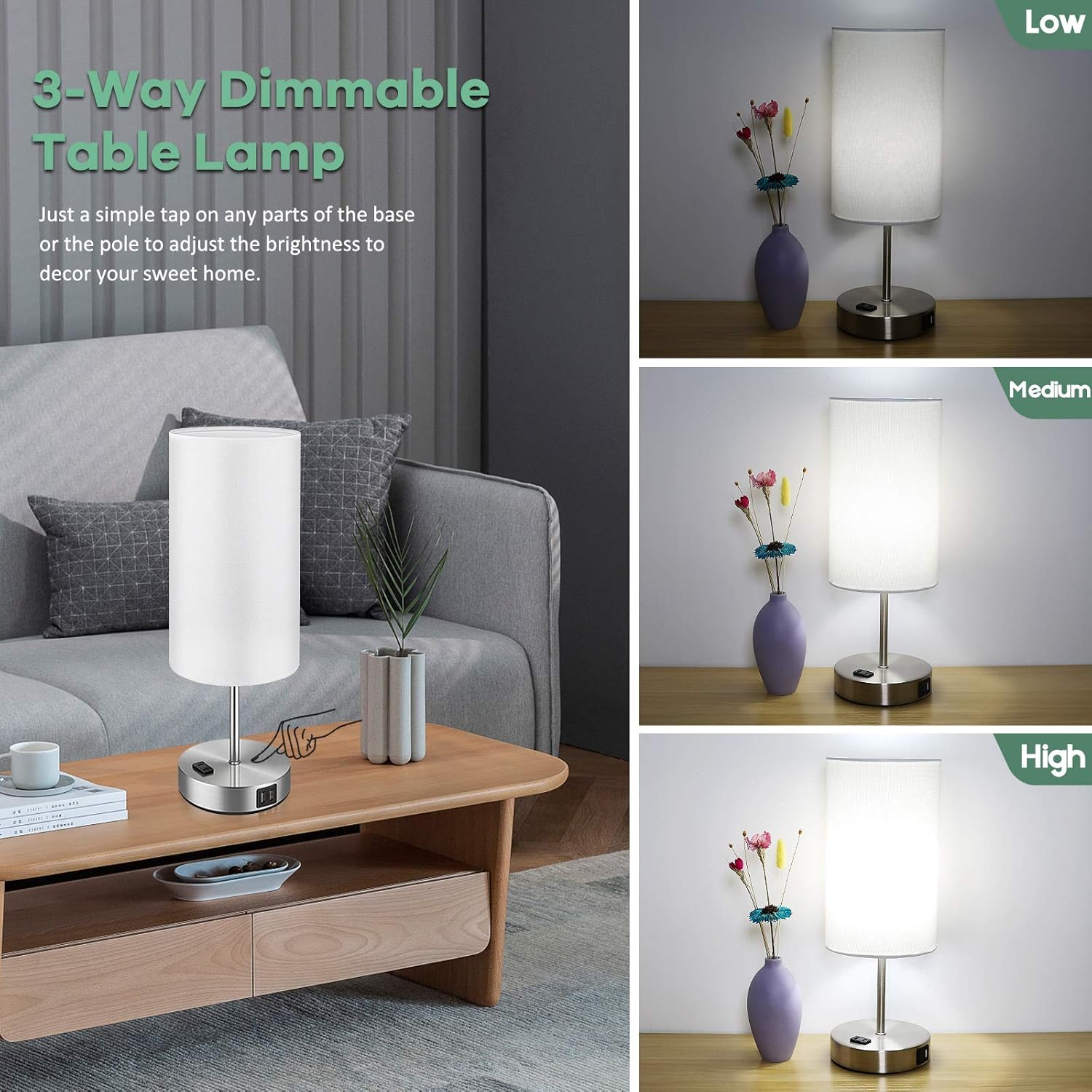
Image: Demonstration of the 3-way dimmable function, showing low, medium, and high light levels.
USB Charging Ports & AC Outlet:
Lamp is equipped with dual 5V/2.1A USB charging ports and one 2-prong AC outlet on its base. These ports are functional whether the lamp lyset er tændt eller slukket, så længe lamp is plugged into a wall outlet. This allows you to conveniently charge your electronic devices such as smartphones, tablets, e-readers, and more.

Billede: L'etamp's integrated USB charging ports and AC outlet in use, providing convenient power for devices.
Opretholdelse
For at sikre din l's levetid og optimale ydeevneamp:
- Rensning: Tag altid stikket ud af lamp before cleaning. Wipe the metal base and lampshade with a soft, dry cloth. Do not use abrasive cleaners or polishes as they may damage the finish.
- Udskiftning af pære: If the included LED bulb needs replacement, ensure the lamp is unplugged and the bulb has cooled down. Replace with an A19 LED bulb with an E26 base. The lamp is compatible with bulbs up to 100 Watts (incandescent equivalent).

Image: Key components of the lamp, useful for understanding maintenance points.
Fejlfinding
Hvis du støder på problemer med din lamp, se venligst følgende almindelige løsninger:
| Problem | Mulig årsag | Løsning |
|---|---|---|
| Lamp tændes ikke. | Ikke tilsluttet; løs pære; strømafbrydelsetage. | Ensure power cord is securely plugged into a live outlet. Tighten the light bulb. Check your home's circuit breaker. |
| Touch control is unresponsive or inconsistent. | Loose connection; static electricity; incompatible bulb. | Ensure all connections are secure. Unplug and replug the lamp. Ensure you are using a dimmable LED bulb. Try touching a different part of the metal base/pole. |
| Lyse flimrer. | Loose bulb; unstable power; incompatible bulb. | Tighten the bulb. Try plugging the lamp into a different outlet. Ensure the bulb is a dimmable LED. |
| USB ports or AC outlet not charging. | Lamp not plugged in; device cable issue; device not compatible. | Sørg for at lamp is plugged into a live wall outlet. Try a different charging cable or device. |

Image: Comparison illustrating the stable, flicker-free lighting provided by Brightever lamps, which aids in eye protection.
Specifikationer
| Feature | Detalje |
|---|---|
| Mærke | Brightever |
| Modelnummer | ST0001-WH |
| Mål (D x B x H) | 5.95 cm x 5.95 cm x 15.9 cm |
| Grundmateriale | Metal |
| Skærmmateriale | Gunny Cloth |
| Switch Type | Tryk på kontrol |
| Lyskildetype | Dæmpbare LED-pærer med E26 fatning |
| Medfølgende pærer | 2 x A19 LED Bulbs |
| Pære Wattage | 7 watt (LED) |
| Maksimal kompatibel wattage | 100 watt |
| Lysstyrke | 800 Lumen |
| Farvetemperatur | 5000 Kelvin (Daylight White) |
| Strømkilde | Elektrisk med ledning |
| Forbindelse | Dual 5V/2.1A USB Charging Ports, One 2-Prong AC Outlet |
| Indendørs/Udendørs brug | Kun indendørs |
Garanti og support
Brightever stands behind the quality of its products. For any questions, concerns, or support needs regarding your table lamps, please contact our customer service team. We are committed to ensuring your satisfaction.
Please refer to your purchase receipt or the product packaging for specific warranty details and contact information. You can also visit the official Brightever store on Amazon for more information and support resources:


