1. Introduktion
This manual provides essential information for the installation, operation, and maintenance of the Comelit 1456G VIP Gateway Mini SIP. This device is designed to integrate SIP (Session Initiation Protocol) based communication into Comelit intercom systems, ensuring robust and reliable performance. Please read this manual thoroughly before installation and use to ensure proper functionality and safety.
2. Sikkerhedsoplysninger
Overhold altid følgende sikkerhedsforanstaltninger:
- Installationen skal udføres af kvalificeret personale i overensstemmelse med lokale el-forskrifter og -regler.
- Afbryd strømmen, før du udfører nogen form for installation, ledningsføring eller vedligeholdelse.
- Udsæt ikke enheden for fugt, regn eller ekstreme temperaturer.
- Sørg for korrekt jordforbindelse, hvor det er nødvendigt.
- Use only original Comelit accessories and spare parts.
3. Pakkens indhold
Bekræft at alle komponenter er til stede i pakken:
- Comelit 1456G VIP Gateway Mini SIP unit
- Installationshardware
4. Produktet er slutview
The Comelit 1456G is a compact gateway designed for DIN rail mounting. It features various ports for power and network connections, facilitating the integration of SIP-based communication within a Comelit system.
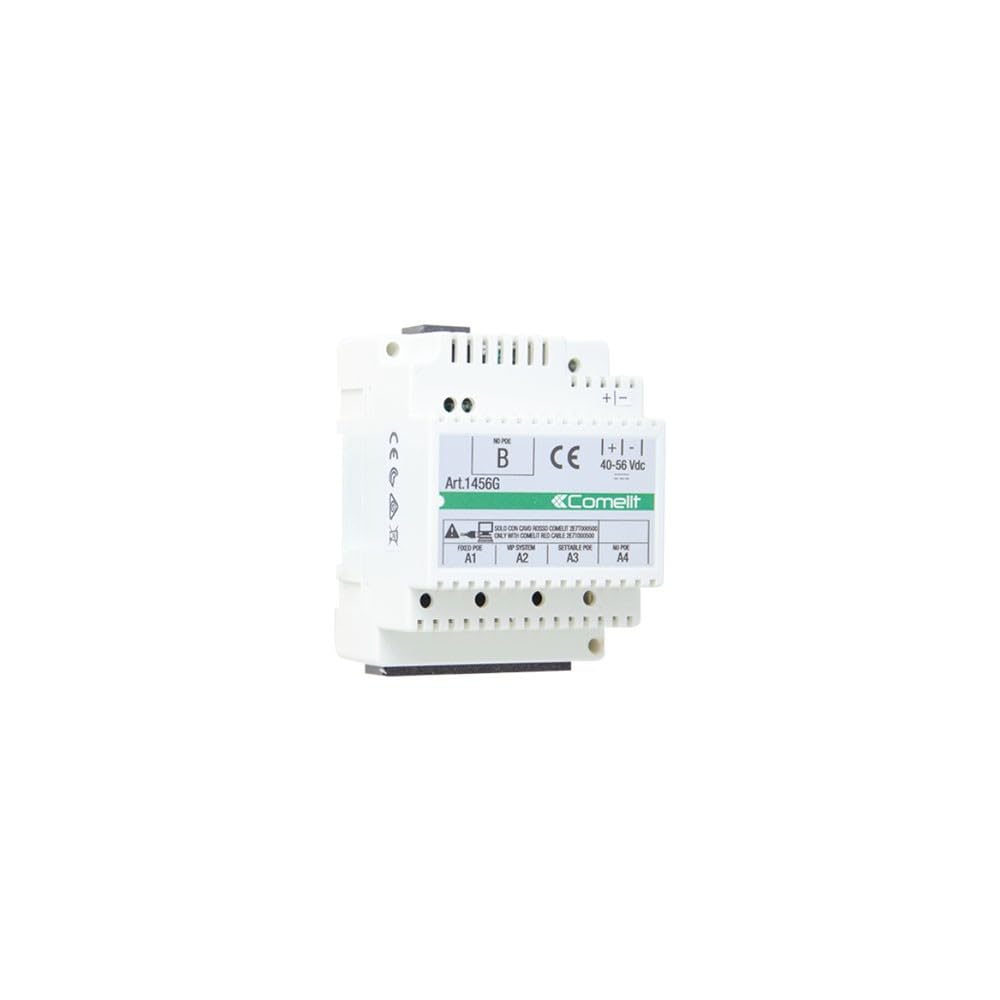
Billede: Forside view of the Comelit 1456G VIP Gateway Mini SIP. The unit is white with a green and white label indicating 'Art.1456G', 'Comelit', and various port labels such as 'FIXED POE A1', 'VIP SYSTEM A2', 'SETTABLE POE A3', 'NO POE A4'. Power input terminals are labeled '+|-' with a voltage range of '40-56 Vdc'.
Key indicators and connections include:
- Strømindgang: Terminals for 40-56 Vdc power supply.
- Netværksporte: Labeled A1, A2, A3, A4, supporting various configurations including Fixed PoE, VIP System, Settable PoE, and No PoE connections.
- Statusindikatorer: (Not explicitly visible in image, but typical for such devices) LEDs for power, network activity, and system status.
5. Opsætning
5.1 Montering
The 1456G unit is designed for installation on a standard DIN rail within an electrical enclosure or suitable mounting box. Ensure adequate ventilation around the unit.
5.2 Ledningsføring
Before connecting any wires, ensure that the power supply is disconnected.
- Strømtilslutning: Connect a stable 40-56 Vdc power supply to the designated '+|-' terminals. Observe polarity.
- Netværksforbindelser: Connect Ethernet cables from your network infrastructure and Comelit VIP system components to the appropriate A1-A4 ports as per your system design. Refer to your overall system diagram for specific port assignments (e.g., Fixed PoE, VIP System, Settable PoE, No PoE).
- Jording: Ensure the unit is properly grounded if required by local regulations.
5.3 Indledende opstart
Once all connections are secure, restore power to the unit. Observe the status indicators (if present) to confirm proper boot-up. The unit should initialize and connect to the network.
6. Betjening
The Comelit 1456G VIP Gateway operates as an interface between SIP devices and the Comelit VIP intercom system. Its primary function is to facilitate communication and data exchange. Configuration of the gateway, including SIP account details and network settings, is typically performed via a web-based interface accessible through a connected computer on the same network. Refer to the Comelit VIP system documentation for detailed configuration procedures.
7. Vedligeholdelse
7.1 Rengøring
To clean the unit, disconnect power and use a soft, dry cloth. Do not use liquid cleaners or abrasive materials.
7.2 firmwareopdateringer
Periodically check the official Comelit website for firmware updates. Keeping the firmware up-to-date ensures optimal performance and access to the latest features and security enhancements. Follow the instructions provided with the firmware update package carefully.
8. Fejlfinding
If you encounter issues with your Comelit 1456G, consider the following:
- Ingen strøm: Check the power supply connection and ensure the 40-56 Vdc power source is active. Verify polarity.
- Ingen netværksforbindelse: Check Ethernet cable connections to all ports. Verify network settings and ensure the gateway has a valid IP address.
- SIP Communication Issues: Verify SIP account credentials and server settings in the gateway's configuration. Ensure network firewalls are not blocking SIP traffic.
- Systemnulstilling: If the unit is unresponsive, disconnect power for 30 seconds and then reconnect.
For persistent issues, consult the detailed troubleshooting guides available on the official Comelit support website or contact Comelit technical support.
9. Specifikationer
| Attribut | Værdi |
|---|---|
| Modelnummer | 1456G |
| Dimensioner (L x B x H) | 56 x 26 x 23 cm |
| Vægt | 600 g |
| Strømforsyning | 40-56 VDC |
| Driftstemperatur | Refer to manufacturer's datasheet |
| Montering | DIN-skinne |
10. Garanti og support
For specific warranty terms and conditions, please refer to the warranty card included with your product or visit the official Comelit website. Technical support and service information can also be found on the Comelit website or by contacting your authorized Comelit distributor.


