1. Introduktion
This manual provides detailed instructions for the setup, operation, and maintenance of your NexiGo N680 1080P Business Webcam. Please read this manual thoroughly before using the product to ensure proper functionality and longevity. Keep this manual for future reference.
2. Pakkens indhold
Bekræft at alle varer er til stede i din pakke:
- NexiGo N680 1080P Business Webcam
- Indbygget Privacy Cover
- Brugermanual
3. Produktet er slutview
Familiarize yourself with the components of your NexiGo N680 webcam.
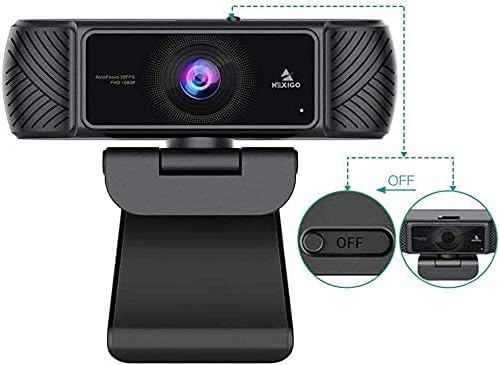
Figur 3.1: Forside view of the NexiGo N680 Webcam, showing the lens, microphone, and privacy cover mechanism.

Figure 3.2: The multi-functional adjusting base of the NexiGo N680 Webcam, illustrating 360-degree rotation and 180-degree tilt capabilities.
4. Opsætningsvejledning
4.1. Tilslutning af Webcam (Plug & Play)
- Sørg for, at din computer er tændt.
- Plug the USB cable from the NexiGo N680 webcam directly into an available USB port on your desktop or laptop.
- De webcam is designed for plug-and-play functionality and typically does not require additional drivers or software installation for basic use. Your operating system should automatically detect and install the necessary components.

Figure 4.1: Connecting the webcam via USB for plug-and-play setup.
4.2. Montering af Webcam
The NexiGo N680 features an adjustable mounting clip for versatile placement.
- På en skærm/bærbar computer: Åbn klipsen og placer webcam on top of your monitor or laptop screen. Adjust the clip to securely grip the top edge of the screen.
- På en flad overflade: Fold klipsen for at danne et stabilt stativ og placer webcam on a desk or shelf.
- Justering af vinkel: De webcam can rotate 360 degrees horizontally and tilt up to 80 degrees vertically on its base, allowing you to achieve the desired camera angle.
5. Betjeningsvejledning
5.1. Using the Privacy Cover
The NexiGo N680 includes a built-in privacy cover to protect your privacy and the camera lens.
- For at åbne: Slide the cover to the side to expose the camera lens.
- At lukke: Slide the cover back over the camera lens when not in use. This physically blocks the camera view.

Figure 5.1: Demonstrating the built-in privacy cover in both open (ON) and closed (OFF) states.
5.2. Justering af kameraindstillinger
For advanced adjustments, NexiGo provides optional software. This software allows you to fine-tune settings such as white balance, brightness, contrast, hue, saturation, sharpness, gamma, and backlight compensation.
- Download NexiGo Webcam Settings software from the official NexiGo webwebsted (nexigo.com/software).
- Installer softwaren på din computer.
- Launch the software to access and modify camera parameters. You can save and load custom presets.

Figure 5.2: The NexiGo Webcam Settings software interface for customizing video output.
5.3. Mikrofonbrug
The N680 features built-in dual stereo microphones with noise-canceling technology.
- The microphones automatically activate when the webcam is connected and selected as the audio input device in your communication software (e.g., Zoom, Skype, Teams).
- Noise-canceling technology helps reduce ambient background noise, providing clearer audio for your calls and recordings.

Figure 5.3: The built-in microphone with noise-canceling technology for clear audio capture.
5.4. Autofocus Functionality
De webcam is equipped with advanced autofocus to maintain sharp image clarity.
- The autofocus system automatically adjusts the lens to keep you and your subject in sharp focus, even with movement.
- This feature ensures consistent video quality without manual focus adjustments.

Figure 5.4: The autofocus feature ensures subjects remain sharp and clear.
5.5. Kompatibilitet
The NexiGo N680 webcam is compatible with a wide range of operating systems and communication platforms:
- Operativsystemer: Windows XP/7/8/10/11, Mac OS 10.6 and higher, Linux 2.6.24 and higher, Chrome OS 29.0.1547 and above, Ubuntu Version 10.04 and higher.
- Ansøgninger: Skype, Zoom, Microsoft Teams, Facetime, OBS, Facebook, and most other popular conferencing or recording applications.
Figur 5.5: Den webcam's broad compatibility with operating systems and communication platforms.
6. Vedligeholdelse
6.1. Rensning
- For at rense webcam lens, use a soft, lint-free cloth. Avoid abrasive materials or harsh chemicals.
- For kroppen af webcam, wipe with a dry or slightly damp klæde.
6.2. Opbevaring
- When not in use, close the built-in privacy cover to protect the lens from dust and scratches.
- Opbevar webcam på et køligt, tørt sted væk fra direkte sollys og ekstreme temperaturer.
7. Fejlfinding
If you encounter issues with your NexiGo N680 webkamera, se følgende almindelige løsninger:
| Problem | Mulig løsning |
|---|---|
| Webcam ikke fundet |
|
| Ingen videoudgang |
|
| Ingen lyd fra mikrofonen |
|
| Dårlig videokvalitet |
|
8. Specifikationer
| Feature | Detalje |
|---|---|
| Model | N680 |
| Videooptagelsesopløsning | 1080P Full HD (30 fps) |
| Fotosensorteknologi | CMOS |
| Autofokus | Ja |
| Felt af View (FOV) | 90° |
| Mikrofon | Dual Stereo with Noise-Canceling |
| Privatlivsdækning | Indbygget |
| Forbindelse | USB |
| Produktdimensioner | 3.81 x 1.81 x 3.54 tommer |
| Varens vægt | 8.4 ounce |
| Farve | Sort |
| Operativsystemkompatibilitet | Windows XP/7/8/10/11, Mac OS 10.6+, Linux 2.6.24+, Chrome OS 29.0.1547+, Ubuntu 10.04+ |
9. Garanti og support
9.1. Garantioplysninger
NexiGo products typically come with a manufacturer's warranty. Please refer to the warranty card included with your product or visit the official NexiGo webwebstedet for specifikke garantivilkår.
9.2. Kundesupport
For technical assistance, troubleshooting, or product inquiries, please contact NexiGo customer support:
- Webwebsted: Visit the official NexiGo support page for FAQs and contact options.
- E-mail: Refer to your product packaging or the NexiGo webwebstedet for support-e-mailadressen.
10. Sikkerhedsoplysninger
- Forsøg ikke at adskille eller ændre webcam. This may void the warranty and cause damage.
- Undgå at udsætte webudsættes for ekstreme temperaturer, fugtighed eller direkte sollys.
- Behold webcam away from water or other liquids.
- Use only the provided USB cable or a certified replacement.
- Opbevares utilgængeligt for børn.


